Monthly Archives: August 2016

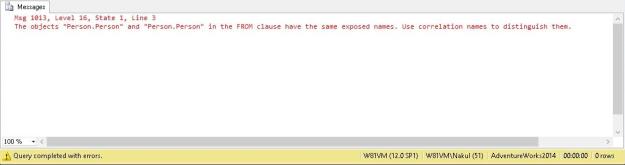
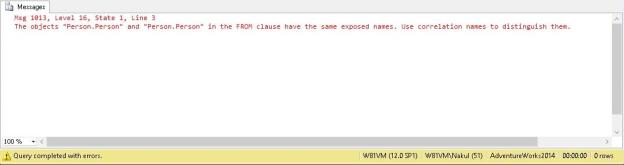
Msg 1013 indicating duplicate exposed names when the same object is referenced again in the query without an alias.

#0383 – SQL Server – Basics – Msg 1013 – The objects in the FROM clause have the same exposed names. Use correlation names to distinguish them.


Working with complex queries (those that have more than a handful of joins), one of the things that is difficult for novice developers is to keep track of where they are and which objects have already been referenced on the query.

One of the developers just walked up to me the other day with the following error (formatted for the sake of brevity):

Msg 1013, Level 16, State 1, Line 3
The objects "Person.Person" and "Person.Person" in the 
FROM clause have the same exposed names. 
Use correlation names to distinguish them.

Now, I did not recollect if I had ever seen the error before, so my first response was to take a look at the query. As soon as I looked at the query, I immediately realized the problem – the query had a self join and no object aliases were used to distinguish between the two instances of the same object!

USE AdventureWorks2014;
GO
SELECT *
FROM Person.Person 
INNER JOIN Person.Person ON BusinesEntityID = BusinessEntityID;
GO
Msg 1013 indicating duplicate exposed names when the same object is referenced again in the query without an alias.

Msg 1013 indicating duplicate exposed names when the same object is referenced again in the query without an alias.

Lesson Learned

Once the objects in the query were given aliases, the error was resolved.

However, this incident enforces what I have always practiced and believed to be a best practice – always ensure that object names, queries and other literals used in a query have proper aliases.

Using proper aliases ensures that as a developer, reviewer or as a support engineer, we always know exactly which instance of the object is being referred.

Until we meet next time,
Be courteous. Drive responsibly.

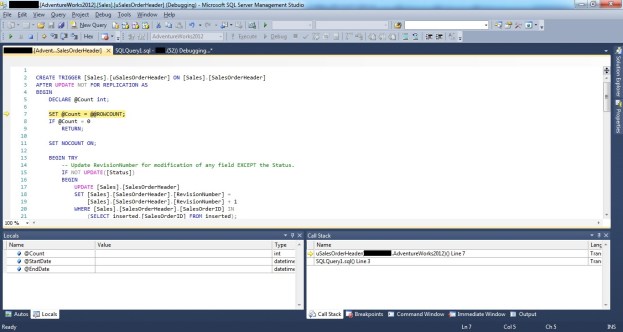
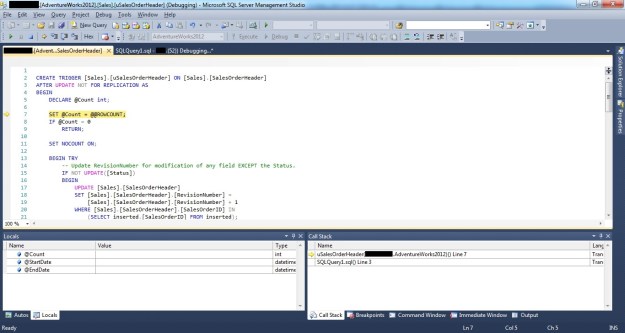
Showing how to debug a DML trigger by stepping into a DML trigger during a SSMS T-SQL Debugging session

#0382 – SQL Server – SSMS – Debugging a T-SQL DML Trigger


I often receive questions related to debugging code using SSMS. Based on these questions, I have written a lot of blog posts in the past, however I was recently asked the question:

How can I debug a DML trigger in SSMS?

I realized that while I had encountered the same question and researched it in my initial days (when I worked on SQL Server 2000), I had never written about it. So, here goes.

In order to demonstrate how to debug a trigger, all we need to do is debug the statement that initiates the trigger.

For this demonstration, I will fire an update on the [Sales].[SalesOrderHeader] table of the AdventureWorks database.

USE AdventureWorks2012;
GO
UPDATE soh
SET soh.SubTotal += 2
FROM Sales.SalesOrderHeader AS soh
WHERE soh.SalesOrderNumber = 'SO43697';

When we debug this query (using F10), the SSMS debugger launches and we can step through the code using the same key combinations as we have in Visual Studio.

Demonstrating how to debug DML triggers using SSMS

Debugging T-SQL script using SSMS

Executing the update should fire the DML trigger [uSalesOrderHeader] which can be debugged like any other T-SQL code by stepping into the trigger (press F11 when executing the update).

Showing how to debug a DML trigger by stepping into a DML trigger during a SSMS T-SQL Debugging session

Stepping into a DML trigger during a SSMS T-SQL Debugging session

That’s it. Debugging a trigger is no different than debugging a stored procedure or any other T-SQL script.

In case you would like to learn more about debugging in SSMS, please do refer my previous posts (links below). If there is anything specific that you would like to know more about, do drop in a line.

Further Reading

  • T-SQL Debugger – Underappreciated Features of Microsoft SQL Server [Blog Link]
  • Enabling T-SQL Debugger in SQL Server Management Studio (SSMS) [Blog Link]
  • SSMS – Tutorial – Part 03 – The T-SQL Debugger (L200) [Blog Link]
  • T-SQL Debugging – Connection Errors & Firewall settings [Blog Link]
  • T-SQL Debugging – SSMS errors – MSDBG2.DLL [Blog Link]
  • Setting, Labeling, Using & Searching Conditional Breakpoints [Blog Link]
  • Export/Import Breakpoints [Blog Link]
  • Using the “When Hit, Do Something” breakpoint configuration [Blog Link]
  • Using Data-Tips [Blog Link]
  • Editing, Exporting and Importing Data Tips [Blog Link]

Until we meet next time,
Be courteous. Drive responsibly.

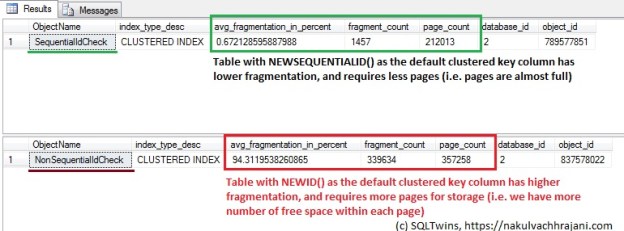
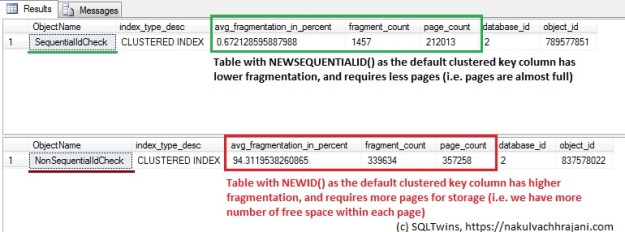
Comparison between the index physical stats when the table uses NEWSEQUENTIALID() v/s NEWID(). We can see that NEWID() results in higher fragmentation and consumes higher number of pages on disk when compared to NEWSEQUENTIALID().

#0381 – SQL Server – Table design – Is it better to use NEWID or NEWSEQUENTIALID when defining the key as a UNIQUEIDENTIFIER?


Database schema design involves defining the clustered keys (generally the primary key) on a table, and one of the main decisions to be taken is whether to use a clustered key based on a UNIQUEIDENTIFIER/ROWGUID or an INTEGER?

Generally, an INTEGER is a default choice for the clustered key column. Compared to an INTEGER, a GUID takes up a lot of space (36 characters!). Hence the decision to use UNIQUEIDENTIFIER/ROWGUID depends a lot upon the desired application:

  • Whether the amount of data to be stored in the table is ever going to exceed the limits of  an integer key value?
  • The code which is going to consume the data (it helps if the underlying storage uses keys in the same format as the code, as in the case of the .NET Enterprise Framework)
  • Nature of integration/DR implemented (e.g. External Id keys used in the integrated system, replication, etc)

If the requirements do require that UNIQUEIDENTIFIER is to be used, the next question is:

What is better to use as the default value for a GUID? NEWID or NEWSEQUENTIALID?

NEWSEQUENTIALID() and NEWID() both generate GUIDs, however NEWSEQUENTIALID() has certain advantages:

  • NEWID() generates a lot of random activity, whereas NEWSEQUENTIALID() does not. Hence, NEWSEQUENTIALID() is faster
  • Because NEWSEQUENTIALID() is sequential, it helps to fill the data pages faster

In order words,

NEWID() generates more fragmentation when compared to NEWSEQUENTIALID()

NEWID() generates more fragments

To test this, I ran the following test:

  1. Create two tables – one with NEWID() as the default value for the key and one with NEWSEQUENTIALID()
  2. Ensure that MAXDOP is set to 0 so that I can insert data into the tables in parallel (to simulate inputs into a table from multiple threads)
  3. Repeat this process multiple times
  4. Once the insert is complete, check the average fragmentation on the tables

Allow me to run through the test step-by-step.

The script below creates two tables:

USE tempdb;
GO
SET NOCOUNT ON;
GO
--Safety Check
IF OBJECT_ID('dbo.SequentialIdCheck','U') IS NOT NULL
BEGIN
   DROP TABLE dbo.SequentialIdCheck;
END
GO

IF OBJECT_ID('dbo.NonSequentialIdCheck','U') IS NOT NULL
BEGIN
   DROP TABLE dbo.NonSequentialIdCheck;
END
GO

--Create the tables (SequentialId Check)
CREATE TABLE dbo.SequentialIdCheck (RowId UNIQUEIDENTIFIER NOT NULL 
                                          CONSTRAINT df_SequentialRowId 
                                          DEFAULT NEWSEQUENTIALID(),
                                    ObjectId INT NOT NULL,
                                    RowValue NVARCHAR(200) NULL,
                                    CONSTRAINT pk_SequentialIdCheck
                                    PRIMARY KEY CLUSTERED (RowId)
                                   );
GO

--Create the tables (Non SequentialId Check)
CREATE TABLE dbo.NonSequentialIdCheck (RowId UNIQUEIDENTIFIER NOT NULL
                                             CONSTRAINT df_NonSequentialRowId 
                                             DEFAULT NEWID(),
                                       ObjectId INT NOT NULL,
                                       RowValue NVARCHAR(200) NULL,
                                       CONSTRAINT pk_NonSequentialIdCheck
                                       PRIMARY KEY CLUSTERED (RowId)
                                      );
GO

Now, I will ensure that max degree of parallelism is turned ON.

sp_configure 'show advanced options',1
RECONFIGURE
GO
sp_configure 'max degree of parallelism',0
RECONFIGURE
GO

Next, I will insert some test data. I will repeat the insert multiple times to simulate an extremely large data-set over multiple inserts.

USE tempdb;
GO
--Insert some test data
--Run the insert 5 times
INSERT INTO dbo.SequentialIdCheck (ObjectId, RowValue)
SELECT sao1.[object_id] AS [ObjectId],
       sao1.[name] AS [RowValue]
FROM sys.all_objects AS sao1
CROSS JOIN sys.all_objects AS sao2;

INSERT INTO dbo.NonSequentialIdCheck (ObjectId, RowValue)
SELECT sao1.[object_id] AS [ObjectId],
       sao1.[name] AS [RowValue]
FROM sys.all_objects AS sao1
CROSS JOIN sys.all_objects AS sao2;
GO 5
Beginning execution loop
Batch execution completed 5 times.

Finally, I check the average fragmentation on the tables by checking the fragmentation of the clustered index.

USE tempdb;
GO
--Check the fragmentation
SELECT OBJECT_NAME(ps.[object_id]) AS ObjectName,
       ps.[index_type_desc],
       ps.[avg_fragmentation_in_percent],
       ps.[fragment_count],
       ps.[page_count],
       ps.[database_id],
       ps.[object_id]
FROM sys.dm_db_index_physical_stats(DB_ID('tempdb'),
                                    OBJECT_ID('dbo.SequentialIdCheck'),
                                    DEFAULT,
                                    DEFAULT,
                                    DEFAULT
                                   ) AS ps;
GO
SELECT OBJECT_NAME(ps.[object_id]) AS ObjectName,
       ps.[index_type_desc],
       ps.[avg_fragmentation_in_percent],
       ps.[fragment_count],
       ps.[page_count],
       ps.[database_id],
       ps.[object_id]
FROM sys.dm_db_index_physical_stats(DB_ID('tempdb'),
                                    OBJECT_ID('dbo.NonSequentialIdCheck'),
                                    DEFAULT,
                                    DEFAULT,
                                    DEFAULT
                                   ) AS ps;
GO
Comparison between the index physical stats when the table uses NEWSEQUENTIALID() v/s NEWID(). We can see that NEWID() results in higher fragmentation and consumes higher number of pages on disk when compared to NEWSEQUENTIALID().

NEWID() results in higher fragmentation and higher pages consumed on disk.

As can be seen clearly from the screenshot above, we see that the table with the NEWID() default key value has a higher fragmentation value when compared to the table with NEWSEQUENTIALID().

We also see that the table with NEWID() default key value has taken a lot of pages – resulting in more space being occupied on disk.

The underlying reason for this is  that NEWSEQUENTIALID() generates GUIDs that are in sequence for the given batch, whereas the GUIDs generated by NEWID() are random. When used as a clustered key, having values in sequence helps fill the pages faster and reduce fragmentation.

Conclusion

In most cases, an INTEGER based key on a table is sufficient. However, when a GUID is required by design, it is important to keep in mind that using NEWID() causes more fragmentation in the underlying data resulting in poor system performance. Because non-sequential GUIDs cause fragmentation, they are (generally) not a good choice for using as a clustered index key unless it is required to do so by the business/application design.

If NEWSEQUENTIALID() is to be used, please do keep in mind that the keys need to be generated by the database engine making it tricky when using with Entity Frameworks where the key value is required by the code in order to instantiate an entity.

Further Reading

Until we meet next time,
Be courteous. Drive responsibly.

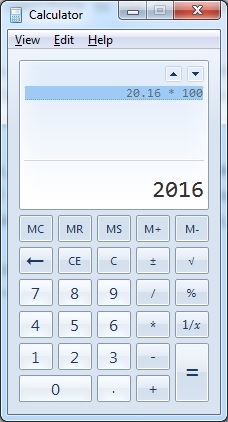
When we multiply a Decimal (20.16) with another number (100) using the calculator, the result is as expected (2016)

#0380 – SQL Server – Basics – Specify Scale and Precision when defining Decimal and Numeric datatypes


I had some interesting conversation during a code review that I was asked to conduct for a simple query that a team had written to support their project monitoring. The team was specializing in quality assurance and had minimal development experience. The team had used variables of decimal data types in their script, but they were declared without any precision or scale. When I gave a review comment on the declaration of variables, I was asked the question:

Does it make a difference if we do not specify scale and precision when defining variables of decimal or numeric datatypes?

I often look forward to such encounters for two reasons:

  1. When I answer their questions, the process reinforces my concepts and learnings
  2. It helps me contribute to the overall community by writing a blog about my experience

When the question was asked, I honestly admitted that I did not have a specific answer other than it was the best practice to do so from a long-term maintainability standpoint. Post lunch, I did a small test which I showed the team and will be presenting today.

The Problem

In the script below, I take a decimal variable (declared without a fixed scale or precision) with value (20.16) and multiply it by a constant number (100) and then by another constant decimal (100.0). If one uses a calculator, the expected result is:

  • 20.16 * 100 = 2016
  • 20.16 * 100.0 = 2016
When we multiply a Decimal (20.16) with another number (100) using the calculator, the result is as expected (2016)

Expected results when we multiply a Decimal with another number using the calculator

However, when we perform the same test via SQL Server, we are in for a surprise:

DECLARE @dVal1 DECIMAL = 20.16;

SELECT (@dVal1 * 100)   AS DecimalMultipliedByAnInteger, 
       (@dVal1 * 100.0) AS DecimalMultipliedByADecimal;
GO

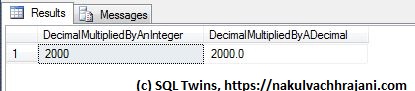
As can be seen from the seen from the results below, we do not get the expected results, but we find that the decimal value was rounded off before the multiplication took place.

Although the test input value is declared as a decimal, the result appears to be based only on the significand, not the mantissa part of the input.

Although the test input value is declared as a decimal, the result appears to be based only on the significand, not the mantissa part of the input.

Root Cause

The reason behind this behaviour is hidden in the following lines of the SQL Server online documentation on MSDN (formerly known as “Books-On-Line”) for decimal and numeric data-types available here: https://msdn.microsoft.com/en-us/library/ms187746.aspx.

…s (scale)
The number of decimal digits that will be stored to the right of the decimal point….Scale can be specified only if precision is specified. The default scale is 0…

The real reason however is a few lines below – rounding.

Converting decimal and numeric Data

…By default, SQL Server uses rounding when converting a number to a decimal or numeric value with a lower precision and scale….

What SQL Server appears to be doing here is that when a variable of DECIMAL datatype is declared without a precision and scale value, the scale is taken to be zero (0). Hence, the test value of 20.16 is rounded to the nearest integer, 20.

To confirm that rounding is indeed taking place, I swapped the digits in the input value from 20.16 to 20.61 and re-ran the same test.

DECLARE @dVal1 DECIMAL = 20.61;

SELECT (@dVal1 * 100)   AS DecimalMultipliedByAnInteger, 
       (@dVal1 * 100.0) AS DecimalMultipliedByADecimal;
GO

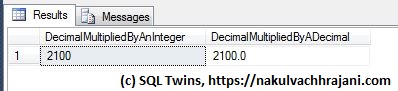
Now, the result was 2100 instead of 2000 because the input test value of 20.61 was rounded to 21 before the multiplication took place.

Because the test input value was declared as a decimal without precision and scale, rounding took place, resulting in a different result.

Because the test input value was declared as a decimal without precision and scale, rounding took place, resulting in a different result.

By this time, my audience was struck in awe as they realized the impact this behaviour would have had on their project monitoring numbers.

The Summary – A Best Practice

We can summarize the learning into a single sentence:

It is a best practice for ensuring data quality to always specify a precision and scale when working with variables of the numeric or decimal data types.

To confirm, here’s a version of the same test as we saw earlier. The only difference is that this time, we have explicitly specified the precision and scale on our input values.

DECLARE @dVal1 DECIMAL(19,4) = 20.16;

SELECT (@dVal1 * 100)   AS DecimalMultipliedByAnInteger, 
       (@dVal1 * 100.0) AS DecimalMultipliedByADecimal;
GO

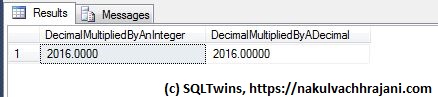
When we look at the results, we see that the output is exactly what we wanted to see, i.e. 2016.

Because the test input value was declared as a decimal with precision and scale, no rounding took place and we got the expected result, i.e. 2016.

Because the test input value was declared as a decimal with precision and scale, no rounding took place and we got the expected result.

Further Reading

Until we meet next time,
Be courteous. Drive responsibly.
Declaring multiple variables and assigning values to them in a single statement

#0379 – SQL Server – Basics- Declaring multiple variables in a single statement


Making a switch between technologies is sometimes difficult and it always helps to establish parallels between them during the learning phase. Recently, I met someone who had worked on object-oriented programming languages like C# and had to start learning T-SQL in order to work on a new Agile project that was coming his way.

In order to help him get started, the first thing I did was to establish a parallel on how to declare new variables in a module/script. Just as one can declare more than one variable in a single statement in C#, one can do so in T-SQL.

This actually came as a surprise to a few of my team-mates, which is why I decided to write it up as a T-SQL basics post.

So, here’s how to declare multiple variables spanning multiple data-types in a single DECLARE statement:

USE tempdb;
GO
DECLARE @iVar1 INT = 10,
        @iVar2 INT = 05,
        @dVar  DECIMAL(19,4) = 10.05,
        @sVar  VARCHAR(20) = 'Ten';

SELECT @iVar1 AS IntegerValue1, 
       @iVar2 AS IntegerValue2, 
       @dVar  AS DecimalValue,
       @sVar  AS StringValue;
GO
Declaring multiple variables and assigning values to them in a single statement

Declaring multiple variables and assigning values to them in a single statement

Do keep in mind though that starting SQL Server 2008, the DECLARE statement can generate exceptions if you perform declarations and initialization/assignment in the same statement.

Until we meet next time,
Be courteous. Drive responsibly.