
If you are using Microsoft Teams, you may have observed that the video volume suddenly drops off when sharing the screen. This is quite annoying for both – the presenter and the attendees. I have finally found (and tested) a solution to this and thought of sharing with you all.
Root cause: Based on various forums that I visited, it seems that a change has been made to the architecture of Teams which reduces the sound of notifications & alerts while on a Teams call. This also reduces the sound of the audio being played.
Solution: As such the solution is outlined in the Microsoft support article here (Share sound from your computer in Microsoft Teams meetings or live events – Microsoft Support)
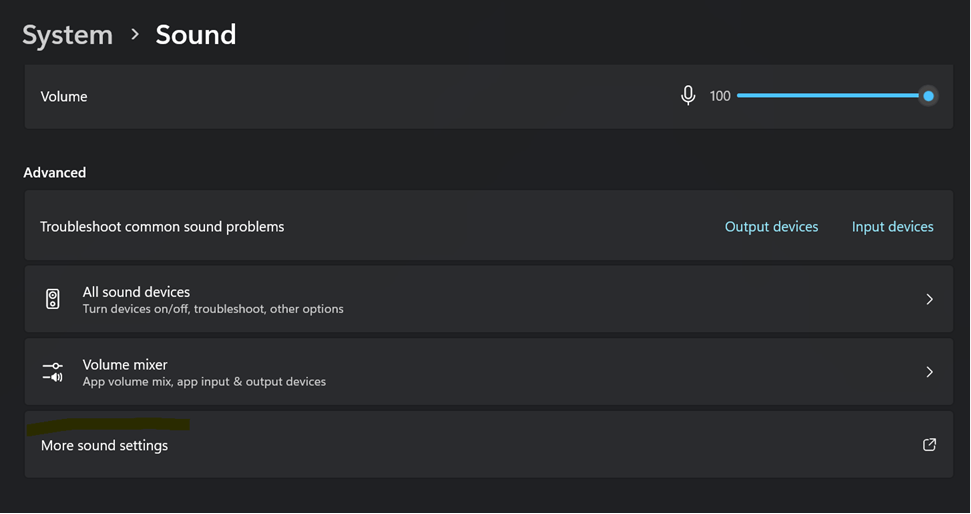
- In the Windows Search bar, type “Sound Settings”
- Under Advanced -> Go to “More Sound Settings”
- Click on the “Communications” tab
- Set it to “Do Nothing”
IMPORTANT: You may want to reset it back to 50% or 80% (depending upon your preference) after your presentation is over – else it becomes quite annoying when other calls are going on.


Until we meet next time,
Be courteous. Drive responsibly.

 SQLTwins by Nakul Vachhrajani