
In my earlier post, I talked about returning scalar values from a stored procedure using the OUTPUT clause. And that made to share a few tips that I have learnt and used through the years.
Returning scalar values is a relatively simple ask. But what if we need to return the entire result set?
The answer is simple – it can’t be done with an OUTPUT clause. Returning a table has to be done in the classical way (been in use since SQL 2000)!
So, today, I will show how to return a table from a stored procedure. Let’s run a quick test.
The Test
The test scenario here is straight-forward. I have a stored procedure ([dbo].[usrproc_SharingTempTablesTesting]) that accepts some inputs and stores the values into a temp. table. The contents of that table are retrieved outside the procedure – thus proving that the table was shared.
The stored procedure is below:
USE [tempdb];
GO

--00. Safety check
IF OBJECT_ID('usrproc_SharingTempTablesTesting') IS NOT NULL
BEGIN
    DROP PROCEDURE usrproc_SharingTempTablesTesting;
END
GO

--01. Create stored procedure
CREATE PROCEDURE [dbo].[usrproc_SharingTempTablesTesting]
    @intA INT,
    @intB INT
AS
BEGIN
  SET NOCOUNT ON

  INSERT INTO #SharingTempTables ([PlaceInserted], [iA], [iB])
  VALUES ('StoredProcedure', @intA, @intB)

  --Selecting data from the temp. table
  SELECT 'Inside',* FROM #SharingTempTables
END
GO
Now, let’s create a temporary table, populate it with values and then call the stored procedure and consume the output:
USE [tempdb];
GO
--00. Safety Check
IF OBJECT_ID('#SharingTempTables') IS NOT NULL
BEGIN
    DROP TABLE #SharingTempTables;
END
GO

--01. Create temp. table
CREATE TABLE #SharingTempTables ([PlaceInserted] NVARCHAR(255) NOT NULL,
                                 [iA]            INT           DEFAULT 0,
                                 [iB]            INT           DEFAULT 0,
                                 [iT]            AS (iA + iB)
                                )
GO

--02. Insert some test data
INSERT INTO #SharingTempTables ([PlaceInserted], [iA], [iB])
VALUES ('Outside SP', 2, 5),
       ('Outside SP', 3, 9);
GO

--03. Execute the stored procedure
EXEC [dbo].[usrproc_SharingTempTablesTesting] @intA = 4, @intB = 2;
GO

--04. Select data from the temp table
SELECT 'Outside',* FROM #SharingTempTables
GO
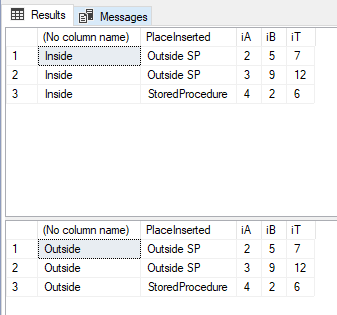
I trust this simple demonstration will help you to understand how to exchange information into a stored procedure and refer the same outside too.
Until we meet next time,
Be courteous. Drive responsibly.

 SQLTwins by Nakul Vachhrajani
Pingback: #0433 – SQL Server – Tips – Returning parameters from stored procedures (Part 2 of 2) | SQLTwins by Nakul Vachhrajani