
Author Archives: nakulvachhrajani

Unknown's avatar

About nakulvachhrajani

Nakul Vachhrajani is a SQL Server MCTS, TOGAF certified Technical Architect with Capgemini having a total IT experience of more than 16 years. Nakul is an active blogger, and has been a guest columnist for SQLAuthority.com and SQLServerCentral.com. Nakul presented a webcast on the “Underappreciated Features of Microsoft SQL Server” at the Microsoft Virtual Tech Days Exclusive Webcast series (May 02-06, 2011) on May 06, 2011. He is also the author of a research paper on Database upgrade methodologies, which was published in a CSI journal, published nationwide. In addition to his passion about SQL Server, Nakul also contributes to the academia out of personal interest. He visits various colleges and universities as an external faculty to judge project activities being carried out by the students. Disclaimer: The opinions expressed herein are his own personal opinions and do not represent his employer’s view in anyway.

#0434 – SQL Server – Stored Procedures – Results are not returned if the caller does not specify the OUTPUT clause


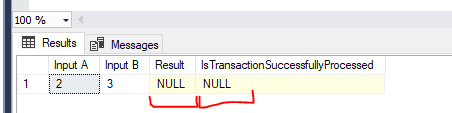
A few weeks ago, I wrote a piece on returning scalar values from a stored procedure using the OUTPUT clause. Shortly after, I got an interesting comment stating that the example outlined in the post was not working. There were no errors – it’s just that the output variables weren’t being set when the stored procedure was called.

Here’s the stored procedure which was shared in my earlier post.

USE [tempdb];
GO
IF OBJECT_ID('dbo.proc_AddNumbersWithMultipleOutputs','P') IS NOT NULL
BEGIN
    DROP PROCEDURE [dbo].[proc_AddNumbersWithMultipleOutputs];
END
GO
 
CREATE PROCEDURE [dbo].[proc_AddNumbersWithMultipleOutputs]
    @intA INT,
    @intB INT,
    @isSuccessfullyProcessed BIT OUTPUT, --Output variable #1
    @resultC                 INT OUTPUT  --Output variable #2
AS
BEGIN
    SET NOCOUNT ON;
 
    SET @isSuccessfullyProcessed = 0;
    SET @resultC                 = 0;
 
    BEGIN TRY
        IF ((@intA IS NULL) OR (@intB IS NULL))
            THROW 51000,'Input Parameters cannot be NULL',-1;
 
        SET @resultC = @intA + @intB;
        SET @isSuccessfullyProcessed = 1;
    END TRY
    BEGIN CATCH
        SET @isSuccessfullyProcessed = 0;
        SELECT ERROR_NUMBER(),
               ERROR_MESSAGE(),
               ERROR_SEVERITY(),
               ERROR_STATE();
    END CATCH
END
GO

And here’s the script that was not working as expected:

--In a separate window, run the following 
DECLARE @inputA  INT = 2; --Use NULL to throw exception
DECLARE @inputB  INT = 3; --Use NULL to throw exception
DECLARE @outputC INT;
DECLARE @processingState INT;
 
EXEC [dbo].[proc_AddNumbersWithMultipleOutputs] 
    @intA                    = @inputA,
    @intB                    = @inputB,
    @isSuccessfullyProcessed = @processingState,
    @resultC                 = @outputC;
 
SELECT @inputA          AS 'Input A', 
       @inputB          AS 'Input B',
       @outputC         AS 'Result', 
       @processingState AS 'IsTransactionSuccessfullyProcessed';
GO
Screenshot showing no values were returned because OUTPUT parameter option was not specified.

If you carefully review the script, you will realize that @processingState and @outputC do not have the OUTPUT parameter specification. Without this specification, SQL Server treats it as a normal input parameter. Hence, no value was being returned. No errors should be expected as well. This behavior is the default and backward compatible.

Further reading

Until we meet next time,

Be courteous. Drive responsibly.
#0433 – SQL Server – Tips – Returning parameters from stored procedures (Part 2 of 2)


Last week, I wrote about how to share tables with stored procedures. This allows data sets to be passed in and then returned with modifications. In case you missed it, do read my post here: https://nakulvachhrajani.com/2025/08/04/0432-sql-server-tips-returning-parameters-from-stored-procedures-part-1-of-2/.

Returning result sets and sharing tables is great when there is little post processing involved. Applications that need to process individual entities, do so after the procedure returns them. Returning a cursor as an output parameter can be more efficient compared to returning a large result set. A forward-only cursor allows the application to iterate through the cursors and retrieve data as required v/s keeping the entire result set in memory.

An Example

Here’s an example on how to return cursors from a stored procedure. What I have here are two (2) stored procedures.

Procedure: The “inner” procedure – returning the cursor

USE [WideWorldImporters];
GO

IF OBJECT_ID('dbo.usrproc_GetSupplierList', 'P') IS NOT NULL
    DROP PROCEDURE dbo.usrproc_GetSupplierList;
GO

CREATE PROCEDURE dbo.usrproc_GetSupplierList
	@supplierListCursor CURSOR VARYING OUTPUT
AS
BEGIN
	SET NOCOUNT ON;

	SET @supplierListCursor = CURSOR FORWARD_ONLY STATIC
		FOR SELECT [ws].[SupplierID],
				   [ws].[SupplierName],
				   [ws].[SupplierReference]
			FROM [Website].[Suppliers] AS [ws] WITH (NOLOCK);
	OPEN @supplierListCursor;
END
GO

Consumer: The “outer” script – consuming the cursor

USE [WideWorldImporters];
GO

DECLARE @sqlTwinsCursor     AS CURSOR;
DECLARE @supplierIdentifier AS INT;
DECLARE @supplierName       AS NVARCHAR(100);
DECLARE @supplierReference  AS NVARCHAR(20);

--OUTPUT clause brings the CURSOR 
EXECUTE dbo.usrproc_GetSupplierList
    @supplierListCursor = @sqlTwinsCursor OUTPUT;

WHILE (@@FETCH_STATUS = 0)
    BEGIN
        FETCH NEXT FROM @sqlTwinsCursor INTO @supplierIdentifier, 
											 @supplierName, 
											 @supplierReference;

		--Consume the values 
		SELECT [ppo].[PurchaseOrderID],
		       [ppo].[SupplierID],
			   [ppo].[OrderDate],
			   [ppo].[ExpectedDeliveryDate],
			   [ppo].[DeliveryMethodID],
			   [ppo].[IsOrderFinalized]
		FROM [Purchasing].[PurchaseOrders] AS [ppo]
		WHERE [ppo].[SupplierID] = @supplierIdentifier
		  AND [ppo].[SupplierReference] = ISNULL (@supplierReference,[ppo].[SupplierReference]);
    END

--Close & deallocate the cursor
CLOSE @sqlTwinsCursor;

DEALLOCATE @sqlTwinsCursor;
GO

In case you are following along, here’s how the output should look like:

Cursor States

Cursor states only matter at return time. As outlined in the official documentation:

“It’s valid to close a cursor part of the way through the procedure, to open it again later in the procedure, and return that cursor’s result set to the calling batch, procedure, or trigger.”

I trust you will find the ability to return cursors from stored procedures helpful in improving the efficiency of your applications. Drop a note in the comments below on how you used it and the benefits you got.

Further Reading

Until we meet next time,

Be courteous. Drive responsibly.

#0432 – SQL Server – Tips – Returning parameters from stored procedures (Part 1 of 2)


In my earlier post, I talked about returning scalar values from a stored procedure using the OUTPUT clause. And that made to share a few tips that I have learnt and used through the years.

Returning scalar values is a relatively simple ask. But what if we need to return the entire result set?

The answer is simple – it can’t be done with an OUTPUT clause. Returning a table has to be done in the classical way (been in use since SQL 2000)!

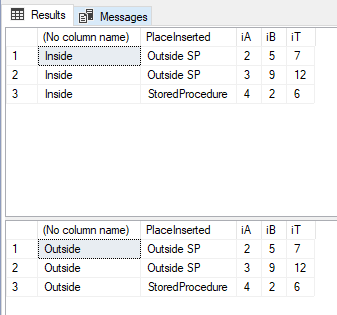
So, today, I will show how to return a table from a stored procedure. Let’s run a quick test.

The Test

The test scenario here is straight-forward. I have a stored procedure ([dbo].[usrproc_SharingTempTablesTesting]) that accepts some inputs and stores the values into a temp. table. The contents of that table are retrieved outside the procedure – thus proving that the table was shared.

The stored procedure is below:

USE [tempdb];
GO

--00. Safety check
IF OBJECT_ID('usrproc_SharingTempTablesTesting') IS NOT NULL
BEGIN
    DROP PROCEDURE usrproc_SharingTempTablesTesting;
END
GO

--01. Create stored procedure
CREATE PROCEDURE [dbo].[usrproc_SharingTempTablesTesting]
    @intA INT,
    @intB INT
AS
BEGIN
  SET NOCOUNT ON

  INSERT INTO #SharingTempTables ([PlaceInserted], [iA], [iB]) 
  VALUES ('StoredProcedure', @intA, @intB)
 
  --Selecting data from the temp. table
  SELECT 'Inside',* FROM #SharingTempTables  
END
GO

Now, let’s create a temporary table, populate it with values and then call the stored procedure and consume the output:

USE [tempdb];
GO
--00. Safety Check
IF OBJECT_ID('#SharingTempTables') IS NOT NULL
BEGIN
    DROP TABLE #SharingTempTables;
END
GO

--01. Create temp. table
CREATE TABLE #SharingTempTables ([PlaceInserted] NVARCHAR(255) NOT NULL,
                                 [iA]            INT           DEFAULT 0, 
                                 [iB]            INT           DEFAULT 0,
                                 [iT]            AS (iA + iB)
                                )
GO

--02. Insert some test data
INSERT INTO #SharingTempTables ([PlaceInserted], [iA], [iB])
VALUES ('Outside SP', 2, 5), 
       ('Outside SP', 3, 9);
GO

--03. Execute the stored procedure
EXEC [dbo].[usrproc_SharingTempTablesTesting] @intA = 4, @intB = 2;
GO

--04. Select data from the temp table
SELECT 'Outside',* FROM #SharingTempTables
GO

I trust this simple demonstration will help you to understand how to exchange information into a stored procedure and refer the same outside too.

Until we meet next time,

Be courteous. Drive responsibly.
#0431 – SQL Server – Myths – Can a stored procedure have more than one OUTPUT variables?


It’s a fairly common practice to use the OUTPUT clause to return scalar output from a stored procedure. Today’s post is based on a question that I was asked by one of my colleagues related to the usage of OUTPUT clause:

“Can a stored procedure have more than one OUTPUT variables?”

The short answer is Yes! Not only that – it also possible to have non-scalar outputs from stored procedures. But more about that in another post.

Here’s a quick example of a stored procedure having more than one (1) OUTPUT variables. It’s a simple procedure that validates if the input parameters are NULL and subsequently adds two (2) integers. At the end, stored procedure returns 2 variables – the processing state and the result of the addition.

USE [tempdb];
GO
IF OBJECT_ID('dbo.proc_AddNumbersWithMultipleOutputs','P') IS NOT NULL
BEGIN
	DROP PROCEDURE [dbo].[proc_AddNumbersWithMultipleOutputs];
END
GO

CREATE PROCEDURE [dbo].[proc_AddNumbersWithMultipleOutputs]
	@intA INT,
	@intB INT,
	@isSuccessfullyProcessed BIT OUTPUT, --Output variable #1
	@resultC                 INT OUTPUT  --Output variable #2
AS 
BEGIN
	SET NOCOUNT ON;

	SET @isSuccessfullyProcessed = 0;
	SET @resultC                 = 0;

	BEGIN TRY
		IF ((@intA IS NULL) OR (@intB IS NULL))
			THROW 51000,'Input Parameters cannot be NULL',-1;

		SET @resultC = @intA + @intB;
		SET @isSuccessfullyProcessed = 1;
	END TRY
	BEGIN CATCH
		SET @isSuccessfullyProcessed = 0;
		SELECT ERROR_NUMBER(),
		       ERROR_MESSAGE(),
			   ERROR_SEVERITY(),
			   ERROR_STATE();
	END CATCH
END
GO

And here’s the procedure in action. The first query indicates successful execution.

--In a separate window, run the following 
DECLARE @inputA  INT = 2; --Use NULL to throw exception
DECLARE @inputB  INT = 3; --Use NULL to throw exception
DECLARE @outputC INT;
DECLARE @processingState INT;

EXEC [dbo].[proc_AddNumbersWithMultipleOutputs] 
	@intA                    = @inputA,
    @intB                    = @inputB,
	@isSuccessfullyProcessed = @processingState OUTPUT,
	@resultC                 = @outputC OUTPUT;

SELECT @inputA          AS 'Input A', 
       @inputB          AS 'Input B',
	   @outputC         AS 'Result', 
	   @processingState AS 'IsTransactionSuccessfullyProcessed';
GO

The following query with NULL input parameters will result in an exception.

--In a separate window, run the following 
DECLARE @inputA  INT = 2; --Use NULL to throw exception
DECLARE @inputB  INT = NULL;
DECLARE @outputC INT;
DECLARE @processingState INT;

EXEC [dbo].[proc_AddNumbersWithMultipleOutputs] 
	@intA                    = @inputA,
    @intB                    = @inputB,
	@isSuccessfullyProcessed = @processingState OUTPUT,
	@resultC                 = @outputC OUTPUT;

SELECT @inputA          AS 'Input A', 
       @inputB          AS 'Input B',
	   @outputC         AS 'Result', 
	   @processingState AS 'IsTransactionSuccessfullyProcessed';
GO

I trust this simple demonstration will help you to write more effective T-SQL code.

Until we meet next time,

Be courteous. Drive responsibly.

#0430 – SQL Server – Tips: Working with JSON to build payload samples


As a system integration architect, I often deal with generating & processing payloads in SQL server. In a previous post, I showed how to avoid JSON array wrappers when generating payloads and samples from data using T-SQL.

Based on the feedback received from a few colleagues of mine, I will be sharing some tips I use to build various JSON payload samples from test data. For these examples, we will be using the [AdventureWorks2022] sample database.

Nesting/Embedding JSONs

The true value of FOR JSON lies in the fact that it can return complex hierarchical data as nested JSON objects or arrays. In the example below, we have a single object corresponding to one (1) customer but they have multiple child orders – which are represented as a JSON array.

USE [AdventureWorks2022];
GO
SELECT [Customer].[FirstName]   AS [Name], 
       [Customer].[PhoneNumber] AS [Phone], 
	   [Customer].[City]        AS [City],
       [Orders].[SalesOrderID]  AS [OrderId],
	   [Orders].[OrderDate]     AS [OrderDate],
	   [Orders].[DueDate]       AS [ExpectedDeliveryDate]
FROM [Sales].[vIndividualCustomer] AS [Customer]
INNER JOIN [Sales].[SalesOrderHeader] AS [Orders] ON [Customer].[BusinessEntityID] = [Orders].[CustomerID]
WHERE [Customer].[BusinessEntityID] = 12630
FOR JSON AUTO, WITHOUT_ARRAY_WRAPPER;
GO
{
	"Name": "Clayton",
	"Phone": "1 (11) 500 555-0145",
	"City": "Roncq",
	"Orders": [
		{
			"OrderId": 49271,
			"OrderDate": "2013-01-09T00:00:00",
			"ExpectedDeliveryDate": "2013-01-21T00:00:00"
		},
		{
			"OrderId": 54524,
			"OrderDate": "2013-08-16T00:00:00",
			"ExpectedDeliveryDate": "2013-08-28T00:00:00"
		},
		{
			"OrderId": 56797,
			"OrderDate": "2013-09-26T00:00:00",
			"ExpectedDeliveryDate": "2013-10-08T00:00:00"
		}
	]
}

Build complex JSON structures

As an extension to the thought process, suppose you want to embed a JSON into another object. Here’s a simple way to do that:

SELECT 
  JSON_QUERY(
    (SELECT '404' AS [HttpStatusCode], 
	        'Page not found' AS [Message]
     FOR JSON PATH, WITHOUT_ARRAY_WRAPPER)
  ) AS [ProcessingStatus],
  20 AS [TransactionId]
FOR JSON PATH, WITHOUT_ARRAY_WRAPPER;
GO
{
	"ProcessingStatus": {
		"HttpStatusCode": "404",
		"Message": "Page not found"
	},
	"TransactionId": 20
}

Similarly, you can even combine 2 JSON messages together:

SELECT 
  JSON_QUERY(
    (SELECT 'HttpTimeout' AS [name], 
	         '60'         AS [value] 
	 FOR JSON PATH, WITHOUT_ARRAY_WRAPPER)
    ) AS [ConfigSettings],
  JSON_QUERY(
    (SELECT 'SQLTwins' AS [username]
	 FOR JSON PATH, WITHOUT_ARRAY_WRAPPER
	)
  ) AS [UserInfo]
FOR JSON PATH, WITHOUT_ARRAY_WRAPPER;
{
	"ConfigSettings": {
		"name": "HttpTimeout",
		"value": "60"
	},
	"UserInfo": {
		"username": "SQLTwins"
	}
}

I trust you will find these tips and samples useful. Do share if you have any tricks that you use when working with JSONs and payloads.

Until we meet next time,

Be courteous. Drive responsibly.
