Category Archives: Imported from BeyondRelational

These posts are imported from my old blog page: http://beyondrelational.com/modules/2/blogs/77/nakuls-blog.aspx

Getting started with Contained Databases in SQL 11 (“Denali”) – Part 03 – Moving Contained Databases


Since the start of the week, I am attempting to explore the concept of contained databases – something that I learnt about during a hands-on lab conducted by Jacob Sebastian. Please read my posts Part 01 and Part 02 in case you missed them.

To get us back into context, let’s revisit the definition of a contained database:

"A contained database has no external dependencies on server-based settings or metadata to define the database. Users defined in a contained database do not have a dependency on logins created on the server, and therefore contain all information necessary to authenticate a user within the database."

Yesterday, we saw how to create our first contained database in the very latest SQL 11 (“Denali”) CTP01, and also learnt a bit about the changes made to the ALTER DATABASE clause in order to support contained databases.

Migrating databases

In order to install a database for an application, server-wide settings potentially must be configured and logins created. When application and database administrators want to move a database from one server instance to another, they need to make sure that each of those settings is identical between instances, and they need the same logins created. I have seen such checklists (excluding the preparation and actual time to apply the changes) running into a number of hours.

SQL 11 (“Denali”) attempts to limit these administrative efforts by introducing contained databases. We will see how by moving the “ContainedDB” we created yesterday across two SQL Servers.

Backing up a contained database

Backing up contained databases is no different than backing up a non-contained database – there is absolutely no difference. So, here’s how you can backup a contained database:

  1. Login to SQL 11 (“Denali”) via the SSMS
  2. In the object explorer, navigate out to “ContainedDB”
  3. Right click, go to Tasks->Backup

Alternatively, you may also want to use the following simple script:

BACKUP DATABASE ContainedDB
TO DISK='E:DatabasesBackupContainedDB.bak'

Restoring a contained database

Once backed up, copy or move the backup to a folder that can be accessed by another instance of SQL 11 (“Denali”). The other instance can be on the same physical machine, or on a remote machine on the network. In my case, I had another instance on the same machine and hence, all I had to do was to use the same physical location as part of the restore.

Again, we have two mechanisms to restore a database, the easy way being via SSMS:

  1. Login to SQL 11 (“Denali”) via the SSMS
  2. In the Object Explorer, navigate out to the “Databases” node
  3. Right-click, and go to Restore Database

Alternatively, you may want to use the following script:

RESTORE DATABASE ContainedDB
FROM DISK='E:DatabasesBackupContainedDB.bak'

Because RESTORE is the opposite of a BACKUP, it’s no wonder that the scripts are quite similar. Yet, when we run the script, we end up in the following error:

Msg 12824, Level 16, State 1, Line 1

The sp_configure value ‘contained database authentication’ must be set to 1 in order to restore a contained database.  You may need to use RECONFIGURE to set the value_in_use.

Msg 3013, Level 16, State 1, Line 1

RESTORE DATABASE is terminating abnormally.

So, what went wrong? Any answers?….

It’s quite simple. Remember from Part 01 that one of the first things we learnt was that SQL 11 (“Denali”) came with the contained database feature turned OFF by default. Hence, in order to create a contained database, one of the first things we did yesterday was to enable the SQL Server to use contained databases. Similarly, to restore a partially contained database, the SQL Server instance needs to have containment enabled.

You can run the following script to enable support of contained databases in SQL 11 (“Denali”). Remember to restart the SQL Server instance after running the script below.

--Enabled Advanced options
sp_configure 'show advanced options',1
RECONFIGURE
GO
--Enabled Database Containment
sp_configure 'contained database authentication',1
RECONFIGURE
GO
--Disable Advanced options
sp_configure 'show advanced options',0
RECONFIGURE
GO

Once the SQL Server instance is restarted, re-run the script to restore the database. The restore will be successful.

Ensuring that the migration worked fine

What better way to test whether or not the migration succeeded is to login to the SQL Server using the credentials of the contained user created in our “ContainedDB”? No such login exists on the SQL Server, and hence, if the login succeeds, the migration worked fine!

  1. In the Object Explorer, click on the Connect drop-down list and choose “Database engine”
  2. Change the authentication to “SQL Server Authentication”
  3. In the login name and password boxes, pass in the login name and the password of the user created (user: “ContainedUser”) yesterday
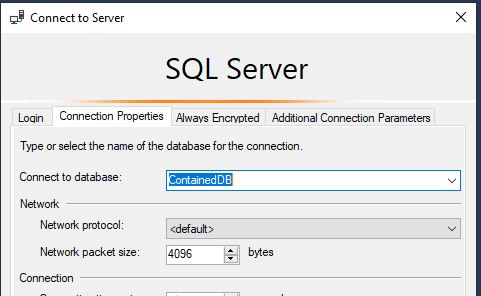
  4. Do not hit “Enter” key or click on “Connect”. Instead, click on the “Options” button on the “Connect to Server” dialog box
  5. In the Connect to Database box, type in the name of the contained database, in our case “ContainedDB”
    image
  6. Now click on “Connect” to connect to the SQL Server
  7. Notice the level of rights that this user is granted
    image
    NOTE: Please note that no login with this name exists on the SQL Server! Yet, the login succeeded.

Isn’t working with contained databases easy? I would say that if you have your hands on a copy of SQL 11 (“Denali”) CTP01, give contained databases a try. You will wonder what took so long for this feature to come.

Tomorrow, we will explore how to convert an existing non-contained database to a contained database.

Until tomorrow,

Be courteous. Drive responsibly.

Getting started with Contained Databases in SQL 11 (“Denali”) – Part 02 – Creating contained databases & changes to ALTER DA


Yesterday, I attempted to explore the concept of contained databases. Today, we will see how to create our first contained database in the very latest SQL 11 (“Denali”) CTP01.

(If you intend to follow along, you will need a instance of SQL 12 or higher)

To get us back into context, let’s revisit the definition of a contained database:

“A contained database has no external dependencies on server-based settings or metadata to define the database. Users defined in a contained database do not have a dependency on logins created on the server, and therefore contain all information necessary to authenticate a user within the database.”

Creating a “contained” database

Here is a step-by-step guide to create your first “contained” database:

Assumption: It is assumed that the reader have fair amount of exposure to SSMS and SQL Server database fundamentals before beginning this exercise.

  1. Login to the SQL Server Management Studio (SSMS)
  2. Right-click on the Server instance name in the Object Explorer and click “Properties”
  3. Select the “Advanced” page
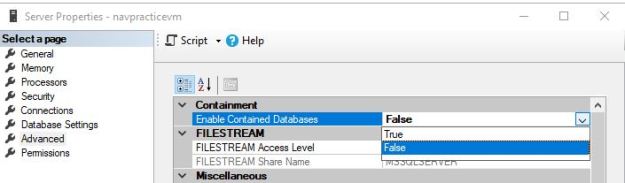
  4. Set the “Enabled contained databases” to TRUE
  5. Now, restart the SQL Server Instance by right-clicking the instance name in SSMS and selecting “Restart”
  6. After the restart, log back into SSMS, right-click on the Database node and select New database
  7. Name the database “ContainedDB
  8. Navigate out to the Options page and select the containment mode as “Partial”
  9. Click “OK” to create the database
This screenshot shows how to enable containment for a given SQL Server instance
Enabling Containment for a given SQL Server instance
This screenshot shows the containment options available when creating a database in SQL Server Management Studio
Containment options available when creating a database in SSMS

T-SQL to enable containment

--Enabled Advanced options
sp_configure 'show advanced options',1;
RECONFIGURE
GO

--Enabled Database Containment
sp_configure 'contained database authentication',1;
RECONFIGURE;
GO

--Disable Advanced options
sp_configure 'show advanced options',0;
RECONFIGURE;
GO

T-SQL to create a partially contained database

--Notice that we now have a new option - CONTAINMENT!
USE [master];
GO
CREATE DATABASE [ContainedDB]
CONTAINMENT=PARTIAL
ON 
( NAME = Sales_dat,
    FILENAME = 'C:Program FilesMicrosoft SQL ServerMSSQL11.MSSQLSERVERMSSQLDATAContainedDB.mdf',
    SIZE = 10,
    MAXSIZE = 50,
    FILEGROWTH = 5 )
LOG ON
( NAME = Sales_log,
    FILENAME = 'C:Program FilesMicrosoft SQL ServerMSSQL11.MSSQLSERVERMSSQLDATAContainedDB.ldf',
    SIZE = 5MB,
    MAXSIZE = 25MB,
    FILEGROWTH = 5MB ) ;
GO

Creating a contained user within the newly created contained database

  1. Login to SQL instance used in the test above via SSMS
  2. Using the Object Explorer, navigate out to “ContainedDB”->Security
  3. Right-click on “Users” and choose “New User”
  4. In the New User dialog, enter the user name and password of your choice to create a new user. I created a user called “ContainedUser”
  5. Navigate out to the Membership page, and select the “db_owner” checkbox

Let’s Login!

It’s time to login to SQL Server using our newly created user. But wait! Don’t we need that this database user is mapped to a login? No! That’s the whole beauty of contained databases!

  1. In the Object Explorer, click on the Connect drop-down list and choose “Database engine”
  2. Change the authentication to “SQL Server Authentication”
  3. In the login name and password boxes, pass in the login name and the password of the user created in the steps above
  4. Do not hit “Enter” key or click on “Connect”. Instead, click on the “Connection Properties” tab
  5. In the Connect to Database box, type in the name of the contained database, in our case “ContainedDB”
    Now click on “Connect” to connect to the SQL Server
  6. Notice the level of rights that this user is granted
This screenshot demonstrates how to explicitly specify a database when connecting to SQL Server.
Explicitly connecting to a database via SSMS
Screenshot showing that although the user (ContainedUser) had db_owner membership, the server/instance-level objects are not exposed to this user under this connection.
Notice that no server-level objects are accessible!

NOTE: Although the user (ContainedUser) had db_owner membership, the server/instance-level objects are not exposed to this user under this connection.

Does this database contain any non-contained  entities?

So, now that the database and the users are created and login process tested, it is essential to ensure that the database is indeed contained and there are no uncontained entities.

Launch a new query editor window using the contained database connection created above, and execute the following query against the “ContainedDB”

USE [ContainedDB];
GO
SELECT * FROM sys.dm_db_uncontained_entities;
GO

You should only see one record for the ROUTE class_desc. This is expected.

Screenshot showing the list of non-contained entities in a partially contained database
List of non-contained entities in a partially contained database

Some finer points…

  1. Only the partial containment mode is supported currently
  2. The following entities are not allowed in a partially contained database
    • Uncontained tables (for example, a table that uses an uncontained function in a constraint or computed column)
    • Check constraints that directly use uncontained entities or functions
    • Numbered procedures
    • Computed columns that directly use uncontained entities or functions
    • Schema-bound objects that depend on built-in functions with collation changes
    • Binding change resulting from collation changes, including references to objects, columns, symbols or types

Tomorrow, we will move this newly created database to another SQL Server instance, and see how easy it can be.

Until tomorrow,

Be courteous. Drive responsibly.

Getting started with Contained Databases in SQL 11 (“Denali”) – Part 01 – An Introduction


As you know, I had visited Tech-Ed 2011 (India) last month. The last day of Tech-Ed was a special day for DBAs because we had a dedicated DBA track – and to add to it, we had a power packed hands-on lab from Jacob Sebastian and break-out sessions from Pinal Dave, Vinod Kumar, Prem Mehra and Balmukund Lakhani. You can read all about Tech-Ed Day 03 at my post here.

For this week, I will be sharing with you the content of the hands-on lab on “Contained Databases in SQL 11 (“Denali”)” from Tech Ed. The hands-on lab was conducted by Jacob Sebastian.

Database containment – the current situation

What does a typical day in the life of the DBA (especially in a development shop) consist of? Let me list a few of these activities down:

  1. Create new databases
  2. Setup database options
  3. Create Logins on the SQL Server and assign permissions to various objects
  4. Move databases across SQL Servers
  5. Repeat the same steps on demand

SQL Server is huge, and there are a variety of objects and tasks to be done within the server. Unfortunately, these objects and tasks are spread all over the entire product, which leads to the following disadvantages:

Database Deployment

This is the most feared situation – it is the time when an application is moved from one instance to another. When this movement happens, some part of the application’s data (eg. the logins and agent job information) is left behind.

The DBA must then painstakingly recreate and map each login to required database users on the new instance. Maintenance and other SQL Agent jobs also need to be recreated on the new instance. Depending upon the number of such operations to be carried out, this process is time-consuming and error-prone.

Application Development

Application development has to currently keep into consideration the finer points of the final deployment/production environment. Database and server configuration and deployment scenarios are no longer isolated. It is quite possible that some of the dependencies and conditions that application developers assumed to be available may not be true (eg. the availability of the “sa” login, permissions to create new logins on the server, or “xp_cmdshell” being enabled).

Another major influencer in application development is the collation of the database. Since this is initially determined by the server collation, developers need to constantly ensure that the collation is exactly as required by the application.

Such situations take the focus away from application development and instead divert it to application deployment, which should not be the case.

Application Administration

Because logins and agent jobs are spread across the instance and the database, administration is a virtual nightmare. In high-security enterprise class installations, the need to administer a single database typically requires that the user be granted permissions to the entire instance – thus providing access to many other databases to which the user has no relation with.

Contained Databases – The solution

There exists a distinct boundary between the multiple areas of any application:

  1. Application boundary – the boundary between the application code and functionality and the server instance
  2. Application Model – inside the application boundary, this is where applications are developed and managed
  3. Management Model – outside of the application boundary, this is where instance-level management happens

Here is how you may classify some of the objects into Application model & Management model:

Application Model Management Model
System tables like sys.tables Instance level system tables like sys.endpoints
Database users and passwords Database server logins
Database server login and database user mapping
User tables in the current database
(i.e. referenced by a 2-part name)
User tables in another database
(i.e. referenced by a 3-part name)

Once these boundaries are defined, and the objects completely contained within these boundaries, they will become independent of the objects on the other side of the boundary.

A “Contained Database” paradigm ensures:

  1. Simplified database movement
  2. Application development environment independent of the deployment environment considerations
  3. More granular, yet powerful administrative groups possible

SQL 11 (“Denali”) and Contained Databases

As of SQL 11 (“Denali”) CTP 01, SQL Server supports the concept of “Contained databases”. Here’s how you can define contained database:

“A contained database has no external dependencies on server-based settings or metadata to define the database. Users defined in a contained database do not have a dependency on logins created on the server, and therefore contain all information necessary to authenticate a user within the database.”

By default, this feature is turned OFF, meaning everything is just as it was before, i.e. “uncontained”.

Tomorrow, we will soon see how to turn Contained Database support ON, and also create a new contained database, after which we will see how to migrate a contained database across severs, and finally, how to convert your non-contained database to a contained one.

You can understand more about Contained Databases at: http://msdn.microsoft.com/en-us/library/ff929071(SQL.110).aspx

Until tomorrow,

Be courteous. Drive responsibly.

T-SQL Worst Practices – a compilation from Jacob’s session at Tech-Ed 2011 – Part 03 – Practices that contribute to execution er


This is in continuation to yesterday’s post on T-SQL worst practices that affect the performance of the results returned/processed.

What have I done? T-SQL Worst Practices

I am attempting to summarize all of the worst T-SQL practices that Jacob demonstrated at Tech-Ed 2011 (India). The summarization has been done after classifying these practices into 3 major buckets:

  1. Practices that can affect accuracy of data returned/processed (Part 01 – read here)
  2. Practices that can adversely impact performance (Part 02 – read here)
  3. Practices that can have unpredictable execution side-effects (Part 03 – today’s post)

While the points covered are exactly the same as covered during the Tech-Ed, I have taken hints from Jacob’s queries and have come up with my own versions using the AdventureWorks2008R2 database supplied as a sample database for SQL 11 (“Denali”) CTP01. In cases where I am directly using Jacob’s scripts, I have mentioned it as such.

Part 03 – Practices that contribute to execution errors

The previous two sessions focused on the efficiency and accuracy of the application. However, errors (logical or otherwise) during execution are a nightmare for technical support and any team assigned the task of maintaining the product after it’s release. Even worse is when these execution errors in the code are sporadic. Today, in the final part of this series, we will look at some of the coding practices which might result in an unstable product.

Using Ordinal positions in the ORDER BY clause

Manager: I need a list of the first and last initials of all contacts in our database. Can you do that?

You: Sure.That’s quite easy. Here you go:

USE [AdventureWorks2008R2]
GO

SELECT LEFT(p.FirstName, 1) AS FirstInitial, 
       LEFT(p.LastName, 1) AS LastInitial
FROM Person.Person p
GO

Manager: But, I want it sorted by the First Initial.

You: No issues. It’s just a small change.

USE [AdventureWorks2008R2]
GO

SELECT LEFT(p.FirstName, 1) AS FirstInitial, 
       LEFT(p.LastName, 1) AS LastInitial
FROM Person.Person p
ORDER BY 1
GO

Manager: That was fast! But, there might be situations where I need to sort it by the Last Name.

You: Okay, it looks like we will need to go beyond simple ad-hoc queries. I will create a stored procedure for you.

USE [AdventureWorks2008R2]
GO

CREATE PROCEDURE GetContacts
(
   @Sort VARCHAR(20)
)
AS
BEGIN
    SELECT LEFT(p.FirstName, 1) AS FirstInitial, 
           LEFT(p.LastName, 1) AS LastInitial
    FROM Person.Person p
    ORDER BY CASE @Sort WHEN 'first' THEN 1
                        ELSE 2
                        END
END
GO

Manager (in the morning the very next day): The stored procedure you gave me yesterday does not work. Fix it and see that you always test your code before submitting to me.

image

You: How is this possible? Today is going to be a bad day. I missed the bus, and now my manager is angry at me. I must do something quickly……Let me try this:

SELECT LEFT(p.FirstName, 1) AS FirstInitial, 
       LEFT(p.LastName, 1) AS LastInitial
FROM Person.Person p
ORDER BY FirstInitial
GO

You: Okay. This works, so let me put it inside the stored procedure to fix the issue that my manager is encountering.

ALTER PROCEDURE GetContacts
(
    @Sort VARCHAR(20)
)
AS
BEGIN
    SELECT LEFT(p.FirstName, 1) AS FirstInitial, 
           LEFT(p.LastName, 1) AS LastInitial
    FROM Person.Person p
    ORDER BY CASE @Sort WHEN 'first' THEN FirstInitial
                        ELSE LastInitial
                        END
END
GO

When you execute the ALTER statement to begin your unit test:

Msg 207, Level 16, State 1, Procedure GetContacts, Line 10
Invalid column name ‘FirstInitial’.
Msg 207, Level 16, State 1, Procedure GetContacts, Line 11
Invalid column name ‘LastInitial’.

You (dumb-struck): ?? What is going on? Nothing is working as expected…

Actually, it’s not your fault entirely. It’s the way expressions are evaluated when used in the ORDER BY clause. When used in the ORDER BY clause, expressions need to be computed before-hand. In your case, you are using a column alias, which does not exist yet and hence the error. Here’s what you can do to resolve the ugly situation:

ALTER PROCEDURE GetContacts
(
	@Sort VARCHAR(20)
)
AS
BEGIN
    SELECT LEFT(p.FirstName, 1) AS FirstInitial, 
           LEFT(p.LastName, 1) AS LastInitial
    FROM Person.Person p
	ORDER BY CASE @Sort WHEN 'first' THEN LEFT(p.FirstName, 1)
                        ELSE LEFT(p.LastName, 1)
                        END
END
GO

Here’s the result – it works!

image

Maintaining Integrity during transactions

At the end of the day, anything and everything within a database is all about maintaining data integrity. Microsoft SQL Server ensures this and also provides all the basic components to the development community so that they can ensure that errors during code execution are handled properly and roll-backs issued so that anything that is inconsistent is not committed to the database.

However, we as developers tend to ignore a couple of things, or take things for granted – one of them is the fact that Microsoft SQL Server leaves the user to decide whether or not it should automatically abort a transaction in the case of an error.

Let’s set the stage by assuming that we have a table called Customers and have some basic data in it.

/*-----------------------------------------------------------------------------
  Date			: 23 March 2011
  SQL Version           : SQL Server 2005/2008/Denali
  Author		: Jacob Sebastian
  Email			: jacob@beyondrelational.com
  Twitter		: @jacobsebastian
  Blog			: http://beyondrelational.com/blogs/jacob
  Website		: http://beyondrelational.com

  Summary:
  This script is part of the demo presented by Jacob Sebastian during 
  Tech-ED India 2011 on "TSQL Worst Practices".

  Disclaimer:  
  THIS CODE AND INFORMATION ARE PROVIDED "AS IS" WITHOUT WARRANTY OF 
  ANY KIND, EITHER EXPRESSED OR IMPLIED, INCLUDING BUT NOT LIMITED 
  TO THE IMPLIED WARRANTIES OF MERCHANTABILITY AND/OR FITNESS FOR A
  PARTICULAR PURPOSE.
-----------------------------------------------------------------------------*/
USE TechEd; 
GO
IF OBJECT_ID('UpdateCustomer') IS NOT NULL DROP PROCEDURE UpdateCustomer; 
GO

IF OBJECT_ID('Customers','U') IS NOT NULL BEGIN
	DROP TABLE Customers 
END
GO

CREATE TABLE Customers (
	CustID INT IDENTITY,
	CustName VARCHAR(100),
	CustCity VARCHAR(100),
	LastOrder DATETIME
)
GO

INSERT INTO Customers (CustName, CustCity)
SELECT 'Jacob', 'Ahmedabad' UNION ALL
SELECT 'Pinal', 'Bangalore'

Now, let’s create a stored procedure to update the Customers table.

USE TechEd; 
GO

CREATE PROCEDURE UpdateCustomer(
	@CustID INT,
	@SalesAmount MONEY
)
AS

BEGIN TRY
	BEGIN TRAN

	UPDATE Customers SET LastOrder = GETDATE() WHERE CustID = @CustID 
	
	UPDATE customerss SET
		SalesAmount = SalesAmount + @SalesAmount 
	WHERE CustID = @CustID 

	COMMIT TRAN

END TRY
BEGIN CATCH
	IF @@TRANCOUNT > 0 
		ROLLBACK TRAN
	PRINT 'Error Number: ' + CAST (ERROR_NUMBER() AS VARCHAR)
END CATCH
GO

Note that although we have an incorrect table name in the stored procedure, it was successfully created. (Do not go and correct it – this incorrect table name is intentional).

Now, in a SQL Server Management Studio window, run the following query. You will encounter a fatal error mentioned below – fatal enough for SQL Server to stop execution then and there. This is expected and not an accident.

EXEC UpdateCustomer 1, 100

(1 row(s) affected)
Msg 208, Level 16, State 1, Procedure UpdateCustomer, Line 13
Invalid object name ‘customerss’.
Msg 266, Level 16, State 2, Procedure UpdateCustomer, Line 13
Transaction count after EXECUTE indicates a mismatching number of BEGIN and COMMIT statements. Previous count = 0, current count = 1.

Then, run the below query in another SQL Server Management Studio query window.

SELECT * FROM customers 

You will notice that the execution continues without producing any results for a long time.

So, what’s the problem?

The problem here is that although the execution of the stored procedure encountered an error, the transaction that we had started was never aborted or rolled-back. As a result, the Customers table remained under lock, causing the SELECT to wait indefinitely. As proof, you may run the following on query window #1:

SELECT @@trancount
ROLLBACK TRAN

You will see that we have one open transaction. Issuing the rollback will cause query window #2 to return results.

What’s the worst that can happen? Well, that depends on your definition of “worst”. According to me, you are already in big trouble – your code just broke. However, if that is not serious enough, your table is now under lock until and unless and external force (i.e. manual ROLLBACK) is applied (almost like Newton’s laws, isn’t it?). This can result in your entire application becoming unusable and ultimately a “site-down” (or P1) support call with the customer (and your manager) screaming on you.

Solution #01: Create a wrapper stored procedure

One of the solutions is to simulate what we just did, i.e. create a wrapper stored procedure, which would be able to:

  • detect that the underlying procedure call failed
  • check if there are any open transactions
  • If yes, rollback all open transactions

We can implement this as under:

USE TechEd; 
GO

BEGIN TRY
	EXEC UpdateCustomer 1, 100
END TRY BEGIN CATCH
	IF @@TRANCOUNT > 0 ROLLBACK TRAN
	PRINT 'Transaction Rolled Back'
END CATCH
GO

Try it out. It works, but there is a problem. In an enterprise class system, we may have hundreds of stored procedures – and it is simply not practical to have wrappers on each.

Solution #02: SET XACT_ABORT ON

This solution is actually, quite simple (and what I would recommend). All we need to tell Microsoft SQL Server is to automatically issue a ROLLBACK if the transaction encounters a fatal error.

All that one needs to do is to use a SET option called XACT_ABORT and set it to ON. (BOL link here)

USE TechEd; 
GO

ALTER PROCEDURE UpdateCustomer(
	@CustID INT,
	@SalesAmount MONEY
)
AS
SET XACT_ABORT ON
BEGIN TRY
	BEGIN TRAN

	UPDATE Customers SET LastOrder = GETDATE() WHERE CustID = @CustID 
	
	UPDATE customerss SET
		SalesAmount = SalesAmount + @SalesAmount 
	WHERE CustID = @CustID 

	COMMIT TRAN

END TRY
BEGIN CATCH
	IF @@TRANCOUNT > 0 
		ROLLBACK TRAN
	PRINT 'Error Number: ' + CAST (ERROR_NUMBER() AS VARCHAR)
END CATCH
GO

Now, repeat the exercise of executing the following in two separate query editor windows. Notice that this time, we do not encounter locking and the second query succeeds.

EXEC UpdateCustomer 1, 100

-- run in another session
SELECT * FROM customers 

Summarizing – Part 03:

Finally, summarizing all the points that have been discussed today (Part 03) and during Tech-Ed 2011

  1. Always test your code before it leaves your table! Although things “should” work, they don’t do so just that one time when you don’t test
  2. If an ordinal position is specified in an expression, it may not produce the expected results
  3. If an expression is used in ORDER BY, it will be evaluated when FILTERS are evaluated
  4. Always use SET XACT_ABORT ON in stored procedures to rollback open transactions in case of unhandled errors

Thank-you, Jacob, for this really great session!

You can read my memories of Tech-Ed by going through the following series:

Tech Ed 2011 (India) – Day 01 – Connect, Learn, Explore, Evolve!

Tech Ed 2011 (India) – Day 02 – IE 9 – India launch – Fast is now beautiful!

Tech Ed 2011 (India) – Day 03 – For the DBAs – Contained Databases, Extended Events, Virtualization, Wait Stats, Wait Queues & High Availability

Until we meet next time,

Be courteous. Drive responsibly.

Want to ask me a question? Do so at: http://beyondrelational.com/ask/nakul/default.aspx

T-SQL Worst Practices – a compilation from Jacob’s session at Tech-Ed 2011 – Part 02 – Practices that affect performance


This is in continuation to yesterday’s post on T-SQL worst practices that affect the accuracy of the results returned/processed

What have I done? T-SQL Worst Practices

I am attempting to summarize all of the worst T-SQL practices that Jacob demonstrated at Tech-Ed 2011 (India). The summarization has been done after classifying these practices into 3 major buckets:

  1. Practices that can affect accuracy of data returned/processed (Part 01 – read here)
  2. Practices that can adversely impact performance (Part 02 – today’s post)
  3. Practices that can have unpredictable execution side-effects (Part 03 – coming tomorrow!)

While the points covered are exactly the same as covered during the Tech-Ed, I have taken hints from Jacob’s queries and have come up with my own versions using the AdventureWorks2008R2 database supplied as a sample database for SQL 11 (“Denali”) CTP01. In cases where I am directly using Jacob’s scripts, I have mentioned it as such.

Part 02 – Practices affecting performance

Using Incorrect data types in a query/Too much reliance on implicit conversions

When I was a little kid in school, my parents used to tell me that there is a lot more than what meets the eye. A lot of things happen in the background before anything reaches us, and sometimes we forget the importance and underestimate the impact of these background processes. Years later, the movie “Munnabhai M.B.B.S.” came along, and that demonstrated, amongst many others, the same concept – how we tend to ignore the cleaning crew who help maintain one of the most important things in a hospital – hygiene.

Anyway, coming over to SQL Server, one of the most taken-for-granted features is implicit conversion. Implicit conversion is the conversion of one data-type to another without the user knowing that such a conversion is happening. Please note that these conversions happen under some pre-defined rules of  data-type precedence. Data types of a lower precedence are implicitly converted to a higher precedence if a data-type mismatch is found.

With this background in mind, let’s see how this feature can land us in performance trouble.

Assume that we have the following table:

/*-----------------------------------------------------------------------------
  Date			: 23 March 2011
  SQL Version           : SQL Server 2005/2008/Denali
  Author		: Jacob Sebastian
  Email			: jacob@beyondrelational.com
  Twitter		: @jacobsebastian
  Blog			: http://beyondrelational.com/blogs/jacob
  Website		: http://beyondrelational.com

  Summary:
  This script is part of the demo presented by Jacob Sebastian during 
  Tech-ED India 2011 on "TSQL Worst Practices".

  Disclaimer:  
  THIS CODE AND INFORMATION ARE PROVIDED "AS IS" WITHOUT WARRANTY OF 
  ANY KIND, EITHER EXPRESSED OR IMPLIED, INCLUDING BUT NOT LIMITED 
  TO THE IMPLIED WARRANTIES OF MERCHANTABILITY AND/OR FITNESS FOR A
  PARTICULAR PURPOSE.
-----------------------------------------------------------------------------*/

USE Teched 
GO

IF OBJECT_ID('orders', 'U') IS NOT NULL BEGIN
	DROP TABLE orders 
END
GO

CREATE TABLE orders (OrderID INT IDENTITY, OrderDate DATETIME, Amount MONEY, Refno VARCHAR(20))
INSERT INTO orders (OrderDate, Amount, Refno) 
SELECT TOP 100000
	DATEADD(minute, ABS(a.object_id % 50000 ), CAST('2010-02-01' AS DATETIME)),
	ABS(a.object_id % 10),
	CAST(ABS(a.object_id) AS VARCHAR)
FROM sys.all_objects a
CROSS JOIN sys.all_objects b
INSERT INTO orders (OrderDate, Amount, Refno)  SELECT GETDATE(), 100, '555'

Now, let’s create a non-clustered index on the RefNo column.

CREATE NONCLUSTERED INDEX idx_refno ON orders(refno)
include(amount)

Next, let’s run through the following queries. Both these queries perform the same function, i.e. select a record whose reference number is 555.

SELECT count(*) 
FROM orders 
WHERE Refno = 555

SELECT COUNT(*) 
FROM orders 
WHERE Refno = '555'

These queries do their work right, but one of them is not advisable for production-class usage.

Here’s why: If the actual execution plan of these queries is enabled by pressing Ctrl+M or by going to Query –> Include Actual Execution plan, we see that Query #1 does an index scan instead of an index seek.

image

The reason is that in the first query, Refno, which is a VARCHAR column is being compared with an integer value. Per rules of data-type precedence (discussed earlier), VARCHAR values need to be implicitly converted to INT because INT has a higher precedence. Thus, SQL Server first has to create a temporary column with the INT representation of each of the Refno values, and then compare that with the supplied criteria.

In the second case, we are supplying SQL Server with the data in character format, and hence, no implicit conversion is required. SQL Server can therefore simply do an index seek to fetch the right results.

Now, let’s do it the other way around. Let’s explicitly convert Refno to an INT and then perform similar SELECT operations.

DROP INDEX idx_refno ON Orders

ALTER TABLE Orders ALTER COLUMN Refno INT

CREATE NONCLUSTERED INDEX idx_refno ON orders(refno)
include(amount)


SELECT count(*) 
FROM orders 
WHERE Refno = 555

SELECT COUNT(*) 
FROM orders 
WHERE Refno = '555'

Looking at the execution plan, we are in for a shocker. We would have expected that now, the second query should be the slower one, but it is not!

image

This is because the column being compared is of a higher precedence. Therefore, only the supplied condition parameter needs to be implicitly converted to INT, thus reducing the performance impact to being negligible.

Functions may not always be your friends

SQL Server has a great collection of functions, some of which are really, really useful. Data manipulation is a common operation in most systems, and the functions available at our disposal for date manipulation are very powerful. However, they might land us in a performance bottleneck if not used carefully.

First of all, let’s create a very simple, non-clustered index on the OrderDate column of the Sales.SalesOrderHeader table in the AdventureWorks2008R2 database.

USE [AdventureWorks2008R2]
GO
CREATE NONCLUSTERED INDEX [Idx_MissingIndexOrderDate]
    ON [Sales].[SalesOrderHeader] ([OrderDate])
GO

Next, let us try to find out all the sales done in the month of April, 2008. Now, there are a lot of solutions available, the most popular ones being the ones below. Which one do you think is the performance hog?

--Number of sales done in April, 2008
SELECT COUNT(*)
FROM Sales.SalesOrderHeader sh
WHERE MONTH(sh.OrderDate) = 4 AND YEAR(sh.OrderDate) = 2008

SELECT COUNT(*)
FROM Sales.SalesOrderHeader sh
WHERE sh.OrderDate >= '2008-04-01' AND sh.OrderDate <= '2008-04-30'

SELECT COUNT(*)
FROM Sales.SalesOrderHeader sh
WHERE sh.OrderDate BETWEEN '2008-04-01' AND '2008-04-30'

If you turn on the execution plan, you would notice that Query #1 takes up the most time, i.e. that is the slowest of them all.

image

The reason is the presence of the functions in the WHERE clause. Functions around columns in a WHERE clause cause table/index scans and must therefore be used judiciously.

If you use these functions in the SELECT clause, you will notice that there isn’t much performance delay. Here’s the proof:

--Number of sales done in April, 2008
SELECT MONTH(sh.OrderDate), YEAR(sh.OrderDate),sh.OrderDate
FROM Sales.SalesOrderHeader sh
WHERE MONTH(sh.OrderDate) = 4 AND YEAR(sh.OrderDate) = 2008

SELECT MONTH(sh.OrderDate), YEAR(sh.OrderDate),sh.OrderDate
FROM Sales.SalesOrderHeader sh
WHERE sh.OrderDate BETWEEN '2008-04-01' AND '2008-04-30'

image

Question to the audience: Now, let’s say that instead of just the date value (which we were dealing with in case of SalesOrderHeader.OrderDate), we have a DATETIME value to work with. What would be good solutions, according to for the same problem statement? Jacob touched upon this during the Tech-Ed, but I am eliminating that part from the post series so that it can become a great user exercise.

Summarizing – Part 02:

Finally, summarizing all the points that have been discussed today (Part 02) and during Tech-Ed 2011

  1. Incorrect use of data-types (especially in the WHERE clause) can cause performance issues because they would force TABLE/INDEX scans due to implicit conversion
  2. As far as possible, take the time out during design to ensure that you choose the proper data type. In our example, Refno column should probably never have been a VARCHAR column
  3. Functions around columns in a WHERE clause cause table/index scans and must therefore be used judiciously

Thank-you, Jacob, for this really great session!

You can read my memories of Tech-Ed by going through the following series:

Tech Ed 2011 (India) – Day 01 – Connect, Learn, Explore, Evolve!

Tech Ed 2011 (India) – Day 02 – IE 9 – India launch – Fast is now beautiful!

Tech Ed 2011 (India) – Day 03 – For the DBAs – Contained Databases, Extended Events, Virtualization, Wait Stats, Wait Queues & High Availability

Until tomorrow,

Be courteous. Drive responsibly.

Want to ask me a question? Do so at: http://beyondrelational.com/ask/nakul/default.aspx