Category Archives: #SQLServer

All about Microsoft SQL Server

#0360 – SQL Server – sp_attach_db v/s CREATE DATABASE FOR ATTACH – Number of files limitation; Msg. 8144 (Procedure has too many arguments specified)


This post has been a long time coming. I am an advocate of using newer T-SQL and administrative features if situation and compatibility related business requirements allow. In implementation of this ideology the question always comes up from most of my team members as to why a change is required when the old syntax/methods work just as effectively. I often demonstrate the example provided below to them.

In development environments, we generally move databases across various instances via a simple detach-append process. The traditional approach is to use the system stored procedure sp_attach_db. When CREATE DATABASE was enhanced to include support of attaching a database, one of the obvious differences that came up was the number of database files that it supported for the ATTACH operation.

The sp_attach_db system stored procedure can only attach a maximum of 16 database files.

In this scenario, the newer option of CREATE DATABASE is a blessing for very large databases where we have multiple files spread across multiple file-groups and multiple drives.

Allow me to demonstrate this with an example.

USE master ;
GO
--Safety Check
IF DB_ID('AttachDBTest') IS NOT NULL 
    DROP DATABASE AttachDBTest ;
GO

--Create the test database that has more than 16 files
CREATE DATABASE AttachDBTest ON PRIMARY  
    (NAME = Attach1,
    FILENAME = 'C:SQLDatabasesDBFileAttachTestAttachdat1.mdf',
    SIZE = 10MB,
    MAXSIZE = 200,
    FILEGROWTH = 20),
    ( NAME = Attach2,
    FILENAME = 'C:SQLDatabasesDBFileAttachTestAttachdat2.ndf',
    SIZE = 10MB,
    MAXSIZE = 200,
    FILEGROWTH = 20),
    ( NAME = Attach3,
    FILENAME = 'C:SQLDatabasesDBFileAttachTestAttachdat3.ndf',
    SIZE = 10MB,
    MAXSIZE = 200,
    FILEGROWTH = 20),
    ( NAME = Attach4,
    FILENAME = 'C:SQLDatabasesDBFileAttachTestAttachdat4.ndf',
    SIZE = 10MB,
    MAXSIZE = 200,
    FILEGROWTH = 20),
    ( NAME = Attach5,
    FILENAME = 'C:SQLDatabasesDBFileAttachTestAttachdat5.ndf',
    SIZE = 10MB,
    MAXSIZE = 200,
    FILEGROWTH = 20),
    ( NAME = Attach6,
    FILENAME = 'C:SQLDatabasesDBFileAttachTestAttachdat6.ndf',
    SIZE = 10MB,
    MAXSIZE = 200,
    FILEGROWTH = 20),
    ( NAME = Attach7,
    FILENAME = 'C:SQLDatabasesDBFileAttachTestAttachdat7.ndf',
    SIZE = 10MB,
    MAXSIZE = 200,
    FILEGROWTH = 20),
    ( NAME = Attach8,
    FILENAME = 'C:SQLDatabasesDBFileAttachTestAttachdat8.ndf',
    SIZE = 10MB,
    MAXSIZE = 200,
    FILEGROWTH = 20),
    ( NAME = Attach9,
    FILENAME = 'C:SQLDatabasesDBFileAttachTestAttachdat9.ndf',
    SIZE = 10MB,
    MAXSIZE = 200,
    FILEGROWTH = 20),
    ( NAME = Attach10,
    FILENAME = 'C:SQLDatabasesDBFileAttachTestAttachdat10.ndf',
    SIZE = 10MB,
    MAXSIZE = 200,
    FILEGROWTH = 20),
    (NAME = Attach11,
    FILENAME = 'C:SQLDatabasesDBFileAttachTestAttachdat11.mdf',
    SIZE = 10MB,
    MAXSIZE = 200,
    FILEGROWTH = 20),
    ( NAME = Attach12,
    FILENAME = 'C:SQLDatabasesDBFileAttachTestAttachdat12.ndf',
    SIZE = 10MB,
    MAXSIZE = 200,
    FILEGROWTH = 20),
    ( NAME = Attach13,
    FILENAME = 'C:SQLDatabasesDBFileAttachTestAttachdat13.ndf',
    SIZE = 10MB,
    MAXSIZE = 200,
    FILEGROWTH = 20),
    ( NAME = Attach14,
    FILENAME = 'C:SQLDatabasesDBFileAttachTestAttachdat14.ndf',
    SIZE = 10MB,
    MAXSIZE = 200,
    FILEGROWTH = 20),
    ( NAME = Attach15,
    FILENAME = 'C:SQLDatabasesDBFileAttachTestAttachdat15.ndf',
    SIZE = 10MB,
    MAXSIZE = 200,
    FILEGROWTH = 20),
    ( NAME = Attach16,
    FILENAME = 'C:SQLDatabasesDBFileAttachTestAttachdat16.ndf',
    SIZE = 10MB,
    MAXSIZE = 200,
    FILEGROWTH = 20),
    ( NAME = Attach17,
    FILENAME = 'C:SQLDatabasesDBFileAttachTestAttachdat17.ndf',
    SIZE = 10MB,
    MAXSIZE = 200,
    FILEGROWTH = 20),
    ( NAME = Attach18,
    FILENAME = 'C:SQLDatabasesDBFileAttachTestAttachdat18.ndf',
    SIZE = 10MB,
    MAXSIZE = 200,
    FILEGROWTH = 20),
    ( NAME = Attach19,
    FILENAME = 'C:SQLDatabasesDBFileAttachTestAttachdat19.ndf',
    SIZE = 10MB,
    MAXSIZE = 200,
    FILEGROWTH = 20),
    ( NAME = Attach20,
    FILENAME = 'C:SQLDatabasesDBFileAttachTestAttachdat20.ndf',
    SIZE = 10MB,
    MAXSIZE = 200,
    FILEGROWTH = 20) 
LOG ON 
   (NAME = Attachlog1,
    FILENAME = 'C:SQLDatabasesDBFileAttachTestAttachlog1.ldf',
    SIZE = 100MB,
    MAXSIZE = 200,
    FILEGROWTH = 20)
--FOR ATTACH
;
GO

--Create Test Table
USE AttachDBTest;
GO
IF OBJECT_ID('dbo.TestTable','U') IS NULL
BEGIN
    CREATE TABLE dbo.TestTable (RecId INT NOT NULL IDENTITY(1,1),
                                RecValue NVARCHAR(20) DEFAULT 'AttachTest'
                               );

END
GO

--Insert Test Data
USE AttachDBTest;
GO
SET NOCOUNT ON;
IF OBJECT_ID('dbo.TestTable','U') IS NOT NULL
BEGIN
    EXEC sp_executesql N'INSERT INTO dbo.TestTable (RecValue) DEFAULT VALUES;';
END
GO 10

--Validate Test Data
USE AttachDBTest;
GO
SELECT * FROM dbo.TestTable;
GO

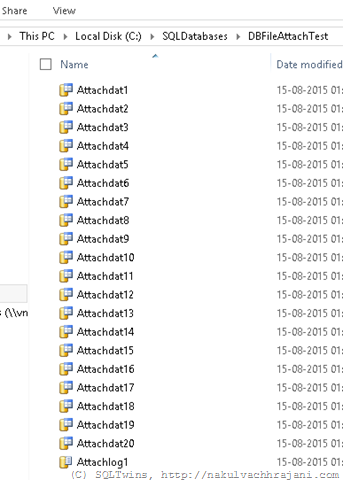
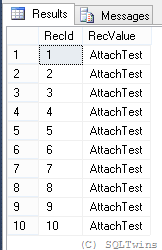
As seen from the screenshots below, the database creation was successful, and so was the insertion of test data.
image

image 

Next, let us detach the database using the system stored procedure sp_detach_db.

--Detach the database
USE master;
GO
EXEC sp_detach_db @dbname = 'AttachDBTest', @skipchecks = 'true' ;
GO

--Confirm that the database has been detached
USE master;
GO
SELECT DB_ID('AttachDBTest') AS AttachDBTestDBID;
GO

image

Now, let us attach the database again with the sp_attach_db system stored procedure.

--Attach the database
USE master;
GO
EXEC sp_attach_db 
    @dbname = 'AttachDBTest', 
    @filename1 = 'C:SQLDatabasesDBFileAttachTestAttachdat1.mdf',
    @filename2 = 'C:SQLDatabasesDBFileAttachTestAttachdat2.ndf',
    @filename3 = 'C:SQLDatabasesDBFileAttachTestAttachdat3.ndf',
    @filename4 = 'C:SQLDatabasesDBFileAttachTestAttachdat4.ndf',
    @filename5 = 'C:SQLDatabasesDBFileAttachTestAttachdat5.ndf',
    @filename6 = 'C:SQLDatabasesDBFileAttachTestAttachdat6.ndf',
    @filename7 = 'C:SQLDatabasesDBFileAttachTestAttachdat7.ndf',
    @filename8 = 'C:SQLDatabasesDBFileAttachTestAttachdat8.ndf',
    @filename9 = 'C:SQLDatabasesDBFileAttachTestAttachdat9.ndf',
    @filename10 = 'C:SQLDatabasesDBFileAttachTestAttachdat10.ndf',
    @filename11 = 'C:SQLDatabasesDBFileAttachTestAttachdat11.ndf',
    @filename12 = 'C:SQLDatabasesDBFileAttachTestAttachdat12.ndf',
    @filename13 = 'C:SQLDatabasesDBFileAttachTestAttachdat13.ndf',
    @filename14 = 'C:SQLDatabasesDBFileAttachTestAttachdat14.ndf',
    @filename15 = 'C:SQLDatabasesDBFileAttachTestAttachdat15.ndf',
    @filename16 = 'C:SQLDatabasesDBFileAttachTestAttachdat16.ndf',
    @filename17 = 'C:SQLDatabasesDBFileAttachTestAttachdat17.ndf',
    @filename18 = 'C:SQLDatabasesDBFileAttachTestAttachdat18.ndf',
    @filename19 = 'C:SQLDatabasesDBFileAttachTestAttachdat19.ndf',
    @filename20 = 'C:SQLDatabasesDBFileAttachTestAttachdat20.ndf',
    @filename21 = 'C:SQLDatabasesDBFileAttachTestAttachlog1.ldf';
GO

Msg 8144, Level 16, State 2, Procedure sp_attach_db, Line 0
Procedure or function sp_attach_db has too many arguments specified.

Now, let us try to attach the database via the CREATE DATABASE statement with the FOR ATTACH option.

--Attach the database using the CREATE DATABASE statement with the FOR ATTACH clause
USE master;
GO
CREATE DATABASE AttachDBTest ON PRIMARY  
    (NAME = Attach1,
    FILENAME = 'C:SQLDatabasesDBFileAttachTestAttachdat1.mdf',
    SIZE = 10MB,
    MAXSIZE = 200,
    FILEGROWTH = 20),
    ( NAME = Attach2,
    FILENAME = 'C:SQLDatabasesDBFileAttachTestAttachdat2.ndf',
    SIZE = 10MB,
    MAXSIZE = 200,
    FILEGROWTH = 20),
    ( NAME = Attach3,
    FILENAME = 'C:SQLDatabasesDBFileAttachTestAttachdat3.ndf',
    SIZE = 10MB,
    MAXSIZE = 200,
    FILEGROWTH = 20),
    ( NAME = Attach4,
    FILENAME = 'C:SQLDatabasesDBFileAttachTestAttachdat4.ndf',
    SIZE = 10MB,
    MAXSIZE = 200,
    FILEGROWTH = 20),
    ( NAME = Attach5,
    FILENAME = 'C:SQLDatabasesDBFileAttachTestAttachdat5.ndf',
    SIZE = 10MB,
    MAXSIZE = 200,
    FILEGROWTH = 20),
    ( NAME = Attach6,
    FILENAME = 'C:SQLDatabasesDBFileAttachTestAttachdat6.ndf',
    SIZE = 10MB,
    MAXSIZE = 200,
    FILEGROWTH = 20),
    ( NAME = Attach7,
    FILENAME = 'C:SQLDatabasesDBFileAttachTestAttachdat7.ndf',
    SIZE = 10MB,
    MAXSIZE = 200,
    FILEGROWTH = 20),
    ( NAME = Attach8,
    FILENAME = 'C:SQLDatabasesDBFileAttachTestAttachdat8.ndf',
    SIZE = 10MB,
    MAXSIZE = 200,
    FILEGROWTH = 20),
    ( NAME = Attach9,
    FILENAME = 'C:SQLDatabasesDBFileAttachTestAttachdat9.ndf',
    SIZE = 10MB,
    MAXSIZE = 200,
    FILEGROWTH = 20),
    ( NAME = Attach10,
    FILENAME = 'C:SQLDatabasesDBFileAttachTestAttachdat10.ndf',
    SIZE = 10MB,
    MAXSIZE = 200,
    FILEGROWTH = 20),
    (NAME = Attach11,
    FILENAME = 'C:SQLDatabasesDBFileAttachTestAttachdat11.mdf',
    SIZE = 10MB,
    MAXSIZE = 200,
    FILEGROWTH = 20),
    ( NAME = Attach12,
    FILENAME = 'C:SQLDatabasesDBFileAttachTestAttachdat12.ndf',
    SIZE = 10MB,
    MAXSIZE = 200,
    FILEGROWTH = 20),
    ( NAME = Attach13,
    FILENAME = 'C:SQLDatabasesDBFileAttachTestAttachdat13.ndf',
    SIZE = 10MB,
    MAXSIZE = 200,
    FILEGROWTH = 20),
    ( NAME = Attach14,
    FILENAME = 'C:SQLDatabasesDBFileAttachTestAttachdat14.ndf',
    SIZE = 10MB,
    MAXSIZE = 200,
    FILEGROWTH = 20),
    ( NAME = Attach15,
    FILENAME = 'C:SQLDatabasesDBFileAttachTestAttachdat15.ndf',
    SIZE = 10MB,
    MAXSIZE = 200,
    FILEGROWTH = 20),
    ( NAME = Attach16,
    FILENAME = 'C:SQLDatabasesDBFileAttachTestAttachdat16.ndf',
    SIZE = 10MB,
    MAXSIZE = 200,
    FILEGROWTH = 20),
    ( NAME = Attach17,
    FILENAME = 'C:SQLDatabasesDBFileAttachTestAttachdat17.ndf',
    SIZE = 10MB,
    MAXSIZE = 200,
    FILEGROWTH = 20),
    ( NAME = Attach18,
    FILENAME = 'C:SQLDatabasesDBFileAttachTestAttachdat18.ndf',
    SIZE = 10MB,
    MAXSIZE = 200,
    FILEGROWTH = 20),
    ( NAME = Attach19,
    FILENAME = 'C:SQLDatabasesDBFileAttachTestAttachdat19.ndf',
    SIZE = 10MB,
    MAXSIZE = 200,
    FILEGROWTH = 20),
    ( NAME = Attach20,
    FILENAME = 'C:SQLDatabasesDBFileAttachTestAttachdat20.ndf',
    SIZE = 10MB,
    MAXSIZE = 200,
    FILEGROWTH = 20) 
LOG ON 
   (NAME = Attachlog1,
    FILENAME = 'C:SQLDatabasesDBFileAttachTestAttachlog1.ldf',
    SIZE = 100MB,
    MAXSIZE = 200,
    FILEGROWTH = 20)
FOR ATTACH
;
GO

--Confirm that the database has been detached
USE master;
GO
SELECT DB_ID('AttachDBTest') AS AttachDBTestDBID;
GO

--Validate Test Data
USE AttachDBTest;
GO
SELECT * FROM dbo.TestTable;
GO

image

This example just demonstrates that when Microsoft recommends a switch from one syntax to another, there has to be some reason behind it and that newer options should be evaluated for replacing older ones.

References

Until we meet next time,
Be courteous. Drive responsibly.

#0359 – SQL Server – Script to reset a SQL Login


A few days ago, we were changing the passwords of SQL Logins on our development SQL Server instances.

Because IT installed them and our Windows credentials were given sysadmin fixed server role access, we had hardly ever used the SQL logins. The result was that we had forgotten the original passwords for many of these instances. We therefore wrote the following script to reset the logins and I thought it to be a script that many of you may find useful.

The script below does the following:

  1. Ensures that the SQL Server instances uses Mixed mode authentication (i.e. both Windows and SQL Logins are allowed)
  2. Ensures that the login referenced by the user is a SQL Login
  3. Ensures that the login is enabled or it is disabled and the user has chosen to activate users
  4. A valid SQL login exists with the name provided in the script
  5. Maintains the properties: MUST_CHANGE, CHECK_POLICY, CHECK_EXPIRATION

Disclaimer: This script are provided “as-is” and without warranty. Please use this only on your development and QA environments after thorough testing.

DECLARE @loginToResetPassword NVARCHAR(255) = N'sa';
DECLARE @newPasswordForLogin NVARCHAR(255) = N'Pa$$w0rd';
DECLARE @enableLoginIfDisabled BIT = 1;

/*********** NO USER CONFIGURABLE CODE BEYOND THIS POINT!! ****************/
SET NOCOUNT ON;
--Declarations of internal variables
BEGIN
    DECLARE @sqlStmnt NVARCHAR(MAX);
    DECLARE @loginIsMustChange INT;  --Per MSDN, this is an INT
    DECLARE @loginIsCheckPolicy BIT; --This will be computed based on the value of DaysUntilExpiration
    DECLARE @serverName NVARCHAR(255) = CAST(SERVERPROPERTY(N'ServerName') AS NVARCHAR(255));
END

--Validations
BEGIN
    --Check for mixed mode authentication
    IF (ISNULL(SERVERPROPERTY(N'IsIntegratedSecurityOnly'),1)=1)
    BEGIN
        PRINT N'<<<< INFO >>>> Environment uses Integrated Security (Windows Authentication) only.';
        PRINT SPACE(14) + N'Login passwords cannot be reset when Integrated Security is used.';
        GOTO SCRIPT_END;
    END

    IF NOT EXISTS (SELECT * 
                   FROM sys.server_principals AS sp 
                   WHERE sp.type = N'S'        --SQL Logins only
                     AND ((sp.is_disabled = 1 AND @enableLoginIfDisabled = 1) OR sp.is_disabled = 0)
                     AND sp.name = @loginToResetPassword
                  )
    BEGIN
        PRINT N'<<<< INFO >>> Login reset cannot be performed because of one of the following reasons:';
        PRINT SPACE(14) + N'1. Login is not a valid SQL Login';
        PRINT SPACE(14) + N'2. The login is disabled and user has chosen not to enable it';
        PRINT SPACE(14) + N'3. The login does not exist';
        GOTO SCRIPT_END;
    END
END

--If we got here, it means that the login is valid, and we can reset it
BEGIN
    --We begin by collecting the login properties
    BEGIN
        --If DaysUntilExpiration = 0, login is either expired or it will expire the day we are running this query 
        --                       = -1, the local security policy in Windows never expires the password
        --                       = NULL the CHECK_POLICY or CHECK_EXPIRATION is OFF for the login 
        --                         or the OS does not support password policies
        SELECT @loginIsMustChange = CAST(LOGINPROPERTY(@loginToResetPassword,N'IsMustChange') AS INT),
               @loginIsCheckPolicy = CASE WHEN LOGINPROPERTY(@loginToResetPassword,N'DaysUntilExpiration') IS NULL THEN 0
                                          ELSE 1
                                          END;  
    END

    --Now we reset the password to the one chosen by the user
    SELECT @sqlStmnt = N'ALTER LOGIN ' + @loginToResetPassword + N' WITH PASSWORD = ''' + @newPasswordForLogin + '''';

    IF (@loginIsMustChange=1)
        SELECT @sqlStmnt += N' MUST_CHANGE';

    IF (@loginIsCheckPolicy=0)
        SELECT @sqlStmnt += N', CHECK_POLICY = OFF, CHECK_EXPIRATION = OFF';
    ELSE
        SELECT @sqlStmnt += N', CHECK_POLICY = ON, CHECK_EXPIRATION = ON';

    IF (@enableLoginIfDisabled = 1)
        SELECT @sqlStmnt += N'; ALTER LOGIN '+ @loginToResetPassword + N' ENABLE ;'

    ----Debug Point
    --SELECT @sqlStmnt;

    --Perform the update
    BEGIN TRY
        EXEC master.sys.sp_executesql @sqlStmnt = @sqlStmnt;

        PRINT N'<<<< INFO >>>> Password for login: ' + @loginToResetPassword + N' has been reset on SQL Server instance: ' + @serverName;
    END TRY
    BEGIN CATCH
        SELECT ERROR_NUMBER() AS ErrorNumber,
               ERROR_SEVERITY() AS ErrorSeverity,
               ERROR_STATE() AS ErrorState,
               ERROR_MESSAGE() AS ErrorMessage; 
        PRINT N'<<<< ALERT!! >>>> The process to reset a SQL login''s password failed.';
    END CATCH
END

SCRIPT_END:
PRINT N'<<<< INFO >>>> Login reset script completed. Please review statements prior to this for any messages.';
GO

References

Until we meet next time,
Be courteous. Drive responsibly.

#0358 – SQL Server – Best Practices – Avoid implicit conversions (Part 02) – Implicit conversions, COALESCE and ISNULL


Last week, I talked about how implicit conversions can cause unexpected issues. In this post, I will take the example forward. Implicit conversion can create problems not only during basic data load, but also during data retrieval and manipulation operations. Today, we will see how implicit conversions can cause COALESCE to error out in a rather unexpected way.

The script below creates the test data similar to what we saw in the previous post.

USE tempdb;
GO
--Demo objects & data
IF OBJECT_ID('dbo.BewareOfImplicitConversion','U') IS NOT NULL
    DROP TABLE dbo.BewareOfImplicitConversion;
GO

CREATE TABLE dbo.BewareOfImplicitConversion
    ( RecordId                   INT         NOT NULL IDENTITY(100,10),
      RowDescription             VARCHAR(20) NOT NULL,
      IntMasqueradingAsCharacter VARCHAR(20)     NULL,
      IntValue                   INT             NULL
    );
GO

INSERT INTO dbo.BewareOfImplicitConversion (RowDescription, IntMasqueradingAsCharacter, IntValue)
VALUES ('One',   NULL, 1),
       ('Two',   NULL, 4),
       ('Three',  '3', 6),
       ('Four',   '4', 8),
       ('Five',   'V', 10);
GO

Now, let us try to select the data from the test table – we will extract the data for all rows except the last one (where we have inserted a character value (V) instead of a numeric value in the column: dbo.BewareOfImplicitConversion.IntMasqueradingAsCharacter.

USE tempdb;
GO
--With COALESCE, everything will work fine untill a character data is encountered
SELECT ic.RecordId,
       ic.RowDescription,
       COALESCE(ic.IntMasqueradingAsCharacter, ic.IntValue) AS CalculatedValue
FROM dbo.BewareOfImplicitConversion AS ic
WHERE ic.IntValue < 10;
GO

image

As we can see from the screenshot above, the SELECT worked and COALESCE was able to successfully use the values from the integer column if the column IntMasqueradingAsCharacter was NULL. Now, let us try to fetch data for the last row.

USE tempdb;
GO
SELECT ic.RecordId,
       ic.RowDescription,
       COALESCE(ic.IntMasqueradingAsCharacter, ic.IntValue) AS CalculatedValue
FROM dbo.BewareOfImplicitConversion AS ic
WHERE ic.IntValue = 10;
GO

The following error is returned:

image

Msg 245, Level 16, State 1, Line 1
Conversion failed when converting the varchar value ‘V’ to data type int.

The reason is quite simple – as discussed in my previous post, data type precedence comes into effect and the  character data is implicitly converted to an integer.

Root Cause

Per MSDN (see references below), COALESCE follows the CASE expression rules and returns the data type of value with the highest precedence. This means that COALESCE would have attempted to convert supplied values to the data-type with highest precedence, which in this case is INT (the data-type of the column IntValue). Because the value ‘V’ cannot be implicitly converted to an integer, the COALESCE fails and returns the data-type conversion error.

A possible solution

One of the solutions is to use the ISNULL function instead. ISNULL() uses the data-type of the 1st supplied parameter (and all other parameters are converted to it accordingly). What this means is that in this case, all parameters will be treated as character values even though a data-type with higher precedence exists in the inputs.

Here’s the output when we use ISNULL() instead of COALESCE().

USE tempdb;
GO
--With ISNULL, the return datatype is always same as the data-type of the first expression.
SELECT ic.RecordId,
       ic.RowDescription,
       ISNULL(ic.IntMasqueradingAsCharacter, ic.IntValue) AS CalculatedValue
FROM dbo.BewareOfImplicitConversion AS ic
WHERE ic.IntValue < 10;

SELECT ic.RecordId,
       ic.RowDescription,
       ISNULL(ic.IntMasqueradingAsCharacter, ic.IntValue) AS CalculatedValue
FROM dbo.BewareOfImplicitConversion AS ic
WHERE ic.IntValue = 10;
GO

image

Conclusion

As I end this 2-part series, the only point I want to make is that one should be very, very careful in the initial database design and during code review in choosing the right data-types and data-type combinations.

These issues are very data centric and the analogy that I often like to quote is that these issues are like ghosts under the bed – they lie dormant for most of the time, but when the right data conditions are available, they raise their head  – simply because the development teams did not keep the necessary conversions and checks in place.

References

  • COALESCE and it’s comparison with ISNULL [MSDN Link]

Until we meet next time,
Be courteous. Drive responsibly.

#0357 – SQL Server – Best Practices – Avoid Implicit conversions as they may cause unexpected issues (Part 01)


Often, I see database developers relying on implicit conversions more than they should. Implicit conversions can use unexpected problems if not used judiciously.

In this post, I will demonstrate how implicit conversions can cause issues when trying to insert data in a table using the VALUES clause. Assume the following sample object into which we want to insert the data.

USE tempdb;
GO
--Demo objects
BEGIN
    IF OBJECT_ID('dbo.BewareOfImplicitConversion','U') IS NOT NULL
        DROP TABLE dbo.BewareOfImplicitConversion;

    CREATE TABLE dbo.BewareOfImplicitConversion
        ( RecordId                   INT         NOT NULL IDENTITY(100,10),
          RowDescription             VARCHAR(20) NOT NULL,
          IntMasqueradingAsCharacter VARCHAR(20)     NULL,
          IntValue                   INT             NULL
        );
END
GO

The column – dbo.BewareOfImplicitConversion.IntMasqueradingAsCharacter has been specifically named because we will be trying to insert numerical data into this column (which is supposed to hold character data) – it is perhaps one of the most common scenarios as far as integrating systems are concerned, however, we will be adding a twist – we will be inserting numeric data as-is, i.e. as integer values.

INSERT INTO dbo.BewareOfImplicitConversion (RowDescription, IntMasqueradingAsCharacter, IntValue)
VALUES ('One',   NULL, 1),
       ('Two',   NULL, 4),
       ('Three',    3, 6),
       ('Four',     4, 8),
       ('Five',   'V', 10);
GO

What we also did was to try and insert, in the same batch, one row of data that actually has character data in the column of interest. When executed, we end up in the following error:

Msg 245, Level 16, State 1, Line 3
Conversion failed when converting the varchar value ‘V’ to data type int.

However, when executed as shown below, the statements work just fine and insert all the 5 records into the table (dbo.BewareOfImplicitConversion).

INSERT INTO dbo.BewareOfImplicitConversion (RowDescription, IntMasqueradingAsCharacter, IntValue)
VALUES ('One',   NULL, 1),
       ('Two',   NULL, 4),
       ('Three',    3, 6),
       ('Four',     4, 8);

INSERT INTO dbo.BewareOfImplicitConversion (RowDescription, IntMasqueradingAsCharacter, IntValue)
VALUES ('Five',   'V', 10);
GO

SELECT * FROM dbo.BewareOfImplicitConversion;

Result:

image

Root Cause

The root cause here is very simple – before inserting data into the object, SQL Server has to first parse the queries populating the source data. During this process, the rules of data-type precedence come into the picture.

Data type precedence states that whenever an operator combines data from two expressions of different data types, the data-type with the lower precedence (in this case, it is the character data type – VARCHAR) is converted implicitly to a data-type with higher precedence (in this case – INT). When an implicit conversion fails, SQL Server will return an error.

In our example, the implicit conversion worked for the first 4 records being inserted because they did not require any implicit conversion, Implicit conversion is implemented for the data in the 5th record. Because they are part of the same statement, SQL Server will try to convert the string data implicitly to an integer value – causing the failure.

Solution/Best Practice:

Always use proper data-type casting and reference styles as shown in the query below and it is guaranteed to work.

INSERT INTO dbo.BewareOfImplicitConversion (RowDescription, IntMasqueradingAsCharacter, IntValue)
VALUES ('One',   NULL, 1),
       ('Two',   NULL, 4),
       ('Three',  '3', 6),
       ('Four',   '4', 8),
       ('Five',   'V', 10);
GO

Further Reading:

Until we meet next time,
Be courteous. Drive responsibly.

#0356 – SQL Server – Search with the LIKE operator and the underscore (_) wildcard character


String searches in most applications are based on the “contains” or “begins-with” paradigms – which are implemented by the use of the LIKE logical operator. The LIKE operator allows for the use of wildcard characters (underscore being one of them), which is the part that most people unknowingly overlook when they have been working with T-SQL for quite some time.

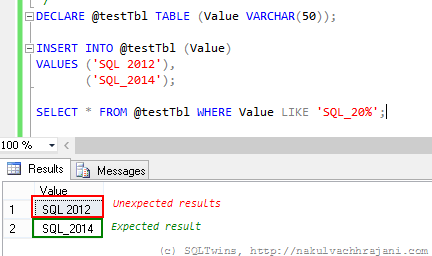
One such incident happened the other day at work when I was asked by a colleague to help him out with a query that appeared correct, but failed to give the expected results. For the sake of brevity, I have condensed the issue into a test scenario below:

DECLARE @testTbl TABLE (Value VARCHAR(50));

INSERT INTO @testTbl (Value)
VALUES ('SQL 2012'),
('SQL_2014');

SELECT * FROM @testTbl WHERE Value LIKE 'SQL_20%';

image

As can be seen in the screenshot above, the results are not what one would expect them to be at the first glance. One would have expected it to return only the string “SQL_2014” and yet the T-SQL query is returning both the records.

Normally, data coming in via flat-files from raw-data collection systems would require such kinds of string searches and manipulations. A well designed system would have these static values as a look-up so that all references look at the same version of the string value

Solution(s)

There are not one, but two possible solutions to choose from to work around this issue.

Using square brackets ([]) around the wildcard character

Because we want to consider the underscore as a character and not as a wildcard, the easiest thing to do would be to surround it with square brackets, similar to what is shown in the query below.

SELECT * FROM @testTbl WHERE Value LIKE 'SQL[_]20%';

image

Using the ESCAPE keyword

The other option, which I have discussed in one of my earlier posts, is to use the ESCAPE keyword. The ESCAPE keyword works on the basis of a user specified escape sequence. When encountered, the query engine will simply ignore the wildcard character and treat it as a normal character.

SELECT * FROM @testTbl WHERE Value LIKE 'SQL*_20%' ESCAPE '*';

image

Conclusion

The moral here is that one must always remember the basics – this thumb rule not only applies to software, but in everything that we go about doing in our day to day lives.

The other key learning that I encourage everyone to take from this is that Occam’s Razor is real – from the multiple explanations that a problem may have, the explanation with the least number of assumptions should be selected as the answer. In this case, the simplest theory was –  human error, which was indeed the case.

References

Until we meet next time,
Be courteous. Drive responsibly.