Category Archives: #SQLServer

All about Microsoft SQL Server

#0346 – SQL Server – Using CASE with a PRINT statement


Informational and alert messages during execution of a T-SQL script are the most preferred method to update the user on the progress of the task being executed. These messages are generated by the various PRINT statements embedded in the script.

Often there may be a requirement to display a particular message when a given set of conditions is met and another message otherwise. In such cases, I used to write a  standard IF…ELSE block and embed the PRINT statements within.

So, for example if the task at hand was to determine whether two numbers are equal or not, the traditional code would have been:

USE tempdb;
GO

--Traditional method
IF OBJECT_ID('dbo.proc_TraditionalNumberCompare','P') IS NOT NULL
DROP PROCEDURE dbo.proc_TraditionalNumberCompare;
GO

CREATE PROCEDURE dbo.proc_TraditionalNumberCompare
@intA INT,
@intB INT
AS
BEGIN
SET NOCOUNT ON;

IF (@intA - @intB ) = 0
PRINT 'Traditional Method - Both integers are the same.';
ELSE IF (@intA - @intB) > 0
PRINT 'Traditional Method - Integer A is greater than Integer B';
ELSE IF (@intA - @intB) < 0
PRINT 'Traditional Method - Integer B is greater than Integer A';
ELSE
PRINT 'Unreachable code!';
END
GO

--Tests
EXEC dbo.proc_TraditionalNumberCompare @intA = 5, @intB = 5;
GO
/* RESULT
Traditional Method - Both integers are the same.
*/

EXEC dbo.proc_TraditionalNumberCompare @intA = 2, @intB = 5;
GO
/* RESULT
Traditional Method - Integer B is greater than Integer A
*/

EXEC dbo.proc_TraditionalNumberCompare @intA = 5, @intB = 3;
GO
/* RESULT
Traditional Method - Integer A is greater than Integer B
*/

However, I recently realized that if the expression returns a string value, it can directly be used in a single PRINT statement, i.e. I can rewrite the logic to compare two integers shown above into a single statement as demonstrated below:

USE tempdb;
GO

IF OBJECT_ID('dbo.proc_NumberCompare','P') IS NOT NULL
DROP PROCEDURE dbo.proc_NumberCompare;
GO

CREATE PROCEDURE dbo.proc_NumberCompare
@intA INT,
@intB INT
AS
BEGIN
SET NOCOUNT ON;

PRINT CASE
WHEN (@intA - @intB) = 0
THEN 'Both integers are the same.'
WHEN (@intA - @intB) > 0
THEN 'Integer A is greater than Integer B'
WHEN (@intA - @intB) < 0
THEN 'Integer B is greater than Integer A'
ELSE 'Unreachable code!'
END;
END
GO

--Tests
EXEC dbo.proc_NumberCompare @intA = 5, @intB = 5;
GO
/*RESULT
Both integers are the same.
*/

EXEC dbo.proc_NumberCompare @intA = 2, @intB = 5;
GO
/*RESULT
Integer B is greater than Integer A
*/

EXEC dbo.proc_NumberCompare @intA = 5, @intB = 3;
GO
/*RESULT
Integer A is greater than Integer B
*/

I’m sure you will also find this flavour of implementing the PRINT statement useful. Do let me know your thoughts before you go.

Further Reading

Until we meet next time,

Be courteous. Drive responsibly.

#0345 – SQL Server – Distributing a result set by equal number of rows


Recently, a colleague brought an interesting query to me – the design for one of their modules required that records in a table be grouped into chunks of a specified integer value and each record within this group be assigned a number starting from 1. Hence, if I had 20 records in a table and the group size was 5 records, I would end up with 4 groups and the records would need to be numbered from 1-5 within each group.

Note here that I do not want a fixed number of groups (I can easily achieve this using NTILE). The groups can reach any number – what I need is a fixed number of elements within a group.

This post documents the first solution that came to my mind. While that particular deliverable is complete by the time I write this post, I look forward to hearing about other solutions/suggestions to achieve this requirement.

Creating the Test Scenario

To create a test scenario, I first create a simple test table and populate it with some test data. To make things interesting, I have inserted a prime number of records.

USE tempdb;
GO
SET NOCOUNT ON
--Safety Check
IF OBJECT_ID('#recordDistributionTest','U') IS NOT NULL
   DROP TABLE #recordDistributionTest;
GO
--Create the test table
CREATE TABLE #recordDistributionTest
       (rowNum INT IDENTITY(1,1),
        numVal AS (rowNum * 10)
       );
GO
--Insert 17 records into the test table
INSERT INTO #recordDistributionTest
DEFAULT VALUES;
GO 17

The solution

The solution that first came to my mind was to use the modulo operator (%) on the identity/row number value.

For the purposes of this example, I have used a @recordsInAGrop variable which is set to 5.

--Variable to hold the number of records in a group
DECLARE @recordsInAGroup INT = 5;
--Perform the grouping when fetching the records
SELECT rdt.rowNum AS RowNumber,
       rdt.numVal AS RecordValue,
       CASE WHEN (rdt.rowNum % @recordsInAGroup) = 0
            THEN @recordsInAGroup
            ELSE (rdt.rowNum % @recordsInAGroup)
       END AS RowNumberWithinGroup
FROM #recordDistributionTest AS rdt;
GO

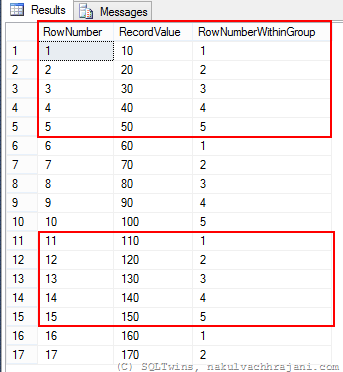
Following is the screenshot of the result obtained from this method.

image

As can be seen from the result, the first 15 records were grouped into 3 groups of 5 each. The last 2 records don’t belong to any group of the size specified in @recordsInAGroup variable and are therefore easily identifiable for further processing.

Do you have any suggestions on how to achieve this requirement in a much more efficient manner? Do drop in a line with your thoughts/suggestions.

Until we meet next time,

Be courteous. Drive responsibly.

#0344 – SQL Server – Missing Configuration Manager on Windows 8


Microsoft SQL Server comes with a very powerful  configuration manager which can be used to manage the SQL Server services and control network visibility and footprint. Working without the SQL Server Configuration Manager is a nightmare for a DBA.

SQL Server Configuration Manager is not available in Windows 8

Many development environments have SQL Server installed on the developer workstations running a Windows 8 operating system. I have been consulted on a couple of instances where the SQL Server Configuration Manager fails to come up in the “Start” menu application list (even using the Search charm does not yield any results).

The workaround

The SQL Server Configuration Manager is in reality a Microsoft Management Console (MMC) application. Hence, the workaround is to do the following:

  1. Launch the Search charm
  2. Search for the SQL Server Configuration Manager MMC snap-in:
    • SQL Server 2012 – search for “SQLServerManager11.msc
    • SQL Server 2008R2 – search for “SQLServerManager10.msc
  3. Press “Enter” to launch (or alternatively, right-click on the result to pin to the Start Menu or create a shortcut on the desktop)

Further Reading on the SQL Server Configuration Manager

  • SQL Server Configuration Manager – Hide your SQL Server Instance [Link]
  • #0151 – SQL Server– Which TCP/IP port is my SQL Server listening on? [Link]
  • Changing SQL Server Service Account or Password – Avoid restarting SQL Server [Link]

[EDIT, 09/08/2014, 10:55AM IST]: Rectified a typo for the MSC file name related to Configuration Manager for SQL Server 2008 R2.

Until we meet next time,

Be courteous. Drive responsibly.

#0343 – SQL Server – String values and effect on DateTime objects


One of the things that I was frequently told during my schooling was to initialize the variables that I use in my programs and scripts. The obvious benefit of having such mentors is that it has now become a matter of habit for me to initialize every variable in my SQL scripts.

One script required me to use the DATETIME datatype and I added an initialization to the variable explicitly. The script was simple enough and I had it all setup as pseudocode on my little notepad. However, in translating my thoughts from the notepad to the SQL script, I made a fatal error – I ended up initializing the DATETIME variable with a string. What follows is an account of the rather painful realization about the impact of my error.

Normally, when we attempt to assign a string value to a DATETIME variable, it results into an error.

DECLARE @myDate DATETIME;
SET @myDate = 'abcd';

SELECT @myDate;
GO

Immediately, we receive the following error:

Msg 241, Level 16, State 1, Line 2
Conversion failed when converting date and/or time from character string.

However, supplying valid dates as string does work.

--Passing valid dates as strings does work
DECLARE @myDate1 DATETIME, 
        @myDate2 DATETIME;
SET @myDate1 = '08/25/2014'
SET @myDate2 = 'August 25, 2014';

SELECT @myDate1 AS MyDate1, 
       @myDate2 AS MyDate2;
GO

/* RESULTS:
MyDate1                 MyDate2
----------------------- -----------------------
2014-08-25 00:00:00.000 2014-08-25 00:00:00.000
*/

However, I had initialized the variable with an empty, i.e. blank string. This does not return any error. However, it does do something different – something that might cause you to go around in circles unless maybe the code is reviewed by another set of eyes (which is what happened in my case) or after you take a much deserved break.

This is what I had done:

DECLARE @myDate DATETIME;
SET @myDate = '';

And the result was something that threw me off because all subsequent calculations that I had done on that particular date variable were returning incorrect results. After a couple of minutes and some help in reviewing the code again, I realized that:

Initializing a DATETIME, DATE or TIME variable with empty string sets it to 01/01/1900 (default value for DATE & TIME data-types).

Initialization with an empty string had initialized my date variable with the value – 00hrs on 01/01/1900, which is the default value for DATE & TIME data-types.

DECLARE @myDate DATETIME;
SET @myDate = '';

SELECT @myDate AS MyDate;
GO

/* RESULT
MyDate
-----------------------
1900-01-01 00:00:00.000
*/

NOTE: Attempting to use an empty string as default value for DATE and TIME data-types in the ISNULL() and COALESCE() functions also results into 01/01/1900 being returned as the default value.

Moral of the story

  • Always initialize all variables – it serves a dual purpose by both preventing and (as in this case) identifying potential errors
  • Be careful about the value being used for the initialization – it is possible that one may end up with an undesired effect of an incorrect initialization
  • It’s always good to have code reviews!

Further Reading

  • DATE and TIME data-types [MSDN Link]

Until we meet next time,

Be courteous. Drive responsibly.

#0342 – SQL Server – LEN v/s DATALENGTH – A feature comparison


There are few typical questions that developers ask when developing applications or when troubleshooting an issue:

  • What is the length of this string?
  • How many bytes does this string take for storage?
  • How many bytes are occupied in storing this BLOB data?

The answer to all these questions lie in 2 T-SQL functions: The DATALENGTH() and the LEN(), which are often used interchangeably by developers who may not have fully understood the subtle differences between them.

Today, I present before you, a feature comparison of these two functions.

The LEN() function

Purpose: Returns the number of characters of the specified string expression, excluding trailing blanks.

Usage example: The following example demonstrates how to use the LEN() function:

SELECT LEN('Four');
GO
--Result: 4

Behaviour for Unicode Strings: Unicode strings store a wider range of characters and hence the same number of characters occupy more space. The LEN() function reports the number of characters, and not the space occupied within a UNICODE string.

SELECT LEN(N'Four');
GO
--Result: 4

Effect of white spaces: The LEN() function has a very interesting behaviour when the string expression being evaluated is padded with white spaces. The function trims out white spaces after a string, but does consider white spaces padded before the string.

SELECT LEN(' Four');
GO
--Result: 8
SELECT LEN('Four ');
GO
--Result: 4


Behaviour with non-string based data-types: Because the DATALENGTH() function returns the number of bytes consumed, it can work with any expression and return the number of bytes consumed. Here is an example of how DATALENGTH() reports the number of bytes accurately for non-character based data-types:

DECLARE @integerData INT = 4;
SELECT LEN(@integerData);
GO
--Result: 1 (the number of characters)
DECLARE @dataTimeValue DATETIME = GETDATE();
SELECT LEN(@dataTimeValue);
GO
--Result: 19 (the number of characters)

The DATALENGTH() function

Purpose: Check the length of any expression.

Usage example: The following example demonstrates how to use the DATALENGTH() function. From a usage perspective, there is no difference between DATALENGTH() and LEN()

SELECT DATALENGTH('Four');
GO
--Result: 4

Behaviour for Unicode Strings: Unicode strings store a wider range of characters and hence the same number of characters occupy more space. Unlike the LEN() function, the DATALENGTH() function returns the actual number of bytes consumed for the storage of the Unicode value.

SELECT DATALENGTH(N'Four');
GO
--Result: 8

Effect of white spaces: Because the DATALENGTH() function returns the number of bytes consumed, and not the number of characters in an expression, white spaces in a string are reported as-is, without any trimming. Here’s an example:

SELECT DATALENGTH(' Four');
GO
--Result: 8
SELECT DATALENGTH('Four ');
GO
--Result: 8

Behaviour with non-string based data-types: Because the DATALENGTH() function returns the number of bytes consumed, it can work with any expression and return the number of bytes consumed. Here is an example of how DATALENGTH() reports the number of bytes accurately for non-character based data-types:

DECLARE @integerData INT = 4;
SELECT DATALENGTH(@integerData);
GO
--Result: 4 (the number of bytes consumed for storage)
DECLARE @dataTimeValue DATETIME = GETDATE();
SELECT DATALENGTH(@dataTimeValue);
GO
--Result: 8 (the number of bytes consumed for storage)

Summary

The feature comparison between LEN() and DATALENGTH() can be made in the following table:

LEN() DATALENGTH()
Purpose Returns the number of characters of the specified string expression, excluding trailing blanks. Returns the number of bytes used to represent any expression.

Effect of Unicode Number of characters in the expression Number of bytes used for storage
Effect of white spaces Prefixed spaces: Considered as part of length

Suffixed spaces: Trimmed

Both prefixed & suffixed spaces are considered
Behaviour with non-string data-types Supported, but reports the number of characters as if it were a character string Reports the number of bytes used for storage

Further Reading

  • LEN function [MSDN Link]
  • DATALENGTH function [MSDN Link]

Until we meet next time,

Be courteous. Drive responsibly.