
Tag Archives: Administration

Articles related to Microsoft SQL Server Administration

#0405 – SQL Server – Msg 5133 – Backup/Restore Errors – Directory lookup for file failed – Operating System Error 5(Access is denied.).


We got a new server recently and one of my colleagues ran into an error when restoring a database. The error was a quite generic (reformatted below for readability):

Msg 5133, Level 16, State 1, Line 1
Directory lookup for the file 
"C:\Users\SQLTwins\Documents\AdventureWorks2014\AdventureWorks2014_Data.mdf" 
failed with the operating system error 5(Access is denied.).

Msg 3156, Level 16, State 3, Line 1
File 'AdventureWorks2014_Data' cannot be restored to 
'C:\Users\SQLTwins\Documents\AdventureWorks2014\AdventureWorks2014_Data.mdf'. 
Use WITH MOVE to identify a valid location for the file.

My immediate reaction was to  review the restore script.

USE [master];
GO
RESTORE DATABASE [AdventureWorks2014]
FROM DISK = 'C:\Program Files\Microsoft SQL Server\MSSQL13.MSSQLSERVER\MSSQL\Backup\AdventureWorks2014.bak'
WITH
MOVE 'AdventureWorks2014_Data' TO 'C:\Users\SQLTwins\Documents\AdventureWorks2014\AdventureWorks2014_Data.mdf',
MOVE 'AdventureWorks2014_Log' TO 'C:\Users\SQLTwins\Documents\AdventureWorks2014\AdventureWorks2014_Log.ldf';
GO

All looked well, I subsequently moved to the environmental aspect of troubleshooting. It was a new server and we had just created the target folders to which the database was to be restored.

We attempted to restore to the default database locations configured during SQL Server installation and the restore worked. So, one thing that became clear: the SQL Server service did not have appropriate security rights on the destination folder.

The Solution

Once we determined that it was the security rights on the destination folder, the only thing remaining was to grant the rights. Here’s how we do it.

  1. Cross-check the user set as the service user for Microsoft SQL Server database engine (use the SQL Server Configuration Manager for interacting with the SQL Server service – here’s why).
  2. Under Folder properties, ensure that this user has full security rights (or at least equivalent to the rights assigned on the default database folders specified at the time of installation)

Here’s are detailed screenshots showing the above process.

01_SQLServerConfigurationManager

Identifying the user running the SQL Server Database Engine service

02_GrantingPermissions_01

Navigating into file system folder security options to grant access to the SQL Server service

02_GrantingPermissions_02

Choosing the appropriate account running the SQL Server service

02_GrantingPermissions_03

Applying appropriate rights to folder

By the way: If you encounter similar issues in accessing your backup files, the root cause and solution are the same. Check the permissions on the folders housing your backups and you should  see that the database engine does not have the necessary security rights.

Further Reading

Maintaining permissions on data folders and appropriate registry entries is something that is handled by the SQL Server Configuration Manager when you change the service account under which  the database engine is running. If you use services.msc (the old way), this is not done and your SQL Server may stop working.

  • Changing SQL Server Service Account or Password – Avoid restarting SQL Server [Blog Link]
  • Blog Post #0344 – SQL Server – Missing Configuration Manager on Windows 8 [Blog Link]

Until we meet next time,

Be courteous. Drive responsibly.

#0404 – SQL Server – Interview Question – What is logical data integrity?


Recently, I encountered an interesting question in one of the forums:

What is logical data integrity?

The person who posted the question was reading about SQL Server and databases in general, when this term was encountered. Because the answer to this question can help clarify one’s understanding of data design  concepts, I thought it would also make a very interesting interview question as well.

Today, I try to describe that data integrity is.

What is data integrity?

Data is a critical part of any business. But, data by itself holds no value. For data to be information of business value, it needs to be valid with respect to the business domain.

A piece of data may be perfectly acceptable from the physical design perspective, but may be still be invalid for the domain.

Let’s take an example – a rate of 2000 is perfectly acceptable for an integer. That is physical data integrity – the value is valid with respect to the physical design of the database. But, if  we are talking  about an application that captures and analyzes patient/medicinal data, the rate of 2000 is totally invalid and indicates some sort of logical bug/corruption.

Other examples would be a meeting end date that’s less than the meeting start date or a business/person without a name.

A data point may not be acceptable within the business rules defined for a domain. Similarly, what’s valid as a data point for one domain may be invalid for another domain. Ensuring that your database only accepts valid values with respect to your domain is what I call logical data integrity”.

Types of Data Integrity

Logical data integrity can be enforced in two ways:

Declarative Data Integrity

If data  integrity is enforced via the data model (implemented via the Data-Definition-Language, i.e. DDL), it is declarative data  integrity. One would enforce declarative integrity via the elements of the table definition:

  • Appropriate Data-Types
    • In our example for the medical domain, it would limit the possibility of corruption if a TINYINT is used to store the heart rate instead of an INT
  • Primary Keys
    • Avoid the insertion of duplicate data!
  • Foreign Keys
    • Ensures that all references are known (it is a valid primary key in another table)
  • Default, Check, Unique and Not-NULL constraints
    • Unique and Not-NULL constraints help maintain uniqueness and avoid insertion of unknown (NULL) data
    • Usage of default constraints ensure that by default unknown (NULL) values are replaced by valid default values
    • Check constraints help ensure that data meets the valid range defined by the business (e.g. a check constraint would help ensure that the meeting end date is greater than or equal to the start date)

Procedural Data Integrity

Legacy applications (I have worked on a few that match this description) which were originally developed in the days of flat-file databases, often used procedural code to enforce data integrity.

When these were migrated to Microsoft SQL Server, the integrity was enforced via stored procedures and triggers to avoid re-engineering the database structure and changing the application code to match the new structure.

Data integrity enforced via code, i.e. via stored procedures, triggers and/or functions is called procedural data integrity.

My take: Procedural code can be disabled, fail or have bugs. This may cause the application code to generate bad/invalid data rather than prevent it.

I believe procedural data integrity is acceptable as long  as it is used as a “fail-safe” mechanism. The primary mechanism to ensure logical data integrity should be declarative in nature, in my humble opinion.

The above is my take on logical data integrity. I welcome your thoughts on the subject in the space below.

Until we meet next time,

Be courteous. Drive responsibly.
#0402–SQL Server 2016 – KB3207512 fails–Msg 17054 – Unable to shutdown the instance; Operating System Error 21 (The device is not ready)


I recently updated my personal sandbox to use SQL Server 2016. While the installation succeeded, one of the first few problems that I ran into were:

  • The SQL Server 2016 instance failed to shutdown
  • Error 17054 was logged every time a shutdown is attempted with the error: “The current event was not reported to the Windows Events log. Operating system error = (null). You may need to clear the Windows Events log if it is full.
  • Installation of KB3207512 (update for SQL Server 2016 SP1 Reporting Services) and latest CUs kept failing
  • User databases would not be accessible with an error: “The operating system returned error 21(The device is not ready.)

While I was trying to figure out what was wrong, I ran into the same problem with a few other instances.

The Solutions

After a lot of rounds of trial and error, the following changes finally did the trick. The items below collectively make up the solution and all items need to be performed in order to get the SQL server instance up-to speed again.

  • Launch the SQL Server Configuration Manager
  • Under “SQL Server Network Configuration” ensure that the TCP/IP protocol is enabled
  • Under “SQL Server Services”, ensure that the following services are started:
    • SQL Server PolyBase Engine
    • SQL Server PolyBase Data Movement

Once the steps provided above are done, all the problems listed above should cease to exist.

Until we meet next time,

Be courteous. Drive responsibly.

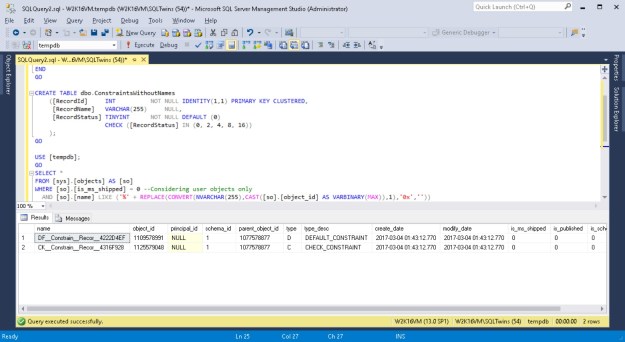
Screenshots showing that objects have been given default constraint names by SQL Server in case a name was not supplied by the user

#0401 – SQL Server – Script to validate object naming convention


A few weeks ago, I ran into a question on one of the forums asking for a script that can help the team validate object naming conventions. Immediately, I was able to sympathize with the team.

What happens is that when developers use the graphical (GUI) tools in the SQL Server Management Studio (SSMS) or via a simple script, they often fail to specify a name to each individual constraint. These slips are not intentional – developers don’t often realize that each constraint is an independent object because they are ultimately related to  another user defined object (a table).

However, when a name is not explicitly specified for a particular constraint, what Microsoft SQL Server does is provide a name by combining the following:

  1. A standard prefix indicating the object (e.g. “DF” for default constraints)
  2. 9 characters of the object name
  3. 5 characters of the field name
  4. Finally, the unique Id of the object, represented in hexa-decimal format

While this format will always generate a unique value, it would generate names that may not be intuitive. It is therefore a common  practice to review the database code and review for compliance with naming conventions  that have been defined in the product/project.

This logic can be leveraged during code reviews/audits to identify objects where standard project naming conventions are not met.

To demonstrate the functionality of the script, I create one table with a wide range of constraints – none of which have a name specified.

USE [tempdb];
GO
IF OBJECT_ID('dbo.ConstraintsWithoutNames','U') IS NOT NULL
BEGIN
    DROP TABLE dbo.ConstraintsWithoutNames;
END
GO

CREATE TABLE dbo.ConstraintsWithoutNames 
    ([RecordId]     INT          NOT NULL IDENTITY(1,1) 
                                 PRIMARY KEY CLUSTERED,
     [RecordName]   VARCHAR(255)     NULL,
     [RecordStatus] TINYINT      NOT NULL DEFAULT (0) 
                    CHECK ([RecordStatus] IN (0, 2, 4, 8))
    );
GO

Now, the following script is a simple string search that looks for strings ending with the hexa-decimal representation of the parent object.

USE [tempdb];
GO
SELECT * 
FROM [sys].[objects] AS [so]
WHERE [so].[is_ms_shipped] = 0 --Considering user objects only
  AND [so].[name] LIKE ('%' + REPLACE(CONVERT(NVARCHAR(255),CAST([so].[object_id] AS VARBINARY(MAX)),1),'0x',''))
                        --Only those objects whose names end with the hexadecimal
                        --representation of their object Id
Screenshots showing that objects have been given default constraint names by SQL Server in case a name was not supplied by the user

Objects given default constraint names

I  hope you found this script useful. Please do  share your ideas/scripts that you may be using in your day-to-day activities.

Until we meet next time,

Be courteous. Drive responsibly.

OLE DB Destination - Rows/Batch and Max. Insert Commit Size

#0393 – SQL Server – SSIS – OLE DB Destination – Table Fast Load – Rows per batch and Max. Insert Commit Size options


Developing SSIS packages is quite easy – it’s mostly drag and drop and some minor configuration. However, when it comes to tuning the package, one needs to understand the finer points of each task on the control flow. On each task, there are some options that help improving the performance of the data flow, whereas some others help regulate the quality of data being migrated.

The OLE DB Destination

I have been writing about the OLE DB destination in the last couple of posts. In order to load data as quickly into the destination as possible, the  OLE DB destination allows us to use a “Fast Load” mode. The “Fast Load” option allows the data team to configure various options that affect the speed of the data load:

  1. Keep Identity
  2. Keep NULLs
  3. Table Lock
  4. Check Constraints
  5. Rows per Batch
  6. Maximum Insert Commit Size

When we use the fast load options of the OLE DB destination, we are essentially using the BULK INSERT T-SQL command. This is the reason we get almost all the options of BULK INSERT in the OLE DB transformation. Today, I will take a look at the last two options which are the secret behind significantly improving the data load performance on a system with a slow I/O subsystem. These are “Rows per Batch” and “Maximum Insert Commit Size”.

My test instance is on my prime development environment and hence even the reasonably large load completes in a couple of minutes. However, on a slow I/O sub-system, the impact of these options will be much higher.

Creating the package with logging for comparing execution time

I have created a simple package that creates a table and inserts data into it. The table is identical to the [Sales].[SalesOrderDetail] table in the [AdventureWorks2014] sample database. The table creation script used in the Execute SQL task on the package is provided below:

USE [tempdb];
GO

IF OBJECT_ID('[dbo].[SalesOrderDetail]','U') IS NOT NULL
BEGIN
    DROP TABLE [dbo].[SalesOrderDetail];
END
GO

CREATE TABLE [dbo].[SalesOrderDetail]
   (
    [SalesOrderID]           [INT]              NOT NULL,
    [SalesOrderDetailID]     [INT]              NOT NULL,
    [CarrierTrackingNumber]  [NVARCHAR](25)         NULL,
    [OrderQty]               [SMALLINT]         NOT NULL,
    [ProductID]              [INT]              NOT NULL,
    [SpecialOfferID]         [INT]              NOT NULL,
    [UnitPrice]              [MONEY]            NOT NULL,
    [UnitPriceDiscount]      [MONEY]            NOT NULL 
                             CONSTRAINT [DF_sodUnitPriceDiscount]  DEFAULT ((0.0)),
    [LineTotal]              DECIMAL(38, 6),
    [rowguid]                [UNIQUEIDENTIFIER] NOT NULL,
    [ModifiedDate]           [DATETIME]         NOT NULL 
                             CONSTRAINT [DF_sodModifiedDate]  DEFAULT (GETDATE())
   ) ON [PRIMARY]
GO

Once the table is created, the package “flows” to the Data Flow Task. Inside the data flow, essentially I simply select about 35,181,930 records by using a CROSS JOIN between the [AdventureWorks2014].[Sales].[SalesOrderDetail] and [AdventureWorks2014].[HumanResources].[Employee] tables using an OLE DB source and pump it to the newly created target table via an OLE DB destination with the “Table Lock” option checked (default).

I then configure logging on the package to log the package activity for the Data Flow Task for the OnError, OnPreExecute and OnPostExecute events (Configuring package logging is out of scope for this blog post).

The script used in the OLEDB source is presented here:

SELECT sod.SalesOrderID,
       sod.SalesOrderDetailID,
       sod.CarrierTrackingNumber,
       sod.OrderQty,
       sod.ProductID,
       sod.SpecialOfferID,
       sod.UnitPrice,
       sod.UnitPriceDiscount,
       sod.LineTotal,
       sod.rowguid,
       sod.ModifiedDate
FROM Sales.SalesOrderDetail AS sod
CROSS JOIN HumanResources.Employee AS hre;
GO

Screenshots showing the package configuration described above are shown below.

OLEDB Destination - Package Overview to test Rows/Batch and Max. Insert Commit Size

OLEDB Destination – Package Overview to test Rows/Batch and Max. Insert Commit Size

Please note that between each run, the data buffers were cleaned and procedure cache was cleared out to get a “cold” state performance of the database engine.

CHECKPOINT;
DBCC DROPCLEANBUFFERS;
DBCC FREEPROCCACHE;
GO

Once the package is executed, I will compare the difference between the OnPreExecute and OnPostExecute times for various configurations of the “Row per batch” and “Max. insert commit size” option to get an idea of the performance difference between them.

NOTE: The packages were executed after it was confirmed that the databases involved (in this case tempdb) had grown sufficiently to accommodate the inserted data.

Comparing package execution performance

Because I had turned on logging on the SSIS package, I ran the following query against the [dbo].[sysssislog] table which gives me the time difference (in seconds) between the “OnPreExecute” and “OnPostExecute” events for both the packages. The query and the results are available below:

USE [tempdb];
GO
SELECT [PivotedData].,
       [PivotedData].[OnPreExecute],
       [PivotedData].[OnPostExecute],
       DATEDIFF(SECOND,[PivotedData].[OnPreExecute],[PivotedData].[OnPostExecute]) AS [ExecutionTime]
FROM (SELECT [sl].,
             [sl].[event],
             [sl].[starttime]
      FROM [dbo].[sysssislog] AS [sl] WITH (NOLOCK)
      WHERE ([sl].[event] = 'OnPreExecute' 
             OR 
             [sl].[event] = 'OnPostExecute'
            )
        AND [sl]. LIKE 'OLEDB%'
     ) AS SourceData
PIVOT (MAX([SourceData].[starttime])
       FOR [SourceData].[event] IN ([OnPreExecute], [OnPostExecute])
      ) AS PivotedData;
GO
OLEDB Destination - Performance impact of adjusting Rows/Batch and Max. Insert Commit Size

OLEDB Destination – Performance impact of adjusting Rows/Batch and Max. Insert Commit Size

As can be seen from the screenshots off the results, the tasks with controlled batch sizes and rows/batch had better performance even on my development environment. I have seen a considerable improvement on systems with poor I/O performance.

Conclusion

The OLE DB destination is, therefore, a very powerful way of tuning the data inserts into a destination SQL Server database.

There is no magic bullet to ensuring SSIS performance, but a thorough evaluation of and appropriate adjustments to the OLEDB destination options based on business rules, overall system configuration and the nature of the workload is sure to get the optimal performance from your packages.

Further Reading

Until we meet next time,

Be courteous. Drive responsibly.