Tag Archives: Administration

Articles related to Microsoft SQL Server Administration

Constraint Violation Errors on UDTT

#0364 – SQL Server – Using Primary Key, Check and other Constraints with User Defined Table Types (UDTT)


As database systems and their interactions and interfaces with systems become more complex, a large amount of complex data is exchanged through the system boundaries. Table Valued parameters are frequently used to exchange data. If the structure of the data being exchanged is known, often systems (which work with  SQL 2008 and above) will use User defined table types (UDTTs).

Depending upon the domain, data being exchanged across system boundaries may need to be constrained to a number of constraints, especially check and unique constraints. My encounter with UDTTs was informal – I learnt about them along the way and never explored them fully. Recently, I was wondering if I could use constraints with UDTTs.

And so, I decided to conduct a small experiment. I created the following UDTT. As can be seen from the definition, I have created the UDTT with the following constraints.

  • Primary Key constraint
  • Unique constraint
  • Default constraint
  • Check constraint
USE tempdb;
GO
CREATE TYPE dbo.UDTTDDLTest AS TABLE
    ( RecordId INT NOT NULL,
      RecordValue VARCHAR(50) NOT NULL UNIQUE,
      RecordStatus TINYINT NOT NULL DEFAULT(2)
      PRIMARY KEY CLUSTERED (RecordId),
      CHECK (RecordStatus>= 1 AND RecordStatus <= 3)
    );
GO

SQL Server allows creation of the constraint without any issues. I then tried to run the following code that attempts to insert various combinations of data into the user defined table type.

USE tempdb;
GO

SET NOCOUNT ON;

DECLARE @myVariable AS dbo.UDTTDDLTest;

--Normal insertion
INSERT INTO @myVariable (RecordId, RecordValue, RecordStatus)
VALUES (1,
        'SQL Twins',
        1
       );


SELECT * FROM @myVariable;

--Checking effect of default constraints
INSERT INTO @myVariable (RecordId, RecordValue)
VALUES (2,
        'SQL Twins with Default'
       );

SELECT * FROM @myVariable;

--Checking effect of primary key constraint
INSERT INTO @myVariable (RecordId, RecordValue, RecordStatus)
VALUES (2,
        'Oops...duplicate key',
        1
       );

SELECT * FROM @myVariable;

--Checking effect of check constraint
INSERT INTO @myVariable (RecordId, RecordValue, RecordStatus)
VALUES (3,
        'Bad Status!',
        4
       );

SELECT * FROM @myVariable;

--Checking effect of unique constraint. The value "SQL Twins" is already in the UDTT,
--so if the constraint is in effect, we will get an error
INSERT INTO @myVariable (RecordId, RecordValue, RecordStatus)
VALUES (4,
        'SQL Twins',
        1
       );


SELECT * FROM @myVariable;
GO

As can be seen from the output below, SQL Server successfully prevented me from entering data that violated any one of the constraints.

Msg 2627, Level 14, State 1, Line 38
Violation of PRIMARY KEY constraint ‘PK__#B40743E__FBDF78E9F9E4365B’. Cannot insert duplicate key in object ‘dbo.@myVariable’. The duplicate key value is (2).
The statement has been terminated.
Msg 547, Level 16, State 0, Line 47
The INSERT statement conflicted with the CHECK constraint “CK__#B40743ED__Recor__B5EF8C5F”. The conflict occurred in database “tempdb”, table “@myVariable”.
The statement has been terminated.
Msg 2627, Level 14, State 1, Line 57
Violation of UNIQUE KEY constraint ‘UQ__#B40743E__4D9E41B64A9AE451’. Cannot insert duplicate key in object ‘dbo.@myVariable’. The duplicate key value is (SQL Twins).
The statement has been terminated.

Records That Inserted Successfully

Constraint Violation Errors on UDTT

Summary

Constraints (Primary Key, Default, Unique and Check constraints) are supported by User Defined Table Types (UDTTs) in Microsoft SQL Server and can be used to ensure the quality of data being exchanged via UDTTs.

Further Reading

  • Passing Table valued parameters to a table valued function – Underappreciated features of Microsoft SQL Server [Link]
  • SQL Server 2000-Alternate to Table Valued Parameters-Share Temporary Tables with a stored procedure [Link]
  • User Defined Table Types [Link]

Until we meet next time,
Be courteous. Drive responsibly.

#0360 – SQL Server – sp_attach_db v/s CREATE DATABASE FOR ATTACH – Number of files limitation; Msg. 8144 (Procedure has too many arguments specified)


This post has been a long time coming. I am an advocate of using newer T-SQL and administrative features if situation and compatibility related business requirements allow. In implementation of this ideology the question always comes up from most of my team members as to why a change is required when the old syntax/methods work just as effectively. I often demonstrate the example provided below to them.

In development environments, we generally move databases across various instances via a simple detach-append process. The traditional approach is to use the system stored procedure sp_attach_db. When CREATE DATABASE was enhanced to include support of attaching a database, one of the obvious differences that came up was the number of database files that it supported for the ATTACH operation.

The sp_attach_db system stored procedure can only attach a maximum of 16 database files.

In this scenario, the newer option of CREATE DATABASE is a blessing for very large databases where we have multiple files spread across multiple file-groups and multiple drives.

Allow me to demonstrate this with an example.

USE master ;
GO
--Safety Check
IF DB_ID('AttachDBTest') IS NOT NULL 
    DROP DATABASE AttachDBTest ;
GO

--Create the test database that has more than 16 files
CREATE DATABASE AttachDBTest ON PRIMARY  
    (NAME = Attach1,
    FILENAME = 'C:SQLDatabasesDBFileAttachTestAttachdat1.mdf',
    SIZE = 10MB,
    MAXSIZE = 200,
    FILEGROWTH = 20),
    ( NAME = Attach2,
    FILENAME = 'C:SQLDatabasesDBFileAttachTestAttachdat2.ndf',
    SIZE = 10MB,
    MAXSIZE = 200,
    FILEGROWTH = 20),
    ( NAME = Attach3,
    FILENAME = 'C:SQLDatabasesDBFileAttachTestAttachdat3.ndf',
    SIZE = 10MB,
    MAXSIZE = 200,
    FILEGROWTH = 20),
    ( NAME = Attach4,
    FILENAME = 'C:SQLDatabasesDBFileAttachTestAttachdat4.ndf',
    SIZE = 10MB,
    MAXSIZE = 200,
    FILEGROWTH = 20),
    ( NAME = Attach5,
    FILENAME = 'C:SQLDatabasesDBFileAttachTestAttachdat5.ndf',
    SIZE = 10MB,
    MAXSIZE = 200,
    FILEGROWTH = 20),
    ( NAME = Attach6,
    FILENAME = 'C:SQLDatabasesDBFileAttachTestAttachdat6.ndf',
    SIZE = 10MB,
    MAXSIZE = 200,
    FILEGROWTH = 20),
    ( NAME = Attach7,
    FILENAME = 'C:SQLDatabasesDBFileAttachTestAttachdat7.ndf',
    SIZE = 10MB,
    MAXSIZE = 200,
    FILEGROWTH = 20),
    ( NAME = Attach8,
    FILENAME = 'C:SQLDatabasesDBFileAttachTestAttachdat8.ndf',
    SIZE = 10MB,
    MAXSIZE = 200,
    FILEGROWTH = 20),
    ( NAME = Attach9,
    FILENAME = 'C:SQLDatabasesDBFileAttachTestAttachdat9.ndf',
    SIZE = 10MB,
    MAXSIZE = 200,
    FILEGROWTH = 20),
    ( NAME = Attach10,
    FILENAME = 'C:SQLDatabasesDBFileAttachTestAttachdat10.ndf',
    SIZE = 10MB,
    MAXSIZE = 200,
    FILEGROWTH = 20),
    (NAME = Attach11,
    FILENAME = 'C:SQLDatabasesDBFileAttachTestAttachdat11.mdf',
    SIZE = 10MB,
    MAXSIZE = 200,
    FILEGROWTH = 20),
    ( NAME = Attach12,
    FILENAME = 'C:SQLDatabasesDBFileAttachTestAttachdat12.ndf',
    SIZE = 10MB,
    MAXSIZE = 200,
    FILEGROWTH = 20),
    ( NAME = Attach13,
    FILENAME = 'C:SQLDatabasesDBFileAttachTestAttachdat13.ndf',
    SIZE = 10MB,
    MAXSIZE = 200,
    FILEGROWTH = 20),
    ( NAME = Attach14,
    FILENAME = 'C:SQLDatabasesDBFileAttachTestAttachdat14.ndf',
    SIZE = 10MB,
    MAXSIZE = 200,
    FILEGROWTH = 20),
    ( NAME = Attach15,
    FILENAME = 'C:SQLDatabasesDBFileAttachTestAttachdat15.ndf',
    SIZE = 10MB,
    MAXSIZE = 200,
    FILEGROWTH = 20),
    ( NAME = Attach16,
    FILENAME = 'C:SQLDatabasesDBFileAttachTestAttachdat16.ndf',
    SIZE = 10MB,
    MAXSIZE = 200,
    FILEGROWTH = 20),
    ( NAME = Attach17,
    FILENAME = 'C:SQLDatabasesDBFileAttachTestAttachdat17.ndf',
    SIZE = 10MB,
    MAXSIZE = 200,
    FILEGROWTH = 20),
    ( NAME = Attach18,
    FILENAME = 'C:SQLDatabasesDBFileAttachTestAttachdat18.ndf',
    SIZE = 10MB,
    MAXSIZE = 200,
    FILEGROWTH = 20),
    ( NAME = Attach19,
    FILENAME = 'C:SQLDatabasesDBFileAttachTestAttachdat19.ndf',
    SIZE = 10MB,
    MAXSIZE = 200,
    FILEGROWTH = 20),
    ( NAME = Attach20,
    FILENAME = 'C:SQLDatabasesDBFileAttachTestAttachdat20.ndf',
    SIZE = 10MB,
    MAXSIZE = 200,
    FILEGROWTH = 20) 
LOG ON 
   (NAME = Attachlog1,
    FILENAME = 'C:SQLDatabasesDBFileAttachTestAttachlog1.ldf',
    SIZE = 100MB,
    MAXSIZE = 200,
    FILEGROWTH = 20)
--FOR ATTACH
;
GO

--Create Test Table
USE AttachDBTest;
GO
IF OBJECT_ID('dbo.TestTable','U') IS NULL
BEGIN
    CREATE TABLE dbo.TestTable (RecId INT NOT NULL IDENTITY(1,1),
                                RecValue NVARCHAR(20) DEFAULT 'AttachTest'
                               );

END
GO

--Insert Test Data
USE AttachDBTest;
GO
SET NOCOUNT ON;
IF OBJECT_ID('dbo.TestTable','U') IS NOT NULL
BEGIN
    EXEC sp_executesql N'INSERT INTO dbo.TestTable (RecValue) DEFAULT VALUES;';
END
GO 10

--Validate Test Data
USE AttachDBTest;
GO
SELECT * FROM dbo.TestTable;
GO

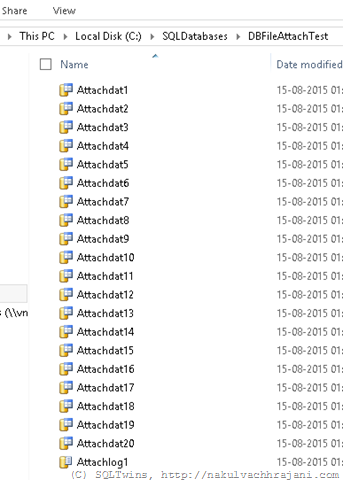
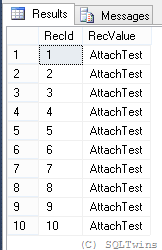
As seen from the screenshots below, the database creation was successful, and so was the insertion of test data.
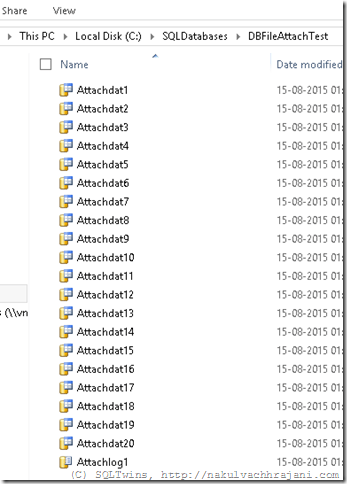
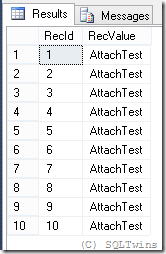
image

image 

Next, let us detach the database using the system stored procedure sp_detach_db.

--Detach the database
USE master;
GO
EXEC sp_detach_db @dbname = 'AttachDBTest', @skipchecks = 'true' ;
GO

--Confirm that the database has been detached
USE master;
GO
SELECT DB_ID('AttachDBTest') AS AttachDBTestDBID;
GO
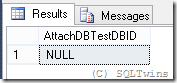
image

Now, let us attach the database again with the sp_attach_db system stored procedure.

--Attach the database
USE master;
GO
EXEC sp_attach_db 
    @dbname = 'AttachDBTest', 
    @filename1 = 'C:SQLDatabasesDBFileAttachTestAttachdat1.mdf',
    @filename2 = 'C:SQLDatabasesDBFileAttachTestAttachdat2.ndf',
    @filename3 = 'C:SQLDatabasesDBFileAttachTestAttachdat3.ndf',
    @filename4 = 'C:SQLDatabasesDBFileAttachTestAttachdat4.ndf',
    @filename5 = 'C:SQLDatabasesDBFileAttachTestAttachdat5.ndf',
    @filename6 = 'C:SQLDatabasesDBFileAttachTestAttachdat6.ndf',
    @filename7 = 'C:SQLDatabasesDBFileAttachTestAttachdat7.ndf',
    @filename8 = 'C:SQLDatabasesDBFileAttachTestAttachdat8.ndf',
    @filename9 = 'C:SQLDatabasesDBFileAttachTestAttachdat9.ndf',
    @filename10 = 'C:SQLDatabasesDBFileAttachTestAttachdat10.ndf',
    @filename11 = 'C:SQLDatabasesDBFileAttachTestAttachdat11.ndf',
    @filename12 = 'C:SQLDatabasesDBFileAttachTestAttachdat12.ndf',
    @filename13 = 'C:SQLDatabasesDBFileAttachTestAttachdat13.ndf',
    @filename14 = 'C:SQLDatabasesDBFileAttachTestAttachdat14.ndf',
    @filename15 = 'C:SQLDatabasesDBFileAttachTestAttachdat15.ndf',
    @filename16 = 'C:SQLDatabasesDBFileAttachTestAttachdat16.ndf',
    @filename17 = 'C:SQLDatabasesDBFileAttachTestAttachdat17.ndf',
    @filename18 = 'C:SQLDatabasesDBFileAttachTestAttachdat18.ndf',
    @filename19 = 'C:SQLDatabasesDBFileAttachTestAttachdat19.ndf',
    @filename20 = 'C:SQLDatabasesDBFileAttachTestAttachdat20.ndf',
    @filename21 = 'C:SQLDatabasesDBFileAttachTestAttachlog1.ldf';
GO

Msg 8144, Level 16, State 2, Procedure sp_attach_db, Line 0
Procedure or function sp_attach_db has too many arguments specified.

Now, let us try to attach the database via the CREATE DATABASE statement with the FOR ATTACH option.

--Attach the database using the CREATE DATABASE statement with the FOR ATTACH clause
USE master;
GO
CREATE DATABASE AttachDBTest ON PRIMARY  
    (NAME = Attach1,
    FILENAME = 'C:SQLDatabasesDBFileAttachTestAttachdat1.mdf',
    SIZE = 10MB,
    MAXSIZE = 200,
    FILEGROWTH = 20),
    ( NAME = Attach2,
    FILENAME = 'C:SQLDatabasesDBFileAttachTestAttachdat2.ndf',
    SIZE = 10MB,
    MAXSIZE = 200,
    FILEGROWTH = 20),
    ( NAME = Attach3,
    FILENAME = 'C:SQLDatabasesDBFileAttachTestAttachdat3.ndf',
    SIZE = 10MB,
    MAXSIZE = 200,
    FILEGROWTH = 20),
    ( NAME = Attach4,
    FILENAME = 'C:SQLDatabasesDBFileAttachTestAttachdat4.ndf',
    SIZE = 10MB,
    MAXSIZE = 200,
    FILEGROWTH = 20),
    ( NAME = Attach5,
    FILENAME = 'C:SQLDatabasesDBFileAttachTestAttachdat5.ndf',
    SIZE = 10MB,
    MAXSIZE = 200,
    FILEGROWTH = 20),
    ( NAME = Attach6,
    FILENAME = 'C:SQLDatabasesDBFileAttachTestAttachdat6.ndf',
    SIZE = 10MB,
    MAXSIZE = 200,
    FILEGROWTH = 20),
    ( NAME = Attach7,
    FILENAME = 'C:SQLDatabasesDBFileAttachTestAttachdat7.ndf',
    SIZE = 10MB,
    MAXSIZE = 200,
    FILEGROWTH = 20),
    ( NAME = Attach8,
    FILENAME = 'C:SQLDatabasesDBFileAttachTestAttachdat8.ndf',
    SIZE = 10MB,
    MAXSIZE = 200,
    FILEGROWTH = 20),
    ( NAME = Attach9,
    FILENAME = 'C:SQLDatabasesDBFileAttachTestAttachdat9.ndf',
    SIZE = 10MB,
    MAXSIZE = 200,
    FILEGROWTH = 20),
    ( NAME = Attach10,
    FILENAME = 'C:SQLDatabasesDBFileAttachTestAttachdat10.ndf',
    SIZE = 10MB,
    MAXSIZE = 200,
    FILEGROWTH = 20),
    (NAME = Attach11,
    FILENAME = 'C:SQLDatabasesDBFileAttachTestAttachdat11.mdf',
    SIZE = 10MB,
    MAXSIZE = 200,
    FILEGROWTH = 20),
    ( NAME = Attach12,
    FILENAME = 'C:SQLDatabasesDBFileAttachTestAttachdat12.ndf',
    SIZE = 10MB,
    MAXSIZE = 200,
    FILEGROWTH = 20),
    ( NAME = Attach13,
    FILENAME = 'C:SQLDatabasesDBFileAttachTestAttachdat13.ndf',
    SIZE = 10MB,
    MAXSIZE = 200,
    FILEGROWTH = 20),
    ( NAME = Attach14,
    FILENAME = 'C:SQLDatabasesDBFileAttachTestAttachdat14.ndf',
    SIZE = 10MB,
    MAXSIZE = 200,
    FILEGROWTH = 20),
    ( NAME = Attach15,
    FILENAME = 'C:SQLDatabasesDBFileAttachTestAttachdat15.ndf',
    SIZE = 10MB,
    MAXSIZE = 200,
    FILEGROWTH = 20),
    ( NAME = Attach16,
    FILENAME = 'C:SQLDatabasesDBFileAttachTestAttachdat16.ndf',
    SIZE = 10MB,
    MAXSIZE = 200,
    FILEGROWTH = 20),
    ( NAME = Attach17,
    FILENAME = 'C:SQLDatabasesDBFileAttachTestAttachdat17.ndf',
    SIZE = 10MB,
    MAXSIZE = 200,
    FILEGROWTH = 20),
    ( NAME = Attach18,
    FILENAME = 'C:SQLDatabasesDBFileAttachTestAttachdat18.ndf',
    SIZE = 10MB,
    MAXSIZE = 200,
    FILEGROWTH = 20),
    ( NAME = Attach19,
    FILENAME = 'C:SQLDatabasesDBFileAttachTestAttachdat19.ndf',
    SIZE = 10MB,
    MAXSIZE = 200,
    FILEGROWTH = 20),
    ( NAME = Attach20,
    FILENAME = 'C:SQLDatabasesDBFileAttachTestAttachdat20.ndf',
    SIZE = 10MB,
    MAXSIZE = 200,
    FILEGROWTH = 20) 
LOG ON 
   (NAME = Attachlog1,
    FILENAME = 'C:SQLDatabasesDBFileAttachTestAttachlog1.ldf',
    SIZE = 100MB,
    MAXSIZE = 200,
    FILEGROWTH = 20)
FOR ATTACH
;
GO

--Confirm that the database has been detached
USE master;
GO
SELECT DB_ID('AttachDBTest') AS AttachDBTestDBID;
GO

--Validate Test Data
USE AttachDBTest;
GO
SELECT * FROM dbo.TestTable;
GO
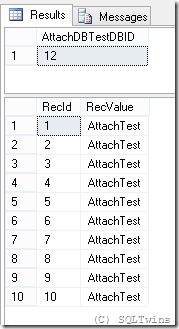
image

This example just demonstrates that when Microsoft recommends a switch from one syntax to another, there has to be some reason behind it and that newer options should be evaluated for replacing older ones.

References

Until we meet next time,
Be courteous. Drive responsibly.

#0359 – SQL Server – Script to reset a SQL Login


A few days ago, we were changing the passwords of SQL Logins on our development SQL Server instances.

Because IT installed them and our Windows credentials were given sysadmin fixed server role access, we had hardly ever used the SQL logins. The result was that we had forgotten the original passwords for many of these instances. We therefore wrote the following script to reset the logins and I thought it to be a script that many of you may find useful.

The script below does the following:

  1. Ensures that the SQL Server instances uses Mixed mode authentication (i.e. both Windows and SQL Logins are allowed)
  2. Ensures that the login referenced by the user is a SQL Login
  3. Ensures that the login is enabled or it is disabled and the user has chosen to activate users
  4. A valid SQL login exists with the name provided in the script
  5. Maintains the properties: MUST_CHANGE, CHECK_POLICY, CHECK_EXPIRATION

Disclaimer: This script are provided “as-is” and without warranty. Please use this only on your development and QA environments after thorough testing.

DECLARE @loginToResetPassword NVARCHAR(255) = N'sa';
DECLARE @newPasswordForLogin NVARCHAR(255) = N'Pa$$w0rd';
DECLARE @enableLoginIfDisabled BIT = 1;

/*********** NO USER CONFIGURABLE CODE BEYOND THIS POINT!! ****************/
SET NOCOUNT ON;
--Declarations of internal variables
BEGIN
    DECLARE @sqlStmnt NVARCHAR(MAX);
    DECLARE @loginIsMustChange INT;  --Per MSDN, this is an INT
    DECLARE @loginIsCheckPolicy BIT; --This will be computed based on the value of DaysUntilExpiration
    DECLARE @serverName NVARCHAR(255) = CAST(SERVERPROPERTY(N'ServerName') AS NVARCHAR(255));
END

--Validations
BEGIN
    --Check for mixed mode authentication
    IF (ISNULL(SERVERPROPERTY(N'IsIntegratedSecurityOnly'),1)=1)
    BEGIN
        PRINT N'<<<< INFO >>>> Environment uses Integrated Security (Windows Authentication) only.';
        PRINT SPACE(14) + N'Login passwords cannot be reset when Integrated Security is used.';
        GOTO SCRIPT_END;
    END

    IF NOT EXISTS (SELECT * 
                   FROM sys.server_principals AS sp 
                   WHERE sp.type = N'S'        --SQL Logins only
                     AND ((sp.is_disabled = 1 AND @enableLoginIfDisabled = 1) OR sp.is_disabled = 0)
                     AND sp.name = @loginToResetPassword
                  )
    BEGIN
        PRINT N'<<<< INFO >>> Login reset cannot be performed because of one of the following reasons:';
        PRINT SPACE(14) + N'1. Login is not a valid SQL Login';
        PRINT SPACE(14) + N'2. The login is disabled and user has chosen not to enable it';
        PRINT SPACE(14) + N'3. The login does not exist';
        GOTO SCRIPT_END;
    END
END

--If we got here, it means that the login is valid, and we can reset it
BEGIN
    --We begin by collecting the login properties
    BEGIN
        --If DaysUntilExpiration = 0, login is either expired or it will expire the day we are running this query 
        --                       = -1, the local security policy in Windows never expires the password
        --                       = NULL the CHECK_POLICY or CHECK_EXPIRATION is OFF for the login 
        --                         or the OS does not support password policies
        SELECT @loginIsMustChange = CAST(LOGINPROPERTY(@loginToResetPassword,N'IsMustChange') AS INT),
               @loginIsCheckPolicy = CASE WHEN LOGINPROPERTY(@loginToResetPassword,N'DaysUntilExpiration') IS NULL THEN 0
                                          ELSE 1
                                          END;  
    END

    --Now we reset the password to the one chosen by the user
    SELECT @sqlStmnt = N'ALTER LOGIN ' + @loginToResetPassword + N' WITH PASSWORD = ''' + @newPasswordForLogin + '''';

    IF (@loginIsMustChange=1)
        SELECT @sqlStmnt += N' MUST_CHANGE';

    IF (@loginIsCheckPolicy=0)
        SELECT @sqlStmnt += N', CHECK_POLICY = OFF, CHECK_EXPIRATION = OFF';
    ELSE
        SELECT @sqlStmnt += N', CHECK_POLICY = ON, CHECK_EXPIRATION = ON';

    IF (@enableLoginIfDisabled = 1)
        SELECT @sqlStmnt += N'; ALTER LOGIN '+ @loginToResetPassword + N' ENABLE ;'

    ----Debug Point
    --SELECT @sqlStmnt;

    --Perform the update
    BEGIN TRY
        EXEC master.sys.sp_executesql @sqlStmnt = @sqlStmnt;

        PRINT N'<<<< INFO >>>> Password for login: ' + @loginToResetPassword + N' has been reset on SQL Server instance: ' + @serverName;
    END TRY
    BEGIN CATCH
        SELECT ERROR_NUMBER() AS ErrorNumber,
               ERROR_SEVERITY() AS ErrorSeverity,
               ERROR_STATE() AS ErrorState,
               ERROR_MESSAGE() AS ErrorMessage; 
        PRINT N'<<<< ALERT!! >>>> The process to reset a SQL login''s password failed.';
    END CATCH
END

SCRIPT_END:
PRINT N'<<<< INFO >>>> Login reset script completed. Please review statements prior to this for any messages.';
GO

References

Until we meet next time,
Be courteous. Drive responsibly.

#0355 – SQL Server – Implementing Case Sensitive Search in a case Insensitive database – Regular Expressions & PATINDEX


In my previous post (#354)on implementing case sensitive search in a database that was case insensitive, I had presented one possible implementation approach that used the COLLATE keyword to temporary convert the column of interest to a case sensitive collation.

I had mentioned that the mechanism internally used the CONVERT() function with the style parameter = 0, which means that it was performing a binary to character conversion and then executing the comparison, resulting in a performance overhead to the system.

As I was asking for feedback from friends and colleagues, I received a couple of interesting ideas, the top 2 being:

  • Regular Expressions
  • PATINDEX

The reason that these caught my attention is quite simple – logic would say that they have to be natively case sensitive – one is a regular expression (which is case sensitive in other programming languages) and the other looks for a pattern within the supplied sting. However, there were serious doubts on whether the underlying column collation will have any effect on the behaviour of these options or not. I therefore decided to test out both the options.

Generating the Test Data

Let us create the same test table that was used in the previous post and also allow it to use the same case insensitive collation as the AdventureWorks2012 database.

USE AdventureWorks2012;
GO

--Step 01: Create test data
IF OBJECT_ID('dbo.Product','U') IS NOT NULL
    DROP TABLE dbo.Product;
GO
CREATE TABLE dbo.Product 
    (ProductId INT NOT NULL IDENTITY(1,1),
     ProductName VARCHAR(100) NOT NULL,
     VendorName VARCHAR(100)
    );
GO

--Add some test data
INSERT INTO dbo.Product (ProductName, VendorName)
VALUES ('Cycles','Contosso'),
       ('cBike', 'AdventureWorks'),
       ('SomeOtherProduct','SomeOtherVendor');
GO

Using Regular Expressions

Now, the regular expression to execute a search for all products whose name begins with “c” (small case) is “[c]%”.

Let me try to use this regular expression in my search query:

USE AdventureWorks2012;
GO
SELECT ProductId,
       ProductName,
       VendorName
FROM dbo.Product 
WHERE ProductName LIKE '[c]%';
GO

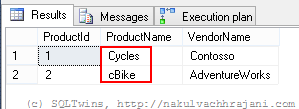
The result is shown in the screenshot below. Records for all products beginning with the letter “c” were returned – irrespective of the case.

image

Using PATINDEX

The second search mechanism that I will be evaluating is the PATINDEX, which basically returns the index or the position where a particular character pattern is found in a given string. If the pattern is not found, the value returned is 0.

USE AdventureWorks2012;
GO
SELECT ProductId,
       ProductName,
       VendorName
FROM dbo.Product 
WHERE PATINDEX('c%',ProductName) > 0;
GO

Again the result is as shown in the screenshot below – a case in-sensitive search was performed by SQL Server.

image

Conclusion

The collation of a particular column determines whether a search on a column will be case sensitive or  case in-sensitive. This is not dependent upon the mechanism used for the comparison (i.e. a simple query v/s regular expressions v/s pattern matching).

Do you have any ideas on implementing  case sensitive search on a case in-sensitive database column? If so, please share in the blog comments.

Further Reading

Until we meet next time,
Be courteous. Drive responsibly.

#0354 – SQL Server – Implementing case sensitive search in a case insensitive database


Searching data from a column is a very common requirement – but with unique variants in each application. Recently, I came across one such requirement:

  1. Underlying database, table and columns use a case in-sensitive (CI) collation
  2. Application must be able to switch between a case sensitive v/s a  case insensitive comparison

The ability to switch between a case sensitive and case insensitive comparison is the challenge because it needs to be done on a database that inherently does not discriminate between the two.

In this post, I will present one method of implementing this requirement. If you have any others that you would like to share, please feel free to do so in the comments area.

Temporarily using Case Sensitive Collations

The most common implementation pattern to realize the case sensitive search requirement is to temporarily use a collation that is case sensitive as shown below.

To begin with, let us create a test table and insert some fictional test data.

USE AdventureWorks2012;
GO

--Step 01: Create test data
IF OBJECT_ID('dbo.Product','U') IS NOT NULL
    DROP TABLE dbo.Product;
GO
CREATE TABLE dbo.Product 
    (ProductId INT NOT NULL IDENTITY(1,1),
     ProductName VARCHAR(100) NOT NULL,
     VendorName VARCHAR(100)
    );
GO

--Add some test data
INSERT INTO dbo.Product (ProductName, VendorName)
VALUES ('Cycles','Contosso'),
       ('cBike', 'AdventureWorks'),
       ('SomeOtherProduct','SomeOtherVendor');
GO

Next, let us fetch the collation of the database where our test table resides. You may also want to use the system stored procedure (sp_help) to study the collation of the table columns (which by default would be same as that of the database in which the table resides). On my server, the collation was – [SQL_Latin1_General_CP1_CI_AS] which is case in-sensitive (notice the CI in the collation name).

--Step 02: Check the database collation
USE AdventureWorks2012;
GO
SELECT DATABASEPROPERTYEX(N'AdventureWorks2012',
                          N'Collation');
GO
--For AdvenutreWorks2012 
--SQL_Latin1_General_CP1_CI_AS

--Check the collation of the table columns
sp_help [dbo.Product];
GO

Now, attempt to query the table for all products whose names begin with the letter ‘c’ (small case). To do so, we need to temporarily COLLATE the column – dbo.Product.ProductName to a case sensitive collation (in my case, this is SQL_Latin1_General_CP1_CS_AS).

USE AdventureWorks2012;
GO
SELECT ProductId,
       ProductName,
       VendorName
FROM dbo.Product 
WHERE ProductName 
    COLLATE SQL_Latin1_General_CP1_CS_AS
    LIKE 'c%';
GO

An observation

As can be seen from the image below, desired results are obtained. However, if one has the actual execution plan opened up, an interesting observation can be made if we look at the properties of the SELECT operation.

Results of case-sensitive comparison

image

We can observe that SQL Server internally uses the CONVERT function with a style of 0. Per Books On Line (see references below), this indicates a binary to character conversion. This conversion is performed for all records in the table, which in-turn affects performance.

Conclusion

Because we have the overhead of applying a conversion on all rows of a particular table, this method should be used only when the column cannot be modified to permanently use a case sensitive collation and a business need exists to provide both case sensitive & insensitive search.

Further Reading

Until we meet next time,
Be courteous. Drive responsibly.