Tag Archives: DBA

Articles for the DBA – accidental or otherwise

#0350 – SQL Server – CREATE INDEX – DROP_EXISTING option and Msg 7999


Normally, when we need to perform maintenance operations on any database object as part of a database deployment, we would first check for it’s existence. If the object exists, the query would be required to first drop the object and then recreate it (or simply modify it).

For indexes, this would result in a script that is similar to the one shown below:

--Creating Indexes (the traditional/common way)
IF EXISTS (SELECT * 
           FROM sys.indexes AS si 
           WHERE si.name = 'ncidx_ProductName')
    DROP INDEX ncidx_ProductName ON dbo.Product;
GO

CREATE UNIQUE NONCLUSTERED INDEX ncidx_ProductName
       ON dbo.Product (ProductName);
GO

However, as I was reading the Books On Line the other day, I noticed an interesting option in the CREATE INDEX statement – the DROP_EXISTING option. Here’s an example demonstrating the usage of this option:

--Creating Indexes using the DROP_EXISTING option
CREATE UNIQUE NONCLUSTERED INDEX ncidx_ProductName 
    ON dbo.Product (ProductName) WITH (DROP_EXISTING = ON);
GO

DROP_EXISTING allows us to request the database engine to drop and rebuild the index with the new definition. However, the index must exist before the DROP_EXISTING can be used. If DROP_EXISTING is used with the CREATE INDEX statement for an index that does not exist, the following error is seen.

Msg 7999, Level 16, State 9, Line 2
Could not find any index named ‘ncidx_ProductName’ for table ‘dbo.Product’.

Summary

Although I am yet to use the DROP_EXISTING option in my maintenance operations, it does appear to be lucrative due to the reduced number of lines involved in recreating the index. A couple of points need to be kept in mind, though:

  • The index must be existing when the DROP_EXISTING option is used
  • We can use DROP_EXISTING when changing the definition of the index
  • Index type (clustered to non-clustered or vice-versa) cannot be changed when DROP_EXISTING is used

Further Reading

Until we meet next time,

Be courteous. Drive responsibly.

#0348 – SQL Server – Msg 1946 – The index entry exceeds maximum length of 900 bytes


Having indexes on character columns is fairly common in OLTP systems that deal with multiple look-up values. However, indexes on character columns come with a small catch.

The maximum size of an index is 900 bytes. With character data forming part of the index columns, 900 bytes can fill up very fast depending upon the overall size of the character columns involved. While an index on the character columns can still be created if the existing data in the columns does not exceed 900 bytes, the system may reject an insert/update because the total size of the columns being inserted/updated exceed 900 bytes.

While I have never actually experienced this situation, I have seen SQL Server warning about index length exceeding 900 bytes. This prompted me to do a small test, which I am sharing via this post.

The scenario

To simulate the scenario, I will create a test table (for representational purposes) with a couple of columns which will be used on an index.

USE tempdb ;
GO

--(C) SQLTwins, nakulvachhrajani.com

--Safety Check
IF OBJECT_ID('dbo.IndexLengthTest', 'U') IS NOT NULL 
    DROP TABLE dbo.IndexLengthTest ;
GO

--Create the test table
--NOTE: For representational purposes only!
CREATE TABLE dbo.IndexLengthTest
    (
      KeyValue1 NVARCHAR(250),
      KeyValue2 NVARCHAR(250),
      KeyValue3 NVARCHAR(250),
      KeyValue4 UNIQUEIDENTIFIER
    )
GO

--Create the test Index
--NOTE: For representational purposes only!
CREATE UNIQUE NONCLUSTERED INDEX uncidx_IndexLengthTest 
    ON dbo.IndexLengthTest ( KeyValue1, KeyValue2, KeyValue3, KeyValue4 ) ;
GO

NOTE that when the index is created, the following warning is seen in the “Messages” tab of the SQL Server Management Studio (SSMS).

Warning! The maximum key length is 900 bytes. The index ‘uncidx_IndexLengthTest’ has maximum length of 1516 bytes. For some combination of large values, the insert/update operation will fail.

The warning clearly indicates that  the maximum possible size of the key in the proposed index is 1516 byes [(2*250)*3 + 16 = 1516 bytes]. Because the existing data in the table is less than 900 bytes, SQL Server will go ahead and create an index on the selected columns.

The Test

I will now  attempt to insert a record in the table whose total size exceeds 900 bytes.

INSERT  INTO dbo.IndexLengthTest
        (
          KeyValue1,
          KeyValue2,
          KeyValue3,
          KeyValue4
        )
VALUES  (
          REPLICATE(N'a', 250),
          REPLICATE(N'b', 250),
          REPLICATE(N'c', 250),
          NEWID()
        ) ;
GO

SQL Server immediately returns the following error:

Msg 1946, Level 16, State 3, Line 1
Operation failed. The index entry of length 1516 bytes for the index ‘uncidx_IndexLengthTest’ exceeds the maximum length of 900 bytes.

To summarize, SQL Server prevents the user from inserting records that violate the index key length which is why caution needs to be exercised when designing indexes on character columns.

Further Reading

Until we meet next time,

Be courteous. Drive responsibly.
#0344 – SQL Server – Missing Configuration Manager on Windows 8


Microsoft SQL Server comes with a very powerful  configuration manager which can be used to manage the SQL Server services and control network visibility and footprint. Working without the SQL Server Configuration Manager is a nightmare for a DBA.

SQL Server Configuration Manager is not available in Windows 8

Many development environments have SQL Server installed on the developer workstations running a Windows 8 operating system. I have been consulted on a couple of instances where the SQL Server Configuration Manager fails to come up in the “Start” menu application list (even using the Search charm does not yield any results).

The workaround

The SQL Server Configuration Manager is in reality a Microsoft Management Console (MMC) application. Hence, the workaround is to do the following:

  1. Launch the Search charm
  2. Search for the SQL Server Configuration Manager MMC snap-in:
    • SQL Server 2012 – search for “SQLServerManager11.msc
    • SQL Server 2008R2 – search for “SQLServerManager10.msc
  3. Press “Enter” to launch (or alternatively, right-click on the result to pin to the Start Menu or create a shortcut on the desktop)

Further Reading on the SQL Server Configuration Manager

  • SQL Server Configuration Manager – Hide your SQL Server Instance [Link]
  • #0151 – SQL Server– Which TCP/IP port is my SQL Server listening on? [Link]
  • Changing SQL Server Service Account or Password – Avoid restarting SQL Server [Link]

[EDIT, 09/08/2014, 10:55AM IST]: Rectified a typo for the MSC file name related to Configuration Manager for SQL Server 2008 R2.

Until we meet next time,

Be courteous. Drive responsibly.

#0342 – SQL Server – LEN v/s DATALENGTH – A feature comparison


There are few typical questions that developers ask when developing applications or when troubleshooting an issue:

  • What is the length of this string?
  • How many bytes does this string take for storage?
  • How many bytes are occupied in storing this BLOB data?

The answer to all these questions lie in 2 T-SQL functions: The DATALENGTH() and the LEN(), which are often used interchangeably by developers who may not have fully understood the subtle differences between them.

Today, I present before you, a feature comparison of these two functions.

The LEN() function

Purpose: Returns the number of characters of the specified string expression, excluding trailing blanks.

Usage example: The following example demonstrates how to use the LEN() function:

SELECT LEN('Four');
GO
--Result: 4

Behaviour for Unicode Strings: Unicode strings store a wider range of characters and hence the same number of characters occupy more space. The LEN() function reports the number of characters, and not the space occupied within a UNICODE string.

SELECT LEN(N'Four');
GO
--Result: 4

Effect of white spaces: The LEN() function has a very interesting behaviour when the string expression being evaluated is padded with white spaces. The function trims out white spaces after a string, but does consider white spaces padded before the string.

SELECT LEN(' Four');
GO
--Result: 8
SELECT LEN('Four ');
GO
--Result: 4


Behaviour with non-string based data-types: Because the DATALENGTH() function returns the number of bytes consumed, it can work with any expression and return the number of bytes consumed. Here is an example of how DATALENGTH() reports the number of bytes accurately for non-character based data-types:

DECLARE @integerData INT = 4;
SELECT LEN(@integerData);
GO
--Result: 1 (the number of characters)
DECLARE @dataTimeValue DATETIME = GETDATE();
SELECT LEN(@dataTimeValue);
GO
--Result: 19 (the number of characters)

The DATALENGTH() function

Purpose: Check the length of any expression.

Usage example: The following example demonstrates how to use the DATALENGTH() function. From a usage perspective, there is no difference between DATALENGTH() and LEN()

SELECT DATALENGTH('Four');
GO
--Result: 4

Behaviour for Unicode Strings: Unicode strings store a wider range of characters and hence the same number of characters occupy more space. Unlike the LEN() function, the DATALENGTH() function returns the actual number of bytes consumed for the storage of the Unicode value.

SELECT DATALENGTH(N'Four');
GO
--Result: 8

Effect of white spaces: Because the DATALENGTH() function returns the number of bytes consumed, and not the number of characters in an expression, white spaces in a string are reported as-is, without any trimming. Here’s an example:

SELECT DATALENGTH(' Four');
GO
--Result: 8
SELECT DATALENGTH('Four ');
GO
--Result: 8

Behaviour with non-string based data-types: Because the DATALENGTH() function returns the number of bytes consumed, it can work with any expression and return the number of bytes consumed. Here is an example of how DATALENGTH() reports the number of bytes accurately for non-character based data-types:

DECLARE @integerData INT = 4;
SELECT DATALENGTH(@integerData);
GO
--Result: 4 (the number of bytes consumed for storage)
DECLARE @dataTimeValue DATETIME = GETDATE();
SELECT DATALENGTH(@dataTimeValue);
GO
--Result: 8 (the number of bytes consumed for storage)

Summary

The feature comparison between LEN() and DATALENGTH() can be made in the following table:

LEN() DATALENGTH()
Purpose Returns the number of characters of the specified string expression, excluding trailing blanks. Returns the number of bytes used to represent any expression.

Effect of Unicode Number of characters in the expression Number of bytes used for storage
Effect of white spaces Prefixed spaces: Considered as part of length

Suffixed spaces: Trimmed

Both prefixed & suffixed spaces are considered
Behaviour with non-string data-types Supported, but reports the number of characters as if it were a character string Reports the number of bytes used for storage

Further Reading

  • LEN function [MSDN Link]
  • DATALENGTH function [MSDN Link]

Until we meet next time,

Be courteous. Drive responsibly.

#0341 – SQL Server – Random “String or binary data would be truncated” errors during bulk data loads


Interfacing multiple systems is always a great source of learning. In the various integrations that I have been a part of over the years, one of the many things that I have learnt is that no two systems have the same world view of the data that they store.

To take a very simple example, assume that we are interfacing a home-grown warehousing system with a 3rd party front desk PoS system. One of the first problems that most people will run into is that the supported length for product name is different – the warehousing system might be accepting a product name of let’s say 60 characters whereas the PoS may have a limit of 50 characters.

Integrations need to take care of this sort of a mismatch, but it’s not always easy. Sometimes, the interface specifications are vague or in case of home-grown legacy systems, possibly non-existent. In most enterprise integrations, a pre-production run is often done with a backup of the existing production data. When doing a data load from one system to another, it is quite possible that we run into situations wherein the tests run fine, but a production run fails with the following error:

Msg 8152, Level 16, State 14, Line 17
String or binary data would be truncated.

As the error suggests, it is what can very simply be termed as a buffer overflow – we are attempting to insert a larger string into a smaller container (table column). Because the data was the same, the question that comes up is:

Why was the “String or binary data would be truncated” error random and not reproducible at will?

Connection Settings – ANSI_WARNINGS

The answer to the puzzle lies in the connection settings for the SET option – ANSI_WARNINGS.

If the ANSI_WARNINGS is set to OFF, attempting to insert a longer string into a smaller column automatically truncates the string. The following test confirms the behaviour:

USE tempdb;
GO

--Create Test table
IF OBJECT_ID('dbo.AnsiWarningsTest','U') IS NOT NULL
DROP TABLE dbo.AnsiWarningsTest;
GO

CREATE TABLE dbo.AnsiWarningsTest (FourtyCharacterTest VARCHAR(40));
GO

--Default value, resetting for safety
SET ANSI_WARNINGS OFF;

--Check current value of ANSI_WARNINGS
IF (@@OPTIONS & 8) = 8
PRINT 'ANSI_WARNINGS are ON';
ELSE
PRINT 'ANSI_WARNINGS are OFF';

--Attempt to insert data longer than available column value
--This should work fine
INSERT INTO dbo.AnsiWarningsTest (FourtyCharacterTest)
SELECT REPLICATE('a',100);
GO

SELECT AnsiWarningsTest.FourtyCharacterTest
FROM dbo.AnsiWarningsTest;
GO

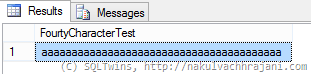
As can be seen from the screenshot below, the only 40 characters were successfully inserted into the table – dbo.AnsiWarningsTest. The string truncation was handled automatically by Microsoft SQL Server.

image

Now, we turn ANSI_WARNINGS OFF and repeat the same test.

--Set ANSI_WARNINGS to ON
SET ANSI_WARNINGS ON;

--Check current value of ANSI_WARNINGS
IF (@@OPTIONS & 8) = 8
PRINT 'ANSI_WARNINGS are ON';
ELSE
PRINT 'ANSI_WARNINGS are OFF';

--Attempt to insert data longer than available column value
--This SHOULD result into an exception
INSERT INTO dbo.AnsiWarningsTest (FourtyCharacterTest)
SELECT REPLICATE('b',100);
GO

Attempting to execute this immediately results into the following error in the “Messages” tab of the SSMS.

ANSI_WARNINGS are ON
Msg 8152, Level 16, State 14, Line 12
String or binary data would be truncated.

Conclusion

When working with bulk data imports, it is important to know the differences in the storage design of both systems. Once known, mismatches that may result into potential string termination errors should be explicitly handled by the SUSBTRING clause.

Further Reading

  • ANSI_WARNINGS [MSDN Link]
  • SUBSTRING [MSDN Link]

Until we meet next time,

Be courteous. Drive responsibly.