Tag Archives: DBA

Articles for the DBA – accidental or otherwise

#0378 – SQL Server – Performance – CASE evaluates all the input result expressions


Recently, I asked to troubleshoot a performance issue with a stored procedure that was being used for reporting purposes. Looking at the execution plan, I realized that while the joins and the filters were as expected, the core bottleneck were sub-queries in the CASE expression. In order to execute the query, SQL Server needs to evaluate all the input result expressions and then return the value in the output result set based on the switch (when expression).

In case one of these input result expressions refer a large table or a table that’s locked, it could compromise the performance of the entire statement – even though the conditions are such that the table is not directly accessed (which is what was happening in our case).

The script below demonstrates the behaviour with an example. In the script, the CASE expression returns the values from one of 3 tables in the AdventureWorks database – Production.Product, Person.Person and Sales.SalesOrderHeader.

USE AdventureWorks2012;
GO

DECLARE @caseSwitch INT = 1;

SELECT CASE @caseSwitch 
            WHEN 1 THEN (SELECT TOP 1 
                                pp.Name
                            FROM Production.Product AS pp
                        )
            WHEN 2 THEN (SELECT TOP 1 
                                per.LastName + ', ' + per.FirstName
                            FROM Person.Person AS per
                        )
            WHEN 3 THEN (SELECT TOP 1 
                                soh.Comment
                            FROM Sales.SalesOrderHeader AS soh
                        )
            ELSE 'Default Value'
       END;
GO

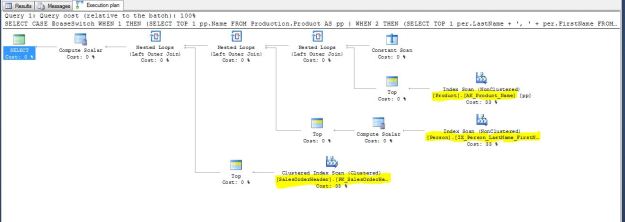
When we execute the script with the “Show Actual Execution Plan” (Ctrl + M) turned on, we can see that all three tables were accessed.

A CASE expressions evaluates all the input result expressions

A CASE expressions evaluates all the input result expressions

If this behaviour presents a lot of performance issues in the system, the solution is to re-engineer the way the system is queried such that the required set of data is staged into temporary tables to avoid loading the underlying tables.

Until we meet next time,
Be courteous. Drive responsibly.

#0377 – SQL Server – Msg 206; Operand Type Clash; Return type of a CASE expression follows datatype precedence


When we were working on a particular SSIS package that was extracting data from a legacy SQL Server database. We kept running into meta-data and datatype mismatch issues on a couple of databases. It was later that we realized that we were overlooking a basic aspect of the CASE expression – the return type.

When the CASE expression is evaluated, it is possible that different result expressions (what’s written in the THEN argument) are of different data-types. In such cases, the CASE expression would follow datatype precedence and return the highest datatype.

The example below is a simple CASE expression that evaluates 3 different inputs – an integer, a decimal and a character value. To demonstrate the return type, I will simply use the SELECT…INTO paradigm to create a new table on the fly.

USE tempdb;
GO
--Safety Check
IF OBJECT_ID('[dbo].[sqlTwinsTable]','U') IS NOT NULL
BEGIN
    DROP TABLE [dbo].[sqlTwinsTable];
END
GO

--Use 3 variables of different datatypes and 
--use a CASE expression to return from them
DECLARE @integerValue INT = 8;
DECLARE @decimalValue DECIMAL(19,4) = 20.16;
DECLARE @characterValue VARCHAR(200) = 'Character Value';

DECLARE @caseSwitch INT = 1;

SELECT CASE @caseSwitch WHEN 1 THEN @integerValue
                        WHEN 2 THEN @decimalValue
                        WHEN 3 THEN @characterValue
                        ELSE 'Undefined Value'
       END AS CaseOutput
INTO [dbo].[sqlTwinsTable]
GO

Checking the table definition of the newly created table, we see that it was created with the datatype “decimal” – even though the switch/input expression was such that it returns an integer.

USE tempdb;
GO
--Check the table definition
SELECT isc.TABLE_SCHEMA,
       isc.TABLE_NAME,
       isc.COLUMN_NAME,
       isc.DATA_TYPE
FROM INFORMATION_SCHEMA.COLUMNS AS isc
WHERE isc.TABLE_SCHEMA = 'dbo'
  AND isc.TABLE_NAME = 'sqlTwinsTable'
GO
--Check the returned value
SELECT CaseOutput
FROM [dbo].[sqlTwinsTable];
GO

377-CASE_ReturnType

As can be seen from the screenshot above, the return type of the CASE expression is the highest precedence datatype from the input result expressions across all the switch branches. Not considering this behaviour may cause issues if the calling application is datatype sensitive.

Word of caution

A classic example of this behaviour causing unexpected issues is when one has incompatible datatypes (which cannot be implicitly converted from one type to another) mixed in the same expression, as in this case.

--Safety Check
IF OBJECT_ID('[dbo].[sqlTwinsTable]','U') IS NOT NULL
BEGIN
    DROP TABLE [dbo].[sqlTwinsTable];
END
GO

--Use 3 variables of different datatypes and 
--use a CASE expression to return from them
DECLARE @integerValue INT = 8;
DECLARE @decimalValue DECIMAL(19,4) = 20.16;
DECLARE @characterValue VARCHAR(200) = 'Character Value';
DECLARE @dateValue DATE = '2016-07-18';

DECLARE @caseSwitch INT = 1;

--The DATE datatype has a higher precedence
--However, all inputs cannot be implicitly converted to DATE
--We will therefore get a data-type conversion error
SELECT CASE @caseSwitch WHEN 1 THEN @integerValue
                        WHEN 2 THEN @decimalValue
                        WHEN 3 THEN @characterValue
                        WHEN 4 THEN @dateValue
                        ELSE 'Undefined Value'
       END AS CaseOutput
INTO [dbo].[sqlTwinsTable]
GO
Msg 206, Level 16, State 2, Line 62
Operand type clash: int is incompatible with date
Msg 206, Level 16, State 2, Line 62
Operand type clash: decimal is incompatible with date

Further Reading

Until we meet next time,
Be courteous. Drive responsibly.

#0376 – SQL Server – Msg 2714: There is already an object named ‘#tableName’ in the database.


Recently, I came across the same question a couple of times around usage of temporary tables in one of the forums I participate in. The questions revolved around attempting to create/use temporary tables in the various scenarios within the same batch:

  1. Same temporary table name, but a different definition
  2. Create the temporary table conditionally with the same definition multiple times (i.e. trying to create the temporary table only if necessary)
  3. Create the temporary table conditionally with possibly different definitions (i.e.  in cases when the definition is unknown, e.g. data dumps/exports, etc)

In all of these cases, users were encountering the following error:

Msg 2714, Level 16, State 1...
There is already an object named '#tableName' in the database.

The scenario can be recreated in your development/study environment using the script provided below.

USE AdventureWorks2012;
GO
--Safety Check 
IF OBJECT_ID('#intermediateDataStore','U') IS NOT NULL
BEGIN
    DROP TABLE #intermediateDataStore;
END
GO

DECLARE @isEmployeeList BIT = 1;

--Generate a list of employees, 
--else generate a list of customer contacts
IF (@isEmployeeList = 1)
BEGIN
    SELECT pp.BusinessEntityID,
            pp.FirstName,
            pp.LastName
    INTO #intermediateDataStore
    FROM Person.Person AS pp
    INNER JOIN HumanResources.Employee AS he 
        ON pp.BusinessEntityID = he.BusinessEntityID;
END
ELSE
BEGIN
    SELECT pp.BusinessEntityID,
            pp.FirstName,
            pp.LastName
    INTO #intermediateDataStore
    FROM Person.Person AS pp
    LEFT OUTER JOIN HumanResources.Employee AS he 
        ON pp.BusinessEntityID = he.BusinessEntityID
    WHERE pp.BusinessEntityID IS NOT NULL
        AND he.BusinessEntityID IS NULL;
END

SELECT BusinessEntityID,
        FirstName,
        LastName
FROM #intermediateDataStore;
GO

Root Cause

In the context of non-temporary user tables, the root cause is quite simple – one has another table with the same name already created in the database.

However, in the context of temporary tables, root cause of the behaviour is a SQL Server design aspect called “Deferred Name Resolution” (DNR) (it  has nothing to do with a medical protocol that shares the same abbreviation).

What is Deferred Name Resolution (DNR)?

If one observes carefully, the statement failed at the time of parsing, and not during execution (one can easily verify this by trying to generate an estimated execution plan, which will also fail).

Here are the sequence of events that caused the script to fail during parsing due to deferred name resolution.

  1. Drop any existing temporary tables with the name #intermediateDataStore
    • Compiles OK
  2. Definition of variable @isEmployeeList
    • Compiles OK
  3. First SELECT…INTO statement for storing a simple list of employees
    • Temporary table does not exist here, and hence is marked for DNR
  4. ELSE block – Second SELECT…INTO statement for storing a simple list of non-employees/contacts
    • Temporary table does not exist here, and hence attempt is made to mark for DNR
    • However, another temporary table with the same name is already marked for DNR within the same batch, resulting in a conflict

Why is DNR required?

Deferred Name Resolution is not a bug, but a design feature – it allows SQL Server database engine to continue with the parsing of the batch with information that it can only get at runtime.

In the case of temporary tables, they have a slightly different actual name during execution. It is therefore impossible to have an idea about what the actual name of the table will be during compilation, which is why the name resolution needs to be deferred.

This is also the reason why stored procedures may show compilation errors only when executed for the first time, and not during deployment.

The Solution

There are multiple ways to arrive at the solutions to this problem, but all solutions revolve around the following two points:

  1. Either separate the offending statements into different batches OR
  2. If the structure is known to be the same/similar, try to define the structure of the temporary table in advance and just refer the already created instance of the temporary table when required

In our case, it is possible to know the structure of the temporary table in advance and hence the solution for our problem is as below:

USE AdventureWorks2012;
GO
--Safety Check 
IF OBJECT_ID('#intermediateDataStore','U') IS NOT NULL
BEGIN
    DROP TABLE #intermediateDataStore;
END
GO

--Because the structure is known, create the temp table here
--Else, one can try to split the application logic into 
--multiple distinct parts 
CREATE TABLE #intermediateDataStore 
    (BusinessEntityID INT           NOT NULL,
     FirstName        NVARCHAR(100)     NULL,
     LastName         NVARCHAR(100)     NULL
    )

DECLARE @isEmployeeList BIT = 1;

--Generate a list of employees, 
--else generate a list of customer contacts
IF (@isEmployeeList = 1)
BEGIN
    --Rather than using a SELECT...INTO, we are now
    --using an INSERT INTO...SELECT
    INSERT INTO #intermediateDataStore (BusinessEntityID,
                                        FirstName,
                                        LastName
                                       )
    SELECT pp.BusinessEntityID,
            pp.FirstName,
            pp.LastName
    FROM Person.Person AS pp
    INNER JOIN HumanResources.Employee AS he 
        ON pp.BusinessEntityID = he.BusinessEntityID;
END
ELSE
BEGIN
    INSERT INTO #intermediateDataStore (BusinessEntityID,
                                        FirstName,
                                        LastName
                                       )
    SELECT pp.BusinessEntityID,
            pp.FirstName,
            pp.LastName
    FROM Person.Person AS pp
    LEFT OUTER JOIN HumanResources.Employee AS he 
        ON pp.BusinessEntityID = he.BusinessEntityID
    WHERE pp.BusinessEntityID IS NOT NULL
        AND he.BusinessEntityID IS NULL;
END

SELECT BusinessEntityID,
        FirstName,
        LastName
FROM #intermediateDataStore;
GO

Conclusion

When I was researching the solution, it actually reminded me of the Single-Responsibility Principle of the SOLID design principles. The DNR problems demonstrated in this example would never have come up if the application had two separate modules – one to report for employees and the other to report for contacts.

Other than the obvious conclusion about the solution to the deferred name resolution message, the hidden conclusion is that design and architectural principles are independent of the programming language and platform – they stand equally true whether you are developing a piece of C# code, or writing a T-SQL stored procedure.

Further Reading

Deferred Name Resolution

  • Microsoft TechNet: Deferred Name Resolution and Compilation [Link]
  • Microsoft Connect: Creating a temporary table within a stored procedure with the same name as a temporary table created in the calling stored procedure [Link]

Fun with Temporary Tables

  • Temporary Table Names – maximum allowed length [Link]
  • Working with Temporary Tables (L100) [Link]
  • Temporary Tables and the impact of ANSI_NULLS_DFLT_ON [Link]
  • Temporary Tables and Foreign Keys [Link]
  • Temporary Tables – Named Constraints, Msg 2714, 1750 [Link]
  • Stored Procedures and Temporary Tables [Link]

Until we meet next time,
Be courteous. Drive responsibly.

#0375 – SQL Server -Collation conflicts may occur when working with string functions (REPLACE, SUBSTRING, etc)


Recently, I was called upon to troubleshoot an interesting issue that came up with manipulating string termination characters (“\0”) using REPLACE. I wrote about the issue here.

As I was writing about the incident, I realized that if the data conditioning/manipulation script involves staging a “fixed” copy of the data one may end up with collation conflicts if the column collations were not specified as part of the column definition of these staging tables.

Allow me to demonstrate with an example.

Basically what I will do in the script below is create a test table with some manufacturer and product data. I later attempt to combine the ManufacturerName and ProductName into a column called FullName. In order to do this, I stage the fixed/updated data into a staging table and later join that to the main table for the update.

--1. Safety check - drop before we recreate
IF OBJECT_ID('tempdb..#product','U') IS NOT NULL
DROP TABLE tempdb..#product;
GO

IF OBJECT_ID('tempdb..#tempProduct','U') IS NOT NULL
DROP TABLE tempdb..#tempProduct;
GO

--2. Create the table to be fixed
CREATE TABLE #product
(ManufacturerName VARCHAR(50) COLLATE Latin1_General_CI_AS,
ProductName VARCHAR(50) COLLATE Latin1_General_CI_AS,
FullName VARCHAR(100) COLLATE Latin1_General_CI_AS
);
GO

--3. Insert some test data
INSERT INTO #product (ManufacturerName,
ProductName,
FullName)
VALUES ('Microsoft-','SQL Server', NULL),
('Microsoft-','Windows', 'Microsoft Windows'),
('Google','Chrome', 'Google Chrome'),
('Microsoft-','Azure',NULL);
GO

--4. Fix the data and store it to a staging table
SELECT ManufacturerName,
ProductName,
(REPLACE(p.ManufacturerName COLLATE Latin1_General_CI_AI, '-', ' ') + p.ProductName) AS FullName
INTO #tempProduct
FROM #product AS p;
GO

The key points to observe are:

  1. When doing the string manipulation, I explicitly specified a collation that is different from the collation of the original table (this may be required in case you are working on strings that need special handling)
  2. I did not explicitly specify the column definition for the staging table

What happens is that the collation of the output of a string function (REPLACE in this case) is same as that of the input string. This collation in the example is different from the collation of the main table. The temporary staging table is created with this different collation.

--5. Check out the meta-data of both the tables
SELECT pisc.COLUMN_NAME,
pisc.COLLATION_NAME AS SourceCollation,
tpisc.COLLATION_NAME AS StagingCollation
FROM tempdb.INFORMATION_SCHEMA.COLUMNS AS pisc
INNER JOIN tempdb.INFORMATION_SCHEMA.COLUMNS AS tpisc
ON pisc.COLUMN_NAME = tpisc.COLUMN_NAME
WHERE pisc.TABLE_NAME LIKE '#product%'
AND tpisc.TABLE_NAME LIKE '#tempProduct%'
GO
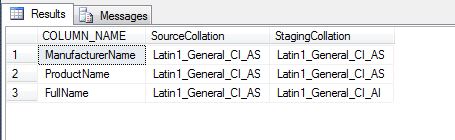
CollationsInMainVsStagingTable

Now, let us see what happens when we try to execute the update:

--6. Try the update and see what happens
UPDATE p
SET p.FullName = tp.FullName
FROM #product AS p
INNER JOIN #tempProduct AS tp
ON p.ManufacturerName = tp.ManufacturerName
AND p.ProductName = tp.ProductName
AND p.FullName <> tp.FullName;
GO
Msg 468, Level 16, State 9, Line 44
Cannot resolve the collation conflict between "Latin1_General_CI_AI" and "Latin1_General_CI_AS" in the not equal to operation.

The update basically fails with a collation conflict error which could have easily been avoided by specifying the column definition (with appropriate collations) for the staging tables.

The problem demonstrated above can be reproduced with other string manipulation functions as well (e.g. SUBSTRING).

The moral of the story: Always follow best practices and specify a column definition when defining a table – permanent, staging or temporary.

Until we meet next time,
Be courteous. Drive responsibly.

Script for this post:

--1. Safety check - drop before we recreate
IF OBJECT_ID('tempdb..#product','U') IS NOT NULL
DROP TABLE tempdb..#product;
GO

IF OBJECT_ID('tempdb..#tempProduct','U') IS NOT NULL
DROP TABLE tempdb..#tempProduct;
GO

--2. Create the table to be fixed
CREATE TABLE #product (ManufacturerName VARCHAR(50) COLLATE Latin1_General_CI_AS,
ProductName VARCHAR(50) COLLATE Latin1_General_CI_AS,
FullName VARCHAR(100) COLLATE Latin1_General_CI_AS
);
GO

--3. Insert some test data
INSERT INTO #product (ManufacturerName, ProductName, FullName)
VALUES ('Microsoft-','SQL Server', NULL),
('Microsoft-','Windows', 'Microsoft Windows'),
('Google','Chrome', 'Google Chrome'),
('Microsoft-','Azure',NULL);
GO

--4. Fix the data and store it to a staging table
SELECT ManufacturerName, ProductName, (REPLACE(p.ManufacturerName COLLATE Latin1_General_CI_AI, '-', ' ') + p.ProductName) AS FullName
INTO #tempProduct
FROM #product AS p;
GO

--5. Check out the meta-data of both the tables
SELECT pisc.COLUMN_NAME, pisc.COLLATION_NAME AS SourceCollation, tpisc.COLLATION_NAME AS StagingCollation
FROM tempdb.INFORMATION_SCHEMA.COLUMNS AS pisc
INNER JOIN tempdb.INFORMATION_SCHEMA.COLUMNS AS tpisc ON pisc.COLUMN_NAME = tpisc.COLUMN_NAME
WHERE pisc.TABLE_NAME LIKE '#product%' AND tpisc.TABLE_NAME LIKE '#tempProduct%'
GO

--6. Try the update and see what happens
UPDATE p
SET p.FullName = tp.FullName
FROM #product AS p
INNER JOIN #tempProduct AS tp ON p.ManufacturerName = tp.ManufacturerName
AND p.ProductName = tp.ProductName
AND p.FullName <> tp.FullName;
GO

--7. Creating the test tables
IF OBJECT_ID('tempdb..#product','U') IS NOT NULL
DROP TABLE tempdb..#product;
GO

IF OBJECT_ID('tempdb..#tempProduct','U') IS NOT NULL
DROP TABLE tempdb..#tempProduct;
GO

#0373 – SQL Server – Interview Questions – Parameters required for server-side paging mechanisms


For a mid-level SQL developer profile, this is one of my favourite interview questions if their current projects involve some sort of paging mechanism while displaying results on a grid.

What is the minimum number of parameters that your stored procedure needs to implement server-side paging?

Despite the multiple blog posts around this topic, this question surprisingly still stumps most of the developers.

The answer is quite simple – at a basic level, you absolutely need two (2) input parameters on your stored procedure to implement server-side paging:

  1. The page number
  2. The page size, i.e. the number of records to be displayed on each page

Of course, the implementation may vary – one can have multiple additional parameters like the sort column and the sort order, but at the very minimum one needs the two (2) parameters listed above.

For reference, here is a sample implementation (for SQL Server 2008 R2 and SQL Server 2012):

USE AdventureWorks2012 ;
GO
SET NOCOUNT ON ;

DECLARE @pageSize INT = 100 ;
DECLARE @pageNumber INT = 3 ;

--SQL 2008 R2 Method
--Source Data, fetched with paging
;
WITH    SourceDataCTE ( CarrierTrackingNumber, SalesOrderId, TotalShipmentValue, RowNumber )
          AS ( SELECT   sod.CarrierTrackingNumber,
                        sod.SalesOrderId,
                        SUM(sod.LineTotal) AS TotalShipmentValue,
                        ROW_NUMBER() OVER ( ORDER BY sod.CarrierTrackingNumber, sod.SalesOrderId ) AS RowNumber
               FROM     Sales.SalesOrderHeader AS soh
                        INNER JOIN Sales.SalesOrderDetail AS sod ON sod.SalesOrderID = soh.SalesOrderID
               WHERE    soh.ShipDate IS NOT NULL
                        AND sod.CarrierTrackingNumber IS NOT NULL
               GROUP BY sod.CarrierTrackingNumber,
                        sod.SalesOrderId
             )
    SELECT TOP ( @pageSize )
            sdCTE.CarrierTrackingNumber,
            sdCTE.SalesOrderId,
            sdCTE.TotalShipmentValue,
                     sdCTE.RowNumber
    FROM    SourceDataCTE AS sdCTE
    WHERE   sdCTE.RowNumber BETWEEN ( ( @pageNumber * @pageSize ) + 1 )
                            AND     ( ( @pageNumber + 1 ) * @pageSize ) ;

--SQL 2012 Method
SELECT   sod.CarrierTrackingNumber,
        sod.SalesOrderId,
        --SUM(sod.LineTotal) OVER ( ORDER BY sod.CarrierTrackingNumber, sod.SalesOrderId ) AS TotalShipmentValue,
        SUM(sod.LineTotal) AS TotalShipmentValue,
        ROW_NUMBER() OVER ( ORDER BY sod.CarrierTrackingNumber, sod.SalesOrderId ) AS RowNumber
FROM     Sales.SalesOrderHeader AS soh
        INNER JOIN Sales.SalesOrderDetail AS sod ON sod.SalesOrderID = soh.SalesOrderID
WHERE    soh.ShipDate IS NOT NULL
        AND sod.CarrierTrackingNumber IS NOT NULL
GROUP BY sod.CarrierTrackingNumber,
        sod.SalesOrderId
ORDER BY sod.CarrierTrackingNumber
OFFSET (@pageNumber * @pageSize) ROWS
FETCH NEXT (@pageSize) ROWS ONLY
GO

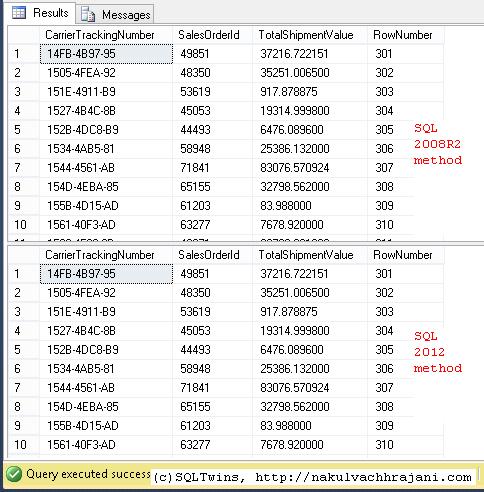
Here’s the result of the code snippet provided above:

Shows the output of the various server-side paging mechanisms available for Microsoft SQL Server

SQL Server Paging Mechanisms

Until we meet next time,
Be courteous. Drive responsibly.