Tag Archives: DBA

Articles for the DBA – accidental or otherwise

#0366 – SQL Server – SSMS – Simulating a TCP/IP connection on the same machine as the server


Most development environments that I have worked in have a developer edition of Microsoft SQL Server on the local machine of the developer. Hence, both the client (SSMS) and the database server are often on the same machine.

What this means is that the default connection mechanism used for all connections will be “Shared Memory”. However, when working on features like auditing, the ability to simulate a TCP/IP connection becomes important. Today, I document a mechanism that you can use to initiate a TCP/IP connection even when both server and client (SSMS) are the on the same machine, provided the server has been configured to allow TCP/IP connections in the Configuration Manager.

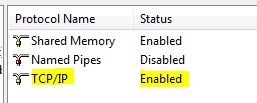
SQLTwins, Post #0366 - Ensuring that TCP/IP connections to the server are enabled via the SQL Server Configuration Manager

SQL Server Configuration Manager – ensuring that TCP/IP connections to the server are enabled

When initiating a new connection using the SQL Server Management Studio, simply click on the “Options” button in the “Connect to Database Engine” window, and navigate to the “Connection properties” tab.

SQLTwins, Post #0366 - SQL Server Management Studio (SSMS) - The "Connect to Database Engine" window

SQL Server Management Studio (SSMS) – The “Connect to Database Engine” window

SQLTwins, Post #0366 - SQL Server Management Studio (SSMS) - Using the Connection Properties tab to change the Network protocol when connecting to a SQL Server instance

SQL Server Management Studio (SSMS) – Using the Connection Properties tab to change the Network protocol

In the “Network” group, locate the “Network Protocol” drop-down. Change the value from “<default>” to “TCP/IP“.

Finally, verify the credentials in the “Login” tab and click “Connect“. That’s it!

Use the CONNECTIONPROPERTY() function described in my previous post to confirm that you are indeed connected via TCP/IP.

Further Reading

  • Testing your connection strings using SSMS [Link]
  • Using CONNECTIONPROPERTY to determine connection properties [Link]

Until we meet next time,
Be courteous. Drive responsibly.

#0365 – SQL Server – Auditing – Fetching properties of the current connection using CONNECTIONPROPERTY


Most enterprise applications implement auditing in areas of application that have business importance, data cleanup and data quality improvement. It therefore becomes important to track the following:

  1. From where a particular data manipulation request is coming? (Client Name, IP address, etc)
  2. What is the connection mechanism used?
  3. Which port is being used by the connection?
  4. What is the payload type (TSQL/SOAP or other)

While Microsoft SQL Server already provides us a way to access connection properties using the DMV – sys.dm_exec_connections, the challenge is in finding the required information for the current connection only, and not for all connections to the server.

The solution is therefore to use the system function – CONNECTIONPROPERTY().

CONNECTIONPROPERTY returns the connection properties for the connection on which the request came in. Hence, unless the auditing runs on a separate connection, we would always get information about the connection that is actually performing the data manipulation. This makes the function an ideal method to implement auditing within triggers.

Allow me to demonstrate it with 2 examples – one where the connection was done using Shared Memory (my SSMS client and the database engine are on the same machine) and using TCP/IP.

SELECT CONNECTIONPROPERTY('net_transport') AS TransportProtocol,
       CONNECTIONPROPERTY('protocol_type') AS PayloadType, 
       CONNECTIONPROPERTY('auth_scheme') AS AuthenticationUsed,
       CONNECTIONPROPERTY('local_net_address') AS TargetServerIPAddressIfTCPUsed,
       CONNECTIONPROPERTY('local_tcp_port') AS TargetServerTCPPortIfTCPUsed,
       CONNECTIONPROPERTY('client_net_address') AS ClientAddress,
       CONNECTIONPROPERTY('physical_net_transport') AS PhysicalTransportProtocol;
SQLTwins, Post #0365 - Output of CONNECTIONPROPERTY() when using a Shared Memory connection

Output of CONNECTIONPROPERTY() when using a shared memory connection

SQLTwins, Post #0365 - Output of CONNECTIONPROPERTY() when using a TCP/IP connection

Output of CONNECTIONPROPERTY() when using a TCP/IP connection

As demonstrated, the CONNECTIONPROPERTY() is the easiest way (in my opinion) to get the properties of the current connection for auditing purposes.

Further Reading

Until we meet next time,
Be courteous. Drive responsibly.

Constraint Violation Errors on UDTT

#0364 – SQL Server – Using Primary Key, Check and other Constraints with User Defined Table Types (UDTT)


As database systems and their interactions and interfaces with systems become more complex, a large amount of complex data is exchanged through the system boundaries. Table Valued parameters are frequently used to exchange data. If the structure of the data being exchanged is known, often systems (which work with  SQL 2008 and above) will use User defined table types (UDTTs).

Depending upon the domain, data being exchanged across system boundaries may need to be constrained to a number of constraints, especially check and unique constraints. My encounter with UDTTs was informal – I learnt about them along the way and never explored them fully. Recently, I was wondering if I could use constraints with UDTTs.

And so, I decided to conduct a small experiment. I created the following UDTT. As can be seen from the definition, I have created the UDTT with the following constraints.

  • Primary Key constraint
  • Unique constraint
  • Default constraint
  • Check constraint
USE tempdb;
GO
CREATE TYPE dbo.UDTTDDLTest AS TABLE
    ( RecordId INT NOT NULL,
      RecordValue VARCHAR(50) NOT NULL UNIQUE,
      RecordStatus TINYINT NOT NULL DEFAULT(2)
      PRIMARY KEY CLUSTERED (RecordId),
      CHECK (RecordStatus>= 1 AND RecordStatus <= 3)
    );
GO

SQL Server allows creation of the constraint without any issues. I then tried to run the following code that attempts to insert various combinations of data into the user defined table type.

USE tempdb;
GO

SET NOCOUNT ON;

DECLARE @myVariable AS dbo.UDTTDDLTest;

--Normal insertion
INSERT INTO @myVariable (RecordId, RecordValue, RecordStatus)
VALUES (1,
        'SQL Twins',
        1
       );


SELECT * FROM @myVariable;

--Checking effect of default constraints
INSERT INTO @myVariable (RecordId, RecordValue)
VALUES (2,
        'SQL Twins with Default'
       );

SELECT * FROM @myVariable;

--Checking effect of primary key constraint
INSERT INTO @myVariable (RecordId, RecordValue, RecordStatus)
VALUES (2,
        'Oops...duplicate key',
        1
       );

SELECT * FROM @myVariable;

--Checking effect of check constraint
INSERT INTO @myVariable (RecordId, RecordValue, RecordStatus)
VALUES (3,
        'Bad Status!',
        4
       );

SELECT * FROM @myVariable;

--Checking effect of unique constraint. The value "SQL Twins" is already in the UDTT,
--so if the constraint is in effect, we will get an error
INSERT INTO @myVariable (RecordId, RecordValue, RecordStatus)
VALUES (4,
        'SQL Twins',
        1
       );


SELECT * FROM @myVariable;
GO

As can be seen from the output below, SQL Server successfully prevented me from entering data that violated any one of the constraints.

Msg 2627, Level 14, State 1, Line 38
Violation of PRIMARY KEY constraint ‘PK__#B40743E__FBDF78E9F9E4365B’. Cannot insert duplicate key in object ‘dbo.@myVariable’. The duplicate key value is (2).
The statement has been terminated.
Msg 547, Level 16, State 0, Line 47
The INSERT statement conflicted with the CHECK constraint “CK__#B40743ED__Recor__B5EF8C5F”. The conflict occurred in database “tempdb”, table “@myVariable”.
The statement has been terminated.
Msg 2627, Level 14, State 1, Line 57
Violation of UNIQUE KEY constraint ‘UQ__#B40743E__4D9E41B64A9AE451’. Cannot insert duplicate key in object ‘dbo.@myVariable’. The duplicate key value is (SQL Twins).
The statement has been terminated.

Records That Inserted Successfully

Constraint Violation Errors on UDTT

Summary

Constraints (Primary Key, Default, Unique and Check constraints) are supported by User Defined Table Types (UDTTs) in Microsoft SQL Server and can be used to ensure the quality of data being exchanged via UDTTs.

Further Reading

  • Passing Table valued parameters to a table valued function – Underappreciated features of Microsoft SQL Server [Link]
  • SQL Server 2000-Alternate to Table Valued Parameters-Share Temporary Tables with a stored procedure [Link]
  • User Defined Table Types [Link]

Until we meet next time,
Be courteous. Drive responsibly.

#0360 – SQL Server – sp_attach_db v/s CREATE DATABASE FOR ATTACH – Number of files limitation; Msg. 8144 (Procedure has too many arguments specified)


This post has been a long time coming. I am an advocate of using newer T-SQL and administrative features if situation and compatibility related business requirements allow. In implementation of this ideology the question always comes up from most of my team members as to why a change is required when the old syntax/methods work just as effectively. I often demonstrate the example provided below to them.

In development environments, we generally move databases across various instances via a simple detach-append process. The traditional approach is to use the system stored procedure sp_attach_db. When CREATE DATABASE was enhanced to include support of attaching a database, one of the obvious differences that came up was the number of database files that it supported for the ATTACH operation.

The sp_attach_db system stored procedure can only attach a maximum of 16 database files.

In this scenario, the newer option of CREATE DATABASE is a blessing for very large databases where we have multiple files spread across multiple file-groups and multiple drives.

Allow me to demonstrate this with an example.

USE master ;
GO
--Safety Check
IF DB_ID('AttachDBTest') IS NOT NULL 
    DROP DATABASE AttachDBTest ;
GO

--Create the test database that has more than 16 files
CREATE DATABASE AttachDBTest ON PRIMARY  
    (NAME = Attach1,
    FILENAME = 'C:SQLDatabasesDBFileAttachTestAttachdat1.mdf',
    SIZE = 10MB,
    MAXSIZE = 200,
    FILEGROWTH = 20),
    ( NAME = Attach2,
    FILENAME = 'C:SQLDatabasesDBFileAttachTestAttachdat2.ndf',
    SIZE = 10MB,
    MAXSIZE = 200,
    FILEGROWTH = 20),
    ( NAME = Attach3,
    FILENAME = 'C:SQLDatabasesDBFileAttachTestAttachdat3.ndf',
    SIZE = 10MB,
    MAXSIZE = 200,
    FILEGROWTH = 20),
    ( NAME = Attach4,
    FILENAME = 'C:SQLDatabasesDBFileAttachTestAttachdat4.ndf',
    SIZE = 10MB,
    MAXSIZE = 200,
    FILEGROWTH = 20),
    ( NAME = Attach5,
    FILENAME = 'C:SQLDatabasesDBFileAttachTestAttachdat5.ndf',
    SIZE = 10MB,
    MAXSIZE = 200,
    FILEGROWTH = 20),
    ( NAME = Attach6,
    FILENAME = 'C:SQLDatabasesDBFileAttachTestAttachdat6.ndf',
    SIZE = 10MB,
    MAXSIZE = 200,
    FILEGROWTH = 20),
    ( NAME = Attach7,
    FILENAME = 'C:SQLDatabasesDBFileAttachTestAttachdat7.ndf',
    SIZE = 10MB,
    MAXSIZE = 200,
    FILEGROWTH = 20),
    ( NAME = Attach8,
    FILENAME = 'C:SQLDatabasesDBFileAttachTestAttachdat8.ndf',
    SIZE = 10MB,
    MAXSIZE = 200,
    FILEGROWTH = 20),
    ( NAME = Attach9,
    FILENAME = 'C:SQLDatabasesDBFileAttachTestAttachdat9.ndf',
    SIZE = 10MB,
    MAXSIZE = 200,
    FILEGROWTH = 20),
    ( NAME = Attach10,
    FILENAME = 'C:SQLDatabasesDBFileAttachTestAttachdat10.ndf',
    SIZE = 10MB,
    MAXSIZE = 200,
    FILEGROWTH = 20),
    (NAME = Attach11,
    FILENAME = 'C:SQLDatabasesDBFileAttachTestAttachdat11.mdf',
    SIZE = 10MB,
    MAXSIZE = 200,
    FILEGROWTH = 20),
    ( NAME = Attach12,
    FILENAME = 'C:SQLDatabasesDBFileAttachTestAttachdat12.ndf',
    SIZE = 10MB,
    MAXSIZE = 200,
    FILEGROWTH = 20),
    ( NAME = Attach13,
    FILENAME = 'C:SQLDatabasesDBFileAttachTestAttachdat13.ndf',
    SIZE = 10MB,
    MAXSIZE = 200,
    FILEGROWTH = 20),
    ( NAME = Attach14,
    FILENAME = 'C:SQLDatabasesDBFileAttachTestAttachdat14.ndf',
    SIZE = 10MB,
    MAXSIZE = 200,
    FILEGROWTH = 20),
    ( NAME = Attach15,
    FILENAME = 'C:SQLDatabasesDBFileAttachTestAttachdat15.ndf',
    SIZE = 10MB,
    MAXSIZE = 200,
    FILEGROWTH = 20),
    ( NAME = Attach16,
    FILENAME = 'C:SQLDatabasesDBFileAttachTestAttachdat16.ndf',
    SIZE = 10MB,
    MAXSIZE = 200,
    FILEGROWTH = 20),
    ( NAME = Attach17,
    FILENAME = 'C:SQLDatabasesDBFileAttachTestAttachdat17.ndf',
    SIZE = 10MB,
    MAXSIZE = 200,
    FILEGROWTH = 20),
    ( NAME = Attach18,
    FILENAME = 'C:SQLDatabasesDBFileAttachTestAttachdat18.ndf',
    SIZE = 10MB,
    MAXSIZE = 200,
    FILEGROWTH = 20),
    ( NAME = Attach19,
    FILENAME = 'C:SQLDatabasesDBFileAttachTestAttachdat19.ndf',
    SIZE = 10MB,
    MAXSIZE = 200,
    FILEGROWTH = 20),
    ( NAME = Attach20,
    FILENAME = 'C:SQLDatabasesDBFileAttachTestAttachdat20.ndf',
    SIZE = 10MB,
    MAXSIZE = 200,
    FILEGROWTH = 20) 
LOG ON 
   (NAME = Attachlog1,
    FILENAME = 'C:SQLDatabasesDBFileAttachTestAttachlog1.ldf',
    SIZE = 100MB,
    MAXSIZE = 200,
    FILEGROWTH = 20)
--FOR ATTACH
;
GO

--Create Test Table
USE AttachDBTest;
GO
IF OBJECT_ID('dbo.TestTable','U') IS NULL
BEGIN
    CREATE TABLE dbo.TestTable (RecId INT NOT NULL IDENTITY(1,1),
                                RecValue NVARCHAR(20) DEFAULT 'AttachTest'
                               );

END
GO

--Insert Test Data
USE AttachDBTest;
GO
SET NOCOUNT ON;
IF OBJECT_ID('dbo.TestTable','U') IS NOT NULL
BEGIN
    EXEC sp_executesql N'INSERT INTO dbo.TestTable (RecValue) DEFAULT VALUES;';
END
GO 10

--Validate Test Data
USE AttachDBTest;
GO
SELECT * FROM dbo.TestTable;
GO

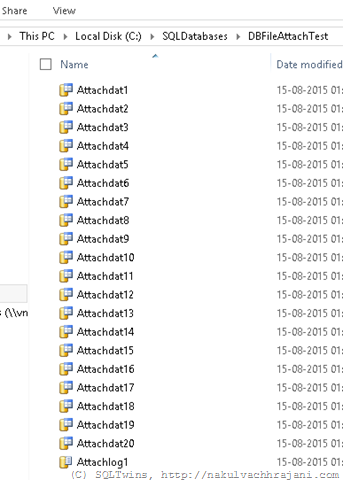
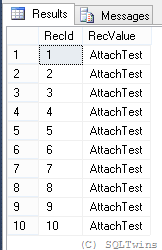
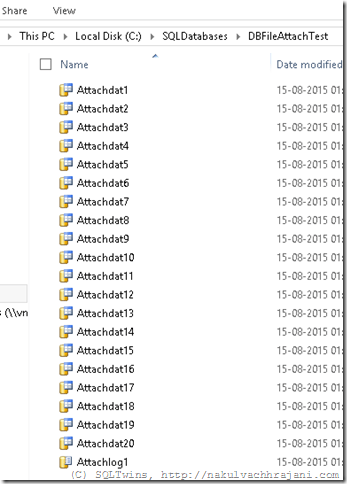
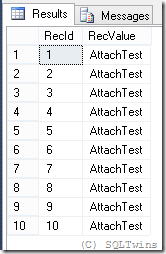
As seen from the screenshots below, the database creation was successful, and so was the insertion of test data.
image

image 

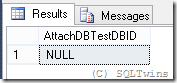
Next, let us detach the database using the system stored procedure sp_detach_db.

--Detach the database
USE master;
GO
EXEC sp_detach_db @dbname = 'AttachDBTest', @skipchecks = 'true' ;
GO

--Confirm that the database has been detached
USE master;
GO
SELECT DB_ID('AttachDBTest') AS AttachDBTestDBID;
GO
image

Now, let us attach the database again with the sp_attach_db system stored procedure.

--Attach the database
USE master;
GO
EXEC sp_attach_db 
    @dbname = 'AttachDBTest', 
    @filename1 = 'C:SQLDatabasesDBFileAttachTestAttachdat1.mdf',
    @filename2 = 'C:SQLDatabasesDBFileAttachTestAttachdat2.ndf',
    @filename3 = 'C:SQLDatabasesDBFileAttachTestAttachdat3.ndf',
    @filename4 = 'C:SQLDatabasesDBFileAttachTestAttachdat4.ndf',
    @filename5 = 'C:SQLDatabasesDBFileAttachTestAttachdat5.ndf',
    @filename6 = 'C:SQLDatabasesDBFileAttachTestAttachdat6.ndf',
    @filename7 = 'C:SQLDatabasesDBFileAttachTestAttachdat7.ndf',
    @filename8 = 'C:SQLDatabasesDBFileAttachTestAttachdat8.ndf',
    @filename9 = 'C:SQLDatabasesDBFileAttachTestAttachdat9.ndf',
    @filename10 = 'C:SQLDatabasesDBFileAttachTestAttachdat10.ndf',
    @filename11 = 'C:SQLDatabasesDBFileAttachTestAttachdat11.ndf',
    @filename12 = 'C:SQLDatabasesDBFileAttachTestAttachdat12.ndf',
    @filename13 = 'C:SQLDatabasesDBFileAttachTestAttachdat13.ndf',
    @filename14 = 'C:SQLDatabasesDBFileAttachTestAttachdat14.ndf',
    @filename15 = 'C:SQLDatabasesDBFileAttachTestAttachdat15.ndf',
    @filename16 = 'C:SQLDatabasesDBFileAttachTestAttachdat16.ndf',
    @filename17 = 'C:SQLDatabasesDBFileAttachTestAttachdat17.ndf',
    @filename18 = 'C:SQLDatabasesDBFileAttachTestAttachdat18.ndf',
    @filename19 = 'C:SQLDatabasesDBFileAttachTestAttachdat19.ndf',
    @filename20 = 'C:SQLDatabasesDBFileAttachTestAttachdat20.ndf',
    @filename21 = 'C:SQLDatabasesDBFileAttachTestAttachlog1.ldf';
GO

Msg 8144, Level 16, State 2, Procedure sp_attach_db, Line 0
Procedure or function sp_attach_db has too many arguments specified.

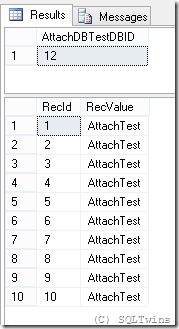
Now, let us try to attach the database via the CREATE DATABASE statement with the FOR ATTACH option.

--Attach the database using the CREATE DATABASE statement with the FOR ATTACH clause
USE master;
GO
CREATE DATABASE AttachDBTest ON PRIMARY  
    (NAME = Attach1,
    FILENAME = 'C:SQLDatabasesDBFileAttachTestAttachdat1.mdf',
    SIZE = 10MB,
    MAXSIZE = 200,
    FILEGROWTH = 20),
    ( NAME = Attach2,
    FILENAME = 'C:SQLDatabasesDBFileAttachTestAttachdat2.ndf',
    SIZE = 10MB,
    MAXSIZE = 200,
    FILEGROWTH = 20),
    ( NAME = Attach3,
    FILENAME = 'C:SQLDatabasesDBFileAttachTestAttachdat3.ndf',
    SIZE = 10MB,
    MAXSIZE = 200,
    FILEGROWTH = 20),
    ( NAME = Attach4,
    FILENAME = 'C:SQLDatabasesDBFileAttachTestAttachdat4.ndf',
    SIZE = 10MB,
    MAXSIZE = 200,
    FILEGROWTH = 20),
    ( NAME = Attach5,
    FILENAME = 'C:SQLDatabasesDBFileAttachTestAttachdat5.ndf',
    SIZE = 10MB,
    MAXSIZE = 200,
    FILEGROWTH = 20),
    ( NAME = Attach6,
    FILENAME = 'C:SQLDatabasesDBFileAttachTestAttachdat6.ndf',
    SIZE = 10MB,
    MAXSIZE = 200,
    FILEGROWTH = 20),
    ( NAME = Attach7,
    FILENAME = 'C:SQLDatabasesDBFileAttachTestAttachdat7.ndf',
    SIZE = 10MB,
    MAXSIZE = 200,
    FILEGROWTH = 20),
    ( NAME = Attach8,
    FILENAME = 'C:SQLDatabasesDBFileAttachTestAttachdat8.ndf',
    SIZE = 10MB,
    MAXSIZE = 200,
    FILEGROWTH = 20),
    ( NAME = Attach9,
    FILENAME = 'C:SQLDatabasesDBFileAttachTestAttachdat9.ndf',
    SIZE = 10MB,
    MAXSIZE = 200,
    FILEGROWTH = 20),
    ( NAME = Attach10,
    FILENAME = 'C:SQLDatabasesDBFileAttachTestAttachdat10.ndf',
    SIZE = 10MB,
    MAXSIZE = 200,
    FILEGROWTH = 20),
    (NAME = Attach11,
    FILENAME = 'C:SQLDatabasesDBFileAttachTestAttachdat11.mdf',
    SIZE = 10MB,
    MAXSIZE = 200,
    FILEGROWTH = 20),
    ( NAME = Attach12,
    FILENAME = 'C:SQLDatabasesDBFileAttachTestAttachdat12.ndf',
    SIZE = 10MB,
    MAXSIZE = 200,
    FILEGROWTH = 20),
    ( NAME = Attach13,
    FILENAME = 'C:SQLDatabasesDBFileAttachTestAttachdat13.ndf',
    SIZE = 10MB,
    MAXSIZE = 200,
    FILEGROWTH = 20),
    ( NAME = Attach14,
    FILENAME = 'C:SQLDatabasesDBFileAttachTestAttachdat14.ndf',
    SIZE = 10MB,
    MAXSIZE = 200,
    FILEGROWTH = 20),
    ( NAME = Attach15,
    FILENAME = 'C:SQLDatabasesDBFileAttachTestAttachdat15.ndf',
    SIZE = 10MB,
    MAXSIZE = 200,
    FILEGROWTH = 20),
    ( NAME = Attach16,
    FILENAME = 'C:SQLDatabasesDBFileAttachTestAttachdat16.ndf',
    SIZE = 10MB,
    MAXSIZE = 200,
    FILEGROWTH = 20),
    ( NAME = Attach17,
    FILENAME = 'C:SQLDatabasesDBFileAttachTestAttachdat17.ndf',
    SIZE = 10MB,
    MAXSIZE = 200,
    FILEGROWTH = 20),
    ( NAME = Attach18,
    FILENAME = 'C:SQLDatabasesDBFileAttachTestAttachdat18.ndf',
    SIZE = 10MB,
    MAXSIZE = 200,
    FILEGROWTH = 20),
    ( NAME = Attach19,
    FILENAME = 'C:SQLDatabasesDBFileAttachTestAttachdat19.ndf',
    SIZE = 10MB,
    MAXSIZE = 200,
    FILEGROWTH = 20),
    ( NAME = Attach20,
    FILENAME = 'C:SQLDatabasesDBFileAttachTestAttachdat20.ndf',
    SIZE = 10MB,
    MAXSIZE = 200,
    FILEGROWTH = 20) 
LOG ON 
   (NAME = Attachlog1,
    FILENAME = 'C:SQLDatabasesDBFileAttachTestAttachlog1.ldf',
    SIZE = 100MB,
    MAXSIZE = 200,
    FILEGROWTH = 20)
FOR ATTACH
;
GO

--Confirm that the database has been detached
USE master;
GO
SELECT DB_ID('AttachDBTest') AS AttachDBTestDBID;
GO

--Validate Test Data
USE AttachDBTest;
GO
SELECT * FROM dbo.TestTable;
GO
image

This example just demonstrates that when Microsoft recommends a switch from one syntax to another, there has to be some reason behind it and that newer options should be evaluated for replacing older ones.

References

Until we meet next time,
Be courteous. Drive responsibly.

#0356 – SQL Server – Search with the LIKE operator and the underscore (_) wildcard character


String searches in most applications are based on the “contains” or “begins-with” paradigms – which are implemented by the use of the LIKE logical operator. The LIKE operator allows for the use of wildcard characters (underscore being one of them), which is the part that most people unknowingly overlook when they have been working with T-SQL for quite some time.

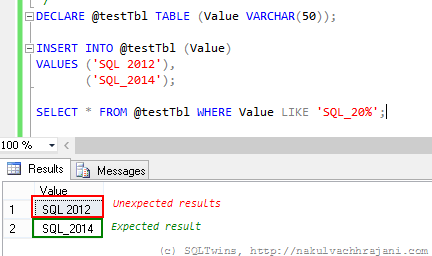
One such incident happened the other day at work when I was asked by a colleague to help him out with a query that appeared correct, but failed to give the expected results. For the sake of brevity, I have condensed the issue into a test scenario below:

DECLARE @testTbl TABLE (Value VARCHAR(50));

INSERT INTO @testTbl (Value)
VALUES ('SQL 2012'),
('SQL_2014');

SELECT * FROM @testTbl WHERE Value LIKE 'SQL_20%';

image

As can be seen in the screenshot above, the results are not what one would expect them to be at the first glance. One would have expected it to return only the string “SQL_2014” and yet the T-SQL query is returning both the records.

Normally, data coming in via flat-files from raw-data collection systems would require such kinds of string searches and manipulations. A well designed system would have these static values as a look-up so that all references look at the same version of the string value

Solution(s)

There are not one, but two possible solutions to choose from to work around this issue.

Using square brackets ([]) around the wildcard character

Because we want to consider the underscore as a character and not as a wildcard, the easiest thing to do would be to surround it with square brackets, similar to what is shown in the query below.

SELECT * FROM @testTbl WHERE Value LIKE 'SQL[_]20%';

image

Using the ESCAPE keyword

The other option, which I have discussed in one of my earlier posts, is to use the ESCAPE keyword. The ESCAPE keyword works on the basis of a user specified escape sequence. When encountered, the query engine will simply ignore the wildcard character and treat it as a normal character.

SELECT * FROM @testTbl WHERE Value LIKE 'SQL*_20%' ESCAPE '*';

image

Conclusion

The moral here is that one must always remember the basics – this thumb rule not only applies to software, but in everything that we go about doing in our day to day lives.

The other key learning that I encourage everyone to take from this is that Occam’s Razor is real – from the multiple explanations that a problem may have, the explanation with the least number of assumptions should be selected as the answer. In this case, the simplest theory was –  human error, which was indeed the case.

References

Until we meet next time,
Be courteous. Drive responsibly.