
Tag Archives: Debugging

Articles related to Microsoft SQL Server debugging

#0356 – SQL Server – Search with the LIKE operator and the underscore (_) wildcard character


String searches in most applications are based on the “contains” or “begins-with” paradigms – which are implemented by the use of the LIKE logical operator. The LIKE operator allows for the use of wildcard characters (underscore being one of them), which is the part that most people unknowingly overlook when they have been working with T-SQL for quite some time.

One such incident happened the other day at work when I was asked by a colleague to help him out with a query that appeared correct, but failed to give the expected results. For the sake of brevity, I have condensed the issue into a test scenario below:

DECLARE @testTbl TABLE (Value VARCHAR(50));

INSERT INTO @testTbl (Value)
VALUES ('SQL 2012'),
('SQL_2014');

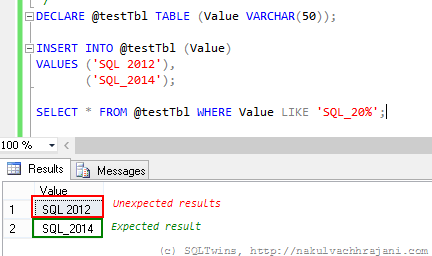
SELECT * FROM @testTbl WHERE Value LIKE 'SQL_20%';
image

As can be seen in the screenshot above, the results are not what one would expect them to be at the first glance. One would have expected it to return only the string “SQL_2014” and yet the T-SQL query is returning both the records.

Normally, data coming in via flat-files from raw-data collection systems would require such kinds of string searches and manipulations. A well designed system would have these static values as a look-up so that all references look at the same version of the string value

Solution(s)

There are not one, but two possible solutions to choose from to work around this issue.

Using square brackets ([]) around the wildcard character

Because we want to consider the underscore as a character and not as a wildcard, the easiest thing to do would be to surround it with square brackets, similar to what is shown in the query below.

SELECT * FROM @testTbl WHERE Value LIKE 'SQL[_]20%';

image

Using the ESCAPE keyword

The other option, which I have discussed in one of my earlier posts, is to use the ESCAPE keyword. The ESCAPE keyword works on the basis of a user specified escape sequence. When encountered, the query engine will simply ignore the wildcard character and treat it as a normal character.

SELECT * FROM @testTbl WHERE Value LIKE 'SQL*_20%' ESCAPE '*';

image

Conclusion

The moral here is that one must always remember the basics – this thumb rule not only applies to software, but in everything that we go about doing in our day to day lives.

The other key learning that I encourage everyone to take from this is that Occam’s Razor is real – from the multiple explanations that a problem may have, the explanation with the least number of assumptions should be selected as the answer. In this case, the simplest theory was –  human error, which was indeed the case.

References

Until we meet next time,
Be courteous. Drive responsibly.

#0352 – SQL Server – Working with Temporary Tables (L100) – Scope


In this post, I provide a Level 100 primer on the scope related considerations for local temporary tables.

While I have written about temporary tables a lot in the past (and the same has also been done by other writers), there are some questions that I keep encountering from the team or in various forums on the Internet which is why I am writing this post.

Temporary tables use the tempdb and come in two variants:

  1. Local Temporary Tables
    • As the name implies, they are local to the connection that created them
    • Therefore, if multiple connections request creation of a temporary table with the same name, each connection gets it’s own unique copy of the temporary table
    • The local temporary tables are implicitly deleted when the connection is closed
    • To create a local temporary table, prefix the desired table name with a single hash (#) mark, e.g. A local temporary table for employees might be named #Employee or #HumanResources
  2. Global Temporary Tables
    • These are global to the entire SQL Server instance and are therefore shared by all connections to the server
    • They are implicitly deleted when the last connection referencing them is closed
    • To create a global temporary table, prefix the desired table name with a double hash (##) mark, e.g. A global temporary table for employees might be named ##Employee or ##HumanResources

A demo on local temporary tables

The most important point that is missed out by most novice developers is that temporary tables are session specific. To briefly demonstrate this, allow me to follow the following steps:

  1. Open SQL Server Management Studio and launch two (2) query editor windows
    • In each window, connect to the same database and same SQL Server instance
  2. Run the following in window #1. This snippet creates a local temporary table and populates some records into it
--Window 01
USE AdventureWorks2012;
GO

--Create the local temporary table if it does not exist
IF OBJECT_ID('tempdb..#BasicEmployeeList','U') IS NULL
BEGIN
CREATE TABLE #BasicEmployeeList 
    ( BusinessEntityID INT          NOT NULL,
      JobTitle         NVARCHAR(50) NOT NULL,
      Title            NVARCHAR(8)      NULL,
      FirstName        NVARCHAR(50) NOT NULL,
      MiddleName       NVARCHAR(50)     NULL,
      LastName         NVARCHAR(50) NOT NULL
    );
END;
GO

INSERT INTO #BasicEmployeeList
    (BusinessEntityID,
     JobTitle,
     Title,
     FirstName,
     MiddleName,
     LastName
    )
SELECT p.BusinessEntityID,
       e.JobTitle,
       p.Title,
       p.FirstName,
       p.MiddleName,
       p.LastName
FROM Person.Person AS p
INNER JOIN HumanResources.Employee AS e
ON p.BusinessEntityID = e.BusinessEntityID;
GO
  1. Without closing window #1, Switch over to window #2
  2. Attempt to run the statement shown below
    • The system will encounter an error
USE AdventureWorks2012;
GO
SELECT bel.BusinessEntityID,
       bel.JobTitle,
       bel.Title,
       bel.FirstName,
       bel.MiddleName,
       bel.LastName
FROM #BasicEmployeeList AS bel;
GO

/* ERROR
Msg 208, Level 16, State 0, Line 1
Invalid object name '#BasicEmployeeList'.
*/
  1. The error is received because the temporary table was created as a local temporary table and is therefore inaccessible to other connections

Important points to note

  • Because temporary tables are persisted in the tempdb, the tempdb can see significantly large I/O operations if your application makes use of a lot of temporary storage
  • SQL Server gives Local Temporary tables an auto-generated name which is transparent to the caller to allow multiple connections to the use local temporary tables with the same name [Link]
  • Local temporary tables can be shared to referencing stored procedures as long as they use the same connection
    • This is documented in my post [Link]
  • Creating named constraints on temporary tables prevent them from being used concurrently
  • Temporary tables do not support:
    • Foreign key constraints [Links]
    • Triggers

Until we meet next time,

Be courteous. Drive responsibly.

#0349 – SQL Server – SSMS Usability – Unable to Show XML, Unexpected End of File when parsing


Today’s post comes from a recent experience. I was trying to extract an XML from one of the logs that we maintain in the application when exchanging data over an interface. The XML was coming from a table and I had written a simple SELECT statement similar to the one shown below:

SELECT xt.XMLTest
FROM dbo.XMLSSMSTest AS xt;
GO

While SSMS displayed the XML in the results pane, clicking on the XML attempts to open the XML. With a very large XML, it results into the following error:

image

——————————
TITLE: Microsoft SQL Server Management Studio
——————————

Unable to show XML. The following error happened:
Unexpected end of file while parsing Name has occurred. Line 1, position 2097154.

One solution is to increase the number of characters retrieved from the server for XML data. To change this setting, on the Tools menu, click Options.

——————————
BUTTONS: OK
——————————

The solution

The solution is actually indicated in the error message itself – increase the number of characters being retrieved from the server for XML data. To do this:

  1. Go to Tools –> Options
  2. Expand the “Query Results” node
  3. Expand SQL Server –> Results to Grid options
  4. Under “Maximum Characters Retrieved”, select the appropriate value for “XML Data”
  5. Click “OK” and close out of the Options window
  6. Attempt to open the XML again

image

A note of caution

Changing the Maximum Characters Retrieved value may impact the SSMS performance depending upon the size of the XML being opened.

Until we meet next time,

Be courteous. Drive responsibly.

#0347 – SQL Server – Basics – A SELECT that does not fetch anything also does not SET anything


In today’s post, I go all the way back to the basics because of a logical bug I saw in production code recently.

It is always said to be a good practice to initialize variables within procedures so that you know what the default value is and what are valid and invalid values for a variable. For example, if the procedure does not have to deal with NULLs, then it is a good idea to initialize the variables as NULL so that a simple = NULL check is sufficient to tell whether we still have a default, invalid value or not.

The code below attempts to fetch the vacation hours for a given employee. The variables have default values defined, so it follows the variable initialization best practice mentioned above. In all probability, static code analysis/review would have never caught a logical bug hidden in the code below which raises it’s head when the code is run with an incorrect employee Id.

USE AdventureWorks2012;
GO

DECLARE @employeeVacationHours INT = -1;
DECLARE @employeeId INT;

--To be filled in by user
SELECT @employeeId = 777;

SELECT @employeeVacationHours = VacationHours
FROM HumanResources.Employee
WHERE BusinessEntityID = @employeeId;

IF (@employeeVacationHours < 0)
PRINT 'Employee has invalid vacation hours.';

SELECT @employeeVacationHours AS VacationHours;

/* RESULT:

VacationHours
-------------
-1

*/

In this case, the SELECT statement which is supposed to fetch the vacation hours for the employee will not return any records. Because of this, the variable will continue to preserve it’s value and will not reset to the default value or NULL.

A SELECT statement that does not fetch anything also does not SET anything.

The scenario mentioned here is a simplified one – in the production code, this logical bug caused the procedure to go down a completely different code path causing various other “random” issues.

The solution to this problem? In this example, it’s quite simple – change the initialization value for the @employeeVacationHours variable to NULL and then check for NULL after the SELECT operation is complete.

Until we meet next time,

Be courteous. Drive responsibly.

#0343 – SQL Server – String values and effect on DateTime objects


One of the things that I was frequently told during my schooling was to initialize the variables that I use in my programs and scripts. The obvious benefit of having such mentors is that it has now become a matter of habit for me to initialize every variable in my SQL scripts.

One script required me to use the DATETIME datatype and I added an initialization to the variable explicitly. The script was simple enough and I had it all setup as pseudocode on my little notepad. However, in translating my thoughts from the notepad to the SQL script, I made a fatal error – I ended up initializing the DATETIME variable with a string. What follows is an account of the rather painful realization about the impact of my error.

Normally, when we attempt to assign a string value to a DATETIME variable, it results into an error.

DECLARE @myDate DATETIME;
SET @myDate = 'abcd';

SELECT @myDate;
GO

Immediately, we receive the following error:

Msg 241, Level 16, State 1, Line 2
Conversion failed when converting date and/or time from character string.

However, supplying valid dates as string does work.

--Passing valid dates as strings does work
DECLARE @myDate1 DATETIME, 
        @myDate2 DATETIME;
SET @myDate1 = '08/25/2014'
SET @myDate2 = 'August 25, 2014';

SELECT @myDate1 AS MyDate1, 
       @myDate2 AS MyDate2;
GO

/* RESULTS:
MyDate1                 MyDate2
----------------------- -----------------------
2014-08-25 00:00:00.000 2014-08-25 00:00:00.000
*/

However, I had initialized the variable with an empty, i.e. blank string. This does not return any error. However, it does do something different – something that might cause you to go around in circles unless maybe the code is reviewed by another set of eyes (which is what happened in my case) or after you take a much deserved break.

This is what I had done:

DECLARE @myDate DATETIME;
SET @myDate = '';

And the result was something that threw me off because all subsequent calculations that I had done on that particular date variable were returning incorrect results. After a couple of minutes and some help in reviewing the code again, I realized that:

Initializing a DATETIME, DATE or TIME variable with empty string sets it to 01/01/1900 (default value for DATE & TIME data-types).

Initialization with an empty string had initialized my date variable with the value – 00hrs on 01/01/1900, which is the default value for DATE & TIME data-types.

DECLARE @myDate DATETIME;
SET @myDate = '';

SELECT @myDate AS MyDate;
GO

/* RESULT
MyDate
-----------------------
1900-01-01 00:00:00.000
*/

NOTE: Attempting to use an empty string as default value for DATE and TIME data-types in the ISNULL() and COALESCE() functions also results into 01/01/1900 being returned as the default value.

Moral of the story

  • Always initialize all variables – it serves a dual purpose by both preventing and (as in this case) identifying potential errors
  • Be careful about the value being used for the initialization – it is possible that one may end up with an undesired effect of an incorrect initialization
  • It’s always good to have code reviews!

Further Reading

  • DATE and TIME data-types [MSDN Link]

Until we meet next time,

Be courteous. Drive responsibly.