
Tag Archives: Development

Articles on Microsoft SQL Server development

#0373 – SQL Server – Interview Questions – Parameters required for server-side paging mechanisms


For a mid-level SQL developer profile, this is one of my favourite interview questions if their current projects involve some sort of paging mechanism while displaying results on a grid.

What is the minimum number of parameters that your stored procedure needs to implement server-side paging?

Despite the multiple blog posts around this topic, this question surprisingly still stumps most of the developers.

The answer is quite simple – at a basic level, you absolutely need two (2) input parameters on your stored procedure to implement server-side paging:

  1. The page number
  2. The page size, i.e. the number of records to be displayed on each page

Of course, the implementation may vary – one can have multiple additional parameters like the sort column and the sort order, but at the very minimum one needs the two (2) parameters listed above.

For reference, here is a sample implementation (for SQL Server 2008 R2 and SQL Server 2012):

USE AdventureWorks2012 ;
GO
SET NOCOUNT ON ;

DECLARE @pageSize INT = 100 ;
DECLARE @pageNumber INT = 3 ;

--SQL 2008 R2 Method
--Source Data, fetched with paging
;
WITH    SourceDataCTE ( CarrierTrackingNumber, SalesOrderId, TotalShipmentValue, RowNumber )
          AS ( SELECT   sod.CarrierTrackingNumber,
                        sod.SalesOrderId,
                        SUM(sod.LineTotal) AS TotalShipmentValue,
                        ROW_NUMBER() OVER ( ORDER BY sod.CarrierTrackingNumber, sod.SalesOrderId ) AS RowNumber
               FROM     Sales.SalesOrderHeader AS soh
                        INNER JOIN Sales.SalesOrderDetail AS sod ON sod.SalesOrderID = soh.SalesOrderID
               WHERE    soh.ShipDate IS NOT NULL
                        AND sod.CarrierTrackingNumber IS NOT NULL
               GROUP BY sod.CarrierTrackingNumber,
                        sod.SalesOrderId
             )
    SELECT TOP ( @pageSize )
            sdCTE.CarrierTrackingNumber,
            sdCTE.SalesOrderId,
            sdCTE.TotalShipmentValue,
                     sdCTE.RowNumber
    FROM    SourceDataCTE AS sdCTE
    WHERE   sdCTE.RowNumber BETWEEN ( ( @pageNumber * @pageSize ) + 1 )
                            AND     ( ( @pageNumber + 1 ) * @pageSize ) ;

--SQL 2012 Method
SELECT   sod.CarrierTrackingNumber,
        sod.SalesOrderId,
        --SUM(sod.LineTotal) OVER ( ORDER BY sod.CarrierTrackingNumber, sod.SalesOrderId ) AS TotalShipmentValue,
        SUM(sod.LineTotal) AS TotalShipmentValue,
        ROW_NUMBER() OVER ( ORDER BY sod.CarrierTrackingNumber, sod.SalesOrderId ) AS RowNumber
FROM     Sales.SalesOrderHeader AS soh
        INNER JOIN Sales.SalesOrderDetail AS sod ON sod.SalesOrderID = soh.SalesOrderID
WHERE    soh.ShipDate IS NOT NULL
        AND sod.CarrierTrackingNumber IS NOT NULL
GROUP BY sod.CarrierTrackingNumber,
        sod.SalesOrderId
ORDER BY sod.CarrierTrackingNumber
OFFSET (@pageNumber * @pageSize) ROWS
FETCH NEXT (@pageSize) ROWS ONLY
GO

Here’s the result of the code snippet provided above:
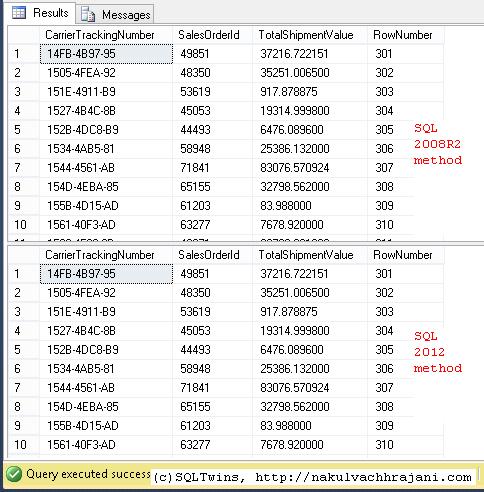
Shows the output of the various server-side paging mechanisms available for Microsoft SQL Server

SQL Server Paging Mechanisms

Until we meet next time,
Be courteous. Drive responsibly.

#0371 – SQL Server – Best Practices – Always use precise decimal data-types


I recently came across a concrete example of something that has always been maintained as a best practice – when working on items that are sensitive to decimal precision, always use precise data-types like DECIMAL instead of FLOAT or REAL.

The following example clearly demonstrates that using a FLOAT in mathematical calculations may change the outcome of the computation. For financial calculations, this would mean incorrect reporting of revenues.

USE tempdb;
GO
DECLARE @floatValue FLOAT = 1.5,
        @decimalValue DECIMAL(5,2) = 1.5,
        @multiplicationFactor INT = 159;

SELECT @floatValue AS FloatValue,
       @decimalValue AS DecimalValue,
       (@multiplicationFactor*(@floatValue/100)) AS FloatBasedValue,
       (@multiplicationFactor*(@decimalValue/100)) AS DecimalBasedValue,
       ROUND((@multiplicationFactor*(@floatValue/100)),2) AS RoundedFloatBasedValue,
       ROUND((@multiplicationFactor*(@decimalValue/100)),2) AS RoundedDecimalBasedValue;

The output of this simple computation is provided in the screenshot below:

Result shows that we have a rounding error when a value based off a FLOAT is rounded to 2 decimals v/s when a fixed precision DECIMAL is rounded

Impact of using imprecise datatypes in mathematical computations

As can clearly be seen, the computations performed using an imprecise datatype (FLOAT) result in a rounding error. When compounded over multiple derived calculations, this can have a serious impact on the end result.

The conclusion therefore is simply that it is always a best practice to use precise datatypes when working with financial calculations.

Further Reading

Until we meet next time,
Be courteous. Drive responsibly.
#0366 – SQL Server – SSMS – Simulating a TCP/IP connection on the same machine as the server


Most development environments that I have worked in have a developer edition of Microsoft SQL Server on the local machine of the developer. Hence, both the client (SSMS) and the database server are often on the same machine.

What this means is that the default connection mechanism used for all connections will be “Shared Memory”. However, when working on features like auditing, the ability to simulate a TCP/IP connection becomes important. Today, I document a mechanism that you can use to initiate a TCP/IP connection even when both server and client (SSMS) are the on the same machine, provided the server has been configured to allow TCP/IP connections in the Configuration Manager.

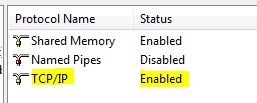
SQLTwins, Post #0366 - Ensuring that TCP/IP connections to the server are enabled via the SQL Server Configuration Manager

SQL Server Configuration Manager – ensuring that TCP/IP connections to the server are enabled

When initiating a new connection using the SQL Server Management Studio, simply click on the “Options” button in the “Connect to Database Engine” window, and navigate to the “Connection properties” tab.

SQLTwins, Post #0366 - SQL Server Management Studio (SSMS) - The "Connect to Database Engine" window

SQL Server Management Studio (SSMS) – The “Connect to Database Engine” window

SQLTwins, Post #0366 - SQL Server Management Studio (SSMS) - Using the Connection Properties tab to change the Network protocol when connecting to a SQL Server instance

SQL Server Management Studio (SSMS) – Using the Connection Properties tab to change the Network protocol

In the “Network” group, locate the “Network Protocol” drop-down. Change the value from “<default>” to “TCP/IP“.

Finally, verify the credentials in the “Login” tab and click “Connect“. That’s it!

Use the CONNECTIONPROPERTY() function described in my previous post to confirm that you are indeed connected via TCP/IP.

Further Reading

  • Testing your connection strings using SSMS [Link]
  • Using CONNECTIONPROPERTY to determine connection properties [Link]

Until we meet next time,
Be courteous. Drive responsibly.

#0363 – SQL Server – T-SQL Script to generate week date ranges from any given day


Recently, I was asked to help out in implementing a requirement for a reporting application. The application was designed to report weekly consumption trends from the day the report is run, and we therefore had to generate a lookup with week long date ranges from any given day.

For example, if the report is run from November 30, 2015, the week ends on December 06, 2015 and subsequent weeks are at 7 days intervals from that point on. If the report is run on December 02, 2015, the first week ends on December 08, 2015 and so on.

In this post, I present two scripts that I created as PoC for the implementation.

Script #01

The first script uses a simple approach – it basically runs a WHILE loop starting from the start date supplied to the script and keeps adding 7 days to the date supplied as the start date. This loop continues until the derived start date exceeds the end date supplied for generating the lookup.

USE tempdb;
GO
DECLARE @weekStartDate DATE = '2015-12-02';
DECLARE @weekEndDate DATE = '2016-02-08';
DECLARE @iterationDate DATE = @weekStartDate;
DECLARE @weekNumberIterator INT = 1;

DECLARE @weekDay TABLE (RelativeWeekNumber INT  NOT NULL,
                        WeekStartDate      DATE NOT NULL,
                        WeekEndDate        DATE NOT NULL
                       );

--Generator
WHILE DATEDIFF(DAY,@iterationDate,@weekEndDate) > 0
BEGIN
    INSERT INTO @weekDay (RelativeWeekNumber, WeekStartDate, WeekEndDate)
    SELECT @weekNumberIterator             AS RelativeWeekNumber,
           @iterationDate                  AS WeekStartDate,
           DATEADD(DAY, 6, @iterationDate) AS WeekEndDate;     --Week will end 6 days AFTER start date

    SELECT @iterationDate = DATEADD(DAY, 7, @iterationDate),   --New week will start 7 days AFTER start date
           @weekNumberIterator += 1;                           --The relative week number is a simple iterator
END

SELECT wd.RelativeWeekNumber,
       wd.WeekStartDate,
       wd.WeekEndDate
FROM @weekDay AS wd;
GO
/*****************
**** RESULTS *****
*****************/
RelativeWeekNumber WeekStartDate WeekEndDate
------------------ ------------- -----------
1                  2015-12-02    2015-12-08
2                  2015-12-09    2015-12-15
3                  2015-12-16    2015-12-22
4                  2015-12-23    2015-12-29
5                  2015-12-30    2016-01-05
6                  2016-01-06    2016-01-12
7                  2016-01-13    2016-01-19
8                  2016-01-20    2016-01-26
9                  2016-01-27    2016-02-02
10                 2016-02-03    2016-02-09

(10 row(s) affected)

Script #02

This version uses a recursive CTE to achieve the same result.

-----Alternate Logic, using Recursive CTE
DECLARE @recursiveWeekStartDate DATE = '2015-12-02';
DECLARE @recursiveWeekEndDate DATE = '2016-02-08';

;WITH WeekPatternGenerator (RelativeWeekNumber, WeekStartDate, WeekEndDate)
AS (--Anchor Member
    SELECT 1 AS RelativeWeekNumber,
           @recursiveWeekStartDate AS WeekStartDate,
           DATEADD(DAY, 6, @recursiveWeekStartDate)  AS WeekEndDate
    UNION ALL
    --Recursive Member
    SELECT (wpg.RelativeWeekNumber + 1) AS RelativeWeekNumber,
           DATEADD(DAY,7,wpg.WeekStartDate) AS WeekStartDate,
           DATEADD(DAY,6,DATEADD(DAY,7,wpg.WeekStartDate)) AS WeekEndDate
    FROM WeekPatternGenerator AS wpg
    WHERE wpg.WeekStartDate < DATEADD(DAY,-6,@recursiveWeekEndDate)
  )
SELECT wpgCTE.RelativeWeekNumber,
       wpgCTE.WeekStartDate,
       wpgCTE.WeekEndDate
FROM WeekPatternGenerator AS wpgCTE;
GO
/*****************
**** RESULTS *****
*****************/
RelativeWeekNumber WeekStartDate WeekEndDate
------------------ ------------- -----------
1                  2015-12-02    2015-12-08
2                  2015-12-09    2015-12-15
3                  2015-12-16    2015-12-22
4                  2015-12-23    2015-12-29
5                  2015-12-30    2016-01-05
6                  2016-01-06    2016-01-12
7                  2016-01-13    2016-01-19
8                  2016-01-20    2016-01-26
9                  2016-01-27    2016-02-02
10                 2016-02-03    2016-02-09

(10 row(s) affected)

The Reverse – Requirement to find weekdays between two dates

In order to validate the bigger sets of date ranges, one can use the approaches documented in the post [Interview Question of the Week #047 – Logic To Find Weekdays Between Two Dates] by Pinal Dave [B|T].

Until we meet next time,
Be courteous. Drive responsibly.

#0362 – SQL Server – Change Detection in Microsoft SQL Server – Limitations of T-SQL: BINARY_CHECKSUM and CHECKSUM


Identification of changes made to the data in a system is an important aspect of data storage design and data cleanup/quality improvement activities. For most enterprise systems, the need to implement change detection is driven by some sort of auditing requirements. A couple of years ago, I authored a series of articles on SQLServerCentral.com and on this blog around data change and tamper detection mechanisms available in Microsoft SQL Server. These are:

  • An in-depth look at change detection in SQL Server – Part 01 [Link]
  • An in-depth look at change detection in SQL Server – Part 02 [ Link]
  • HASHBYTES: Is CHECKSUM really required? [Link]
  • HASHBYTES-String or binary data would be truncated: Msg 8152 [ Link]

A recent coincidence at work prompted me to write this post. I was working on comparing a set of records from one table to another after a data cleanup exercise when I realized that a couple of my checksums were coming up as 0, i.e. a blank string (as disccussed in my article on Chage Detection, part 01). The twist to the tale was that there were no blank strings in the sample that I was using.

The Problem

In order to demonstrate the issue clearly, I have prepared the following sample. As can be seen from the sample, both CHEKSUM and BINARY_CHECKSUM work as expected as long as the string under evaluation is less than 26,000 characters in length. As soon as the string hits the 26,000 mark, the functions stop working.

USE tempdb;
GO

DECLARE @stringPatternToReplicate VARCHAR(MAX) = 'a'
DECLARE @stringPatternToEvaluate VARCHAR(MAX)
DECLARE @replicateTillLength INT = 25999
 
SELECT @stringPatternToEvaluate = REPLICATE(@stringPatternToReplicate,@replicateTillLength);
 
SELECT LEN(@stringPatternToEvaluate) AS StringLength,
       CHECKSUM(@stringPatternToEvaluate) AS CheckSumForString,
       BINARY_CHECKSUM(@stringPatternToEvaluate) BinaryCheckSumForString,
       @stringPatternToEvaluate AS StringPatternToEvaluate;

--Repeat after incrementing the @replicateTillLength by 1
SELECT @replicateTillLength += 1
 
SELECT @stringPatternToEvaluate = REPLICATE(@stringPatternToReplicate,@replicateTillLength);
 
SELECT LEN(@stringPatternToEvaluate) AS StringLength,
       CHECKSUM(@stringPatternToEvaluate) AS CheckSumForString,
       BINARY_CHECKSUM(@stringPatternToEvaluate) BinaryCheckSumForString,
       @stringPatternToEvaluate AS StringPatternToEvaluate;
GO

Solution?

The quick solution that I moved ahead with was to perform a direct comparison of the strings involved.

Now, we know that CHECKSUM and BINARY_CHECKSUM will not work if the datatype being evaluated is one of: text/ntext/image/cursor/xml. But, in the example provided above, the strings were the classic – VARCHAR with the MAX keyword to allow storage > 8000 characters.

However, I would like to invite views from you, the kind reader on whether you have faced a similar issue in the past or whether you have any other ideas to resolve this issue.

Summary:

Checksum and BINARY_CHECKSUM can fail to detect a change if:

  • The characters involved are not standard ASCII characters, i.e. have an ASCII value greater than 255
  • The string is a blank string
  • The string is more than 25,999 characters in length (as demonstrated above)

Open Item

I would like to invite views from you, the kind reader on whether you have faced a similar issue in the past or whether you have any other ideas to resolve this issue.

I have written up a Microsoft Connect ticket for this issue to look for an official explanation [MS Connect item #2021430].

Further Reading

  • An in-depth look at change detection in SQL Server – Part 01 [Link]
  • An in-depth look at change detection in SQL Server – Part 02 [ Link]
  • HASHBYTES: Is CHECKSUM really required? [Link]
  • HASHBYTES-String or binary data would be truncated: Msg 8152 [ Link]

Until we meet next time,
Be courteous. Drive responsibly.