Tag Archives: Development

Articles on Microsoft SQL Server development

#0406 – SQL Server – Remember that spaces and blank strings are the same


It was recently brought to my attention that a particular script was passing spaces when it should not. Here’s an example:

DECLARE @spaceCharacter NVARCHAR(1) = N' ';
DECLARE @blankCharacter NVARCHAR(1) = N'';

--Confirm that we are looking at different values
--The ASCII codes are different!
SELECT ASCII(@spaceCharacter) AS ASCIICodeForSpace,
       ASCII(@blankCharacter) AS ASCIICodeForBlankString;

--Compare a blank string with spaces
IF (@spaceCharacter = @blankCharacter)
    SELECT 'Yes' AS IsSpaceSameAsBlankString;
ELSE 
    SELECT 'No' AS IsSpaceSameAsBlankString;
GO

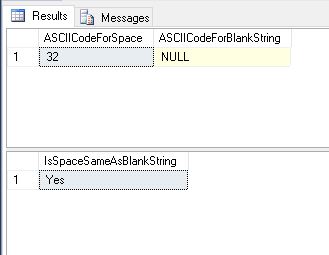
/* RESULTS
ASCIICodeForSpace ASCIICodeForBlankString
----------------- -----------------------
32                NULL

IsSpaceSameAsBlankString
------------------------
Yes
*/
01_Symptom

We then checked the LENGTH and DATALENGTH of both strings and noticed something interesting – the check on the LENGTH was trimming out trailing spaces whereas the check on the DATALENGTH was not.

DECLARE @spaceCharacter NVARCHAR(1) = N' ';
DECLARE @blankCharacter NVARCHAR(1) = N'';

--Check the length
SELECT LEN(@spaceCharacter) AS LengthOfSpace, 
       LEN(@blankCharacter) AS LengthOfBlankCharacter,
       DATALENGTH(@spaceCharacter) AS DataLengthOfSpace, 
       DATALENGTH(@blankCharacter) AS DataLengthOfBlankCharacter;
GO

/* RESULTS
LengthOfSpace LengthOfBlankCharacter DataLengthOfSpace DataLengthOfBlankCharacter
------------- ---------------------- ----------------- --------------------------
0             0                      2                 0
*/

02_LengthAndDataLength

Often, we loose sight of the most basic concepts – they hide in our subconscious. This behaviour of SQL Server is enforced by the SQL Standard (specifically SQL ’92) based on which most RDBMS systems are made of.

The ideal solution for an accurate string comparison was therefore to also compare the data length in addition to a normal string comparison.

DECLARE @spaceCharacter NVARCHAR(1) = N' ';
DECLARE @blankCharacter NVARCHAR(1) = N'';

--The Solution
IF (@spaceCharacter = @blankCharacter) 
   AND (DATALENGTH(@spaceCharacter) = DATALENGTH(@blankCharacter))
    SELECT 'Yes' AS IsSpaceSameAsBlankString;
ELSE 
    SELECT 'No' AS IsSpaceSameAsBlankString;
GO

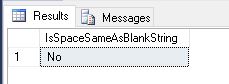
/* RESULTS
IsSpaceSameAsBlankString
------------------------
No
*/
03_Solution

Further Reading

  • How SQL Server Compares Strings with Trailing Spaces [KB316626]

Until we meet next time,

Be courteous. Drive responsibly.

#0404 – SQL Server – Interview Question – What is logical data integrity?


Recently, I encountered an interesting question in one of the forums:

What is logical data integrity?

The person who posted the question was reading about SQL Server and databases in general, when this term was encountered. Because the answer to this question can help clarify one’s understanding of data design  concepts, I thought it would also make a very interesting interview question as well.

Today, I try to describe that data integrity is.

What is data integrity?

Data is a critical part of any business. But, data by itself holds no value. For data to be information of business value, it needs to be valid with respect to the business domain.

A piece of data may be perfectly acceptable from the physical design perspective, but may be still be invalid for the domain.

Let’s take an example – a rate of 2000 is perfectly acceptable for an integer. That is physical data integrity – the value is valid with respect to the physical design of the database. But, if  we are talking  about an application that captures and analyzes patient/medicinal data, the rate of 2000 is totally invalid and indicates some sort of logical bug/corruption.

Other examples would be a meeting end date that’s less than the meeting start date or a business/person without a name.

A data point may not be acceptable within the business rules defined for a domain. Similarly, what’s valid as a data point for one domain may be invalid for another domain. Ensuring that your database only accepts valid values with respect to your domain is what I call logical data integrity”.

Types of Data Integrity

Logical data integrity can be enforced in two ways:

Declarative Data Integrity

If data  integrity is enforced via the data model (implemented via the Data-Definition-Language, i.e. DDL), it is declarative data  integrity. One would enforce declarative integrity via the elements of the table definition:

  • Appropriate Data-Types
    • In our example for the medical domain, it would limit the possibility of corruption if a TINYINT is used to store the heart rate instead of an INT
  • Primary Keys
    • Avoid the insertion of duplicate data!
  • Foreign Keys
    • Ensures that all references are known (it is a valid primary key in another table)
  • Default, Check, Unique and Not-NULL constraints
    • Unique and Not-NULL constraints help maintain uniqueness and avoid insertion of unknown (NULL) data
    • Usage of default constraints ensure that by default unknown (NULL) values are replaced by valid default values
    • Check constraints help ensure that data meets the valid range defined by the business (e.g. a check constraint would help ensure that the meeting end date is greater than or equal to the start date)

Procedural Data Integrity

Legacy applications (I have worked on a few that match this description) which were originally developed in the days of flat-file databases, often used procedural code to enforce data integrity.

When these were migrated to Microsoft SQL Server, the integrity was enforced via stored procedures and triggers to avoid re-engineering the database structure and changing the application code to match the new structure.

Data integrity enforced via code, i.e. via stored procedures, triggers and/or functions is called procedural data integrity.

My take: Procedural code can be disabled, fail or have bugs. This may cause the application code to generate bad/invalid data rather than prevent it.

I believe procedural data integrity is acceptable as long  as it is used as a “fail-safe” mechanism. The primary mechanism to ensure logical data integrity should be declarative in nature, in my humble opinion.

The above is my take on logical data integrity. I welcome your thoughts on the subject in the space below.

Until we meet next time,

Be courteous. Drive responsibly.
#0403 – SQL Server – CAST/CONVERT to string – Pad zeroes or spaces to an integer


Helping the community via forums often leads to some very interesting moments. Recently, I came across quite a common question – as part of a data migration, someone wanted to pad integers with zeroes. There are various variations to this question, namely:

How do I pad zeroes to  convert an integer to a fixed length string?

How do I pad zeroes before an integer?

How to I pad blank spaces before an integer?

All of these questions have quite a simple solution, which I am going to present before you today.

The script demonstrates the process of padding the required values to a set of integers in a test table. The script:

  1. Converts the Integer to a string
  2. Appends this string representation of the integer to the padding string
  3. Finally, returns the required number of characters from the right of the string

For the purposes of this demo, I have shown the result with two padding characters – a zero (0) and an asterisk (*).

Have you ever faced such a requirement as part of a data migration or an integration? Do you use a similar approach? Do share your thoughts and suggestions in the space below.

--Pad zeroes in string representation of a number
USE tempdb;
GO
--Safety Check
IF OBJECT_ID('dbo.TestTable','U') IS NOT NULL
BEGIN
   DROP TABLE dbo.TestTable;
END
GO

--Create the test tables
CREATE TABLE dbo.TestTable
            (RecordId    INT NOT NULL IDENTITY(1,1),
             RecordValue INT     NULL
            );
GO

--Populate some test data
INSERT INTO dbo.TestTable (RecordValue)
VALUES (123),
       (1023),
       (NULL);
GO

/**************** PADDING CHARACTER: ZERO (0) ****************************/

--Change the padding character and the number of strings as required
DECLARE @requiredStringLength INT = 10;
DECLARE @paddingCharacter CHAR(1) = '0'

--The script:
--1. Converts the Integer to a string
--2. Appends this string representation of the integer to the padding string
--3. Finally, returns the required number of characters from the right of the string
SELECT RecordId,
       RecordValue AS OriginalValue,
       RIGHT( (REPLICATE( @paddingCharacter, @requiredStringLength )
              + CAST(RecordValue AS VARCHAR(20))
              ),
              @requiredStringLength
            ) AS PaddedValue
FROM dbo.TestTable AS tt;
GO

/* RESULTS
RecordId    OriginalValue PaddedValue
----------- ------------- ------------
1           123           0000000123
2           1023          0000001023
3           NULL          NULL

*/

/**************** PADDING CHARACTER: ASTERISK (*) ****************************/

--Change the padding character and the number of strings as required
DECLARE @requiredStringLength INT = 10;
DECLARE @paddingCharacter CHAR(1) = '*'

--The script:
--1. Converts the Integer to a string
--2. Appends this string representation of the integer to the padding string
--3. Finally, returns the required number of characters from the right of the string
SELECT RecordId,
       RecordValue AS OriginalValue,
       RIGHT( (REPLICATE( @paddingCharacter, @requiredStringLength )
               + CAST(RecordValue AS VARCHAR(20))
              ),
              @requiredStringLength
            ) AS PaddedValue
FROM dbo.TestTable AS tt;
GO

/* RESULTS
RecordId    OriginalValue PaddedValue
----------- ------------- ------------
1           123           *******123
2           1023          ******1023
3           NULL          NULL
*/

Until we meet next time,

Be courteous. Drive responsibly.
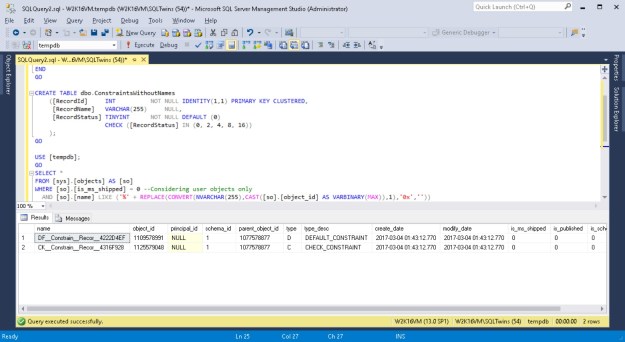
Screenshots showing that objects have been given default constraint names by SQL Server in case a name was not supplied by the user

#0401 – SQL Server – Script to validate object naming convention


A few weeks ago, I ran into a question on one of the forums asking for a script that can help the team validate object naming conventions. Immediately, I was able to sympathize with the team.

What happens is that when developers use the graphical (GUI) tools in the SQL Server Management Studio (SSMS) or via a simple script, they often fail to specify a name to each individual constraint. These slips are not intentional – developers don’t often realize that each constraint is an independent object because they are ultimately related to  another user defined object (a table).

However, when a name is not explicitly specified for a particular constraint, what Microsoft SQL Server does is provide a name by combining the following:

  1. A standard prefix indicating the object (e.g. “DF” for default constraints)
  2. 9 characters of the object name
  3. 5 characters of the field name
  4. Finally, the unique Id of the object, represented in hexa-decimal format

While this format will always generate a unique value, it would generate names that may not be intuitive. It is therefore a common  practice to review the database code and review for compliance with naming conventions  that have been defined in the product/project.

This logic can be leveraged during code reviews/audits to identify objects where standard project naming conventions are not met.

To demonstrate the functionality of the script, I create one table with a wide range of constraints – none of which have a name specified.

USE [tempdb];
GO
IF OBJECT_ID('dbo.ConstraintsWithoutNames','U') IS NOT NULL
BEGIN
    DROP TABLE dbo.ConstraintsWithoutNames;
END
GO

CREATE TABLE dbo.ConstraintsWithoutNames 
    ([RecordId]     INT          NOT NULL IDENTITY(1,1) 
                                 PRIMARY KEY CLUSTERED,
     [RecordName]   VARCHAR(255)     NULL,
     [RecordStatus] TINYINT      NOT NULL DEFAULT (0) 
                    CHECK ([RecordStatus] IN (0, 2, 4, 8))
    );
GO

Now, the following script is a simple string search that looks for strings ending with the hexa-decimal representation of the parent object.

USE [tempdb];
GO
SELECT * 
FROM [sys].[objects] AS [so]
WHERE [so].[is_ms_shipped] = 0 --Considering user objects only
  AND [so].[name] LIKE ('%' + REPLACE(CONVERT(NVARCHAR(255),CAST([so].[object_id] AS VARBINARY(MAX)),1),'0x',''))
                        --Only those objects whose names end with the hexadecimal
                        --representation of their object Id
Screenshots showing that objects have been given default constraint names by SQL Server in case a name was not supplied by the user

Objects given default constraint names

I  hope you found this script useful. Please do  share your ideas/scripts that you may be using in your day-to-day activities.

Until we meet next time,

Be courteous. Drive responsibly.
#0400 – SQL Server – SSIS – Using the SQL Server Destination


SSIS packages are quite easy to get started with – it’s mostly drag and drop of various containers, tasks and setting of connections. Ensuring that the components work optimally requires using the right mix of tasks based on the scenario at hand.

Often SSIS packages connect to remote data sources & destinations. However, there are cases where the destination is a Microsoft SQL Server and it is required to run the package on the same server where the instance is hosted and we do not need granular grouping. Such situations may include data import into a staging area during migrations or as part of an ETL.

In such situations, the SQL Server destination may prove to be a better option as compared to the OLE DB destination.

Generally,  we would have a data pipeline with an OLE DB destination on the receiving end. The setup for using SQL Server destination is extremely simple – the only change is replacing OLE DB destination with the SQL Server destination. The SQL Server destination performs Bulk Inserts into the destination SQL Server while leveraging shared memory connections to SQL Server over the existing OLE DB connection manager.

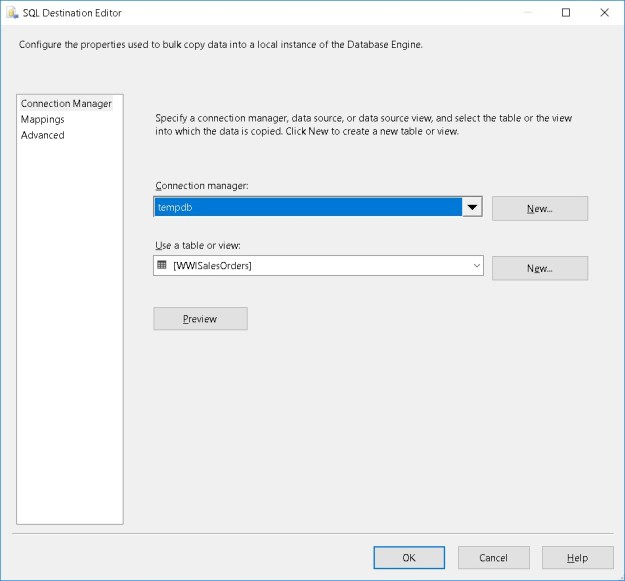
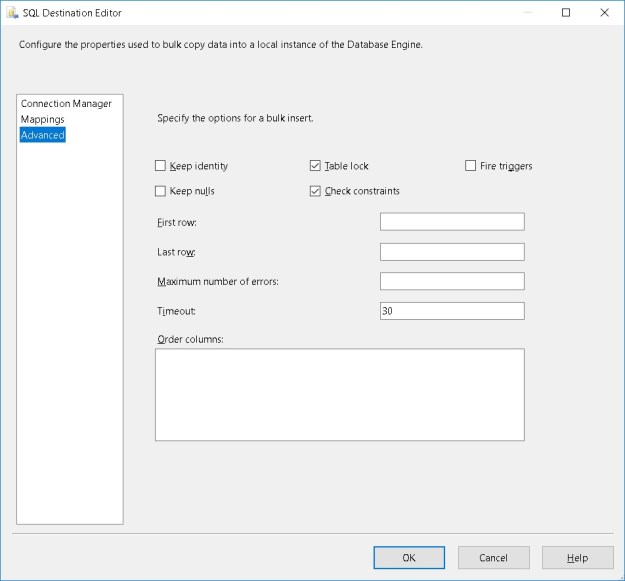
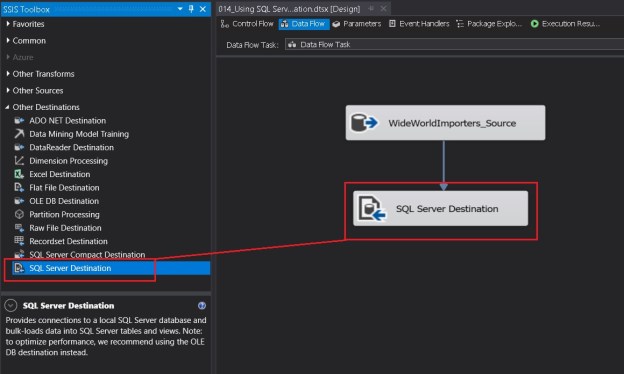
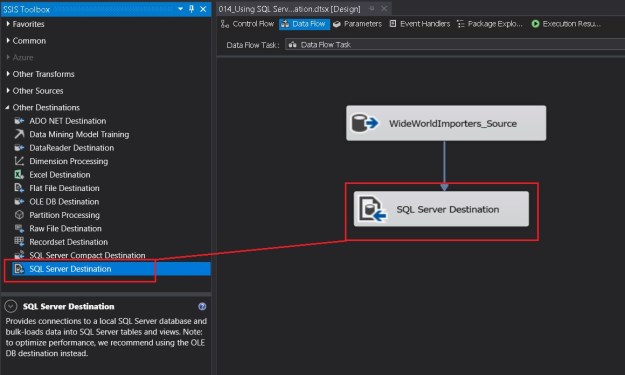
The  screenshots below indicate the simplicity of using the SQL Server destination.

01_sqldestinationtask

Adding the SQL Server destination to a data flow

02_sqldestination_connectionmanager

Selecting a connection manager

03_sqldestination_advancedpane

The “Advanced” tab of the SQL Server destination

The Advanced tab (see above) has a host of options to improve the performance and control the behaviour of the bulk inserts made by the SQL Server destination.

  • Keep Identity – controls whether to insert values into an identity column
  • Keep Nulls – controls whether NULLs should be inserted instead of using the default values defined on the column
  • Table Lock – allows to take a higher-level table lock during the bulk insert
  • Check Constraints – controls whether constraints should be checked during the insert or not
  • Fire Triggers – controls whether or not to fire DML triggers defined on the table
  • First Row – specifies the first row to insert. By default all rows are inserted
  • Last Row – specifies the last row to insert. By default all rows are inserted
  • Maximum number of errors – controls the number of errors before the bulk insert operation stops
  • Timeout – controls the bulk insert operation timeout
  • Order Columns – Allows a user to specify the sort order on one or more columns

Summary

The SQL Server Destination is recommended instead of the OLE DB destination if the SSIS package is to be executed on the same machine/server where the target Microsoft SQL Server instance is located. Below are the finer points about the SQL Server destination:

  1. The SSIS package must be executed on the same server where the Microsoft SQL Server instance is located
  2. The Shared Memory protocol for data exchange is enabled for the instance from the SQL Server Configuration Manager
    • Warning: This may need local security policy updates if User Access Control (UAC) is configured
  3. SQL Server destination
    • Only works with OLE DB connection managers (ODBC is not supported)
    • Supports only one input
    • Does not support an error output
    • Performs bulk insert of data
    • Allows leveraging of fast load options of the OLE DB connection

Further Reading

Until we meet next time,

Be courteous.  Drive responsibly.