Tag Archives: #SQLServer

All about Microsoft SQL Server

#0286 – SQL Server – Productivity Tip – Include Query in the Result Set


At work, I am both a DBA and a technical lead for a couple of tracks. It is not uncommon to have situations where I have been working on a query for sometime and am pulled into a completely different task as part of a query resolution activity. When I return back to work on my query, it is sometimes hard to remember whether a particular result set is that of the most recent changes or that of a previous change iteration.


The SQL Server Management Studio provides a quick configuration option which allows me to include the query that produced a particular result as part of the informational messages generated during the query execution. This option is aptly worded “Include the query in the result set”.


To access this option, simply navigate out to Tools –> Options –> Query Results –> Results to Grid (Or Results to Text, if one is generating output as Text).


image


Here’s the option in action:


After setting this option, whenever I execute a query, the query is printed in the Messages tab. As can be seen in the image below, if the Query Editor has a query different than that available in the Messages Tab, it is a direct indication that the results in the Results tab is not generated by the query in the editor.


image 


Summary


The ability to co-relate a result set with the query that produced the result set is a great productivity booster because it reduces the time it takes me to “get back into the zone”.


I trust this tip was helpful for you. Do share with me other productivity tips that you may have.


Until we meet next time,


Be courteous. Drive responsibly.

#0285 – SQL Server – Using Regular Expressions with CHECK constraints


I was recently asked a good question by one of the team members. They wanted to know if it would be possible to control the insertion of values in a table to match a given set of business rules via check constraints. What attracted my attention and prompted me to spend some time with them was the fact that they knew CHECK constraints were the answer, but were unaware about how to use CHECK constraints in this scenario.

The solution that I provided was to use regular expressions in the CHECK constraint definition. Here’s a small example that will guide the reader on using regular expressions in CHECK constraints.

The example

Assume that the fictional AdventureWorks BiCycle Company has a business rule that all invoices being processed must begin with the letters AWC followed by a 5-digit number beginning at 10000, making the pattern (AWCxyyyy, where x = some integer greater than or equal to 1, y = some integer).

We will attempt to achieve this via a simple CHECK constraint. To begin with, we will create a sample temporary table:

USE [tempdb];
GO

--Safety Check
IF OBJECT_ID('tempdb..#InvoicesProcessed') IS NOT NULL
    DROP TABLE #InvoicesProcessed;
GO

--Create a dummy table
CREATE TABLE #InvoicesProcessed
    (InvoiceNumber VARCHAR(10) NOT NULL,
     ProcessDate   DATETIME
    )
GO

--Add a simple default constraint for the ProcessDate field
ALTER TABLE tempdb..#InvoicesProcessed
    ADD CONSTRAINT df_ProcessDate DEFAULT GETDATE() FOR ProcessDate;
GO

Using Regular Expressions in a CHECK constraint definition

Now comes time to create the CHECK constraint that will actually implement the business logic. We will be using regular expressions in the constraint. To summarize, the requirements for an Invoice Number are:

  • Total length = 8 characters
  • 1st 3 characters must be AWC
  • Next 5 characters are numbers
  • The sequence of numbers must begin from 10000

The pattern therefore is (AWCxyyyy, where x = some integer greater than or equal to 1, y = some integer), which translates to the following CHECK constraint:

USE tempdb;
GO
--Now. add the CHECK constraint with the regular expressions
ALTER TABLE tempdb..#InvoicesProcessed
    ADD CONSTRAINT chk_InvoiceNumber
    CHECK (InvoiceNumber LIKE 'AWC[1-9][0-9][0-9][0-9][0-9]');
GO

The Test

Let us know test the constraint by adding some valid and some invalid values:

USE [tempdb];
GO

--Add some valid test data
INSERT INTO #InvoicesProcessed (InvoiceNumber)
VALUES ('AWC10021');
GO
--Add some invalid test data
--Failure Reason: 1st numeric value after AWC must be greater than 1
INSERT INTO #InvoicesProcessed (InvoiceNumber)
VALUES ('AWC00021');
GO

--Failure Reason: Does not start with AWC
INSERT INTO #InvoicesProcessed (InvoiceNumber)
VALUES ('00010021');
GO

--Failure Reason: Trailing characters are not numeric
INSERT INTO #InvoicesProcessed (InvoiceNumber)
VALUES ('AWC100AB');
GO

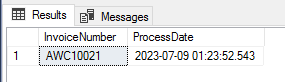
As can be seen from the messages tab, we notice that only 1 record was added to the table – the others failed because they did not meet the Invoice Number requirements.

(1 row(s) affected)
Msg 547, Level 16, State 0, Line 4
The INSERT statement conflicted with the CHECK constraint “chk_InvoiceNumber”. The conflict occurred in database “tempdb”, table “dbo.#InvoicesProcessed__________________________________________________________________________________________________000000000004”, column ‘InvoiceNumber’.

The statement has been terminated.
Msg 547, Level 16, State 0, Line 3
The INSERT statement conflicted with the CHECK constraint “chk_InvoiceNumber”. The conflict occurred in database “tempdb”, table “dbo.#InvoicesProcessed__________________________________________________________________________________________________000000000004”, column ‘InvoiceNumber’.

The statement has been terminated.
Msg 547, Level 16, State 0, Line 3
The INSERT statement conflicted with the CHECK constraint “chk_InvoiceNumber”. The conflict occurred in database “tempdb”, table “dbo.#InvoicesProcessed__________________________________________________________________________________________________000000000004”, column ‘InvoiceNumber’.

The statement has been terminated.

Let us validate the Inserts by SELECTing data from the table.

USE tempdb;
GO

--Select from the table
SELECT ip.InvoiceNumber,
       ip.ProcessDate
FROM #InvoicesProcessed AS ip;
GO

Conclusion

Regular Expressions are extremely powerful and CHECK constraints is just one of the many Microsoft SQL Server provides areas where they can be leveraged to enforced the rules required by the business.

Further Reading:

  • Temporary Table Naming – Maximum Allowed Length and associated naming logic [Link]

Until we meet next time,

Be courteous. Drive responsibly.

#0284 – SQL Server – Fun with Temporary Tables – Foreign Keys


There is a very interesting aspect of temporary tables – in many aspects they are very different from the “regular” user tables. One such area is the constraints that temporary tables support. We have already looked at named constraints in a previous post.

Today, we will look at foreign keys on temporary tables.

The rule

Temporary tables DO NOT support foreign key constraints.

The rule above says it all – temporary tables do not support foreign key constraints. If we explicitly attempt to define a foreign key constraint on a temporary table, we receive the following message:

Skipping FOREIGN KEY constraint ‘fk_temployeeList_HREmployee’ definition for temporary table. FOREIGN KEY constraints are not enforced on local or global temporary tables.

To validate this, I wrote the following script. The script creates a local temporary table with a primary key defined on it. I later go on to define a foreign key constraint with the HumanResources.Employee table in the AdventureWorks database.

USE AdventureWorks2012;
GO
IF OBJECT_ID ('tempdb..#employeeList','U') IS NOT NULL
DROP TABLE #employeeList;
GO

CREATE TABLE #employeeList 
    (ListId           INT NOT NULL IDENTITY(1,1) PRIMARY KEY CLUSTERED,
     BusinessEntityID INT     NULL,
    );

--FK creation
ALTER TABLE #employeeList
ADD CONSTRAINT fk_temployeeList_HREmployee 
    FOREIGN KEY (BusinessEntityID) 
    REFERENCES HumanResources.Employee(BusinessEntityID)
GO

/**********
RESULTS 01
**********/
/*
Skipping FOREIGN KEY constraint 'fk_temployeeList_HREmployee' definition for temporary table.
FOREIGN KEY constraints are not enforced on local or global temporary tables.
*/

The following script also helps us validate that the primary key was created, but the foreign key was not created.

-- Step 02: Confirm that the primary key was created, but the foreign key was not
IF OBJECT_ID ('tempdb..#employeeList','U') IS NOT NULL
BEGIN
    SELECT skc.name AS PrimaryKeyConstraintName
    FROM tempdb.sys.key_constraints AS skc
    WHERE skc.parent_object_id = OBJECT_ID ('tempdb..#employeeList','U')
      AND skc.type = 'PK'
      AND skc.is_ms_shipped = 0;

    SELECT psc.name                               AS ParentColumnName,
           OBJECT_NAME(sfkc.referenced_object_id) AS ReferencedTable,
           rsc.name                               AS ReferencedColumnName
    FROM tempdb.sys.foreign_key_columns AS sfkc
    INNER JOIN tempdb.sys.columns AS psc ON sfkc.parent_column_id = psc.column_id
                                        AND sfkc.parent_object_id = psc.object_id
    INNER JOIN tempdb.sys.columns AS rsc ON sfkc.referenced_column_id = rsc.column_id
                                        AND sfkc.referenced_object_id = rsc.object_id
    WHERE sfkc.parent_object_id = OBJECT_ID('#employeeList');
END
GO

/**********
RESULTS
**********/
/*
PrimaryKeyConstraintName
-------------------------------
PK__#employe__E38328055A6D792F

ParentColumnName  ReferencedTable  ReferencedColumnName
----------------- ---------------- ---------------------

*/

Hope that you found this post interesting. Do let me know your feedback in the comments area below before leaving.

Until we meet next time,

Be courteous. Drive responsibly.

#0283 – SQL Server – Fun with Temporary Tables – Named Constraints, Msg 2714, 1750


I was recently developing a stored procedure and ended up with an strange error during unit testing – the stored procedure failed whenever two connections executed the stored procedure while the other connection was active.

I was able to attribute the error to an oversight I had made with respect to temporary table handling and that incident triggered some reading and the posts this week.

The Error

Here is a gist of what my temporary table creation script looked like:

USE tempdb;
GO
IF OBJECT_ID ('tempdb..#tableWithNamedPK','U') IS NOT NULL
    DROP TABLE #tableWithNamedPK;
GO

CREATE TABLE #tableWithNamedPK 
    (RecId    INT,
     RecValue VARCHAR(20),
     CONSTRAINT pk_tableWithNamedPK PRIMARY KEY CLUSTERED (RecId)
    );
GO

Whenever I run the same script from a different SSMS window (thereby simulating two or more users executing the script through the application), I ended up with the following error:

Msg 2714, Level 16, State 5, Line 2
There is already an object named ‘pk_tableWithNamedPK’ in the database.
Msg 1750, Level 16, State 0, Line 2
Could not create constraint. See previous errors.

The Explanation

The explanation is actually quite simple – when local temporary tables are created, there is a different instance of the temporary table created in the tempdb (Refer my post on the temporary table naming convention  for a detailed explanation). If we define named constraints, all these tables will have the same named constraint, which is not valid!

In my case the named constraints defined on my temporary tables ensured that only one user connection at a time can execute the statement that creates the temporary table.

Not restricted to primary keys

This thumb-rule is not restricted to primary keys alone. This is applicable to any named constraint. To demonstrate this in this post, I wrote this little script:

USE tempdb;
GO
IF OBJECT_ID ('tempdb..#tableWithNamedUK','U') IS NOT NULL
    DROP TABLE #tableWithNamedUK;
GO

CREATE TABLE #tableWithNamedUK 
    (UniqueExternalSystemId INT,
     RecValue               VARCHAR(20),
     CONSTRAINT uk_tableWithNamedUK_ExternalSystemId
     UNIQUE NONCLUSTERED (UniqueExternalSystemId)
    );
GO

To test it out, open two SSMS query editor windows. You can execute this in SSMS Query editor window #1 and #2, and the following error will be seen for query editor window #2.

Msg 2714, Level 16, State 5, Line 2
There is already an object named ‘uk_tableWithNamedUK_ExternalSystemId’ in the database.
Msg 1750, Level 16, State 0, Line 2
Could not create constraint. See previous errors.

The Solution

The question therefore comes is: How can one define constraints on temporary tables?

The devil is in the details and if we re-read the thumb-rule highlighted above, we realize that the restriction is not on the definition of the constraint – it’s on the definition of named constraints.

The following script therefore will work in multiple concurrent connections. The script also contains a code snippet to identify the name of the system generated constraint names.

USE tempdb;
GO
IF OBJECT_ID ('tempdb..#tableWithNamedPK','U') IS NOT NULL
    DROP TABLE #tableWithNamedPK;
GO

CREATE TABLE #tableWithNamedPK 
    (RecId    INT,
     RecValue VARCHAR(20),
     PRIMARY KEY CLUSTERED (RecId)
    );
GO

USE tempdb;
GO
IF OBJECT_ID ('tempdb..#tableWithNamedUK','U') IS NOT NULL
    DROP TABLE #tableWithNamedUK;
GO

CREATE TABLE #tableWithNamedUK 
    (UniqueExternalSystemId INT,
     RecValue               VARCHAR(20),
     UNIQUE NONCLUSTERED (UniqueExternalSystemId)
    );
GO

--Check the primary key names
SELECT skc.name AS ConstraintName,
       skc.type_desc AS ConstraintType
FROM tempdb.sys.key_constraints AS skc
WHERE ( skc.parent_object_id = OBJECT_ID ('tempdb..#tableWithNamedPK','U')
        OR
        skc.parent_object_id = OBJECT_ID ('tempdb..#tableWithNamedUK','U')
      )
      AND 
      ( skc.type = 'PK' OR skc.type = 'UQ' )
  AND skc.is_ms_shipped = 0;
GO

/*********************
RESULTS 03
*********************/
/*
ConstraintName                  ConstraintType
------------------------------- -----------------------
PK__#tableWi__360414DF6D0EF7FB  PRIMARY_KEY_CONSTRAINT
UQ__#tableWi__D9712AD5EC6B160E  UNIQUE_CONSTRAINT
*/

Please do let me know your feedback, and have a great time working with temporary tables today!

Until we meet next time,

Be courteous. Drive responsibly.

#0282 – SQL Server – T-SQL – Best Practice – Evaluate costliest condition towards the end of the logical AND operation


Knowing the internals of how a system works has always fascinated me. Although a bit theoretical, knowing about query evaluation is a very exciting topic and I attempt to learn something new about it every now and then.

One of my seniors had a mantra which I remember till date – when evaluating a logical “AND” condition, the costliest condition should always be the last one to be evaluated. Today, I will try to demonstrate why this is a good practice.

The evaluation of the logical AND is actually quite simple. A set of checks evaluate to FALSE even if one of the checks returns FALSE. This simple rule means that the AND evaluation must be a “short-circuit” operation, i.e. as soon as a condition is encountered which determines the end result, all checks beyond that point can be ignored.

The test

The test below demonstrates this concept. What I have in the script is a simple query that returns results based on the evaluation of two conditions – one of which is bound to raise an exception.

USE AdventureWorks2008R2;
GO
BEGIN TRY
    SELECT *
    FROM HumanResources.Employee
    WHERE (1 = 0)    --This one is false making the entire AND condition FALSE
      AND (1/0 = 0); --This one results in an exception
PRINT 'Execution was successful.';
END TRY
BEGIN CATCH
PRINT 'All conditions were evaluated resulting in an exception!'
+ CHAR(10) + 'Error Message : ' + ERROR_MESSAGE()
+ CHAR(10) + 'Error Number : ' + CAST(ERROR_NUMBER() AS VARCHAR(10));
END CATCH
GO

/*********************
RESULTS
*********************/
/*
(0 row(s) affected)
Execution was successful.
*/

In this first query, the first condition itself evaluates to FALSE. Hence, there is no reason for the evaluation of the logical AND to continue. The query therefore returns no results. Had both conditions been evaluated, we would have received an exception.

USE AdventureWorks2008R2;
GO
BEGIN TRY
    SELECT *
    FROM HumanResources.Employee
    WHERE (1 = 1)    --This one is TRUE,
                     --because of which the next condition will be evaluated
      AND (1/0 = 0); --This one results in an exception
PRINT 'Execution was successful.';
END TRY
BEGIN CATCH
PRINT 'All conditions were evaluated resulting in an exception!'
+ CHAR(10) + 'Error Message : ' + ERROR_MESSAGE()
+ CHAR(10) + 'Error Number : ' + CAST(ERROR_NUMBER() AS VARCHAR(10));
END CATCH
GO
/*********************
RESULTS
*********************/
/*
(0 row(s) affected)
All conditions were evaluated resulting in an exception!
Error Message : Divide by zero error encountered.
Error Number : 8134
*/

Because the first condition retuned a TRUE in the query above, it returned an exception because the evaluation of the logical AND operation had to evaluate both conditions.

Conclusion

This simple test proves that the logical AND operation is a “short-circuit” operation. Therefore, the costliest condition (maybe a sub-query) in a set to be evaluated with a logical AND must be placed towards the end of the sequence to prevent un-necessary evaluations. Only if the preceding conditions are TRUE, will the more complex conditions be evaluated under this logic.

Until we meet next time,

Be courteous. Drive responsibly.