Recently, a team at the office asked me how could they fire off a query against a linked server. The condition was that the server where the query would originate from was going to be a Microsoft SQL Server 2008 instance whereas the target was Microsoft SQL Server 2005 instance. The information that they would be getting would be:
SQL Server Instance name
Database Name
Schema Name
Table Name
Based on this information, they wanted to find out if a given table existed on the given database on the given instance. In all cases, the instance name would either be the local instance or a linked server.
Here’s the solution I proposed to them:
Step 01: Add a Microsoft SQL Server 2005 linked server
USE master;
GO
EXEC sp_addlinkedserver
   'VPCW2K3',
   N'SQL Server'
GO
Step 02: Write a stored procedure that builds and executes a dynamic SQL statement
Here is the stored procedure that I wrote as a POC to help them out:
CREATE PROCEDURE dbo.proc_CheckTableExistance @tInstanceName NVARCHAR(200),
                                              @tDatabaseName NVARCHAR(100),
                                              @tSchemaName   NVARCHAR(100),
                                              @tTableName    NVARCHAR(100)
AS
BEGIN
    DECLARE @stmnt NVARCHAR(MAX)
    --Check if the provided server is a linked server or not
    IF EXISTS (SELECT data_source FROM sys.servers ss WHERE ss.data_source = @tInstanceName AND ss.is_linked = 0)
    BEGIN
        SET @stmnt = 'SELECT IST.TABLE_NAME FROM [' + LTRIM(RTRIM(@tDatabaseName)) + '].' +
                     'INFORMATION_SCHEMA.TABLES IST WHERE IST.TABLE_CATALOG = '
                                                    + '''' + LTRIM(RTRIM(@tDatabaseName)) + '''' +
                     ' AND IST.TABLE_SCHEMA = '     + '''' + LTRIM(RTRIM(@tSchemaName))   + '''' +
                     ' AND IST.TABLE_NAME = '       + '''' + LTRIM(RTRIM(@tTableName))    + ''''
    END
    ELSE IF EXISTS (SELECT data_source FROM sys.servers ss WHERE ss.data_source = @tInstanceName AND ss.is_linked = 1)
    BEGIN
        SET @stmnt = 'EXECUTE (''SELECT IST.TABLE_NAME FROM ' + @tDatabaseName +
                     '.INFORMATION_SCHEMA.TABLES IST WHERE IST.TABLE_CATALOG = ? AND IST.TABLE_SCHEMA = ? AND IST.TABLE_NAME = ?'', '''
                                + @tDatabaseName + ''', '''
                                + @tSchemaName   + ''','''
                                + @tTableName + ''') AT [' + @tInstanceName + ']'
    END
    ELSE
    BEGIN
        SET @stmnt = 'SELECT ''Required SQL instance not found in sys.servers catalog view.'''
    END

    EXEC sp_executesql @stmnt
END
GO
The key point here is the usage of the EXECUTE statement. The EXECUTE statement has the provision to execute a query against a linked server when combined with the “AT” clause. More details are available from the MSDN page here.
In Conclusion
Please note that there is one major point that you need to take care before using EXECUTE in this way. EXECUTE is prone to SQL Injections and hence please make sure that you production code has each and every input validated beforehand.
You can, in this way, use the EXECUTE…AT combination to execute a query against a SQL Server of a different version or even against a different data source (the MSDN example has a way to fire off a query against an ORACLE data source).
Do let me know what you, the reader, uses to query a different database on a different SQL Server instance or a different data source.
SQLServerCentral (or “SSC” as we know it), ran a very good editorial last year on Friday, December 17, 2010. The editorial was a guest editorial by Andy Warren on “under-appreciated features of SQL Server” (http://www.sqlservercentral.com/articles/Editorial/71788/). Andy looks back at the evolution of Microsoft SQL Server over the past decade (that we just bid goodbye to) and the tons of features that have been introduced across the various releases. Some of these features are still with us, some have been deprecated; however the editorial is more targeted to identifying those features that held a lot of promise, but for one reason or the other failed to take off within the general SQL Server community.
If you follow the discussion that took place afterwards, a lot of interesting features were listed down. I have here a summary of the same:
As I was following the discussion and compiling the list, it dawned upon me that this is an excellent opportunity to write a little bit on each of these features that we as a community might end up appreciating a bit more.
The major technological enhancements are such that they require a detailed study of their own. However, the rest are really very quick demos in order to get started and I am sure that they will definitely change your life at the work place.
I will thus spin off a series of small articles and ultimately link them all back to this parent article. Finally, as a closing post to the series, I will be also be pointing you towards some learning resources for rest of the items on the list.
Do send in your feedback on how you would use (or are using) each of these items.
Data type conversion has been one of the most used features of any programming language. Microsoft SQL Server users are familiar with the two functions: CAST() and CONVERT() and use them regularly, and more specifically, interchangeably.
However, using CAST() and CONVERT() interchangeably is one of the most capital mistakes that a developer can make. Madhivanan, a SQL Server blogger on BeyondRelational.com (http://beyondrelational.com/blogs/madhivanan/default.aspx) does a very good job at highlighting the differences between CAST() and CONVERT() in his blog post here.
To summarize, the differences that he highlights are:
CAST is an ANSI standard, while CONVERT is specific to Microsoft SQL Server
CAST cannot be used for formatting purposes (i.e. used to type cast something to a character string), whereas CONVERT can do so, especially for datetime and money datatypes
CAST cannot convert a string to a DATETIME value of a required format (i.e. formatting as mm/dd/yyyy or dd/mm/yyyy as required etc), while the CONVERT can
Finally, he warns us to use a properly calculated size value when using the CAST and CONVERT functions to convert integer values to character data types.
All very great points, and very, very useful. Thank-you, Madhivanan for the wonderful research and enlightenment.
A Question
We can draw a general conclusion that for computation purposes, CAST should be used and for formatting of values for display on a UI or a report, CONVERT should be used. However, the interesting question is one which came up when I was following the discussion on the blog the other day –
Tuesday, July 27, 2010 10:38 AM by cute_boboi
For data extraction purpose, with 1M+ records, which method is faster/recommended ? CAST or CONVERT from:
(i) Date to varchar
(ii) Int to varchar
Today, I try to answer that question.
The Demonstration
Preparing the Environment
Let’s start by creating a table, and filling it up with some test data (Running against the AdventureWorks2008 database gives you about 356409 rows in the table):
-- Step 01. Create a test table
CREATE TABLE CASTCONVERTTest (Id INT,
                              CrDate DATETIME)

-- Step 02. Generate Test Data
INSERT INTO CASTCONVERTTest
SELECT sso1.Id, sso1.crdate
FROM sys.sysobjects sso1
CROSS JOIN sys.sysobjects sso2
Now, let’s begin by pressing Ctrl+M when in the SQL Server Management Studio or go to Query->Include Actual Execution Plan to enable showing the Actual Execution Plan.
Conversion of INT to VARCHAR
In order to see the performance of using CAST and CONVERT on INT to VARCHAR conversion, we will use the following script. At each stage, we will be using DBCC freeproccache to remove all elements from the plan cache.
/***********************************************************
Press Ctrl+M (or go to Query->Include Actual Execution Plan)
************************************************************/
-- Step 03. Test conversion of INT to VARCHAR
-- A. Remove all elements from the plan cache
DBCC freeproccache
GO

-- B. Check the performance of CAST
SELECT CAST(Id AS VARCHAR(11))
FROM CASTCONVERTTest
GO

-- C. Remove all elements from the plan cache
DBCC freeproccache
GO

-- D. Check the performance of CONVERT
SELECT CONVERT(VARCHAR(11),Id)
FROM CASTCONVERTTest
GO
Let’s look at the Actual Execution Plan used by SQL Server. As you can see, we get a 50-50 split, which means that both CAST and CONVERT perform equally well for the INT to VARCHAR conversion.
Conversion of DATETIME to VARCHAR
In order to see the performance of using CAST and CONVERT on DATETIME to VARCHAR conversion, we will use the following script. At each stage, we will be using DBCC freeproccache to remove all elements from the plan cache.
-- Step 04. Test conversion of DATETIME to VARCHAR
-- A. Remove all elements from the plan cache
DBCC freeproccache
GO

-- B. Check the performance of CAST
SELECT CAST(CrDate AS VARCHAR(25))
FROM CASTCONVERTTest
GO

-- C. Remove all elements from the plan cache
DBCC freeproccache
GO

-- D. Check the performance of CONVERT
SELECT CONVERT(VARCHAR(25),CrDate,106)
FROM CASTCONVERTTest
GO
Let’s look at the Actual Execution Plan used by SQL Server. As you can see, again we get a 50-50 split, which means that both CAST and CONVERT perform equally well for the DATETIME to VARCHAR conversion.
The Cleanup
Finally, as always, let’s cleanup the environment.
-- Step 05. Cleanup!
DROP TABLE CASTCONVERTTest
In Conclusion
In conclusion, we can safely conclude that both CAST and CONVERT perform equally well for the following conversions:
INT to VARCHAR
DATETIME to VARCHAR
I hope the above is a satisfactory reply to the question we started with.
Powered with the research conducted by Madhivanan and with the afore described performance test, the choice is now up to the reader. Do share your practices with CAST & CONVERT on this blog. Also, do mention the reasons why you practice a particular rule of thumb, if possible.
It’s New Year’s Eve, and I am spending some nice family time by taking a holiday from work. However, it is not possible for me to forget the nice memories that the SQL Server community has given me.
As we wind up the year 2010, I would like to express my sincere thanks to the entire SQL Server Community for their kind support and encouragement in 2010. It was fun attending the various Community Tech Days events and also view the recorded Virtual Tech Days (being work days, I was not able to participate as a live attendee).
This year, I made an attempt to start giving back to the SQL Server Community in order to help strengthen it even further. I am thankful that all my contributions have been welcomed by the community and continue to pray that I will receive the same support in the years to come.
One of the the most important professional developments that happened for me in 2010 was that I started my blog with the kind help of Jacob Sebastian and the encouragement of both local SQL Server heroes – Pinal Dave and Jacob Sebastian. Here is a summary of my other contributions to the community:
Contributed quite a few “Question Of the Day” on SQLServerCentral.com
I pray to the Almighty that I continue contributing to the community with even increased zeal and fervor in 2011! I am proud to be associated with a community as vibrant and as wonderful as the SQL Server community.
With this, I will close and allow you all to get back with your families to ring in the New Year. I wish you all a very Happy and Prosperous New Year!
The other day, one of the developers at the office asked me a seemingly very simple question. They had an application with a form that presented a record to the user by default as “read-only”. If a user wishes to edit the record, they need to click on a little “edit” button and the form would magically become editable. The developer wanted to know how could they prevent a problem commonly known as the “phantom update”.
A “phantom update” is a situation that can occur if two users fetch a record at almost the same time, and one updates the record before the other. What happens is that all update that happened before the final update are lost. Here’s a small demonstration:
A demonstration of the problem
We will first begin by creating a test database and some test objects.
/* Step 01: Create a test database */
CREATE DATABASE [OptimisticConcurrency];
GO

/* Step 02: Create Test objects                                             */
/*          Source: http://support.microsoft.com/kb/917040                  */
/* Since TIMESTAMP is a deprecated feature, we are using ROWVERSION instead */
USE [OptimisticConcurrency]
GO
CREATE TABLE [MyTest] (myKey   INT PRIMARY KEY,
                       myValue INT,
                       RV      ROWVERSION
                      )
GO

/* Step 03: Generate Test Data                             */
/*          Source: http://support.microsoft.com/kb/917040 */
USE [OptimisticConcurrency]
GO
INSERT INTO [MyTest] (myKey, myValue)
VALUES (1, 0),
       (2, 0)
GO
Now, let us try to see the problem of the “phantom update”:
-- Assume that the below SELECT statement is the process of two connections fetching the data
SELECT *
FROM [dbo].[MyTest];
GO

-- Assume that this update is happening from connection #1
UPDATE [dbo].[MyTest]
SET [myValue] = 2
WHERE [myKey] = 1;
GO

-- Assume that this update is happening from connection #2, a different SSMS Query window
UPDATE [dbo].[MyTest]
SET [myValue] = 1
WHERE [myKey] = 1;
GO

-- Now, let us see the values that have actually been committed to the database
SELECT *
FROM [dbo].[MyTest];
GO
The following is the result set. The update setting the [dbo].[MyTest].[myValue] to 2 has been lost.
The solution
The best way to handle this scenario is to implement concurrency, which means allowing multiple users to access the same record at the same time.
In simple terms, what normally happens during an update is locking, i.e. while a particular record is being accessed by a connection, another connection cannot access the same. To prevent this, Microsoft SQL Server 2005 supports both Optimistic and Pessimistic concurrency models through T-SQL statements and also via programming interfaces like ADO, ADO.NET, OLE DB, and ODBC.
Because most systems are 80% read, 20% write systems, the probability of two connections attempting to update the same record is decreased. On the other hand, the record should be accessed by multiple connections without experiencing any locking. Optimistic concurrency uses this statistical information to always assume that the record under consideration would not be modified until the user holding the current connection decides to do so.
Optimistic concurrency can be used within Microsoft SQL Server by the use of the ROWVERSION column on a table (the test environment created above has the ROWVERSION column in it already). The Books On Line provides a wonderful, simple explanation of the ROWVERSION, which I have quoted below:
ROWVERSION is a data type that exposes automatically generated, unique binary numbers within a database. Each database has a counter that is incremented for each insert or update operation that is performed on a table that contains a ROWVERSION column within the database. This counter is the database ROWVERSION. ROWVERSION is thus generally used as a mechanism for version-stamping table rows.
In the stored procedure below, we essentially check for changing ROWVERSION values by using the ROWVERSION value in the WHERE clause.
USE [OptimisticConcurrency];
GO

CREATE PROCEDURE [dbo].[proc_ModifyMyTest]
                @tKey      INT = 0,
                @tNewValue INT = 0,
                @tRV       ROWVERSION
AS
BEGIN
    --Create a table variable to hold the updated ROWVERSION value
    DECLARE @t TABLE (myKey int);

    --Update the record as required, and output the new ROWVERION into the
    --table variable created above
    UPDATE [dbo].[MyTest]
    SET [myValue] = @tNewValue
    OUTPUT [inserted].[myKey] INTO @t(myKey)
    WHERE [myKey] = @tKey
      AND [RV]    = @tRV;

    --Ensure if anything changed. If we used a stale ROWVERSION value (i.e. somebody updated the record before us),
    --nothing will be updated, in which case, raise an exception to the calling program
    IF (SELECT COUNT(*) FROM @t) = 0
      BEGIN
        RAISERROR ('Error encountered while changing row with myKey = %d. Please refresh your data and try again.',
                   16, -- Severity.
                   1, -- State.
                   @tKey) -- myKey that was changed
      END
END
GO
Now that we have a stored procedure ready for us to use during the update, we will repeat what we did earlier, only this time, we will use the stored procedure to update the values in the table MyTest. The script below should be self-explanatory.
/* Step 04: Now, run the following queries (entire step) against the [OptimisticConcurrency] database           */
/*          We will read the value once (similar to two users accessing the record for reading simultaneously   */
/*          Next, we will update the record once (similar to user #1 updating the record)                       */
/*          Finally, user #2 tries to update the record without refreshing the change, and encounters the error */
/*                                                                                                              */
/*          Please follow the instructions carefully for successful demo                                        */
/*                                                                                                              */
USE [OptimisticConcurrency];
GO

-- A. Declaration
DECLARE @stmnt    NVARCHAR(200);
DECLARE @params   NVARCHAR(100);
DECLARE @tRV      VARBINARY(8);
DECLARE @tMyKey   INT;
DECLARE @tMyValue INT;

-- B. We are reading the value (this is equivalent to two users opening the record for viewing simultaneously
--    In the application, all you will need to cache is the primary key and the rowversion value. Rest comes from the UI
PRINT '<<<< INFO >>>> Two users have now read the data into their local variables...';

SET @tMyKey   = 1
SET @tMyValue = 2
SET @tRV = (SELECT CONVERT(VARBINARY(8), [RV])
            FROM [dbo].[MyTest]
            WHERE [myKey] = @tMyKey
           );
SET @stmnt  = N'[dbo].[proc_ModifyMyTest] @tKey, @tNewValue, @tRowValue'
SET @params = N'@tKey INT, @tNewValue INT, @tRowValue ROWVERSION'

-- C-1. Now, User #1 fires the update, and is successful
--      Using sp_executesql will execute the query under a different connection
PRINT '<<<< INFO >>>> User #1 is now firing an update...';
EXEC sp_executesql @stmnt     = @stmnt,
                   @params    = @params,
                   @tKey      = @tMyKey,
                   @tNewValue = @tMyValue,
                   @tRowValue = @tRV;

-- C-1. Now, User #2 fires the update, and is unsuccessful
--      This is because User #2 is using the same Row Version value, which is invalid
--      because Connection #1 has already changed the record
SET @tMyValue = @tMyValue + 1
PRINT '<<<< INFO >>>> User #2 is now firing an update...';
EXEC sp_executesql @stmnt     = @stmnt,
                   @params    = @params,
                   @tKey      = @tMyKey,
                   @tNewValue = @tMyValue,
                   @tRowValue = @tRV;
GO
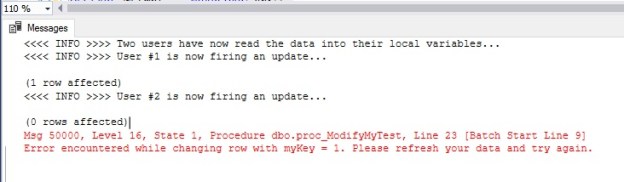
The first update will go successful because the underlying record has not been updated before the stored procedure call. After user #1, user #2 then fires off an update using what is now stale information. The mismatch of the ROWVERSION column prevents user #2 from updating the data modified by user #1.
The execution of the above script will produce the following output when run from the SQL Server Management Studio. The exception being thrown during the second update can be trapped by the UI and a nicely decorated message shown to the user.
Msg 50000, Level 16, State 1, Procedure dbo.proc_ModifyMyTest, Line 23 [Batch Start Line 9]
Error encountered while changing row with myKey = 1. Please refresh your data and try again.
Tip:
The global variable @@DBTS returns the last-used timestamp value (VARBINARY) of the current database.
Conclusion
Optimistic concurrency is widely used in production systems. While the locking and concurrency models are huge topics to cover in a handful of articles, I hope that this post gives you a simple, conceptual overview of the Optimistic Concurrency model.
Please note:
The ROWVERSION data type is just an incrementing number and does not preserve a date or a time
A table can have only one ROWVERSION column
ROWVERSION should not be used as keys, especially primary keys
Using a SELECT INTO statement has the potential to generate duplicate ROWVERSION values
Finally for those who came from SQL 2005, the TIMESTAMP is deprecated. Please avoid using this in new DDL statements
Unlike TIMESTAMP, the ROWVERSION column needs a column name in the DDL statements





 SQLTwins by Nakul Vachhrajani