
Tag Archives: Tips

General Microsoft SQL Server tips

#0356 – SQL Server – Search with the LIKE operator and the underscore (_) wildcard character


String searches in most applications are based on the “contains” or “begins-with” paradigms – which are implemented by the use of the LIKE logical operator. The LIKE operator allows for the use of wildcard characters (underscore being one of them), which is the part that most people unknowingly overlook when they have been working with T-SQL for quite some time.

One such incident happened the other day at work when I was asked by a colleague to help him out with a query that appeared correct, but failed to give the expected results. For the sake of brevity, I have condensed the issue into a test scenario below:

DECLARE @testTbl TABLE (Value VARCHAR(50));

INSERT INTO @testTbl (Value)
VALUES ('SQL 2012'),
('SQL_2014');

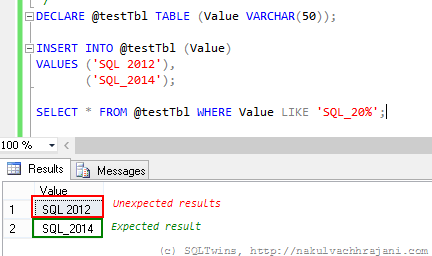
SELECT * FROM @testTbl WHERE Value LIKE 'SQL_20%';
image

As can be seen in the screenshot above, the results are not what one would expect them to be at the first glance. One would have expected it to return only the string “SQL_2014” and yet the T-SQL query is returning both the records.

Normally, data coming in via flat-files from raw-data collection systems would require such kinds of string searches and manipulations. A well designed system would have these static values as a look-up so that all references look at the same version of the string value

Solution(s)

There are not one, but two possible solutions to choose from to work around this issue.

Using square brackets ([]) around the wildcard character

Because we want to consider the underscore as a character and not as a wildcard, the easiest thing to do would be to surround it with square brackets, similar to what is shown in the query below.

SELECT * FROM @testTbl WHERE Value LIKE 'SQL[_]20%';

image

Using the ESCAPE keyword

The other option, which I have discussed in one of my earlier posts, is to use the ESCAPE keyword. The ESCAPE keyword works on the basis of a user specified escape sequence. When encountered, the query engine will simply ignore the wildcard character and treat it as a normal character.

SELECT * FROM @testTbl WHERE Value LIKE 'SQL*_20%' ESCAPE '*';

image

Conclusion

The moral here is that one must always remember the basics – this thumb rule not only applies to software, but in everything that we go about doing in our day to day lives.

The other key learning that I encourage everyone to take from this is that Occam’s Razor is real – from the multiple explanations that a problem may have, the explanation with the least number of assumptions should be selected as the answer. In this case, the simplest theory was –  human error, which was indeed the case.

References

Until we meet next time,
Be courteous. Drive responsibly.
#0355 – SQL Server – Implementing Case Sensitive Search in a case Insensitive database – Regular Expressions & PATINDEX


In my previous post (#354)on implementing case sensitive search in a database that was case insensitive, I had presented one possible implementation approach that used the COLLATE keyword to temporary convert the column of interest to a case sensitive collation.

I had mentioned that the mechanism internally used the CONVERT() function with the style parameter = 0, which means that it was performing a binary to character conversion and then executing the comparison, resulting in a performance overhead to the system.

As I was asking for feedback from friends and colleagues, I received a couple of interesting ideas, the top 2 being:

  • Regular Expressions
  • PATINDEX

The reason that these caught my attention is quite simple – logic would say that they have to be natively case sensitive – one is a regular expression (which is case sensitive in other programming languages) and the other looks for a pattern within the supplied sting. However, there were serious doubts on whether the underlying column collation will have any effect on the behaviour of these options or not. I therefore decided to test out both the options.

Generating the Test Data

Let us create the same test table that was used in the previous post and also allow it to use the same case insensitive collation as the AdventureWorks2012 database.

USE AdventureWorks2012;
GO

--Step 01: Create test data
IF OBJECT_ID('dbo.Product','U') IS NOT NULL
    DROP TABLE dbo.Product;
GO
CREATE TABLE dbo.Product 
    (ProductId INT NOT NULL IDENTITY(1,1),
     ProductName VARCHAR(100) NOT NULL,
     VendorName VARCHAR(100)
    );
GO

--Add some test data
INSERT INTO dbo.Product (ProductName, VendorName)
VALUES ('Cycles','Contosso'),
       ('cBike', 'AdventureWorks'),
       ('SomeOtherProduct','SomeOtherVendor');
GO

Using Regular Expressions

Now, the regular expression to execute a search for all products whose name begins with “c” (small case) is “[c]%”.

Let me try to use this regular expression in my search query:

USE AdventureWorks2012;
GO
SELECT ProductId,
       ProductName,
       VendorName
FROM dbo.Product 
WHERE ProductName LIKE '[c]%';
GO

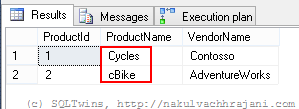
The result is shown in the screenshot below. Records for all products beginning with the letter “c” were returned – irrespective of the case.

image

Using PATINDEX

The second search mechanism that I will be evaluating is the PATINDEX, which basically returns the index or the position where a particular character pattern is found in a given string. If the pattern is not found, the value returned is 0.

USE AdventureWorks2012;
GO
SELECT ProductId,
       ProductName,
       VendorName
FROM dbo.Product 
WHERE PATINDEX('c%',ProductName) > 0;
GO

Again the result is as shown in the screenshot below – a case in-sensitive search was performed by SQL Server.

image

Conclusion

The collation of a particular column determines whether a search on a column will be case sensitive or  case in-sensitive. This is not dependent upon the mechanism used for the comparison (i.e. a simple query v/s regular expressions v/s pattern matching).

Do you have any ideas on implementing  case sensitive search on a case in-sensitive database column? If so, please share in the blog comments.

Further Reading

Until we meet next time,
Be courteous. Drive responsibly.

#0354 – SQL Server – Implementing case sensitive search in a case insensitive database


Searching data from a column is a very common requirement – but with unique variants in each application. Recently, I came across one such requirement:

  1. Underlying database, table and columns use a case in-sensitive (CI) collation
  2. Application must be able to switch between a case sensitive v/s a  case insensitive comparison

The ability to switch between a case sensitive and case insensitive comparison is the challenge because it needs to be done on a database that inherently does not discriminate between the two.

In this post, I will present one method of implementing this requirement. If you have any others that you would like to share, please feel free to do so in the comments area.

Temporarily using Case Sensitive Collations

The most common implementation pattern to realize the case sensitive search requirement is to temporarily use a collation that is case sensitive as shown below.

To begin with, let us create a test table and insert some fictional test data.

USE AdventureWorks2012;
GO

--Step 01: Create test data
IF OBJECT_ID('dbo.Product','U') IS NOT NULL
    DROP TABLE dbo.Product;
GO
CREATE TABLE dbo.Product 
    (ProductId INT NOT NULL IDENTITY(1,1),
     ProductName VARCHAR(100) NOT NULL,
     VendorName VARCHAR(100)
    );
GO

--Add some test data
INSERT INTO dbo.Product (ProductName, VendorName)
VALUES ('Cycles','Contosso'),
       ('cBike', 'AdventureWorks'),
       ('SomeOtherProduct','SomeOtherVendor');
GO

Next, let us fetch the collation of the database where our test table resides. You may also want to use the system stored procedure (sp_help) to study the collation of the table columns (which by default would be same as that of the database in which the table resides). On my server, the collation was – [SQL_Latin1_General_CP1_CI_AS] which is case in-sensitive (notice the CI in the collation name).

--Step 02: Check the database collation
USE AdventureWorks2012;
GO
SELECT DATABASEPROPERTYEX(N'AdventureWorks2012',
                          N'Collation');
GO
--For AdvenutreWorks2012 
--SQL_Latin1_General_CP1_CI_AS

--Check the collation of the table columns
sp_help [dbo.Product];
GO

Now, attempt to query the table for all products whose names begin with the letter ‘c’ (small case). To do so, we need to temporarily COLLATE the column – dbo.Product.ProductName to a case sensitive collation (in my case, this is SQL_Latin1_General_CP1_CS_AS).

USE AdventureWorks2012;
GO
SELECT ProductId,
       ProductName,
       VendorName
FROM dbo.Product 
WHERE ProductName 
    COLLATE SQL_Latin1_General_CP1_CS_AS
    LIKE 'c%';
GO

An observation

As can be seen from the image below, desired results are obtained. However, if one has the actual execution plan opened up, an interesting observation can be made if we look at the properties of the SELECT operation.

Results of case-sensitive comparison

image

We can observe that SQL Server internally uses the CONVERT function with a style of 0. Per Books On Line (see references below), this indicates a binary to character conversion. This conversion is performed for all records in the table, which in-turn affects performance.

Conclusion

Because we have the overhead of applying a conversion on all rows of a particular table, this method should be used only when the column cannot be modified to permanently use a case sensitive collation and a business need exists to provide both case sensitive & insensitive search.

Further Reading

Until we meet next time,
Be courteous. Drive responsibly.

#0353 – SQL Server – Locate an object in a SQL Server Instance (using documented features)


A while back, I wrote a post on locating an object in a SQL Server instance (post #351). One of the items I received as part of the feedback was to implement the logic using documented (and therefore supported) features.

As you may know, I had used the sp_MSforeachDB system stored procedure in my earlier post. This is an undocumented procedure and therefore the recommendation is to assume that it is unsupported and not use it in production environments. In today’s post, I present before you a script that achieves the same objective (i.e. locate an object in a SQL Server instance), but using fully documented (and therefore fully supported) features.

Improvements over the script using sp_MSforeachDB:

  • Uses fully documented features
  • Does a comparison on both – the schema name and the object name
  • Search is only limited to user databases by default (system databases can be easily reintroduced by commenting out appropriate filter conditions in the query below)

The entire script is provided below for your reference:

USE master;
GO

SET NOCOUNT ON;

--Declarations
BEGIN
    --User to fill in
    DECLARE @schemaToSearch NVARCHAR(255) 
                            = N'dbo';
    DECLARE @objectToSearch NVARCHAR(255) 
                            = N'uspGetBillOfMaterials';

    --Internal variables
    DECLARE @databaseInformation TABLE 
                (DatabaseId INT NOT NULL,
                 DatabaseName NVARCHAR(255),
                 IsProcessed BIT NOT NULL
                );
    DECLARE @databaseId INT = 0;
    DECLARE @databaseName NVARCHAR(255) = N'';
    DECLARE @sqlStmnt NVARCHAR(1000) = N'';
END

--Fetch all user databases into temporary table variable
--for convenience
BEGIN
    INSERT INTO @databaseInformation (DatabaseId, 
                                      DatabaseName, 
                                      IsProcessed)
    SELECT sdb.database_id AS DatabaseId,
           sdb.name AS DatabaseName,
           0 AS IsProcessed
    FROM sys.databases AS sdb 
    WHERE CAST((CASE WHEN SUBSTRING(sdb.name,0,14) 
                          IN ('master',
                              'msdb',
                              'model',
                              'tempdb',
                              'ReportServer$') 
                          THEN 1 
                     ELSE sdb.is_distributor 
                END) AS BIT) = 0;
END

--Begin processing one database after another
WHILE EXISTS (SELECT dbi.DatabaseId 
              FROM @databaseInformation AS dbi 
              WHERE dbi.IsProcessed = 0
             )
BEGIN
    SELECT TOP 1
           @databaseId = dbi.DatabaseId,
           @databaseName = dbi.DatabaseName
    FROM @databaseInformation AS dbi
    WHERE dbi.IsProcessed = 0;

    --Build the statement to fetch the objectId of an object 
    --and then check for it's existence
    SET @sqlStmnt = N'USE ' + QUOTENAME(@databaseName) + N';
    DECLARE @objectId INT;
    SET @objectId = OBJECT_ID(''' 
                + QUOTENAME(@schemaToSearch) 
                + N'.' 
                + QUOTENAME(@objectToSearch) 
                + N''')
    IF EXISTS (SELECT *
               FROM sys.objects AS so
               WHERE so.is_ms_shipped = 0
               AND so.object_id = @objectId
             )
    BEGIN
        SELECT DB_NAME() AS DatabaseName;
    END;'

    --Execute the query
    --PRINT @sqlStmnt;
    EXEC sp_executesql @sqlStmnt = @sqlStmnt;

    --Mark the database as done
    UPDATE dbi
    SET dbi.IsProcessed = 1
    FROM @databaseInformation AS dbi
    WHERE dbi.DatabaseId = @databaseId
      AND dbi.DatabaseName = @databaseName; 

END
GO

Until we meet next time,
Be courteous. Drive responsibly.

#0352 – SQL Server – Working with Temporary Tables (L100) – Scope


In this post, I provide a Level 100 primer on the scope related considerations for local temporary tables.

While I have written about temporary tables a lot in the past (and the same has also been done by other writers), there are some questions that I keep encountering from the team or in various forums on the Internet which is why I am writing this post.

Temporary tables use the tempdb and come in two variants:

  1. Local Temporary Tables
    • As the name implies, they are local to the connection that created them
    • Therefore, if multiple connections request creation of a temporary table with the same name, each connection gets it’s own unique copy of the temporary table
    • The local temporary tables are implicitly deleted when the connection is closed
    • To create a local temporary table, prefix the desired table name with a single hash (#) mark, e.g. A local temporary table for employees might be named #Employee or #HumanResources
  2. Global Temporary Tables
    • These are global to the entire SQL Server instance and are therefore shared by all connections to the server
    • They are implicitly deleted when the last connection referencing them is closed
    • To create a global temporary table, prefix the desired table name with a double hash (##) mark, e.g. A global temporary table for employees might be named ##Employee or ##HumanResources

A demo on local temporary tables

The most important point that is missed out by most novice developers is that temporary tables are session specific. To briefly demonstrate this, allow me to follow the following steps:

  1. Open SQL Server Management Studio and launch two (2) query editor windows
    • In each window, connect to the same database and same SQL Server instance
  2. Run the following in window #1. This snippet creates a local temporary table and populates some records into it
--Window 01
USE AdventureWorks2012;
GO

--Create the local temporary table if it does not exist
IF OBJECT_ID('tempdb..#BasicEmployeeList','U') IS NULL
BEGIN
CREATE TABLE #BasicEmployeeList 
    ( BusinessEntityID INT          NOT NULL,
      JobTitle         NVARCHAR(50) NOT NULL,
      Title            NVARCHAR(8)      NULL,
      FirstName        NVARCHAR(50) NOT NULL,
      MiddleName       NVARCHAR(50)     NULL,
      LastName         NVARCHAR(50) NOT NULL
    );
END;
GO

INSERT INTO #BasicEmployeeList
    (BusinessEntityID,
     JobTitle,
     Title,
     FirstName,
     MiddleName,
     LastName
    )
SELECT p.BusinessEntityID,
       e.JobTitle,
       p.Title,
       p.FirstName,
       p.MiddleName,
       p.LastName
FROM Person.Person AS p
INNER JOIN HumanResources.Employee AS e
ON p.BusinessEntityID = e.BusinessEntityID;
GO
  1. Without closing window #1, Switch over to window #2
  2. Attempt to run the statement shown below
    • The system will encounter an error
USE AdventureWorks2012;
GO
SELECT bel.BusinessEntityID,
       bel.JobTitle,
       bel.Title,
       bel.FirstName,
       bel.MiddleName,
       bel.LastName
FROM #BasicEmployeeList AS bel;
GO

/* ERROR
Msg 208, Level 16, State 0, Line 1
Invalid object name '#BasicEmployeeList'.
*/
  1. The error is received because the temporary table was created as a local temporary table and is therefore inaccessible to other connections

Important points to note

  • Because temporary tables are persisted in the tempdb, the tempdb can see significantly large I/O operations if your application makes use of a lot of temporary storage
  • SQL Server gives Local Temporary tables an auto-generated name which is transparent to the caller to allow multiple connections to the use local temporary tables with the same name [Link]
  • Local temporary tables can be shared to referencing stored procedures as long as they use the same connection
    • This is documented in my post [Link]
  • Creating named constraints on temporary tables prevent them from being used concurrently
  • Temporary tables do not support:
    • Foreign key constraints [Links]
    • Triggers

Until we meet next time,

Be courteous. Drive responsibly.