Tag Archives: #TSQL

Articles on T-SQL. This can be a script or a syntax element

#0342 – SQL Server – LEN v/s DATALENGTH – A feature comparison


There are few typical questions that developers ask when developing applications or when troubleshooting an issue:

  • What is the length of this string?
  • How many bytes does this string take for storage?
  • How many bytes are occupied in storing this BLOB data?

The answer to all these questions lie in 2 T-SQL functions: The DATALENGTH() and the LEN(), which are often used interchangeably by developers who may not have fully understood the subtle differences between them.

Today, I present before you, a feature comparison of these two functions.

The LEN() function

Purpose: Returns the number of characters of the specified string expression, excluding trailing blanks.

Usage example: The following example demonstrates how to use the LEN() function:

SELECT LEN('Four');
GO
--Result: 4

Behaviour for Unicode Strings: Unicode strings store a wider range of characters and hence the same number of characters occupy more space. The LEN() function reports the number of characters, and not the space occupied within a UNICODE string.

SELECT LEN(N'Four');
GO
--Result: 4

Effect of white spaces: The LEN() function has a very interesting behaviour when the string expression being evaluated is padded with white spaces. The function trims out white spaces after a string, but does consider white spaces padded before the string.

SELECT LEN(' Four');
GO
--Result: 8
SELECT LEN('Four ');
GO
--Result: 4


Behaviour with non-string based data-types: Because the DATALENGTH() function returns the number of bytes consumed, it can work with any expression and return the number of bytes consumed. Here is an example of how DATALENGTH() reports the number of bytes accurately for non-character based data-types:

DECLARE @integerData INT = 4;
SELECT LEN(@integerData);
GO
--Result: 1 (the number of characters)
DECLARE @dataTimeValue DATETIME = GETDATE();
SELECT LEN(@dataTimeValue);
GO
--Result: 19 (the number of characters)

The DATALENGTH() function

Purpose: Check the length of any expression.

Usage example: The following example demonstrates how to use the DATALENGTH() function. From a usage perspective, there is no difference between DATALENGTH() and LEN()

SELECT DATALENGTH('Four');
GO
--Result: 4

Behaviour for Unicode Strings: Unicode strings store a wider range of characters and hence the same number of characters occupy more space. Unlike the LEN() function, the DATALENGTH() function returns the actual number of bytes consumed for the storage of the Unicode value.

SELECT DATALENGTH(N'Four');
GO
--Result: 8

Effect of white spaces: Because the DATALENGTH() function returns the number of bytes consumed, and not the number of characters in an expression, white spaces in a string are reported as-is, without any trimming. Here’s an example:

SELECT DATALENGTH(' Four');
GO
--Result: 8
SELECT DATALENGTH('Four ');
GO
--Result: 8

Behaviour with non-string based data-types: Because the DATALENGTH() function returns the number of bytes consumed, it can work with any expression and return the number of bytes consumed. Here is an example of how DATALENGTH() reports the number of bytes accurately for non-character based data-types:

DECLARE @integerData INT = 4;
SELECT DATALENGTH(@integerData);
GO
--Result: 4 (the number of bytes consumed for storage)
DECLARE @dataTimeValue DATETIME = GETDATE();
SELECT DATALENGTH(@dataTimeValue);
GO
--Result: 8 (the number of bytes consumed for storage)

Summary

The feature comparison between LEN() and DATALENGTH() can be made in the following table:

LEN() DATALENGTH()
Purpose Returns the number of characters of the specified string expression, excluding trailing blanks. Returns the number of bytes used to represent any expression.

Effect of Unicode Number of characters in the expression Number of bytes used for storage
Effect of white spaces Prefixed spaces: Considered as part of length

Suffixed spaces: Trimmed

Both prefixed & suffixed spaces are considered
Behaviour with non-string data-types Supported, but reports the number of characters as if it were a character string Reports the number of bytes used for storage

Further Reading

  • LEN function [MSDN Link]
  • DATALENGTH function [MSDN Link]

Until we meet next time,

Be courteous. Drive responsibly.

#0341 – SQL Server – Random “String or binary data would be truncated” errors during bulk data loads


Interfacing multiple systems is always a great source of learning. In the various integrations that I have been a part of over the years, one of the many things that I have learnt is that no two systems have the same world view of the data that they store.

To take a very simple example, assume that we are interfacing a home-grown warehousing system with a 3rd party front desk PoS system. One of the first problems that most people will run into is that the supported length for product name is different – the warehousing system might be accepting a product name of let’s say 60 characters whereas the PoS may have a limit of 50 characters.

Integrations need to take care of this sort of a mismatch, but it’s not always easy. Sometimes, the interface specifications are vague or in case of home-grown legacy systems, possibly non-existent. In most enterprise integrations, a pre-production run is often done with a backup of the existing production data. When doing a data load from one system to another, it is quite possible that we run into situations wherein the tests run fine, but a production run fails with the following error:

Msg 8152, Level 16, State 14, Line 17
String or binary data would be truncated.

As the error suggests, it is what can very simply be termed as a buffer overflow – we are attempting to insert a larger string into a smaller container (table column). Because the data was the same, the question that comes up is:

Why was the “String or binary data would be truncated” error random and not reproducible at will?

Connection Settings – ANSI_WARNINGS

The answer to the puzzle lies in the connection settings for the SET option – ANSI_WARNINGS.

If the ANSI_WARNINGS is set to OFF, attempting to insert a longer string into a smaller column automatically truncates the string. The following test confirms the behaviour:

USE tempdb;
GO

--Create Test table
IF OBJECT_ID('dbo.AnsiWarningsTest','U') IS NOT NULL
DROP TABLE dbo.AnsiWarningsTest;
GO

CREATE TABLE dbo.AnsiWarningsTest (FourtyCharacterTest VARCHAR(40));
GO

--Default value, resetting for safety
SET ANSI_WARNINGS OFF;

--Check current value of ANSI_WARNINGS
IF (@@OPTIONS & 8) = 8
PRINT 'ANSI_WARNINGS are ON';
ELSE
PRINT 'ANSI_WARNINGS are OFF';

--Attempt to insert data longer than available column value
--This should work fine
INSERT INTO dbo.AnsiWarningsTest (FourtyCharacterTest)
SELECT REPLICATE('a',100);
GO

SELECT AnsiWarningsTest.FourtyCharacterTest
FROM dbo.AnsiWarningsTest;
GO

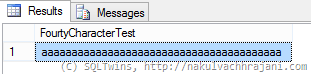
As can be seen from the screenshot below, the only 40 characters were successfully inserted into the table – dbo.AnsiWarningsTest. The string truncation was handled automatically by Microsoft SQL Server.

image

Now, we turn ANSI_WARNINGS OFF and repeat the same test.

--Set ANSI_WARNINGS to ON
SET ANSI_WARNINGS ON;

--Check current value of ANSI_WARNINGS
IF (@@OPTIONS & 8) = 8
PRINT 'ANSI_WARNINGS are ON';
ELSE
PRINT 'ANSI_WARNINGS are OFF';

--Attempt to insert data longer than available column value
--This SHOULD result into an exception
INSERT INTO dbo.AnsiWarningsTest (FourtyCharacterTest)
SELECT REPLICATE('b',100);
GO

Attempting to execute this immediately results into the following error in the “Messages” tab of the SSMS.

ANSI_WARNINGS are ON
Msg 8152, Level 16, State 14, Line 12
String or binary data would be truncated.

Conclusion

When working with bulk data imports, it is important to know the differences in the storage design of both systems. Once known, mismatches that may result into potential string termination errors should be explicitly handled by the SUSBTRING clause.

Further Reading

  • ANSI_WARNINGS [MSDN Link]
  • SUBSTRING [MSDN Link]

Until we meet next time,

Be courteous. Drive responsibly.

#0340 – SQL Server – Myths – ORDER BY can only work on columns fetched in the SELECT clause


We were recently working on an ad-hoc reporting request that involved customizations to an existing report (more specifically, customizations to an existing query). The query was to be embedded into a custom Excel reporting solution.

One of the requirements that we had was to ensure that by default the results appear in a given order. It’s a fairly common request, but what made this one stand out is the fact that we were asked to perform the sort on a column that was not part of the SELECT statement.

The myth

Every result that is processed by Microsoft SQL Server has two elements – a set of records and a set of columns, common to all data represented by the set of records.

The normal understanding of Microsoft SQL Server’s ORDER BY clause is that it works on the “selected” set of records. This is often misinterpreted to mean that it works on the columns selected, i.e. one can only use ORDER BY on columns which are selected in the SELECT clause.

So, what’s the truth and what’s going on behind the scenes.

The test

The following is a simple query that fetches details about some Employees from the HumanResources schema of the AdventureWorks2012 sample database. The only catch is that it is performing an ORDER BY operation on the DepartmentId column, which is not included in the SELECT clause.

USE AdventureWorks2012;
GO
--Notice that DepartmentId used in the ORDER BY is not fetched
--in the results returned by the SELECT clause
SELECT hredh.BusinessEntityID,
hre.JobTitle,
--hredh.DepartmentID,
hrd.Name,
hredh.StartDate,
hredh.EndDate,
hredh.ShiftID,
hrs.Name
FROM HumanResources.Shift AS hrs
INNER JOIN HumanResources.EmployeeDepartmentHistory AS hredh ON hredh.ShiftID = hrs.ShiftID
INNER JOIN HumanResources.Employee AS hre ON hredh.BusinessEntityID = hre.BusinessEntityID
INNER JOIN HumanResources.Department AS hrd ON hredh.DepartmentID = hrd.DepartmentID
ORDER BY hredh.DepartmentID;
GO

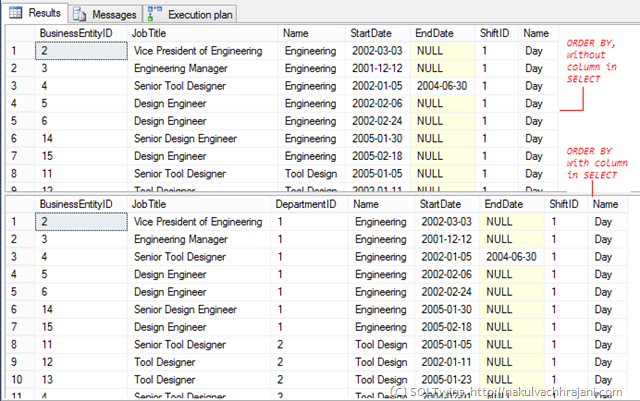
Attempting to execute this query does not return any error. The results do not appear to have been returned in any specific order (un-commenting the DepartmentId from the SELECT clause and running the query again will clear out the confusion).

image

Studying the execution plan

So, the question comes – what’s going on in the background that helps Microsoft SQL Server perform an ORDER BY on a column (or a set of columns) which are not even selected?

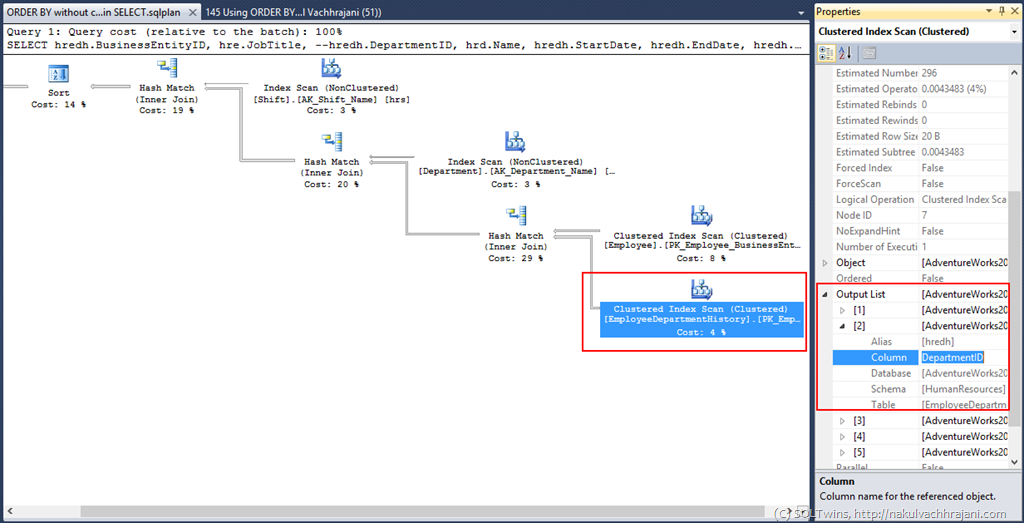
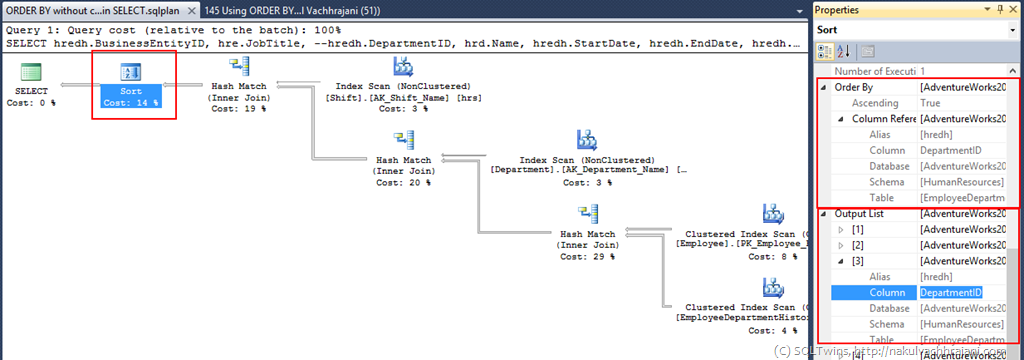
A quick look at the execution plan reveals the truth – DepartmentId is actually fetched from the underlying tables, and is filtered from the final result once the ORDER BY/Sort operation is complete.

image

image

This is identical to the execution plan produced if we keep the ORDER BY in the SELECT clause.

Conclusion

This proves that when an ORDER BY operation is performed, the columns required to perform the SORT need to be fetched by the database engine. This is irrespective of whether the query needs a particular column to be returned via the SELECT clause.

While the database engine will fetch the column as part of data retrieval, there is no restriction that mandates the presence of a column in the SELECT if a sort/ORDER BY is being done on that column in the query.

A Word of caution

While it is legal to have an implementation as highlighted above, be careful when combining this with the DISTINCT and TOP clauses – because the column(s) on which the ordering/sorting is done are not available, it can result into query results which are difficult to understand.

Until we meet next time,

Be courteous. Drive responsibly.

#0277 – SQL Server – Interview Question – Script to Identify DML Triggers and Trigger types


As a DBA, it is very important to be aware about the database schema that you own. For an entry level DBA position, some of the common interview questions around the subject of maintaining database DML triggers are:


  • How many DML triggers exist in your database?

  • Can you classify them into INSERT, UPDATE and DELETE triggers?

  • Given any Microsoft SQL Server database, can you answer both these questions?

This post presents a script that answers all the questions above. The script below involves querying the Catalog Views – sys.triggers and sys.trigger_events to answer these questions:

USE AdventureWorks2008R2 ;
GO
SELECT  st.name AS TriggerName,
        OBJECT_NAME(st.parent_id) AS ParentTableName,
        st.is_ms_shipped AS IsMSShipped,
        st.is_disabled AS IsDisabled,
        st.is_not_for_replication AS IsNotForReplication,
        st.is_instead_of_trigger AS IsInsteadOfTrigger,
        te.type AS TypeId,
        te.type_desc AS TypeDescription,
        te.is_first AS IsTriggerFiredFirst,
        te.is_last AS IsTriggerFiredLast
FROM    sys.triggers AS st
INNER JOIN sys.trigger_events AS te ON te.object_id = st.object_id
WHERE st.parent_id > 0
  AND st.is_ms_shipped = 0
ORDER BY st.parent_id, te.type ASC;
GO

/* Results:
TriggerName          ParentTableName      IsMS    Is       IsNotFor    IsInstead Type Type        IsTrigger   IsTrigger
                                          Shipped Disabled Replication Trigger   Id   Description FiredFirst  FiredLast
-------------------- -------------------- ------- -------- ----------- --------- ---- ----------- ----------- ---------
dVendor              Vendor               0       0        1           1         3    DELETE      0           0
iWorkOrder           WorkOrder            0       0        0           0         1    INSERT      0           0
uWorkOrder           WorkOrder            0       0        0           0         2    UPDATE      0           0
iPurchaseOrderDetail PurchaseOrderDetail  0       0        0           0         1    INSERT      0           0
uPurchaseOrderDetail PurchaseOrderDetail  0       0        0           0         2    UPDATE      0           0
uPurchaseOrderHeader PurchaseOrderHeader  0       0        0           0         2    UPDATE      0           0
iduSalesOrderDetail  SalesOrderDetail     0       0        0           0         1    INSERT      0           0
iduSalesOrderDetail  SalesOrderDetail     0       0        0           0         2    UPDATE      0           0
iduSalesOrderDetail  SalesOrderDetail     0       0        0           0         3    DELETE      0           0
dEmployee            Employee             0       0        1           1         3    DELETE      0           0
uSalesOrderHeader    SalesOrderHeader     0       0        1           0         2    UPDATE      0           0
iuPerson             Person               0       0        1           0         1    INSERT      0           0
iuPerson             Person               0       0        1           0         2    UPDATE      0           0
*/

Further Reading


  • sys.triggers [Link]

  • sys.trigger_events [Link]

Until we meet next time,


Be courteous. Drive responsibly.

#0276 – SQL Server – IDENTITY columns – Use IDENTITY() Function to change the Identity specification in a SELECT…INTO statement


We know that copying a table into another using the SELECT…INTO statement copies over the IDENTITY property also. However, it is possible that one might want to use an IDENTITY specification different from the source table in this process.


This can be achieved using the IDENTITY() function, which allows us to create a new column for the destination table when used with the SELECT…INTO clause. The function accepts upto 3 parameters – the data-type, the Identity seed and the Identity increment values for the new column.


The process described in this post can also be used to define an IDENTITY column in the destination table when the source table does not have one.


IDENTITY() – Demo


The script below demonstrates the usage of the IDENTITY column. I do not have an IDENTITY column on the source table. During the SELECT…INTO process, I wanted to create the new table with an IDENTITY specification in-place. To do so, I used the IDENTITY() function.

USE tempdb;
GO

SET NOCOUNT ON;

--1. Prepare the environment
--   Create a table, and add some test data into it

--Safety Check
IF OBJECT_ID('tIdentity','U') IS NOT NULL
    DROP TABLE dbo.tIdentity;
GO

--Create a table, notice that there are NO Identity columns on this table
CREATE TABLE dbo.tIdentity ( IdentityValue VARCHAR(10) );
GO

--Add some test data
INSERT INTO dbo.tIdentity (IdentityValue)
VALUES ('One'),
       ('Two'),
       ('Three'),
       ('Four'),
       ('Five');
GO

--2. Use SELECT..INTO to bulk insert data to a new table
SELECT IDENTITY(INT,100,1) AS DestinationId,
       SourceTable.IdentityValue AS DestinationValue
INTO dbo.DestinationTable
FROM dbo.tIdentity AS SourceTable ;

--2a. Fetch the value inserted into the destination table
SELECT DestinationTable.DestinationId,
       DestinationTable.DestinationValue
FROM dbo.DestinationTable;

--3. Check the properties of the new column - is it an IDENTITY column?
SELECT sc.name AS ColumnName,
       OBJECT_NAME(sc.object_id) AS TableName,
       sic.seed_value AS IdentitySeed,
       sic.increment_value AS IdentityIncrement,
       sic.is_nullable AS IsNullable,
       sic.last_value AS LastIdentityValueUsed
FROM sys.columns AS sc
INNER JOIN sys.identity_columns AS sic ON sc.object_id = sic.object_id
                                      AND sc.column_id = sic.column_id
WHERE ( sc.object_id = OBJECT_ID(N'dbo.DestinationTable',N'U') OR
        sc.object_id = OBJECT_ID(N'dbo.tIdentity',N'U')
      )
  AND sc.is_identity = 1;

--4. Cleanup
IF OBJECT_ID('dbo.tIdentity','U') IS NOT NULL
    DROP TABLE dbo.tIdentity;
GO

IF OBJECT_ID('dbo.DestinationTable','U') IS NOT NULL
    DROP TABLE dbo.DestinationTable;
GO

/**********************************************
               RESULTS
**********************************************/
/*
DestinationId DestinationValue
------------- ----------------
100           One
101           Two
102           Three
103           Four
104           Five

ColumnName     TableName         IdentitySeed  IdentityIncrement  IsNullable LastIdentityValueUsed
-------------- ----------------- ------------- ------------------ ---------- ----------------------
DestinationId  DestinationTable  100           1                  0          104
*/

Using IDENTITY() without SELECT…INTO – Msg 177


IDENTITY() does appear to be a very useful function, but please be aware that it cannot be used outside the SELECT…INTO clause. This can be confirmed by a simple modification to the SELECT query used in the example above:

SELECT IDENTITY(INT,100,1) AS DestinationId,
       SourceTable.IdentityValue AS DestinationValue
FROM dbo.tIdentity AS SourceTable ;

Executing this statement (assuming that the dependent tables and data is in-place) returns the following error:


Msg 177, Level 15, State 1, Line 16
The IDENTITY function can only be used when the SELECT statement has an INTO clause.


Conclusion


As can be seen from the scripts above, the IDENTITY() function is very useful to define domain/product-specific IDENTITY specification when importing data from one table to another.


Until we meet next time,


Be courteous. Drive responsibly.