Tag Archives: #TSQL

Articles on T-SQL. This can be a script or a syntax element

#0375 – SQL Server -Collation conflicts may occur when working with string functions (REPLACE, SUBSTRING, etc)


Recently, I was called upon to troubleshoot an interesting issue that came up with manipulating string termination characters (“\0”) using REPLACE. I wrote about the issue here.

As I was writing about the incident, I realized that if the data conditioning/manipulation script involves staging a “fixed” copy of the data one may end up with collation conflicts if the column collations were not specified as part of the column definition of these staging tables.

Allow me to demonstrate with an example.

Basically what I will do in the script below is create a test table with some manufacturer and product data. I later attempt to combine the ManufacturerName and ProductName into a column called FullName. In order to do this, I stage the fixed/updated data into a staging table and later join that to the main table for the update.

--1. Safety check - drop before we recreate
IF OBJECT_ID('tempdb..#product','U') IS NOT NULL
DROP TABLE tempdb..#product;
GO

IF OBJECT_ID('tempdb..#tempProduct','U') IS NOT NULL
DROP TABLE tempdb..#tempProduct;
GO

--2. Create the table to be fixed
CREATE TABLE #product
(ManufacturerName VARCHAR(50) COLLATE Latin1_General_CI_AS,
ProductName VARCHAR(50) COLLATE Latin1_General_CI_AS,
FullName VARCHAR(100) COLLATE Latin1_General_CI_AS
);
GO

--3. Insert some test data
INSERT INTO #product (ManufacturerName,
ProductName,
FullName)
VALUES ('Microsoft-','SQL Server', NULL),
('Microsoft-','Windows', 'Microsoft Windows'),
('Google','Chrome', 'Google Chrome'),
('Microsoft-','Azure',NULL);
GO

--4. Fix the data and store it to a staging table
SELECT ManufacturerName,
ProductName,
(REPLACE(p.ManufacturerName COLLATE Latin1_General_CI_AI, '-', ' ') + p.ProductName) AS FullName
INTO #tempProduct
FROM #product AS p;
GO

The key points to observe are:

  1. When doing the string manipulation, I explicitly specified a collation that is different from the collation of the original table (this may be required in case you are working on strings that need special handling)
  2. I did not explicitly specify the column definition for the staging table

What happens is that the collation of the output of a string function (REPLACE in this case) is same as that of the input string. This collation in the example is different from the collation of the main table. The temporary staging table is created with this different collation.

--5. Check out the meta-data of both the tables
SELECT pisc.COLUMN_NAME,
pisc.COLLATION_NAME AS SourceCollation,
tpisc.COLLATION_NAME AS StagingCollation
FROM tempdb.INFORMATION_SCHEMA.COLUMNS AS pisc
INNER JOIN tempdb.INFORMATION_SCHEMA.COLUMNS AS tpisc
ON pisc.COLUMN_NAME = tpisc.COLUMN_NAME
WHERE pisc.TABLE_NAME LIKE '#product%'
AND tpisc.TABLE_NAME LIKE '#tempProduct%'
GO
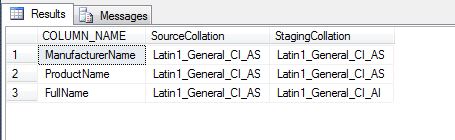
CollationsInMainVsStagingTable

Now, let us see what happens when we try to execute the update:

--6. Try the update and see what happens
UPDATE p
SET p.FullName = tp.FullName
FROM #product AS p
INNER JOIN #tempProduct AS tp
ON p.ManufacturerName = tp.ManufacturerName
AND p.ProductName = tp.ProductName
AND p.FullName <> tp.FullName;
GO
Msg 468, Level 16, State 9, Line 44
Cannot resolve the collation conflict between "Latin1_General_CI_AI" and "Latin1_General_CI_AS" in the not equal to operation.

The update basically fails with a collation conflict error which could have easily been avoided by specifying the column definition (with appropriate collations) for the staging tables.

The problem demonstrated above can be reproduced with other string manipulation functions as well (e.g. SUBSTRING).

The moral of the story: Always follow best practices and specify a column definition when defining a table – permanent, staging or temporary.

Until we meet next time,
Be courteous. Drive responsibly.

Script for this post:

--1. Safety check - drop before we recreate
IF OBJECT_ID('tempdb..#product','U') IS NOT NULL
DROP TABLE tempdb..#product;
GO

IF OBJECT_ID('tempdb..#tempProduct','U') IS NOT NULL
DROP TABLE tempdb..#tempProduct;
GO
--2. Create the table to be fixed
CREATE TABLE #product (ManufacturerName VARCHAR(50) COLLATE Latin1_General_CI_AS,
ProductName VARCHAR(50) COLLATE Latin1_General_CI_AS,
FullName VARCHAR(100) COLLATE Latin1_General_CI_AS
);
GO

--3. Insert some test data
INSERT INTO #product (ManufacturerName, ProductName, FullName)
VALUES ('Microsoft-','SQL Server', NULL),
('Microsoft-','Windows', 'Microsoft Windows'),
('Google','Chrome', 'Google Chrome'),
('Microsoft-','Azure',NULL);
GO

--4. Fix the data and store it to a staging table
SELECT ManufacturerName, ProductName, (REPLACE(p.ManufacturerName COLLATE Latin1_General_CI_AI, '-', ' ') + p.ProductName) AS FullName
INTO #tempProduct
FROM #product AS p;
GO

--5. Check out the meta-data of both the tables
SELECT pisc.COLUMN_NAME, pisc.COLLATION_NAME AS SourceCollation, tpisc.COLLATION_NAME AS StagingCollation
FROM tempdb.INFORMATION_SCHEMA.COLUMNS AS pisc
INNER JOIN tempdb.INFORMATION_SCHEMA.COLUMNS AS tpisc ON pisc.COLUMN_NAME = tpisc.COLUMN_NAME
WHERE pisc.TABLE_NAME LIKE '#product%' AND tpisc.TABLE_NAME LIKE '#tempProduct%'
GO

--6. Try the update and see what happens
UPDATE p
SET p.FullName = tp.FullName
FROM #product AS p
INNER JOIN #tempProduct AS tp ON p.ManufacturerName = tp.ManufacturerName
AND p.ProductName = tp.ProductName
AND p.FullName <> tp.FullName;
GO

--7. Creating the test tables
IF OBJECT_ID('tempdb..#product','U') IS NOT NULL
DROP TABLE tempdb..#product;
GO

IF OBJECT_ID('tempdb..#tempProduct','U') IS NOT NULL
DROP TABLE tempdb..#tempProduct;
GO
#0374 – SQL Server – Removing string terminators (“\0”) using REPLACE during string concatenation


Recently, I was called upon to troubleshoot a strange behaviour demonstrated by a data conditioning script that involved string concatenations. The script ran fine without any errors, but the script did not appear to be concatenating string.

The entire script for this post is shared towards the end of the post. Because the script involves creating specific data which would give away the root cause, I will not be presenting the snippets beforehand.

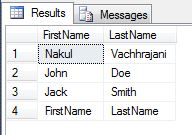
Assume that we have a simple table with two columns, “FirstName” and “LastName”:

Simple table with test data for string concatenation demo

Simple table with test data for string concatenation demo

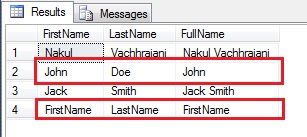
The data conditioning script involved populating the “FullName” column in the table with a simple combination of the First and the Last names.

Output of String Concatenation Script demonstrating the problem

Output of String Concatenation Script demonstrating the problem

The Problem: If we look at the output carefully, there is a problem with the FullNames for rows # 2 and 4. Although the LastName is present, only the FirstName is seen in the concatenation result.

The Theory:

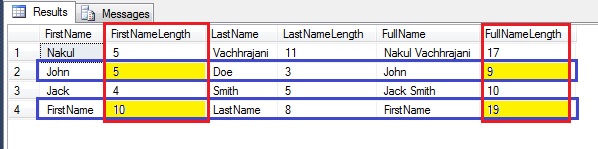
After about an hour of troubleshooting, we decided to check out the length of the strings in the table, and that’s when we hit gold. Although we could “see” only a couple of characters, the length was turning out to be a higher than what we expected.

As can be seen from the screenshot below, although the First Name “John” has a length of 4, we get 5 in the length. Similarly, although the FullName shows up as “John”, we get a length of 9.

Screenshot showing the length of the strings in the table

Screenshot showing the length of the strings in the table

This is the moment when the light bulb went off and we realized what was going on. The strings were inserted by a legacy application based on C/C++ code. In such legacy applications, we need to explicitly handle termination of strings by adding the string termination character. That would very well account for the presence of an additional character in the FirstName.

In order to explain the mystery behind the length of the FullName, let’s walk through the concatenation of a record.

  • FirstName = John, 4 characters
  • LastName = Doe, 3 characters
  • Expected length of FullName = First Name + a space + Last Name = 4 + 1 + 3 = 8 characters
  • Actual length of FullName = 9 characters

The difference can be accurately explained when we believe that the concatenation did actually happen – only thing is that we are unable to see the LastName part of the string because the system encounters the string termination character, causing it to stop displaying more characters from the string.

In order to confirm our theory, we replaced the string termination character with a hyphen (-), using the REPLACE function.

UPDATE pt
SET pt.FullName = REPLACE(pt.FullName COLLATE Latin1_General_BIN, CHAR(0) COLLATE Latin1_General_BIN, '-')
FROM @personTable AS pt;

In order for this to work in all environments, we changed the collation to binary when performing the replace (because ultimately, string terminators are just a set of bits when performing binary manipulation).

Finding and Replacing the String Terminator in a string.

Finding and Replacing the String Terminator in a string.

As can be seen from the screenshot above, the REPLACE was successful, and we were able to see the entire string.

In Conclusion

  • When working with data created by legacy code, it is useful to understand how the code works. In this case, we realized that the string terminator was causing a problem and were able to overcome it – but it could have led to hours of troubleshooting (an option of re-creating data manually was also put on the table)
  • SQL Server, and T-SQL can be trusted when it comes to data manipulation. Almost always it’s the system or the human element that is missing something critical

Until we meet next time,
Be courteous. Drive responsibly.

Script for this post:

USE tempdb;
GO
--Creating the sample table
DECLARE @personTable TABLE (FirstName VARCHAR(50),
                            LastName  VARCHAR(50),
                            FullName  VARCHAR(100)
                           );

--Insert some test data
INSERT INTO @personTable (FirstName, LastName)
VALUES ('Nakul','Vachhrajani'),
       ('John' + CHAR(0),'Doe'),
       ('Jack','Smith'),
       ('FirstName' + CHAR(0),'LastName');

--Check out the data
SELECT pt.FirstName,
       pt.LastName
FROM @personTable AS pt;

--Perform the string concatenation
UPDATE pt
SET pt.FullName = pt.FirstName + ' ' + pt.LastName
FROM @personTable AS pt;


--Check out the data
SELECT pt.FirstName,
       pt.LastName,
       pt.FullName
FROM @personTable AS pt;

--Checking the length of the data
SELECT pt.FirstName,
       LEN(pt.FirstName) AS FirstNameLength,
       pt.LastName,
       LEN(pt.LastName) AS LastNameLength,
       pt.FullName,
       LEN(pt.FullName) AS FullNameLength
FROM @personTable AS pt;

--Confirming presence of string termination characters
SELECT pt.FirstName,
       LEN(pt.FirstName) AS FirstNameLength,
       CHARINDEX(CHAR(0),pt.FirstName,1) AS LocationOfStringTerminator,
       pt.LastName,
       LEN(pt.LastName) AS LastNameLength,
       pt.FullName,
       LEN(pt.FullName) AS FullNameLength,
       CHARINDEX(CHAR(0),pt.FullName,1) AS LocationOfStringTerminatorInFullName
FROM @personTable AS pt;

--Replace the string termination character with a hyphen
UPDATE pt
SET pt.FullName = REPLACE(pt.FullName COLLATE Latin1_General_BIN, CHAR(0) COLLATE Latin1_General_BIN, '-')
FROM @personTable AS pt;

--Confirming that string termination characters are no longer present
SELECT pt.FirstName,
       LEN(pt.FirstName) AS FirstNameLength,
       CHARINDEX(CHAR(0),pt.FirstName,1) AS LocationOfStringTerminator,
       pt.LastName,
       LEN(pt.LastName) AS LastNameLength,
       pt.FullName,
       LEN(pt.FullName) AS FullNameLength,
       CHARINDEX(CHAR(0),pt.FullName,1) AS LocationOfStringTerminatorInFullName
FROM @personTable AS pt;
GO

#0373 – SQL Server – Interview Questions – Parameters required for server-side paging mechanisms


For a mid-level SQL developer profile, this is one of my favourite interview questions if their current projects involve some sort of paging mechanism while displaying results on a grid.

What is the minimum number of parameters that your stored procedure needs to implement server-side paging?

Despite the multiple blog posts around this topic, this question surprisingly still stumps most of the developers.

The answer is quite simple – at a basic level, you absolutely need two (2) input parameters on your stored procedure to implement server-side paging:

  1. The page number
  2. The page size, i.e. the number of records to be displayed on each page

Of course, the implementation may vary – one can have multiple additional parameters like the sort column and the sort order, but at the very minimum one needs the two (2) parameters listed above.

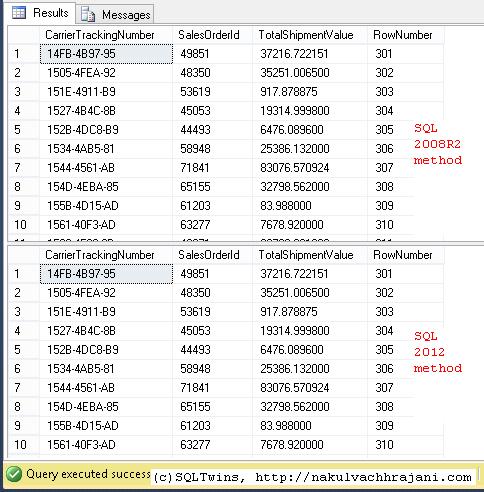
For reference, here is a sample implementation (for SQL Server 2008 R2 and SQL Server 2012):

USE AdventureWorks2012 ;
GO
SET NOCOUNT ON ;

DECLARE @pageSize INT = 100 ;
DECLARE @pageNumber INT = 3 ;

--SQL 2008 R2 Method
--Source Data, fetched with paging
;
WITH    SourceDataCTE ( CarrierTrackingNumber, SalesOrderId, TotalShipmentValue, RowNumber )
          AS ( SELECT   sod.CarrierTrackingNumber,
                        sod.SalesOrderId,
                        SUM(sod.LineTotal) AS TotalShipmentValue,
                        ROW_NUMBER() OVER ( ORDER BY sod.CarrierTrackingNumber, sod.SalesOrderId ) AS RowNumber
               FROM     Sales.SalesOrderHeader AS soh
                        INNER JOIN Sales.SalesOrderDetail AS sod ON sod.SalesOrderID = soh.SalesOrderID
               WHERE    soh.ShipDate IS NOT NULL
                        AND sod.CarrierTrackingNumber IS NOT NULL
               GROUP BY sod.CarrierTrackingNumber,
                        sod.SalesOrderId
             )
    SELECT TOP ( @pageSize )
            sdCTE.CarrierTrackingNumber,
            sdCTE.SalesOrderId,
            sdCTE.TotalShipmentValue,
                     sdCTE.RowNumber
    FROM    SourceDataCTE AS sdCTE
    WHERE   sdCTE.RowNumber BETWEEN ( ( @pageNumber * @pageSize ) + 1 )
                            AND     ( ( @pageNumber + 1 ) * @pageSize ) ;

--SQL 2012 Method
SELECT   sod.CarrierTrackingNumber,
        sod.SalesOrderId,
        --SUM(sod.LineTotal) OVER ( ORDER BY sod.CarrierTrackingNumber, sod.SalesOrderId ) AS TotalShipmentValue,
        SUM(sod.LineTotal) AS TotalShipmentValue,
        ROW_NUMBER() OVER ( ORDER BY sod.CarrierTrackingNumber, sod.SalesOrderId ) AS RowNumber
FROM     Sales.SalesOrderHeader AS soh
        INNER JOIN Sales.SalesOrderDetail AS sod ON sod.SalesOrderID = soh.SalesOrderID
WHERE    soh.ShipDate IS NOT NULL
        AND sod.CarrierTrackingNumber IS NOT NULL
GROUP BY sod.CarrierTrackingNumber,
        sod.SalesOrderId
ORDER BY sod.CarrierTrackingNumber
OFFSET (@pageNumber * @pageSize) ROWS
FETCH NEXT (@pageSize) ROWS ONLY
GO

Here’s the result of the code snippet provided above:

Shows the output of the various server-side paging mechanisms available for Microsoft SQL Server

SQL Server Paging Mechanisms

Until we meet next time,
Be courteous. Drive responsibly.

#0371 – SQL Server – Best Practices – Always use precise decimal data-types


I recently came across a concrete example of something that has always been maintained as a best practice – when working on items that are sensitive to decimal precision, always use precise data-types like DECIMAL instead of FLOAT or REAL.

The following example clearly demonstrates that using a FLOAT in mathematical calculations may change the outcome of the computation. For financial calculations, this would mean incorrect reporting of revenues.

USE tempdb;
GO
DECLARE @floatValue FLOAT = 1.5,
        @decimalValue DECIMAL(5,2) = 1.5,
        @multiplicationFactor INT = 159;

SELECT @floatValue AS FloatValue,
       @decimalValue AS DecimalValue,
       (@multiplicationFactor*(@floatValue/100)) AS FloatBasedValue,
       (@multiplicationFactor*(@decimalValue/100)) AS DecimalBasedValue,
       ROUND((@multiplicationFactor*(@floatValue/100)),2) AS RoundedFloatBasedValue,
       ROUND((@multiplicationFactor*(@decimalValue/100)),2) AS RoundedDecimalBasedValue;

The output of this simple computation is provided in the screenshot below:

Result shows that we have a rounding error when a value based off a FLOAT is rounded to 2 decimals v/s when a fixed precision DECIMAL is rounded

Impact of using imprecise datatypes in mathematical computations

As can clearly be seen, the computations performed using an imprecise datatype (FLOAT) result in a rounding error. When compounded over multiple derived calculations, this can have a serious impact on the end result.

The conclusion therefore is simply that it is always a best practice to use precise datatypes when working with financial calculations.

Further Reading

Until we meet next time,
Be courteous. Drive responsibly.

#0370 – SQL Server – Myths – CREATE DATABASE FOR ATTACH_REBUILD_LOG will not work for read-only databases


In the past, I have written about attaching data files to a SQL Server instance when log files are missing by the use of the FOR ATTACH_REBUILD_LOG clause of the CREATE DATABASE statement. Recently, I was referring the CREATE DATABASE documentation on MSDN. It’s a comprehensive document and and the following line for read-only databases caught my attention.

For a read-only database, the log cannot be rebuilt because the primary file cannot be updated. Therefore, when you attach a read-only database with a log that is unavailable, you must provide the log files, or the files in the FOR ATTACH clause.

This statement was contrary to what I had observed before. Hence, I decided to re-validate the findings via a demo.

The first step, of course is to create a database.

USE [master];
GO
CREATE DATABASE ReadOnlyDBForAttach
ON PRIMARY (NAME = ReadOnlyDBForAttach_Data,
            FILENAME='C:\SQLData\MSSQL12.SQL2014\MSSQL\DATA\ReadOnlyDBForAttach_Data.mdf'),
   FILEGROUP RODefault (NAME = ReadOnlyDBForAttach_RODefault,
              FILENAME='C:\SQLData\MSSQL12.SQL2014\MSSQL\DATA\ReadOnlyDBForAttach_RODefault.mdf')
LOG ON (NAME = ReadOnlyDBForAttach_Log,
        FILENAME='C:\SQLData\MSSQL12.SQL2014\MSSQL\DATA\ReadOnlyDBForAttach_Log.ldf');
GO

As can be seen from the script referenced above, the database we created as 2 data file groups, one is the default PRIMARY filegroup. Because we cannot make the PRIMARY filegroup READ_ONLY, we will be making the other filegroup (RODefault) READ_ONLY. To add complexity, we will also make it the default filegroup, i.e. any new objects created without specifying a filegroup, it will be created in the filegroup marked as default.

Finally, we will also mark the database as READ_ONLY.

USE [master];
GO
ALTER DATABASE ReadOnlyDBForAttach
MODIFY FILEGROUP [RODefault] DEFAULT;
GO

ALTER DATABASE ReadOnlyDBForAttach
MODIFY FILEGROUP [RODefault] READ_ONLY;
GO

ALTER DATABASE ReadOnlyDBForAttach SET READ_ONLY;
GO

Now, let us check out the database and filegroup properties.

USE ReadOnlyDBForAttach;
GO
SELECT 'Database Properties',
       sd.[name],
       sd.is_read_only,
       sd.is_cleanly_shutdown
FROM sys.databases AS sd
WHERE sd.[name] = 'ReadOnlyDBForAttach';

SELECT 'File properties',
       sdf.file_id,
       sdf.type,
       sdf.data_space_id,
       sdf.type_desc,
       sdf.name,
       sdf.is_read_only,
       sdf.is_media_read_only
FROM sys.database_files AS sdf;
GO
Image showing database and database file properties for the read-only database - ReadOnlyDBForAttach

Read Only database and database file properties

Now, let us detach the database, and delete the log file. (NOTE: We are removing the log file for the purposes of this demo only. Please do not do this in your QA or production environments).

USE [master];
GO
EXEC sp_detach_db @dbname = 'ReadOnlyDBForAttach';
GO
Image showing the log file physically removed from the file system

Read Only Database – Log File Removed

Finally, let us attach the database back to the SQL Server instance using the CREATE DATABASE…FOR ATTACH_REBUILD_LOG clause.

USE [master]
GO
CREATE DATABASE [ReadOnlyDBForAttach]
ON  PRIMARY ( NAME = N'ReadOnlyDBForAttach_Data',
                FILENAME = N'C:\SQLData\MSSQL12.SQL2014\MSSQL\DATA\ReadOnlyDBForAttach_Data.mdf')
FOR ATTACH_REBUILD_LOG
GO
File activation failure. The physical file name "C:\SQLData\MSSQL12.SQL2014\MSSQL\DATA\ReadOnlyDBForAttach_Log.ldf" may be incorrect.
New log file 'C:\SQLData\MSSQL12.SQL2014\MSSQL\DATA\ReadOnlyDBForAttach_log.ldf' was created.

As can be seen from the message above, the log file was successfully created and the database was successfully attached to the SQL Server instance.

Let us cross-check the database and file properties again:

USE ReadOnlyDBForAttach;
GO
SELECT 'Database Properties',
       sd.[name],
       sd.is_read_only,
       sd.is_cleanly_shutdown
FROM sys.databases AS sd
WHERE sd.[name] = 'ReadOnlyDBForAttach';

SELECT 'File properties',
       sdf.file_id,
       sdf.type,
       sdf.data_space_id,
       sdf.type_desc,
       sdf.name,
       sdf.is_read_only,
       sdf.is_media_read_only
FROM sys.database_files AS sdf;
GO
Read Only Database and Data File Properties After Attach showing that the database is no longer Read Only

Read Only Database and Data File Properties After Attach

Conclusion

  • Contrary to the MSDN remark, a read-only database can be successfully attached to a SQL Server instance even when the log file does not exist by the use of CREATE DATABASE…FOR ATTACH_REBUILD_LOG
  • A read-only database becomes a read/write database if it has been attached to the SQL Server using FOR ATTACH_REBUILD_LOG and the log file was rebuilt

My findings above do not agree with the MSDN remark. At the moment, I am inclined to believe that this is a bug in the documentation as I have found a couple of years ago as well (see references). Please do share your views on the same in the post comments.

References/Further Reading

  • SQL Server Myth: Log files are removed when a database is made READ_ONLY [Link]
  • Creating a database without the log backup file – Error Msg. 5120 [Link]
  • CREATE DATABASE…ATTACH_REBUILD_LOG resets database recovery mode to SIMPLE [Link]
  • Setting database to READ_ONLY does not change the file-group properties [Link]
  • sp_attach_db v/s CREATE DATABASE FOR ATTACH – Number of files limitation; Msg. 8144 (Procedure has too many arguments specified) [Link]
  • CREATE DATABASE [MSDN Documentation]

Until we meet next time,
Be courteous. Drive responsibly.