Category Archives: Imported from BeyondRelational

These posts are imported from my old blog page: http://beyondrelational.com/modules/2/blogs/77/nakuls-blog.aspx

SQL Server – SQL Agent – Jobs – Automatically delete SQL Server Agent jobs


I would start today’s post with a question – Have you ever faced a requirement to delete a job once it successfully completes?

Once I had to achieve just that – a SQL Server job had to be created, and the requirement was to delete the job after it’s execution. Now, the job was a scheduled data cleanup operation in a client-server system whose code-fix had already been deployed previously and therefore there was no need to run the job ever again. However, we were not able to run it during the day because users were in the system. We needed to run the job before the nightly end-of-day routines executed, and at a time we knew that nobody would be accessing the system. So, here is what we did.

From the Object explorer, navigate to the SQL Server Agent, and start the creation of a new nightly job image
Fill-in the required details on the “General” tab image
In the “Steps” tab, add the necessary steps.

For our demonstration, we will only use a single rebuild index step

image  
image
Script used in the job:
/*
WARNING : THIS SCRIPT IS PROVIDED AS-IS AND WITHOUT
                     WARRANTY.
                     THE SCRIPT IS INTENDED FOR DEMOSTRATION
                     PURPOSES ONLY.
*/
USE AdventureWorks2008R2
GO
ALTER INDEX IX_SalesOrderDetail_ProductID ON Sales.SalesOrderDetail
REBUILD;
GO

Navigate out to the Notifications tab and Check the checkbox – “Automatically delete job”.

As you can see we have 3 options to delete the job when:

1. The job succeeds

2. The job fails

3. The job completes

We will choose to delete the job upon success.

image
Notice that our job is now successfully created image
Run the job manually

(For our demo, we have not established Job schedules. In the real world, you would almost always have scheduled jobs.)

image
Confirm that the indexes were rebuilt as requested image
Script used for the verification
USE AdventureWorks2008R2;
GO
SELECT a.index_id, name, avg_fragmentation_in_percent
FROM sys.dm_db_index_physical_stats (DB_ID(), OBJECT_ID(N'Sales.SalesOrderDetail'),
     NULL, NULL, NULL) AS a
    JOIN sys.indexes AS b ON a.object_id = b.object_id AND a.index_id = b.index_id;
GO
Verify that the job has been deleted image

I trust that you found the post interesting and that the above mentioned method of automatically deleting a SQL Server agent job will be of help to you someday.

Until we meet next time,

Be courteous. Drive responsibly.

Subscribe to my posts via E-mail: Subscribe here | Read my posts via your favourite RSS reader: Click Here!

SQL Server – T-SQL – ALTER SCHEMA…TRANSFER option – Change the schema of a database object, type or XML Schema Collection


Ever since SQL Server 2005 introduced user-schema separation, schemas have received due importance. Most new designs isolate functionality within the same database via the use of schemas. With the growing use schemas, did you ever face a situation wherein you or one of the team members created a table or a stored procedure (i.e. any securable) against the wrong schema?

This post is based on a personal experience I had long eons ago (in our world of information technology, even a span as long as 2 years is pre-historic!). During a deployment, one of the engineers deployed a stored procedure against an incorrect schema. When the application started throwing errors, a DBA friend of mine and I were called to the rescue. While we resolved the issue using old school techniques (drop & recreate), I recently came across a similar need and that’s when I discovered the solution described below.

The problem

Let’s assume that a stored procedure needs to be added to retrieve the pay history for an Employee. A simplified stored procedure would be something like:

/*
THIS SCRIPT IS PROVIDED AS-IS AND WITHOUT WARRANTY
THE SCRIPT IS FOR DEMONSTRATION PURPOSES ONLY
*/
USE AdventureWorks2008R2
GO

CREATE PROCEDURE proc_GetEmployeePayHistory 
    @businessEntityId INT
AS 
BEGIN
    SET NOCOUNT ON

    SELECT Employee.BusinessEntityID,
           Employee.NationalIDNumber,
           Employee.HireDate,
           EmployeePayHistory.PayFrequency,
           EmployeePayHistory.Rate,
           EmployeePayHistory.RateChangeDate,
           Employee.JobTitle
    FROM HumanResources.Employee
    INNER JOIN HumanResources.EmployeePayHistory ON Employee.BusinessEntityID = EmployeePayHistory.BusinessEntityID
    WHERE Employee.BusinessEntityID = @businessEntityId
END
GO

image

The stored procedure should have been created against the “HumanResources” schema. However, because no schema has been defined in the script above, by default, the procedure would be created in the “dbo” schema, which is incorrect and needs to be fixed.

The solution – ALTER SCHEMA….TRANSFER option

For a stored procedure, it is comparatively easy for us to drop and recreate the procedure against the correct schema. However, for tables and other securable objects, rectifying an incorrect schema may not be that easy. For example, in the case of tables, one might have default data that needs to be re-generated or may have pre-existing data that needs to be migrated to the new table. A generic solution is therefore required.

This generic solution is provided by Microsoft SQL Server in the form of a TRANSFER option as part of the ALTER SCHEMA syntax.

To change the schema of our stored procedure here, we need to run the following script:

/*
THIS SCRIPT IS PROVIDED AS-IS AND WITHOUT WARRANTY
THE SCRIPT IS FOR DEMONSTRATION PURPOSES ONLY
*/
USE AdventureWorks2008R2
GO

ALTER SCHEMA HumanResources
TRANSFER Object::dbo.proc_GetEmployeePayHistory
GO

Doing so transfers the object – dbo.proc_GetEmployeePayHistory to the HumanResources schema.

image

Advantage

As mentioned earlier, for stored procedures, views and functions it is reasonably easy to drop-and-recreate the objects. However, the story is different in case of tables. Tables contain data, so dropping and recreating them would involve large amounts of I/O, and would therefore be performance intensive and a rather long process.

The use of ALTER SCHEMA…TRANSFER is a metadata update, and therefore is lightning fast – minimal I/O overheads when compared to the old school methods.

Does this work only with stored procedures?

Of course not! The ALTER SCHEMA…TRANSFER works with the following securable entity types:

  • Objects
    • Includes tables, stored procedures, views and functions
  • Types
  • XML Schema Collections

Security Requirements

To use the ALTER SCHEMA…TRANSFER statement, one needs to have:

  1. CONTROL permissions on the object AND
  2. ALTER permission on the target schema

In addition, if the securable has an EXECUTE AS OWNER specification on it and the owner is set to SCHEMA OWNER, the user must also have IMPERSONATION permission on the owner of the target schema.

NOTE: After the transfer, any permissions applied on the object are lost and will therefore have to be reapplied.

Reference:

Until we meet next time,

Be courteous. Drive responsibly.

Subscribe to my posts via E-mail: Subscribe here | Read my posts via your favourite RSS reader: Click Here!

SQL Server – T-SQL – Best Practice – Composite Primary Keys – Performance (and accuracy) impact


One of the reasons I enjoy working with Microsoft SQL Server because often I find that its behaviour is a classic case of GIGO (Garbage In Garbage Out). Jacob Sebastian (LinkedIn) always makes it a point to mention in his TechEd and Community Tech Days sessions that one must also treat SQL Server with respect, else it will create problems for us!

Based on my practical experience in resolving issues during code review and sometimes during bug-fixing, what I am going to discuss about today demonstrates that if we (i.e. SQL developers) do not respect SQL Server or feed it the wrong queries, the output will be wrong!

Composite Primary Keys

There are many cases when we have the primary key on a table as a composite key, i.e. comprised of one or more key columns. Let us assume that we are making an application for a courier company, and have divided the country into multiple zones. Each zone has a set of delivery centers supported by the company.

USE tempdb
GO

IF (OBJECT_ID('tempdb.dbo.IndexBehaviourTest') IS NOT NULL)
	DROP TABLE tempdb.dbo.IndexBehaviourTest

CREATE TABLE IndexBehaviourTest (CityId INT NOT NULL,
                                 ZoneId INT NOT NULL,
                                 City VARCHAR(20),
                                 PRIMARY KEY(CityId, ZoneId))
GO

INSERT INTO IndexBehaviourTest (CityId, ZoneId, City)
VALUES
(1, 1, 'Delhi'),
(2, 1, 'Chandigadh'),
(1, 2, 'Mumbai'),
(2, 2, 'Ahmedabad'),
(1, 3, 'Kolkotta'),
(2, 3, 'Guwhati'),
(1, 4, 'Bengaluru'),
(2, 4, 'Chennai')
GO

As you can see from the script above, both the ZoneId and the CityId together identify a unique delivery location. Such cases are ideal for use of a composite primary key.

All of us “know” that whenever we write a query, we need to use the full primary key as the qualifier/filter in the WHERE clause. However, those who have supported a product for long will know that often developers in a rush to get things out of the door throw caution to the wind and proceed with whatever works.

The errors that occur

An unexpected result set

Normally, when developers develop code and unit test, the focus is more on getting the code to work, not on the accuracy of the code. The developer would begin by inserting a few cities into the database, and then use a simple query to fetch the results.

USE tempdb
GO
--Insert some unit test data
INSERT INTO IndexBehaviourTest (CityId, ZoneId, City)
VALUES
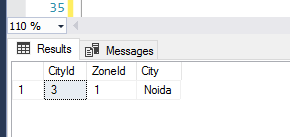
(3, 1, 'Noida')

--Fetch the test data to unit test
SELECT * FROM IndexBehaviourTest WHERE CityId = 3;
GO

The developer would be happy that the code worked and that SQL Server performed an index seek as expected. The developer would therefore integrate the query into source control. However, an incomplete primary key has been used and outside of the unit test data, the user is bound to end up with an unexpected result set.

USE tempdb
GO
--Impact of using only part of the key
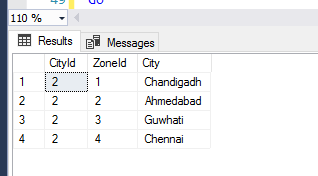
SELECT * FROM IndexBehaviourTest WHERE CityId = 2;
GO

As you can see, SQL Server returned us an incorrect result set because we requested “garbage” by not specifying the full primary key.

A performance hit

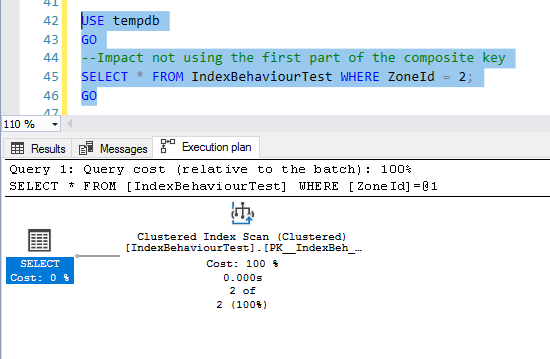
This is all about respecting SQL Server. If we do not use the first key column that makes up the composite key, we are not respecting SQL Server, and it will punish us by performing an index scan and thereby impacting performance:

USE tempdb
GO
--Impact not using the first part of the composite key
SELECT * FROM IndexBehaviourTest WHERE ZoneId = 2;
GO

Conclusion – Always use the full primary key

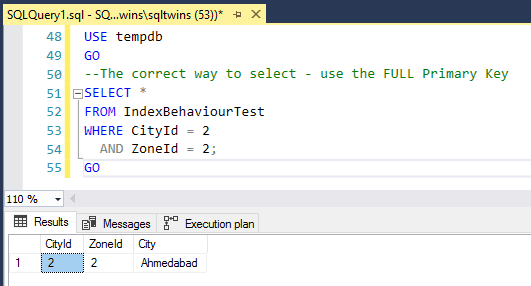
Always remember to treat SQL Server with respect, and never feed it junk to work upon. Always use the full primary key, and you will NEVER run into the specific issues mentioned above.

USE tempdb
GO
--The correct way to select - use the FULL Primary Key
SELECT * 
FROM IndexBehaviourTest 
WHERE CityId = 2 
  AND ZoneId = 2;
GO

Until we meet next time,

Be courteous. Drive responsibly.

SQL Server – TempDB v/s Model database – Minimum size considerations – CREATE DATABASE – Error Msg 1803


A few weeks ago, I wrote a post related to the tempdb where I attempted to answer the question – Is TempDB a copy of the model database? The post attracted a couple of follow-up comments (which I really appreciate, because it gives everyone a great deal to think about) and led me to a thought-filled week-end.

If you have not read my previous post, I strongly recommend that you read it by going to the link here – SQL Server – TempDB – Is it a copy of the Model database?

SCHEMA v/s Storage – Influence of the model database

Most administrators often make changes to their SQL Server database configuration. These changes typically include (and are not limited to):

  • Changing the default sizes and growth values of the data and log files
  • Changing the number of files & file-groups associated to a database
  • Changing the location of their database files
  • Changing the database collation
  • Implement mirroring, log shipping, etc
  • As demonstrated in my previous post, objects can be created in the model database, so that they are available whenever a database is created
    • Because the tempdb is re-created every time the SQL Server restarts, this is applicable to the tempdb also

Most of these changes can be classified into the following major categories:

  • Storage Parameters (size & number of files, collation, etc)
  • Security (changing roles and permissions)
  • Availability & Disaster Recovery (mirroring, log shipping, etc)
  • Schema changes (Defining or manipulating objects)

Each of these changes need to be applied either during database creation or after. These changes therefore need to be persisted somewhere so that they can be picked up during database creation/recovery.

However, the basic schema of any new database within Microsoft SQL Server will always come from the model database, and as demonstrated in my original post this is also applicable to the tempdb. Hence, while any database is schematically a copy of the model database, the storage & other parameters may differ based on the values specified by the user.

Is the initial size of a database independent of the model database?

This question is a tricky one to answer. So, let’s do a simple, 2-part experiment. First, let’s bring our environment up to the state mentioned in my previous post – SQL Server – TempDB – Is it a copy of the Model database?. This can be done by running the following script and restarting the SQL Server instance. Notice that as per the referenced post, tempdb gets copied over from the model database.

/**********************************************
              !!!WARNING!!!
THIS SCRIPT IS PROVIDED AS-IS AND WITHOUT
WARRANTY. THE AUTHOR AND nakulvachhrajani.com (@SQLTwins)
ARE NOT RESPONSIBLE FOR ANY DAMAGE CAUSED 
BY USING THIS SCRIPT.
**********************************************/
USE model
GO
CREATE TABLE DefaultTableTest
( DataId INT IDENTITY(1,1),
  RandomId INT DEFAULT (RAND()*1000),
  DataName VARCHAR(10) DEFAULT 'DEFAULT'
)
GO

/**********************************************
   Insert some test data into the table
**********************************************/
USE model
GO
INSERT INTO DefaultTableTest DEFAULT VALUES
GO 600000

Part 01 – Influence of the model database’s size on the tempdb

Now, remove the test object from both the model and the tempdb databases. Also, let’s use the ALTER DATABASE…MODIFY FILE clause to change the default size of the tempdb.

/**********************************************
              !!!WARNING!!!
THIS SCRIPT IS PROVIDED AS-IS AND WITHOUT
WARRANTY. THE AUTHOR AND nakulvachhrajani.com (@SQLTwins)
ARE NOT RESPONSIBLE FOR ANY DAMAGE CAUSED 
BY USING THIS SCRIPT.
**********************************************/
--Remove the object from the model database
USE model
GO
DROP TABLE DefaultTableTest
GO

--Remove the object from the tempdb database
USE tempdb
GO
DROP TABLE DefaultTableTest
GO

--Alter the tempdb to use an initial size of 10MB as opposed to the current size (approx. 21MB)
ALTER DATABASE tempdb
    MODIFY FILE ( NAME = 'tempdev',
                  SIZE = 10MB
                )
GO

Let’s restart the SQL Server instance, and verify the size of the tempdb.

As you can see, the tempdb continues to be of the same size as the model database. So what went wrong? Well, what’s wrong is that ALTER DATABASE…MODIFY FILE cannot modify the size such that it is smaller than the current size. Per Books On Line (http://msdn.microsoft.com/en-us/library/bb522469.aspx): “If SIZE is specified, the new size must be larger than the current file size.

Now, let’s see if CREATE DATABASE can create a database for us that has an initial size which is less than that of the model database.

Part 02 – Influence of the model database’s size on a newly created database

We will pickup from where Part 01 left off, i.e. the objects in the model database are gone, and both the model and the tempdb are about 21MB each.

Let’s try to create a database by specifying an initial file size which is less than that of the model database:

/**********************************************
              !!!WARNING!!!
THIS SCRIPT IS PROVIDED AS-IS AND WITHOUT
WARRANTY. THE AUTHOR AND nakulvachhrajani.com (@SQLTwins)
ARE NOT RESPONSIBLE FOR ANY DAMAGE CAUSED 
BY USING THIS SCRIPT.
**********************************************/
USE [master]
GO

CREATE DATABASE [InitialFileSizeDefined]
ON PRIMARY (NAME = 'InitialFileSizeDefined_Data', 
            FILENAME = 'C:Program FilesMicrosoft SQL ServerMSSQL11.DENALICTP03MSSQLDATAInitialFileSizeDefined_Data.mdf',
            SIZE = 10MB , MAXSIZE = UNLIMITED, FILEGROWTH = 1MB)
LOG ON (NAME = 'InitialFileSizeDefined_Log', 
        FILENAME = 'C:Program FilesMicrosoft SQL ServerMSSQL11.DENALICTP03MSSQLDATAInitialFileSizeDefined_Log.mdf',
        SIZE = 10MB , MAXSIZE = UNLIMITED, FILEGROWTH = 1MB)
GO

We receive the following error:

Msg 1803, Level 16, State 1, Line 2

The CREATE DATABASE statement failed. The primary file must be at least 21 MB to accommodate a copy of the model database.

Per Books On Line (http://msdn.microsoft.com/en-us/library/ms176061.aspx): “The size specified for the primary file must be at least as large as the primary file of the model database.

Conclusions:

The best part of the day was to summarize my thoughts. We can draw the following conclusions from the above observations:

  1. While every database (including the tempdb) is schematically a copy of the model database, the storage & other parameters may differ
  2. The minimum size of the any database has to be greater than or equal to that of the model database
    • ALTER DATABASE…MODIFY FILE and CREATE DATABASE cannot be used to circumvent this
  3. Extreme caution should be exercised when making changes (schematic or other) that result in a change to the size of the model database

The conclusion #2 is, I believe, by far the most important conclusion of this experiment. I look forward to hearing your thoughts on this topic.

References:

All references today come from Books On Line:

Until we meet next time,

Be courteous. Drive responsibly.

SQL Server – Profiler – Part 6 – Correlating the Profiler Trace with Windows Performance Log Data


Based on popular demand from my colleagues and you, the kind reader, I am currently writing a series of posts on the SQL Server Profiler. Five parts have been published till date, and for your kind reference, here are the links to them:

  1. What is a SQL Trace? Permissions, space requirements and launching the Profiler
  2. Profiler Templates, Template Types & creating custom templates
  3. Trace execution options – Save trace to file or a table, Auto-scroll and keyboard shortcuts
  4. Review T-SQL code to identify objects no longer supported by Microsoft – Deprecation Event
  5. Replaying a trace – from a file or a table – using breakpoints during trace replay

Today, in the last part of the series, we will be looking at another important application of the SQL Server Profiler – Correlating the Profiler Trace with Windows Profiler Log Data. This is helpful when you, as an IT or database administrator suspect that SQL Server is either being held up by or is the cause of an I/O, memory or processor contention.

Windows Reliability & Performance Monitor Log Data

Windows Reliability and Performance Monitor is a Microsoft Management Console (MMC) snap-in that combines the functionality of previous stand-alone tools including Performance Logs and Alerts, Server Performance Advisor, and System Monitor. The tool of interest to us is the Performance Logs and Alerts, erstwhile known as “Perfmon”.

Because this is a post on the SQL Server Profiler, demonstrating the capture of data using the Windows Reliability and Performance Monitor is out of scope. You may refer the References section for more details on the Windows Reliability and Performance Monitor.

For this test, I have created a Performance trace of the following counters (because the goal of this exercise was just to have a demonstration, very basic counters have been chosen. Under “live” circumstances, the counter range would be different):

  • Total Disk – Reads/sec
  • Total Disk – Writes/sec
  • Total Disk – Current Queue Length
  • SQL Server Buffer Manager – Page reads/sec
  • SQL Server Buffer Manager – Page writes/sec

SQL Server Profiler Trace Data

Using the custom trace developed in earlier editions of this series, capture a SQL Server Profiler Log for the following script. Notice that the script has been designed to have a distinct set of read & write activities:

/**********************************************
           !!!! WARNING !!!!
THIS SCRIPT IS PROVIDED AS-IS AND WITHOUT
WARRANTY. THE AUTHOR AND BEYONDRELATIONAL.COM
ARE NOT RESPONSIBLE FOR ANY DAMANGE CAUSED BY
THE USE OF THIS SCRIPT.
**********************************************/
USE tempdb
GO
CREATE TABLE DefaultTableTest
( DataId INT IDENTITY(1,1),
  RandomId INT DEFAULT (RAND()*1000),
  DataName VARCHAR(10) DEFAULT 'DEFAULT'
)
GO

/******************************************
   Insert some test data into the table
- This should generate lots of writes
******************************************/
USE tempdb
GO
INSERT INTO DefaultTableTest DEFAULT VALUES
GO 20000

/******************************************
   Fetch the test data
- This should generate lots of reads!
******************************************/
USE tempdb
GO
SELECT * FROM DefaultTableTest
GO
SELECT * FROM AdventureWorks2008R2.HumanResources.Employee
GO
--Wait for some time
WAITFOR DELAY'00:00:20'
--Regenerate some activity
USE tempdb
GO
SELECT * FROM DefaultTableTest
GO
SELECT * FROM AdventureWorks2008R2.HumanResources.Employee
GO

It is important to remember that the time ranges for the Windows Performance Monitor Log and SQL Server Profiler Trace log must overlap for the Profiler to be able to correlate them.

Correlating the Profiler Trace with Windows Performance Log Data

Once the data has been collected, now is the time to correlate the Profiler trace with the Windows Performance Log data. Below are the steps that you can use to do so:

In the SQL Server Profiler, open the saved Profiler trace file image
On the SQL Server Profiler File menu, click Import Performance Data image
In the Open dialog box, select a file that contains a performance log.

In the Performance Counters Limit dialog box, select the check boxes that correspond to the System Monitor objects and counters that you want to display alongside the trace. Click OK.

image

Notice that the performance monitor graph came out to be exactly as expected

  • Lot of Page writes in the beginning
  • Very small period of disk reads and buffer page reads towards the end
  • Note that disk writes continue in an even fashion throughout – indicating disk writing by the SQL Profiler and the Performance monitor
image

Select an event in the trace events window, or navigate through several adjacent rows in the trace events window by using the arrow keys.

The vertical red bar in the System Monitor data window indicates the performance log data that is correlated with the selected trace event.

image
Click a point of interest in the System Monitor graph.

The corresponding trace row that is nearest in time is selected.

Once the graph receives the mouse click, you can also use the right & left arrow keys to navigate

image
To zoom in on a time range, press and drag the mouse pointer (as if you are selecting a section of an image) in the System Monitor graph image

NOTES:

  1. The time ranges of the Profiler & Windows Performance Log data must overlap
  2. For accurate correlation with System Monitor data, the trace must contain both StartTime and EndTime data columns
  3. Correlation of the Profiler & Windows Performance Log data is not possible for a running trace that is still active & collecting data

References:

I hope you liked reading all 6 parts of my series on the SQL Server Profiler. Do leave your feedback – I really appreciate and thank-you for taking the time out of your busy day to read my posts.

Until we meet next time,

Be courteous. Drive responsibly.

Subscribe to my posts via E-mail: Subscribe here | Read my posts via your favourite RSS reader: Click Here!