
Category Archives: Blog

Articles related to this Blog

OLE DB Destination Configuration. Notice the "Keep nulls" switch is unchecked.

#0389 – SQL Server – SSIS – OLE DB Destination – Table Fast Load – Keep NULLs option


SQL Server Integration Services (SSIS) are typically called upon when integrating systems exchange data from one source to a given destination. The reason I use the term “source” and “destination” instead of a “database” because either of the two can be something other than a database (a flat file, some web-service, a script task, etc). This is possible because SSIS is more like any other .net framework based programming language (C# or VB.net).

OLE DB destination

Because one would commonly have either a Microsoft Access or a Microsoft SQL Server on at least one side of the integration, the most common source & destinations used in a SSIS-based data solution are the OLE DB Source and the OLE DB Destination. The OLE DB destination allows you to load data to a table, a view or even a SQL command (e.g. the results of a statement execution).

In order to load data as quickly into the destination as possible, the  OLE DB destination allows us to use a “Fast Load” mode. The “Fast Load” option allows the data team to configure various options that affect the speed of the data load:

  1. Keep Identity
  2. Keep NULLs
  3. Table Lock
  4. Check Constraints
  5. Rows per Batch
  6. Maximum Insert Commit Size

We will look at each option in detail over the next couple of weeks.

Keep NULLs option

The Keep NULLs option is normally something that most accidental SSIS developers do not pay much attention to. It comes unchecked by default and it left unchecked. However, the state of this checkbox can have a significant impact on the completeness and quality of data being inserted into the destination database.

To clarify, allow me to explain the functionality of this checkbox:

  1. Checked – If a column in the source data has NULL values, keep them as-is
  2. Unchecked – If a column in the source data has NULL values, try to replace them with the default values as defined by the destination DB

The state of this checkbox typically does not make much of a difference because in most cases, the domain and business rules in both the systems involved would be similar. Thus, the if a column in one system allows a NULL value, other systems in the same domain would also allow a NULL (e.g. in most enrollment forms, the last name would generally be mandatory but the first name is not). However, legacy systems (which have been around since decades) would have accumulated a lot data that does not conform to newer domain practices, causing issues during migration. This is when the “Keep Nulls” checkbox comes into action.

In the case I am going to present today, I have a set of Product Names and their corresponding Manufacturers. In a few of these cases, I don’t know the manufacturer and have therefore kept it blank.

USE tempdb;
GO
--Test Data
SELECT [ProductList].[ProductName],
       [ProductList].[ManufacturerName] 
FROM (VALUES ('Windows'     , 'Microsoft'),
             ('SQL Server'  , NULL       ),
             ('VisualStudio','Microsoft'),
             ('MySQL'       , 'Oracle'   ),
             ('PeopleSoft'  , 'Oracle'   )
     ) AS [ProductList] ([ProductName], [ManufacturerName]);
GO
Sample data with some NULL values

Sample data with some NULL values

For the sake of this demo, I have used this query as my source in the test SSIS package. Below is a screenshot of my data flow task.
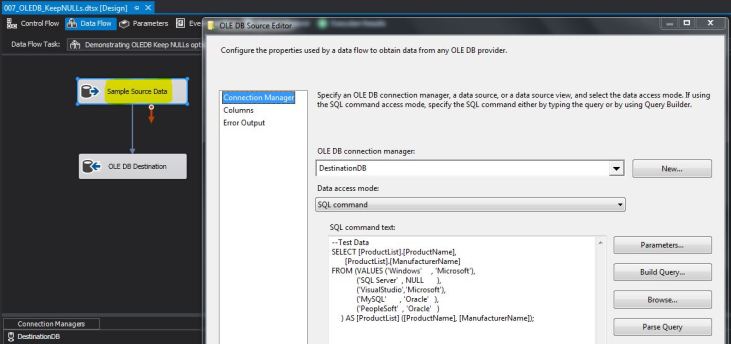
Using a test data query in the OLE DB source command

Using a test data query in the OLE DB source command

I directly take this dataset as input to the OLE DB destination. The OLE DB destination is configured to a test table ([dbo].[KeepNullsInOLEDB]) with the following table definition.

USE [tempdb];
GO
--Safety Check
IF OBJECT_ID('dbo.KeepNullsInOLEDB','U') IS NOT NULL
BEGIN
    DROP TABLE dbo.KeepNullsInOLEDB;
END
GO

--Create table
CREATE TABLE dbo.KeepNullsInOLEDB 
        ([ProductName]      VARCHAR(255) NULL,
         [ManufacturerName] VARCHAR(255) NULL     
                            CONSTRAINT df_KeepNullsInOLEDB_ManufacturerName 
                            DEFAULT ('Microsoft')
        );
GO
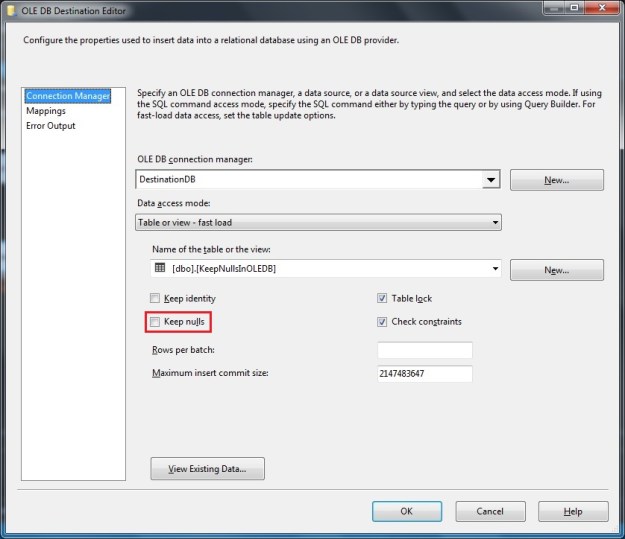
OLE DB Destination Configuration. Notice the “Keep nulls” switch is unchecked.

After executing the package, I query the [dbo].[KeepNullsInOLEDB] table in the destination database, and compare with the source data.

Values inserted into the destination table. Notice the default value from table definition is used.

Values inserted into the destination table. Notice the default value from table definition is used.

As can be seen from the screenshot, the [ManufacturerName] for “SQL Server” is not NULL. It is instead set to “Microsoft” which is the default value as set in the default constraint on the destination table.

The data inserted in the destination table changes if the switch is kept checked in the OLE DB destination.
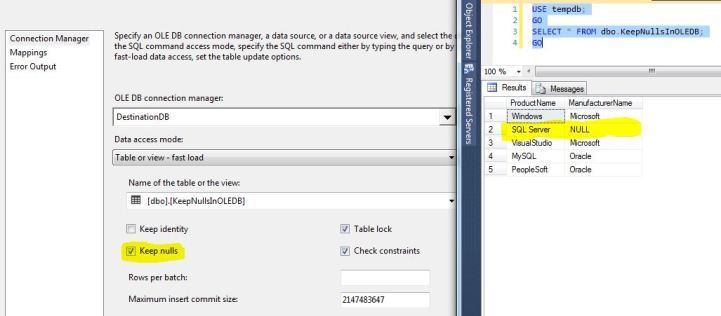
Notice how the value from the default constraint is not used when “Keep Nulls” is checked.

If the “Keep nulls” checkbox is checked, the default constraint on the target table is not used – thereby maintaining the same data as the source.

Summary

Depending upon the business requirements, it may be critical to migrate data from a source to a destination “as-is”, without the application of default constraints. In such situations, the “Keep nulls” switch on the OLE DB destination (“Fast Load” mode) needs to be checked.

If the “Keep nulls” switch is unchecked, the default constraints from the target table definition come into effect.

In my future posts, I will take a look at the other switches on the OLE DB Fast Load mode.

Until we meet next time,

Be courteous. Drive responsibly.

#0339 – SQL Server – I’ve moved! How to stay in touch with me?


My blog has always been the documentation of my evolutionary journey through the world of databases, especially, Microsoft SQL Server. Today, on the birthday of our daughters, I am pleased to announce the start of my blog, SQLTwins at http://nakulvachhrajani.com. I dedicate my journey with Microsoft SQL Server to our daughters, Devika & Devina.

The content on my pages in BeyondRelational.com [Link] will be moved (gradually) over to the new blog.

Today’s post is a brief summary of the various ways in which you can stay in touch with me.

My Blog

I will start posting to my blog (http://nakulvachhrajani.com)  effective today.

You can leave a comment (every one of which will be read by me). I would like to hear from you, so please leave your feedback – whether you liked the post, did not like it (if not, why), and what else would you like to know. I eagerly look forward to your comments.

You can follow my blog or even subscribe via E-mail!

My Linked-In Profile:

You can take a look at my Linked In Profile here:

View Nakul Vachhrajani's profile on LinkedIn

Social Media Presence

You can follow me on the following:

Twitter: Tweet to @sqltwins

Google+: +Nakul

Facebook: The SQLTwins Page on FB

Do note that it’s generally a busy day at the office for me, so I don’t post updates on my stream often.

That’s pretty much it. There aren’t too many channels, which helps me to read each reply, comment or query that you might send out to me.

Until we meet next time,

Be courteous. Drive responsibly.

#0339 – SQL Server – This Blog is moving! How to stay in touch with me?


My blog has always been the documentation of my evolutionary journey through the world of databases, especially, Microsoft SQL Server. Today, on the birthday of our daughters, I am pleased to announce the start of my blog, SQLTwins at http://nakulvachhrajani.com. I dedicate my journey with Microsoft SQL Server to our daughters, Devika & Devina.

The content on my pages in BeyondRelational.com will be moved (gradually) over to the new blog.

Today’s post is a brief summary of the various ways in which you can stay in touch with me.

My Blog

This blog will now move to http://nakulvachhrajani.com effective today.

You can leave a comment (every one of which will be read by me). I would like to hear from you, so please leave your feedback – whether you liked the post, did not like it (if not, why), and what else would you like to know. I eagerly look forward to your comments.

You can follow my blog or even subscribe via E-mail!

My Linked-In Profile:

You can take a look at my Linked In Profile here:

View Nakul Vachhrajani's profile on LinkedIn

Social Media Presence

You can follow me on the following:

Twitter: Tweet to @sqltwins

Google+: +Nakul

Facebook: The SQLTwins Page on FB

Do note that it’s generally a busy day at the office for me, so I don’t post updates on my stream often.

That’s pretty much it. There aren’t too many channels, which helps me to read each reply, comment or query that you might send out to me.

Until we meet next time,

Be courteous. Drive responsibly.

#0338 – SQL Server – Recursive CTE – Script to generate a simple multiplication table


I was explaining recursive CTEs recently, and had to come up with a practical example for the CTE implementation. One of the first use cases that came to mind was the creation of a simple multiplication table. Now that the script is created, I thought that you may also find it useful sometime in the future.

USE tempdb;
GO

–Generate basic mathematical tables using Recursive CTE
DECLARE @inputValue INT = 2;
DECLARE @targetMultiplicationFactor INT = 20;

–Define the CTE to generate a mathematical table
;WITH GenerateTablesCTE (Input, MultiplicationFactor, Result)
AS
(
–Anchor member
SELECT @inputValue AS Input,
1 AS MultiplicationFactor,
(@inputValue * 1) AS Result
UNION ALL
–Recursive member
SELECT @inputValue AS Input,
(gtCTE.MultiplicationFactor + 1) AS MultiplicationFactor,
(@inputValue * (gtCTE.MultiplicationFactor + 1)) AS Result
FROM GenerateTablesCTE AS gtCTE
WHERE gtCTE.MultiplicationFactor < @targetMultiplicationFactor
)
SELECT ogtCTE.Input,
ogtCTE.MultiplicationFactor,
ogtCTE.Result
FROM GenerateTablesCTE AS ogtCTE;
GO


Here’s the result:


image


This script can be used to populate a tally/look-up table.


Further Reading


  • Multiplication Table [Wikipedia Link]

Until we meet next time,


Be courteous. Drive responsibly.

#0337 – SQL Server – Inline TVFs – Using multiple SELECTs with UNION


The topic of today’s post might be obvious, but is backed by a question that came to me while making a change to one of our in-line table-valued functions (TVF).

We had an in-line TVF to which we had to add another SELECT statement in order to achieve a business requirement. Normally, the first thing that most developers would do is to convert it into a multi-line TVF. As a DBA, this would raise a red flag due to the much-talked about performance issues associated with multi-line TVFs.

Per Books-on-line (refer “Further Reading” section below):

The SELECT statement used in an inline function is subject to the same restrictions as SELECT statements used in views.

Now, a view can use multiple SELECT statements separated by UNION or UNION ALL. Hence, if a UNION can be used be used such that the SELECTs in a TVF can be combined into a single statement, then SQL Server will continue to treat the function as an in-line TVF. Here’s the simple example I used to cross-check that a function with only multiple SELECTs combined via the use of UNION will make it an in-line TVF:

USE tempdb;
GO</pre>
--Safety Check
IF OBJECT_ID('dbo.tmpfunc_MultiLineTest','IF') IS NOT NULL
DROP FUNCTION dbo.tmpfunc_MultiLineTest;
GO

--Create the function
--Disclaimer: This function has been created for demo purposes only!
CREATE FUNCTION dbo.tmpfunc_MultiLineTest
(@id1 INT,
@id2 INT
)
RETURNS TABLE
AS
RETURN
SELECT 1 AS Col1, 2 AS Col2
UNION
SELECT 2 AS Col1, 3 AS Col2
UNION
SELECT @id1 AS Col1, @id2 AS Col2
GO

--Is the function an in-line table valued function?
SELECT so.name,
so.type,
so.type_desc
FROM sys.objects AS so
WHERE so.name = 'tmpfunc_MultiLineTest';
GO
-------------------------
-- RESULTS
-------------------------
--name type type_desc
-------------------------- ---- ---------------------------------
--tmpfunc_MultiLineTest IF SQL_INLINE_TABLE_VALUED_FUNCTION

As you can see, I have a function that uses the syntax for in-line TVFs and has 3 SELECT statements combined via the use of a UNION operator. I then query the sys.objects catalog view which clearly tells me that this created an in-line TVF.

The reason? It’s quite simple – it’s still a single query!

Further Reading

  • Inline User Defined Table Valued Functions [TechNet Link]
  • Table valued parameters to a table valued function – Underappreciated features of Microsoft SQL Server [Blog Link]

Until we meet next time,

Be courteous. Drive responsibly.