Category Archives: #SQLServer

All about Microsoft SQL Server

#0341 – SQL Server – Random “String or binary data would be truncated” errors during bulk data loads


Interfacing multiple systems is always a great source of learning. In the various integrations that I have been a part of over the years, one of the many things that I have learnt is that no two systems have the same world view of the data that they store.

To take a very simple example, assume that we are interfacing a home-grown warehousing system with a 3rd party front desk PoS system. One of the first problems that most people will run into is that the supported length for product name is different – the warehousing system might be accepting a product name of let’s say 60 characters whereas the PoS may have a limit of 50 characters.

Integrations need to take care of this sort of a mismatch, but it’s not always easy. Sometimes, the interface specifications are vague or in case of home-grown legacy systems, possibly non-existent. In most enterprise integrations, a pre-production run is often done with a backup of the existing production data. When doing a data load from one system to another, it is quite possible that we run into situations wherein the tests run fine, but a production run fails with the following error:

Msg 8152, Level 16, State 14, Line 17
String or binary data would be truncated.

As the error suggests, it is what can very simply be termed as a buffer overflow – we are attempting to insert a larger string into a smaller container (table column). Because the data was the same, the question that comes up is:

Why was the “String or binary data would be truncated” error random and not reproducible at will?

Connection Settings – ANSI_WARNINGS

The answer to the puzzle lies in the connection settings for the SET option – ANSI_WARNINGS.

If the ANSI_WARNINGS is set to OFF, attempting to insert a longer string into a smaller column automatically truncates the string. The following test confirms the behaviour:

USE tempdb;
GO

--Create Test table
IF OBJECT_ID('dbo.AnsiWarningsTest','U') IS NOT NULL
DROP TABLE dbo.AnsiWarningsTest;
GO

CREATE TABLE dbo.AnsiWarningsTest (FourtyCharacterTest VARCHAR(40));
GO

--Default value, resetting for safety
SET ANSI_WARNINGS OFF;

--Check current value of ANSI_WARNINGS
IF (@@OPTIONS & 8) = 8
PRINT 'ANSI_WARNINGS are ON';
ELSE
PRINT 'ANSI_WARNINGS are OFF';

--Attempt to insert data longer than available column value
--This should work fine
INSERT INTO dbo.AnsiWarningsTest (FourtyCharacterTest)
SELECT REPLICATE('a',100);
GO

SELECT AnsiWarningsTest.FourtyCharacterTest
FROM dbo.AnsiWarningsTest;
GO

As can be seen from the screenshot below, the only 40 characters were successfully inserted into the table – dbo.AnsiWarningsTest. The string truncation was handled automatically by Microsoft SQL Server.
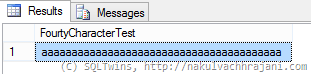
image

Now, we turn ANSI_WARNINGS OFF and repeat the same test.

--Set ANSI_WARNINGS to ON
SET ANSI_WARNINGS ON;

--Check current value of ANSI_WARNINGS
IF (@@OPTIONS & 8) = 8
PRINT 'ANSI_WARNINGS are ON';
ELSE
PRINT 'ANSI_WARNINGS are OFF';

--Attempt to insert data longer than available column value
--This SHOULD result into an exception
INSERT INTO dbo.AnsiWarningsTest (FourtyCharacterTest)
SELECT REPLICATE('b',100);
GO

Attempting to execute this immediately results into the following error in the “Messages” tab of the SSMS.

ANSI_WARNINGS are ON
Msg 8152, Level 16, State 14, Line 12
String or binary data would be truncated.

Conclusion

When working with bulk data imports, it is important to know the differences in the storage design of both systems. Once known, mismatches that may result into potential string termination errors should be explicitly handled by the SUSBTRING clause.

Further Reading

  • ANSI_WARNINGS [MSDN Link]
  • SUBSTRING [MSDN Link]

Until we meet next time,

Be courteous. Drive responsibly.

#0340 – SQL Server – Myths – ORDER BY can only work on columns fetched in the SELECT clause


We were recently working on an ad-hoc reporting request that involved customizations to an existing report (more specifically, customizations to an existing query). The query was to be embedded into a custom Excel reporting solution.

One of the requirements that we had was to ensure that by default the results appear in a given order. It’s a fairly common request, but what made this one stand out is the fact that we were asked to perform the sort on a column that was not part of the SELECT statement.

The myth

Every result that is processed by Microsoft SQL Server has two elements – a set of records and a set of columns, common to all data represented by the set of records.

The normal understanding of Microsoft SQL Server’s ORDER BY clause is that it works on the “selected” set of records. This is often misinterpreted to mean that it works on the columns selected, i.e. one can only use ORDER BY on columns which are selected in the SELECT clause.

So, what’s the truth and what’s going on behind the scenes.

The test

The following is a simple query that fetches details about some Employees from the HumanResources schema of the AdventureWorks2012 sample database. The only catch is that it is performing an ORDER BY operation on the DepartmentId column, which is not included in the SELECT clause.

USE AdventureWorks2012;
GO
--Notice that DepartmentId used in the ORDER BY is not fetched
--in the results returned by the SELECT clause
SELECT hredh.BusinessEntityID,
hre.JobTitle,
--hredh.DepartmentID,
hrd.Name,
hredh.StartDate,
hredh.EndDate,
hredh.ShiftID,
hrs.Name
FROM HumanResources.Shift AS hrs
INNER JOIN HumanResources.EmployeeDepartmentHistory AS hredh ON hredh.ShiftID = hrs.ShiftID
INNER JOIN HumanResources.Employee AS hre ON hredh.BusinessEntityID = hre.BusinessEntityID
INNER JOIN HumanResources.Department AS hrd ON hredh.DepartmentID = hrd.DepartmentID
ORDER BY hredh.DepartmentID;
GO

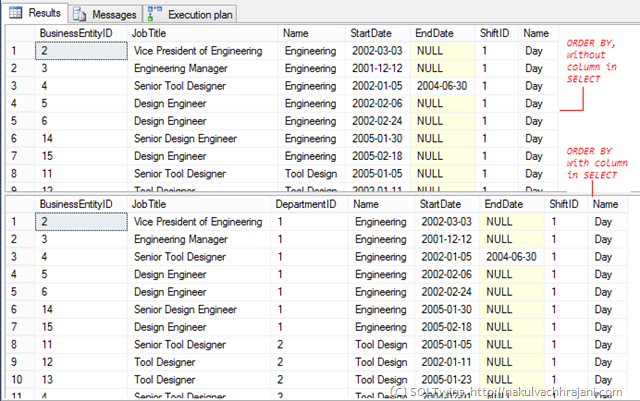
Attempting to execute this query does not return any error. The results do not appear to have been returned in any specific order (un-commenting the DepartmentId from the SELECT clause and running the query again will clear out the confusion).

image

Studying the execution plan

So, the question comes – what’s going on in the background that helps Microsoft SQL Server perform an ORDER BY on a column (or a set of columns) which are not even selected?

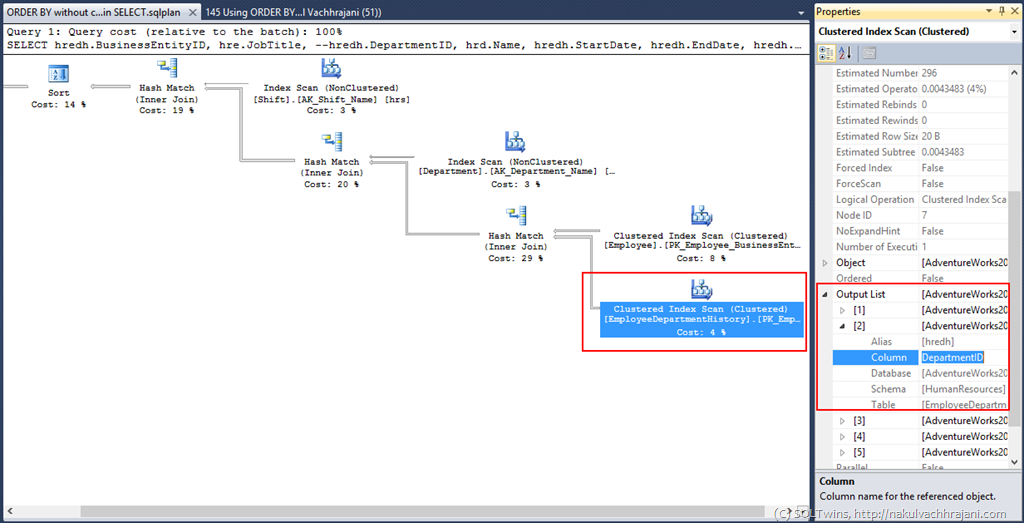
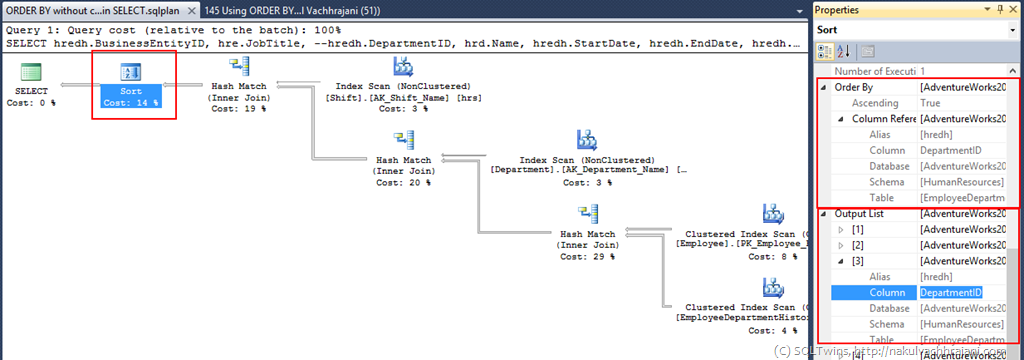
A quick look at the execution plan reveals the truth – DepartmentId is actually fetched from the underlying tables, and is filtered from the final result once the ORDER BY/Sort operation is complete.

image

image

This is identical to the execution plan produced if we keep the ORDER BY in the SELECT clause.

Conclusion

This proves that when an ORDER BY operation is performed, the columns required to perform the SORT need to be fetched by the database engine. This is irrespective of whether the query needs a particular column to be returned via the SELECT clause.

While the database engine will fetch the column as part of data retrieval, there is no restriction that mandates the presence of a column in the SELECT if a sort/ORDER BY is being done on that column in the query.

A Word of caution

While it is legal to have an implementation as highlighted above, be careful when combining this with the DISTINCT and TOP clauses – because the column(s) on which the ordering/sorting is done are not available, it can result into query results which are difficult to understand.

Until we meet next time,

Be courteous. Drive responsibly.

#0339 – SQL Server – This Blog is moving! How to stay in touch with me?


My blog has always been the documentation of my evolutionary journey through the world of databases, especially, Microsoft SQL Server. Today, on the birthday of our daughters, I am pleased to announce the start of my blog, SQLTwins at http://nakulvachhrajani.com. I dedicate my journey with Microsoft SQL Server to our daughters, Devika & Devina.

The content on my pages in BeyondRelational.com will be moved (gradually) over to the new blog.

Today’s post is a brief summary of the various ways in which you can stay in touch with me.

My Blog

This blog will now move to http://nakulvachhrajani.com effective today.

You can leave a comment (every one of which will be read by me). I would like to hear from you, so please leave your feedback – whether you liked the post, did not like it (if not, why), and what else would you like to know. I eagerly look forward to your comments.

You can follow my blog or even subscribe via E-mail!

My Linked-In Profile:

You can take a look at my Linked In Profile here:

View Nakul Vachhrajani's profile on LinkedIn

Social Media Presence

You can follow me on the following:

Twitter: Tweet to @sqltwins

Google+: +Nakul

Facebook: The SQLTwins Page on FB

Do note that it’s generally a busy day at the office for me, so I don’t post updates on my stream often.

That’s pretty much it. There aren’t too many channels, which helps me to read each reply, comment or query that you might send out to me.

Until we meet next time,

Be courteous. Drive responsibly.

#0338 – SQL Server – Recursive CTE – Script to generate a simple multiplication table


I was explaining recursive CTEs recently, and had to come up with a practical example for the CTE implementation. One of the first use cases that came to mind was the creation of a simple multiplication table. Now that the script is created, I thought that you may also find it useful sometime in the future.

USE tempdb;
GO

–Generate basic mathematical tables using Recursive CTE
DECLARE @inputValue INT = 2;
DECLARE @targetMultiplicationFactor INT = 20;

–Define the CTE to generate a mathematical table
;WITH GenerateTablesCTE (Input, MultiplicationFactor, Result)
AS
(
–Anchor member
SELECT @inputValue AS Input,
1 AS MultiplicationFactor,
(@inputValue * 1) AS Result
UNION ALL
–Recursive member
SELECT @inputValue AS Input,
(gtCTE.MultiplicationFactor + 1) AS MultiplicationFactor,
(@inputValue * (gtCTE.MultiplicationFactor + 1)) AS Result
FROM GenerateTablesCTE AS gtCTE
WHERE gtCTE.MultiplicationFactor < @targetMultiplicationFactor
)
SELECT ogtCTE.Input,
ogtCTE.MultiplicationFactor,
ogtCTE.Result
FROM GenerateTablesCTE AS ogtCTE;
GO


Here’s the result:


image


This script can be used to populate a tally/look-up table.


Further Reading


  • Multiplication Table [Wikipedia Link]

Until we meet next time,


Be courteous. Drive responsibly.

#0337 – SQL Server – Inline TVFs – Using multiple SELECTs with UNION


The topic of today’s post might be obvious, but is backed by a question that came to me while making a change to one of our in-line table-valued functions (TVF).

We had an in-line TVF to which we had to add another SELECT statement in order to achieve a business requirement. Normally, the first thing that most developers would do is to convert it into a multi-line TVF. As a DBA, this would raise a red flag due to the much-talked about performance issues associated with multi-line TVFs.

Per Books-on-line (refer “Further Reading” section below):

The SELECT statement used in an inline function is subject to the same restrictions as SELECT statements used in views.

Now, a view can use multiple SELECT statements separated by UNION or UNION ALL. Hence, if a UNION can be used be used such that the SELECTs in a TVF can be combined into a single statement, then SQL Server will continue to treat the function as an in-line TVF. Here’s the simple example I used to cross-check that a function with only multiple SELECTs combined via the use of UNION will make it an in-line TVF:

USE tempdb;
GO</pre>
--Safety Check
IF OBJECT_ID('dbo.tmpfunc_MultiLineTest','IF') IS NOT NULL
DROP FUNCTION dbo.tmpfunc_MultiLineTest;
GO

--Create the function
--Disclaimer: This function has been created for demo purposes only!
CREATE FUNCTION dbo.tmpfunc_MultiLineTest
(@id1 INT,
@id2 INT
)
RETURNS TABLE
AS
RETURN
SELECT 1 AS Col1, 2 AS Col2
UNION
SELECT 2 AS Col1, 3 AS Col2
UNION
SELECT @id1 AS Col1, @id2 AS Col2
GO

--Is the function an in-line table valued function?
SELECT so.name,
so.type,
so.type_desc
FROM sys.objects AS so
WHERE so.name = 'tmpfunc_MultiLineTest';
GO
-------------------------
-- RESULTS
-------------------------
--name type type_desc
-------------------------- ---- ---------------------------------
--tmpfunc_MultiLineTest IF SQL_INLINE_TABLE_VALUED_FUNCTION

As you can see, I have a function that uses the syntax for in-line TVFs and has 3 SELECT statements combined via the use of a UNION operator. I then query the sys.objects catalog view which clearly tells me that this created an in-line TVF.

The reason? It’s quite simple – it’s still a single query!

Further Reading

  • Inline User Defined Table Valued Functions [TechNet Link]
  • Table valued parameters to a table valued function – Underappreciated features of Microsoft SQL Server [Blog Link]

Until we meet next time,

Be courteous. Drive responsibly.