Category Archives: #SQLServer

All about Microsoft SQL Server

Book Review – SQL Server Interview Questions and Answers by Pinal Dave & Vinod Kumar


SQL Server Interview QuestionsThe Merriam-Webster dictionary describes a book (http://www.merriam-webster.com/dictionary/book) as “something that yields knowledge or understanding” and that it is the source of the “the total available knowledge and experience that can be brought to bear on a task or problem”.
I just completed reading a book that does true justice to the definition above. The book was “SQL Server Interview Questions and Answers”, authored by Pinal Dave (blog) and Vinod Kumar (blog), both of whom have been a source of inspiration to the entire SQL Server community and enthusiasts like myself.

First Impressions

The book arrived at my door a couple of weeks ago, and the first thing that surprised me was the size of the book. It’s a nice little book – convenient enough to carry around wherever you go.  Just skimming through the 207 odd pages brought another surprise. The pages are of good quality, and if you are in a habit like me to scribble little notes in the margins, you will be surprised with the large “notes” space that you get. The fonts are large and comfortable to read, preventing eye-strain. These are the advantages of a printed book!

The book was already on its way to becoming a winner.

Mastering the basics

Although the name contains the word “Interview”, this book is much more than just an interview questions guide. As you start reading the book, what you realize immediately is that this small package covers almost everything under the SQL Server umbrella, and caters to multiple audiences of multiple proficiency levels.

Audience

This is not a book just for learners; it’s not supposed to be. I would recommend that everyone working with Microsoft SQL Server for more than half of their day should get a copy of this book. Why? Think of it as a quiz. As you start answering the questions from this book, you begin to get a deeper understanding of the basics of Microsoft SQL Server. To aid the discovery process, there are reference links that are available where one can go to for additional information. Most of them lead to Pinal’s blog, which we all know is a goldmine in itself!

For engineers already having practical, hands-on experience on SQL Server, this book is a refresher course on the basics. It is a ready-reckoner for every SQL Server developer & administrator.

Simple, yet power packed content

For those who have had the privilege to listen to Pinal & Vinod presenting various sessions at Tech-Ed & Community Tech Days or for those who read their posts regularly, the simplicity of the language used in the book will not surprise you. It is really hard to keep things simple, and the hard-work of both the authors deserves a round of applause – they have kept things simple enough for the rookie, while packing enough content to excite the professional. (Spoiler alert!) For example, you can read the answer to the question – “Why can there be only one clustered index on a table?” which can be found on page #92. The concept is a complex one, but the way it has been treated makes it so simple to understand.

Book Organization

Book is organized into the following major sections or chapters:

  1. Database Concepts With SQL Server
  2. Common Generic Questions & Answers
  3. Common Developer Questions
  4. Common Tricky Questions
  5. Miscellaneous Questions On Sql Server 2008
  6. DBA Skills Related Questions
  7. Data Warehousing Interview Questions & Answers
  8. General Best Practices

What I liked about each section was:

  • A very inspiring quote at the start of the section
  • A “points to ponder” section at the end of the section
    • Quick references to Joes 2 Pros books (parts 1 through 4)
    • If given proper thought, this part is more than enough to gain reasonable expertise on SQL Server
  • Links to Pinal’s posts for further reading
  • Tips and things to keep in mind (for example, ready reference DBCC commands, or edition limitations) are provided in-line, which helps establish a context with the content at hand

Where can you get a copy?

Visit the book’s home pages for information on how you can get a copy for yourself:

(The only thing I found lacking on the book’s home pages is a link to an errata section)

Overall score

The book takes it all! A 5/5 rating!

With real world questions and practical answers, this is one book you simply cannot afford to miss. Happy reading!

Until we meet next time,

Be courteous. Drive responsibly.

Subscribe to my posts via E-mail: Subscribe here | Read my posts via your favourite RSS reader: Click Here!

SQL Server–Blog’s 1st Anniversary–Happy Birthday to Nakul’s Blog!


Today is the 1st birthday of this blog!

It all began one year ago, during a Community Tech Days event on a cold winter day. Jacob Sebastian (blog) asked if I would be willing to share my experiences, thoughts and tips around Microsoft SQL Server via a blog. I had never blogged before, and therefore, I thought of giving it a go. Rather than repeating what’s already available in Books On Line, I decided to direct my attempts towards bringing to the community something new, something that comes right out of day-to-day experiences – something that every reader can use everyday.

I would like to mention the names of the 3 people from the community who have had a major role in helping me take that first step towards establishing my online presence. They are – Jacob Sebastian (blog), Pinal Dave (blog) and Vinod Kumar (blog). In addition, I would thank my dear wife, Ami and my respected parents, without whose love, blessings and support I wouldn’t have achieved this. Finally, I would thank my friends and colleagues at work who kept providing me feedback on my posts and encouraged me to write more!

Some milestones…

Some of the most memorable posts and experiences during the last year have been:

There are lots of other posts that I have written over the last year and which are unique in their own right. Therefore instead of listing them here, I invite you all to visit my blog’s home page, and browse out through the archives. Some of my favourite posts are available here.

The journey that started a year ago has given me an experience that I can never forget. For a beginner, my first post, The Ghost of the Y2K received an astonishing response – 1371 reads in total! The current average daily readership for my posts is in excess of 700 reads/day! You, the community have showed your appreciation towards my efforts in bringing real-life, practically useful tips and easier understanding of concepts before you. I pray that you will continue showing your support as ever.

As an author, I love to hear your feedback. Whenever you read my post, do think about leaving your feedback – tell me what you liked, what you did not like and what you would want to read about in the future. You can remain in touch with me via My RSS Feed, via E-mail and via Google+ 

SQL Server and the SQL Server community rocks! Thank-you!

Until we meet next time,

Be courteous. Drive responsibly.

Subscribe to my posts via E-mail: Subscribe here | Read my posts via your favourite RSS reader: Click Here!

SQL Server – SQL Agent – Jobs – Automatically delete SQL Server Agent jobs


I would start today’s post with a question – Have you ever faced a requirement to delete a job once it successfully completes?

Once I had to achieve just that – a SQL Server job had to be created, and the requirement was to delete the job after it’s execution. Now, the job was a scheduled data cleanup operation in a client-server system whose code-fix had already been deployed previously and therefore there was no need to run the job ever again. However, we were not able to run it during the day because users were in the system. We needed to run the job before the nightly end-of-day routines executed, and at a time we knew that nobody would be accessing the system. So, here is what we did.

From the Object explorer, navigate to the SQL Server Agent, and start the creation of a new nightly job image
Fill-in the required details on the “General” tab image
In the “Steps” tab, add the necessary steps.

For our demonstration, we will only use a single rebuild index step

image  
image
Script used in the job:
/*
WARNING : THIS SCRIPT IS PROVIDED AS-IS AND WITHOUT
                     WARRANTY.
                     THE SCRIPT IS INTENDED FOR DEMOSTRATION
                     PURPOSES ONLY.
*/
USE AdventureWorks2008R2
GO
ALTER INDEX IX_SalesOrderDetail_ProductID ON Sales.SalesOrderDetail
REBUILD;
GO

Navigate out to the Notifications tab and Check the checkbox – “Automatically delete job”.

As you can see we have 3 options to delete the job when:

1. The job succeeds

2. The job fails

3. The job completes

We will choose to delete the job upon success.

image
Notice that our job is now successfully created image
Run the job manually

(For our demo, we have not established Job schedules. In the real world, you would almost always have scheduled jobs.)

image
Confirm that the indexes were rebuilt as requested image
Script used for the verification
USE AdventureWorks2008R2;
GO
SELECT a.index_id, name, avg_fragmentation_in_percent
FROM sys.dm_db_index_physical_stats (DB_ID(), OBJECT_ID(N'Sales.SalesOrderDetail'),
     NULL, NULL, NULL) AS a
    JOIN sys.indexes AS b ON a.object_id = b.object_id AND a.index_id = b.index_id;
GO
Verify that the job has been deleted image

I trust that you found the post interesting and that the above mentioned method of automatically deleting a SQL Server agent job will be of help to you someday.

Until we meet next time,

Be courteous. Drive responsibly.

Subscribe to my posts via E-mail: Subscribe here | Read my posts via your favourite RSS reader: Click Here!

SQL Server – T-SQL – ALTER SCHEMA…TRANSFER option – Change the schema of a database object, type or XML Schema Collection


Ever since SQL Server 2005 introduced user-schema separation, schemas have received due importance. Most new designs isolate functionality within the same database via the use of schemas. With the growing use schemas, did you ever face a situation wherein you or one of the team members created a table or a stored procedure (i.e. any securable) against the wrong schema?

This post is based on a personal experience I had long eons ago (in our world of information technology, even a span as long as 2 years is pre-historic!). During a deployment, one of the engineers deployed a stored procedure against an incorrect schema. When the application started throwing errors, a DBA friend of mine and I were called to the rescue. While we resolved the issue using old school techniques (drop & recreate), I recently came across a similar need and that’s when I discovered the solution described below.

The problem

Let’s assume that a stored procedure needs to be added to retrieve the pay history for an Employee. A simplified stored procedure would be something like:

/*
THIS SCRIPT IS PROVIDED AS-IS AND WITHOUT WARRANTY
THE SCRIPT IS FOR DEMONSTRATION PURPOSES ONLY
*/
USE AdventureWorks2008R2
GO

CREATE PROCEDURE proc_GetEmployeePayHistory 
    @businessEntityId INT
AS 
BEGIN
    SET NOCOUNT ON

    SELECT Employee.BusinessEntityID,
           Employee.NationalIDNumber,
           Employee.HireDate,
           EmployeePayHistory.PayFrequency,
           EmployeePayHistory.Rate,
           EmployeePayHistory.RateChangeDate,
           Employee.JobTitle
    FROM HumanResources.Employee
    INNER JOIN HumanResources.EmployeePayHistory ON Employee.BusinessEntityID = EmployeePayHistory.BusinessEntityID
    WHERE Employee.BusinessEntityID = @businessEntityId
END
GO

image

The stored procedure should have been created against the “HumanResources” schema. However, because no schema has been defined in the script above, by default, the procedure would be created in the “dbo” schema, which is incorrect and needs to be fixed.

The solution – ALTER SCHEMA….TRANSFER option

For a stored procedure, it is comparatively easy for us to drop and recreate the procedure against the correct schema. However, for tables and other securable objects, rectifying an incorrect schema may not be that easy. For example, in the case of tables, one might have default data that needs to be re-generated or may have pre-existing data that needs to be migrated to the new table. A generic solution is therefore required.

This generic solution is provided by Microsoft SQL Server in the form of a TRANSFER option as part of the ALTER SCHEMA syntax.

To change the schema of our stored procedure here, we need to run the following script:

/*
THIS SCRIPT IS PROVIDED AS-IS AND WITHOUT WARRANTY
THE SCRIPT IS FOR DEMONSTRATION PURPOSES ONLY
*/
USE AdventureWorks2008R2
GO

ALTER SCHEMA HumanResources
TRANSFER Object::dbo.proc_GetEmployeePayHistory
GO

Doing so transfers the object – dbo.proc_GetEmployeePayHistory to the HumanResources schema.

image

Advantage

As mentioned earlier, for stored procedures, views and functions it is reasonably easy to drop-and-recreate the objects. However, the story is different in case of tables. Tables contain data, so dropping and recreating them would involve large amounts of I/O, and would therefore be performance intensive and a rather long process.

The use of ALTER SCHEMA…TRANSFER is a metadata update, and therefore is lightning fast – minimal I/O overheads when compared to the old school methods.

Does this work only with stored procedures?

Of course not! The ALTER SCHEMA…TRANSFER works with the following securable entity types:

  • Objects
    • Includes tables, stored procedures, views and functions
  • Types
  • XML Schema Collections

Security Requirements

To use the ALTER SCHEMA…TRANSFER statement, one needs to have:

  1. CONTROL permissions on the object AND
  2. ALTER permission on the target schema

In addition, if the securable has an EXECUTE AS OWNER specification on it and the owner is set to SCHEMA OWNER, the user must also have IMPERSONATION permission on the owner of the target schema.

NOTE: After the transfer, any permissions applied on the object are lost and will therefore have to be reapplied.

Reference:

Until we meet next time,

Be courteous. Drive responsibly.

Subscribe to my posts via E-mail: Subscribe here | Read my posts via your favourite RSS reader: Click Here!

SQL Server – T-SQL – Best Practice – Composite Primary Keys – Performance (and accuracy) impact


One of the reasons I enjoy working with Microsoft SQL Server because often I find that its behaviour is a classic case of GIGO (Garbage In Garbage Out). Jacob Sebastian (LinkedIn) always makes it a point to mention in his TechEd and Community Tech Days sessions that one must also treat SQL Server with respect, else it will create problems for us!

Based on my practical experience in resolving issues during code review and sometimes during bug-fixing, what I am going to discuss about today demonstrates that if we (i.e. SQL developers) do not respect SQL Server or feed it the wrong queries, the output will be wrong!

Composite Primary Keys

There are many cases when we have the primary key on a table as a composite key, i.e. comprised of one or more key columns. Let us assume that we are making an application for a courier company, and have divided the country into multiple zones. Each zone has a set of delivery centers supported by the company.

USE tempdb
GO

IF (OBJECT_ID('tempdb.dbo.IndexBehaviourTest') IS NOT NULL)
	DROP TABLE tempdb.dbo.IndexBehaviourTest

CREATE TABLE IndexBehaviourTest (CityId INT NOT NULL,
                                 ZoneId INT NOT NULL,
                                 City VARCHAR(20),
                                 PRIMARY KEY(CityId, ZoneId))
GO

INSERT INTO IndexBehaviourTest (CityId, ZoneId, City)
VALUES
(1, 1, 'Delhi'),
(2, 1, 'Chandigadh'),
(1, 2, 'Mumbai'),
(2, 2, 'Ahmedabad'),
(1, 3, 'Kolkotta'),
(2, 3, 'Guwhati'),
(1, 4, 'Bengaluru'),
(2, 4, 'Chennai')
GO

As you can see from the script above, both the ZoneId and the CityId together identify a unique delivery location. Such cases are ideal for use of a composite primary key.

All of us “know” that whenever we write a query, we need to use the full primary key as the qualifier/filter in the WHERE clause. However, those who have supported a product for long will know that often developers in a rush to get things out of the door throw caution to the wind and proceed with whatever works.

The errors that occur

An unexpected result set

Normally, when developers develop code and unit test, the focus is more on getting the code to work, not on the accuracy of the code. The developer would begin by inserting a few cities into the database, and then use a simple query to fetch the results.

USE tempdb
GO
--Insert some unit test data
INSERT INTO IndexBehaviourTest (CityId, ZoneId, City)
VALUES
(3, 1, 'Noida')

--Fetch the test data to unit test
SELECT * FROM IndexBehaviourTest WHERE CityId = 3;
GO

The developer would be happy that the code worked and that SQL Server performed an index seek as expected. The developer would therefore integrate the query into source control. However, an incomplete primary key has been used and outside of the unit test data, the user is bound to end up with an unexpected result set.

USE tempdb
GO
--Impact of using only part of the key
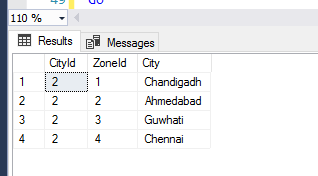
SELECT * FROM IndexBehaviourTest WHERE CityId = 2;
GO

As you can see, SQL Server returned us an incorrect result set because we requested “garbage” by not specifying the full primary key.

A performance hit

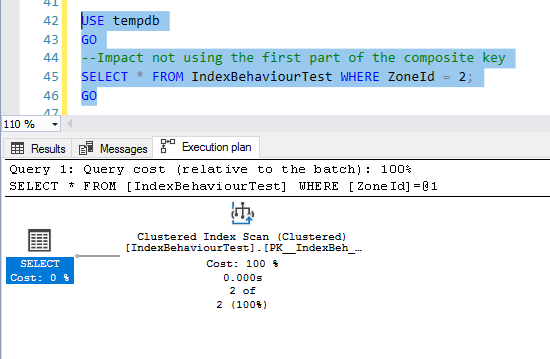
This is all about respecting SQL Server. If we do not use the first key column that makes up the composite key, we are not respecting SQL Server, and it will punish us by performing an index scan and thereby impacting performance:

USE tempdb
GO
--Impact not using the first part of the composite key
SELECT * FROM IndexBehaviourTest WHERE ZoneId = 2;
GO

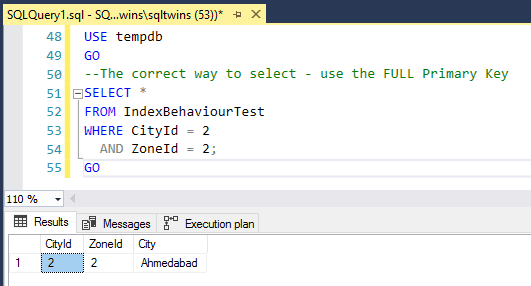
Conclusion – Always use the full primary key

Always remember to treat SQL Server with respect, and never feed it junk to work upon. Always use the full primary key, and you will NEVER run into the specific issues mentioned above.

USE tempdb
GO
--The correct way to select - use the FULL Primary Key
SELECT * 
FROM IndexBehaviourTest 
WHERE CityId = 2 
  AND ZoneId = 2;
GO

Until we meet next time,

Be courteous. Drive responsibly.