
One of the reasons I enjoy working with Microsoft SQL Server because often I find that its behaviour is a classic case of GIGO (Garbage In Garbage Out). Jacob Sebastian (LinkedIn) always makes it a point to mention in his TechEd and Community Tech Days sessions that one must also treat SQL Server with respect, else it will create problems for us!
Based on my practical experience in resolving issues during code review and sometimes during bug-fixing, what I am going to discuss about today demonstrates that if we (i.e. SQL developers) do not respect SQL Server or feed it the wrong queries, the output will be wrong!
Composite Primary Keys
There are many cases when we have the primary key on a table as a composite key, i.e. comprised of one or more key columns. Let us assume that we are making an application for a courier company, and have divided the country into multiple zones. Each zone has a set of delivery centers supported by the company.
USE tempdb
GO

IF (OBJECT_ID('tempdb.dbo.IndexBehaviourTest') IS NOT NULL)
	DROP TABLE tempdb.dbo.IndexBehaviourTest

CREATE TABLE IndexBehaviourTest (CityId INT NOT NULL,
                                 ZoneId INT NOT NULL,
                                 City VARCHAR(20),
                                 PRIMARY KEY(CityId, ZoneId))
GO

INSERT INTO IndexBehaviourTest (CityId, ZoneId, City)
VALUES
(1, 1, 'Delhi'),
(2, 1, 'Chandigadh'),
(1, 2, 'Mumbai'),
(2, 2, 'Ahmedabad'),
(1, 3, 'Kolkotta'),
(2, 3, 'Guwhati'),
(1, 4, 'Bengaluru'),
(2, 4, 'Chennai')
GO
As you can see from the script above, both the ZoneId and the CityId together identify a unique delivery location. Such cases are ideal for use of a composite primary key.
All of us “know” that whenever we write a query, we need to use the full primary key as the qualifier/filter in the WHERE clause. However, those who have supported a product for long will know that often developers in a rush to get things out of the door throw caution to the wind and proceed with whatever works.
The errors that occur
An unexpected result set
Normally, when developers develop code and unit test, the focus is more on getting the code to work, not on the accuracy of the code. The developer would begin by inserting a few cities into the database, and then use a simple query to fetch the results.
USE tempdb
GO
--Insert some unit test data
INSERT INTO IndexBehaviourTest (CityId, ZoneId, City)
VALUES
(3, 1, 'Noida')

--Fetch the test data to unit test
SELECT * FROM IndexBehaviourTest WHERE CityId = 3;
GO
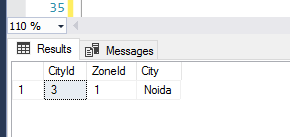
The developer would be happy that the code worked and that SQL Server performed an index seek as expected. The developer would therefore integrate the query into source control. However, an incomplete primary key has been used and outside of the unit test data, the user is bound to end up with an unexpected result set.
USE tempdb
GO
--Impact of using only part of the key
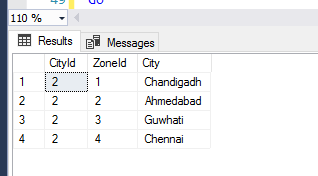
SELECT * FROM IndexBehaviourTest WHERE CityId = 2;
GO
As you can see, SQL Server returned us an incorrect result set because we requested “garbage” by not specifying the full primary key.
A performance hit
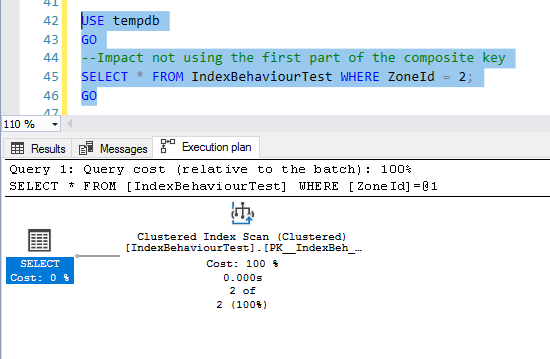
This is all about respecting SQL Server. If we do not use the first key column that makes up the composite key, we are not respecting SQL Server, and it will punish us by performing an index scan and thereby impacting performance:
USE tempdb
GO
--Impact not using the first part of the composite key
SELECT * FROM IndexBehaviourTest WHERE ZoneId = 2;
GO

Conclusion – Always use the full primary key
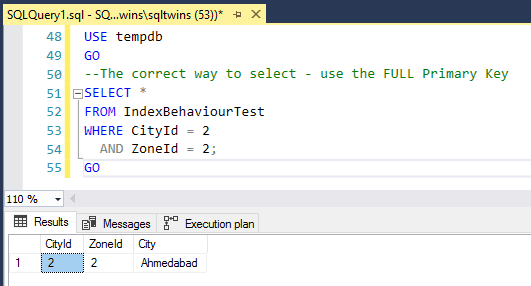
Always remember to treat SQL Server with respect, and never feed it junk to work upon. Always use the full primary key, and you will NEVER run into the specific issues mentioned above.
USE tempdb
GO
--The correct way to select - use the FULL Primary Key
SELECT *
FROM IndexBehaviourTest
WHERE CityId = 2
  AND ZoneId = 2;
GO

Until we meet next time,
Be courteous. Drive responsibly.


 SQLTwins by Nakul Vachhrajani