Tag Archives: Administration

Articles related to Microsoft SQL Server Administration

#0392 – SQL Server – SSIS – OLE DB Destination – Table Fast Load – Check Constraints option


Developing SSIS packages is quite easy – it’s mostly drag and drop and some minor configuration, which is a really boon for someone who is new to SSIS. However, when it comes to tuning the package, one needs to understand the finer points of each task on the control flow. On each task, there are some options that help improving the performance of the data flow, whereas some others help regulate the quality of data being migrated.

The OLE DB Destination

I have written about the OLE DB destination. In order to load data as quickly into the destination as possible, the  OLE DB destination allows us to use a “Fast Load” mode. The “Fast Load” option allows the data team to configure various options that affect the speed of the data load:

  1. Keep Identity
  2. Keep NULLs
  3. Table Lock
  4. Check Constraints
  5. Rows per Batch
  6. Maximum Insert Commit Size

Today, I will take a look at the “Check Constraints” option which controls the quality of the data “flowing” through the data flow task.

Leveraging Constraints in SQL Server

Before I go ahead and demonstrate the effect of the “Check Constraints” checkbox on the OLE DB Destination, I will reiterate the usage of constraints in Microsoft SQL Server table design. SQL Server supports multiple types of constraints, helping in maintaining data quality – both referential and domain:

  • NOT NULL constraint – Prevents NULL values in a column
  • UNIQUE constraint – Ensures values in a column are unique
  • PRIMARY KEY – Uniquely identifies a row in a table
  • FOREIGN KEY – They identify and enforce relationships between tables
  • CHECK constraint – Checks the values being inserted against a defined set of business rules for valid data range values in the column
  • DEFAULT constraint – Ensures that when an explicit value is not specified by the client, a default value is used so as not to break logical integrity of the data

Constraints that enforce referential and domain integrity are a physical implementation of the entity relationship and logical database design. As businesses grow and system architectures evolve, valid values for various enumerations also change and evolve. Values valid for a domain are enforced in the physical design via CHECK constraints.

Historical data may or may not confirm to the values enforced by current CHECK constraints today. For example, an expense workflow may have multiple stages which may not have existed in the past. While current data in the transaction systems would have been updated to confirm to the new enumerations, the historical data may still be as-is, i.e. valid in the past, but invalid today.

Check constraints and OLE DB Destination in SSIS

When moving such data over to a warehouse, the data transfer is a bulk data movement. By default, Microsoft SQL Server does not check constraints when loading data in bulk. SSIS allows you to control this behaviour when using the OLE DB transformation.

Demo

For this demo, I have a fairly simple scenario – a user registration table that enforces the following simple rules:

  • A basic check for the validity of E-mail address
  • The user registering must be 18 years in age or older

These checks are enforced by using CHECK constraints, and the DDL is provided below for your kind reference.

USE tempdb;
GO

--Safety Check
IF OBJECT_ID('dbo.UserRegistration','U') IS NOT NULL
BEGIN
    DROP TABLE dbo.UserRegistration;
END
GO

CREATE TABLE dbo.UserRegistration 
            (UserId         INT         NOT NULL IDENTITY(1,1),
             UserName       VARCHAR(20) NOT NULL,
             UserPassword   VARCHAR(20) NOT NULL,
             UserEmail      VARCHAR(50)     NULL,
             UserBirthDate  DATE        NOT NULL
            );
GO

--Primary Key
ALTER TABLE dbo.UserRegistration
    ADD CONSTRAINT pk_UserRegistrationUserId PRIMARY KEY CLUSTERED (UserId);
GO

--User must have a valid E-mail 
--(basic checking done here)
ALTER TABLE dbo.UserRegistration
    ADD CONSTRAINT chk_UserRegistrationUserEmail 
        CHECK (UserEmail LIKE '[a-z,0-9,_,-]%@[a-z,0-9,_,-]%.[a-z][a-z]%');
GO

--User must be at least 18 years in age
ALTER TABLE dbo.UserRegistration
    ADD CONSTRAINT chk_UserRegistrationBirthDate 
        CHECK (DATEDIFF(YEAR,UserBirthDate,GETDATE()) >= 18);
GO

In my SSIS package, I have used a standard data flow task. The OLE DB source uses a query that creates some valid and invalid data which I would like to insert into the destination [dbo].[UserRegistration] table. Below is the T-SQL query used for the source and screenshots of my data flow task.

SELECT TestData.UserName, 
       TestData.UserPassword, 
       TestData.UserEmail, 
       TestData.UserBirthDate
FROM 
(VALUES --Valid Data
    ('SQLTwins1','SQLTwins@Pwd1','validEmail1@somedomain.com','1960-01-01'),
    ('SQLTwins2','SQLTwins@Pwd2','validEmail2@somedomain.com','1970-01-01'),
    --Invalid Email
    ('SQLTwins3','SQLTwins@Pwd3','invalidEmail@somedomain'   ,'1970-01-01'),
    --Invalid BirthDate
    ('SQLTwins4','SQLTwins@Pwd4','validEmail4@somedomain'    ,'2016-01-01'),
    --Invalid Email & BirthDate
    ('SQLTwins5','SQLTwins@Pwd5','invalidEmail'              ,'2016-01-01')
) AS TestData (UserName, UserPassword, UserEmail, UserBirthDate);
OLE DB Source for checking bypass of the check constraints during bulk inserts

OLE DB Source for checking bypass of the check constraints during bulk inserts

0392-sqltwins-ssis-checkconstraints-oledbdestination

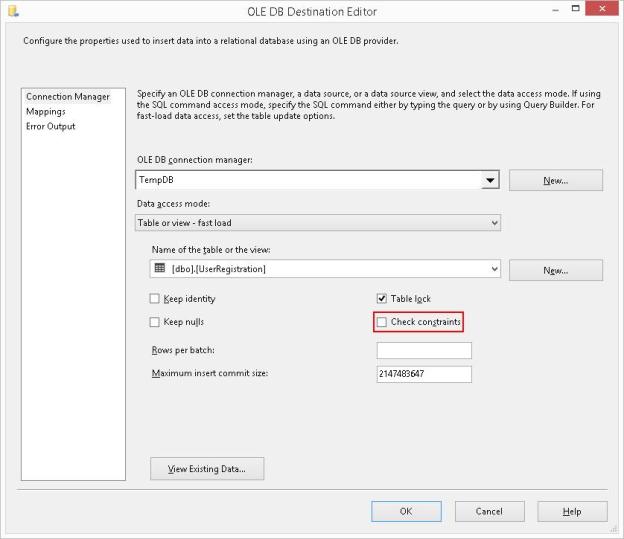
OLE DB Destination with Fast Load options, notice the “Check constraints” is checked by default

Notice that by default, the CHECK Constraints checkbox is checked. When I run the package by keeping CHECK constraints enabled, the package fails during execution.

SSIS Package failure when one or more input values violate CHECK constraints

SSIS Package failure when one or more input values violate CHECK constraints

Looking at the package progress log, I can confirm that the package failed because the data violated check constraints when inserting into the table. The error has been formatted below to enhance readability.

[Insert into UserRegistration table [2]] Error: SSIS Error Code DTS_E_OLEDBERROR.  
An OLE DB error has occurred. Error code: 0x80004005.

An OLE DB record is available.  Source: "Microsoft SQL Server Native Client 11.0"  
Hresult: 0x80004005  Description: "The statement has been terminated.".

An OLE DB record is available.  Source: "Microsoft SQL Server Native Client 11.0"  
Hresult: 0x80004005  
Description: "The INSERT statement conflicted with the CHECK constraint "chk_UserRegistrationUserEmail". 
             The conflict occurred in database "tempdb", table "dbo.UserRegistration", column 'UserEmail'.".

I now edit the package to uncheck the “Check Constraints” checkbox on the OLE DB Destination.

0392-SQLTwins-SSIS-CheckConstraints-OLEDBDestination_Unchecked.JPG

Unchecking the “Check constraints” checkbox on the OLE DB Destination

Running the package again results in success.
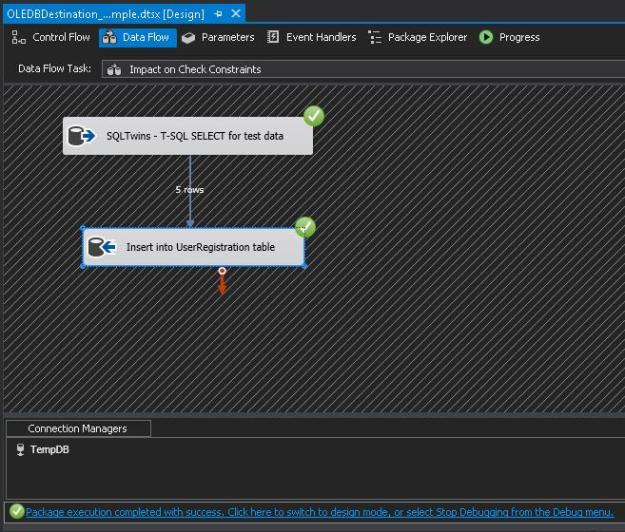
Successful Package Execution with “Check constraints” unchecked, i.e. data violating check constraints was successfully inserted

I now validate the data in the [dbo].[UserRegistration] table. I can see that data violating check constraints was successfully inserted.

USE [tempdb];
GO
SELECT [ur].[UserId],
       [ur].[UserName],
       [ur].[UserPassword],
       [ur].[UserEmail],
       [ur].[UserBirthDate]
FROM [dbo].[UserRegistration] AS [ur];
GO
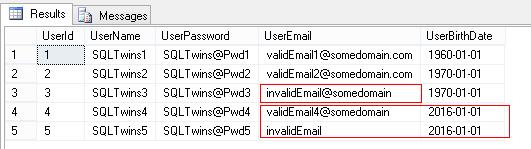
Confirmation that constraints were not checked during insertion of data by the SSIS package

Confirmation that constraints were not checked during insertion of data by the SSIS package

Important Notes

  • Unchecking “Check Constraints” only turns off the checks for check constraints
  • Referential and other integrity constraints (NOT NULL, Foreign Key, Unique Key, etc) continue to be enforced

Conclusion

The OLE DB destination task is a very powerful way to load data into SQL Server table in a short duration of time. At the same time, it can also cause bad data to be inserted into the destination if not used wisely.

Turn the Check Constraints option off to optimize the data load when you are sure that:

  • Source data has expected discrepancies which are acceptable to the business/domain OR source data is correct
  • Re-validation of the check constraints will be done as a post migration process to make all constraints trusted (disabling check constraints would have marked them as non-trusted)

Further Reading:

Until we meet next time,

Be courteous. Drive responsibly.

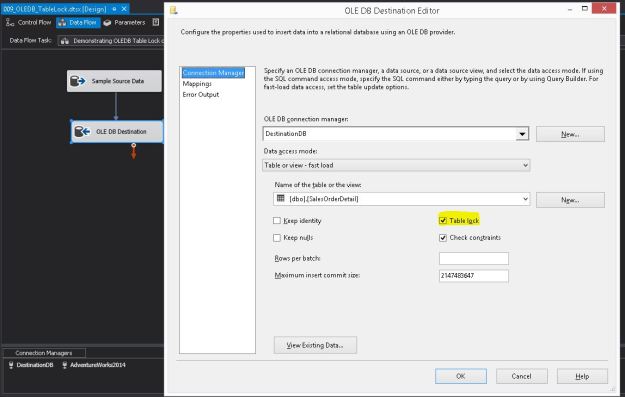
The OLE DB destination in "Fast Load" configuration with "Table Lock" checked (default)

#0391 – SQL Server – SSIS – OLE DB Destination – Table Fast Load – Performance – Table Lock option


Developing SSIS packages is quite easy – it’s mostly drag and drop and some minor configuration, which is a really boon for someone who is new to SSIS. However, when it comes to tuning the package, one needs to understand the finer points of each task on the control flow.

The OLE DB Destination

In one of my previous posts, I started to explore the OLE DB destination. In order to load data as quickly into the destination as possible, the  OLE DB destination allows us to use a “Fast Load” mode. The “Fast Load” option allows the data team to configure various options that affect the speed of the data load:

  1. Keep Identity
  2. Keep NULLs
  3. Table Lock
  4. Check Constraints
  5. Rows per Batch
  6. Maximum Insert Commit Size

I looked at the “Keep NULLs” and the “Keep Identity” options earlier, and today I will go over the “Table Lock” option.

Because the option is part of the OLE DB destination task, the “Table Lock” option indicates whether the database engine should request a more wider lock on the entire table (i.e. use TABLOCK) rather than trying to get granular locks one each row/page and then follow lock escalation to block the table.

Theoretically, when moving extremely large amounts of data compared to the number of records already available in the destination table, the database engine would deem the granular locks (at the row/page level) too cost prohibitive and escalate to the table anyway. In this case, it would be better to specify the wider TABLOCK.

Allow me to present a brief demo.

Creating the package with logging for comparing execution time

As always, I have created a simple package that creates a table and inserts data into it. The table is identical to the [Sales].[SalesOrderDetail] table in the [AdventureWorks2014] sample database. The table creation script used in the Execute SQL task on the package is provided below:

USE [tempdb];
GO

IF OBJECT_ID('[dbo].[SalesOrderDetail]','U') IS NOT NULL
BEGIN
    DROP TABLE [dbo].[SalesOrderDetail];
END
GO

CREATE TABLE [dbo].[SalesOrderDetail]
   (
    [SalesOrderID]           [INT]              NOT NULL,
    [SalesOrderDetailID]     [INT]              NOT NULL,
    [CarrierTrackingNumber]  [NVARCHAR](25)         NULL,
    [OrderQty]               [SMALLINT]         NOT NULL,
    [ProductID]              [INT]              NOT NULL,
    [SpecialOfferID]         [INT]              NOT NULL,
    [UnitPrice]              [MONEY]            NOT NULL,
    [UnitPriceDiscount]      [MONEY]            NOT NULL 
                             CONSTRAINT [DF_sodUnitPriceDiscount]  DEFAULT ((0.0)),
    [LineTotal]              DECIMAL(38, 6),
    [rowguid]                [UNIQUEIDENTIFIER] NOT NULL,
    [ModifiedDate]           [DATETIME]         NOT NULL 
                             CONSTRAINT [DF_sodModifiedDate]  DEFAULT (GETDATE())
   ) ON [PRIMARY]
GO

Once the table is created, the package “flows” to the Data Flow Task. Inside the data flow, essentially I simply select about 4 times the data from the [AdventureWorks2014].[Sales].[SalesOrderDetail] table (approximately 485268 rows) using an OLE DB source and pump it to the newly created target table via an OLE DB destination with the “Table Lock” option checked (default).

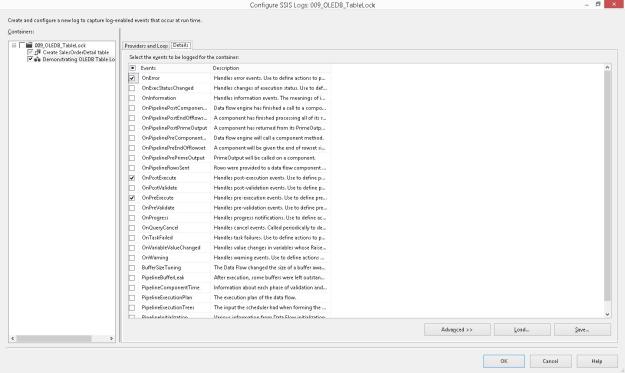
I then configure logging on the package to log the package activity for the Data Flow Task for the OnError, OnPreExecute and OnPostExecute events (Configuring package logging is out of scope for this blog post).

The script used in the OLEDB source is presented here:

USE AdventureWorks2014;
GO
SELECT sod.SalesOrderID,
       sod.SalesOrderDetailID,
       sod.CarrierTrackingNumber,
       sod.OrderQty,
       sod.ProductID,
       sod.SpecialOfferID,
       sod.UnitPrice,
       sod.UnitPriceDiscount,
       sod.LineTotal,
       sod.rowguid,
       sod.ModifiedDate
FROM Sales.SalesOrderDetail AS sod
CROSS JOIN (VALUES (1), (2), (3), (4)) AS Combinations (ComboValue)
GO

A set of screenshots showing the package configuration described above are shown below.

An

An “Execute SQL Task” creates the test table

0391-sqltwins-ssis-tablelock-dataflow-oledbdestination

The OLE DB destination in “Fast Load” configuration with “Table Lock” checked (default)

Package Log configuration enabled for the OLEDB destination

Package Log configuration enabled for the OLEDB destination

Event configuration done to log task activities as part of package logging

Event configuration done to log task activities as part of package logging

Once the package is executed, I will compare the difference between the OnPreExecute and OnPostExecute times for both configurations of the “Table Lock” option to get an idea of the performance difference between them.

NOTE: The packages were executed after it was confirmed that the databases involved (in this case tempdb) had grown sufficiently to accommodate the inserted data.

Confirming that we are indeed taking a Table Lock

While the package is executing in SQL Server Data Tools (SSDT, erstwhile BIDS), I run the following query on the SQL Server to check the locks occupied on our test table.

USE [tempdb]
GO
SELECT tl.resource_associated_entity_id AS ObjectId,
       OBJECT_NAME(tl.resource_associated_entity_id) AS ObjectName,
       tl.request_mode AS LockRequestMode
FROM [sys].[dm_tran_locks] AS tl
WHERE tl.resource_database_id = DB_ID()
  AND tl.resource_associated_entity_id = OBJECT_ID('[dbo].[SalesOrderDetail]','U');
GO

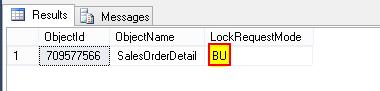
Based on the results, we can confirm that an exclusive Bulk Update (BU) lock has indeed been requested and granted on the table – indicating that the TABLOCK option was used as part of the insert.

Bulk Update (BU) lock used on the table, indicating use of TABLOCK (Table Lock)

Bulk Update (BU) lock used on the table, indicating use of TABLOCK (Table Lock)

Running the package with “Table Lock” turned Off

If I check the locks on the table while running the package with the “Table Lock” option unchecked, I see that either an “Intent Exclusive” (IX) or an “Exclusive” (X) lock have been used. This indicates that SQL Server is actually using Exclusive locks on lower level allocation units (page/row).

0391-sqltwins-ssis-tablelock-intentexclusivetablelockrequested

When “Table Lock” is unchecked, an Intent Exclusive Lock is acquired on the table, indicating granular exclusive locks in use

Please note that between each run, the data buffers were cleaned and procedure cache was cleared out to get a “cold” state performance of the database engine.

CHECKPOINT;
DBCC DROPCLEANBUFFERS;
DBCC FREEPROCCACHE;
GO

Comparing package execution performance

Because I had turned on logging on the SSIS package, I ran the following query against the [dbo].[sysssislog] table which gives me the time difference (in seconds) between the “OnPreExecute” and “OnPostExecute” events for both the packages. The query and the results are available below:

USE [tempdb];
GO
SELECT [PivotedTbl].,
       DATEDIFF(SECOND, 
                [PivotedTbl].[OnPreExecute], 
                [PivotedTbl].[OnPostExecute]
               ) AS PackageRunTimeInSeconds
FROM (SELECT sl.,
             sl.[event],
             sl.[starttime]
      FROM [dbo].[sysssislog] AS sl
     ) AS [SourceTbl]
PIVOT (MAX([SourceTbl].[starttime]) 
       FOR [SourceTbl].[event] IN ([OnPreExecute],[OnPostExecute])
      ) AS [PivotedTbl];
GO
0391-sqltwins-ssis-tablelock-executiontimes

Execution time summary showing data flow with OLE DB destination using Table locks completes faster than one using granular locks

We can clearly see that the table load with “Table lock” checkbox turned on is comparatively faster.

Summary

The OLE DB destination task is a very powerful way to load data into SQL Server table. It also provides the flexibility to boost the rate of data insertion when used wisely.

  • When loading data into an empty table or when system is under an outage window, evaluate keeping the “Table Lock” checkbox checked
  • When it is important to keep the tables accessible during the data load, evaluate keeping the “Table Lock” checkbox unchecked
    • This will ensure that if possible, the SELECT queries are not blocked from being executed as long as they do not refer to the same page(s) being inserted/updated
  • Using a higher-level lock (in case of requesting a Table Lock/TABLOCK) does provide a reduced data “load” time due to reduced overhead of maintaining granular locks and can be used as a means to speed up the data inserts for large data sets

References:

  • Lock Modes in SQL Server [MSDN Link]
  • Lock Compatibility [MSDN Link]
  • Performance – Best Practice – Create Index Before or After a data insert? [Blog Link]
  • Performance – Best Practice – Create Index Before or After a data insert – I/O, Fragmentation, CPU and Elapsed Time [Blog Link]

Until we meet next time,

Be courteous. Drive responsibly.

#0387 – SQL Server – Script to find source backups used in a database restore


In our development environment, we frequently refresh our databases from various baseline backup sets for each sprint of the product development cycle. During one such sprint, we had a confusion as  to which backup was used to refresh the database.

Microsoft SQL Server tracks every possible detail about each backup and restore operation in the [msdb] system database, and unless explicitly cleared, this history is available effectively forever.

I therefore developed a quick query on the [msdb].[dbo].[restorehistory] and  [msdb].[dbo].[backupset] tables of the msdb database to fetch the following information:

  1. Name of the restored database
  2. Date of the restore
  3. User who restored the DB
  4. Type of the restore (full/differential/transaction log)
  5. Was the restore done over an existing database (i.e. “replace” operation)
  6. Name of the backup set
  7. User who performed the backup
  8. Database creation date as logged  during the backup
  9. Backup Start & End times
  10. Type of the backup (full/differential/transaction log)
  11. Machine where the backup was taken

We were able to confirm that the restored backup was indeed a correct one and a documentation discrepancy was the root cause of the confusion. I thought the script would be useful for the entire community in fulfilling such adhoc verification tasks. I trust you will find it useful.

(FYI – In the script, I have kept additional joins to the [msdb].[dbo].[backupfile] and [msdb].[dbo].[restorefile] to get the information of the individual  database files as well. You can uncomment them as necessary.)

Here is the script below fetching information for the [AdventureWorks2012] database:

USE msdb;
GO
SELECT BackupRestoreHistory.[destination_database_name] AS RestoredDatabaseName,
       BackupRestoreHistory.[restore_date] AS BackupRestoreDate,
       BackupRestoreHistory.[user_name] AS BackupRestoredByUser,
       CASE BackupRestoreHistory.[restore_type] WHEN 'D' THEN 'Database'
                                                WHEN 'F' THEN 'File'
                                                WHEN 'G' THEN 'Filegroup'
                                                WHEN 'I' THEN 'Differential'
                                                WHEN 'L' THEN 'Transaction Log'
                                                WHEN 'V' THEN 'Verify Only'
                                                ELSE 'Information Not Available'
       END AS RestoreType,
       BackupRestoreHistory.[replace] AS IsDatabaseReplacedDuringRestore,
       --RestoreFileInformation.[destination_phys_name] AS RestoredFileName,
       --BackupFileInformation.[physical_name] AS SourceBackupFileName,
       BackupSetInformation.[name] AS BackupSetName,
       BackupSetInformation.[user_name] AS BackupDoneByUser,
       BackupSetInformation.[database_name] AS DatabaseNameWhenBackupWasTaken,
       BackupSetInformation.[database_creation_date] AS DatabaseCreationDateRecordedAtBackup,
       BackupSetInformation.[backup_start_date] AS BackupStartDateTime,
       BackupSetInformation.[backup_finish_date] AS BackupEndDateTime,
       CASE BackupSetInformation.[type] WHEN 'D' THEN 'Database'
                                        WHEN 'I' THEN 'Differential database'
                                        WHEN 'L' THEN 'Log'
                                        WHEN 'F' THEN 'File or filegroup'
                                        WHEN 'G' THEN 'Differential file'
                                        WHEN 'P' THEN 'Partial'
                                        WHEN 'Q' THEN 'Differential partial'
                                        ELSE 'Information Not Available'
        END AS BackupType,
        BackupSetInformation.[server_name] AS ServerWhereBackupWasTaken
FROM msdb.dbo.restorehistory AS BackupRestoreHistory
LEFT OUTER JOIN msdb.dbo.backupset AS BackupSetInformation ON BackupRestoreHistory.backup_set_id = BackupSetInformation.backup_set_id 
--LEFT OUTER JOIN msdb.dbo.restorefile AS RestoreFileInformation ON BackupRestoreHistory.[restore_history_id] = RestoreFileInformation.[restore_history_id]
--LEFT OUTER JOIN msdb.dbo.backupfile AS BackupFileInformation ON BackupSetInformation.[backup_set_id] = BackupFileInformation.[backup_set_id]
WHERE BackupRestoreHistory.[destination_database_name] = 'AdventureWorks2012';
GO
0387-backupandrestoreinformation

Backup information corresponding to a restored version of the AdventureWorks2012 database

Until we meet next time,

Be courteous. Drive responsibly.
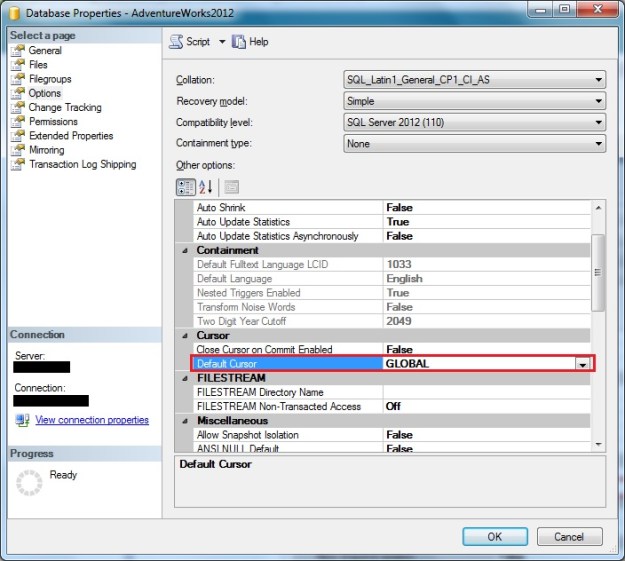
"Default Cursor" scope set at the database level can be verified using the "Options" page of the "Database Properties" window in SSMS

#0386 – SQL Server – Cursor Scope – A cursor with the name ‘cursor name’ does not exist.; Msg 16916


It’s a well-known fact that using T-SQL cursors have a significant overhead on the query performance. At the same time, there are applications where one simply cannot use a set-based approach and use T-SQL cursors. Examples of such scenarios are when cascading complex calculations need to happen for each record (which are handled via CLR code or dedicated stored procedures) or when interfacing applications can only accept one record at a time.

Each T-SQL cursor has a specific scope. The cursor can be limited for use within the given stored procedure, trigger or batch making it a LOCAL cursor. If the context of the cursor is to be made available to multiple objects and scopes within the connection until explicitly deallocated, it is a GLOBAL cursor.

The cursor scope (GLOBAL/LOCAL) can be defined at the database level and can be overridden by the DECLARE CURSOR statement. Most implementations that I have seen rely on the database configuration. In such cases, if the cursor has been designed for GLOBAL access and someone changes the database configuration to a LOCAL cursor scope, the code will break.

Checking Default Cursor Scope: Database Configuration

Using T-SQL

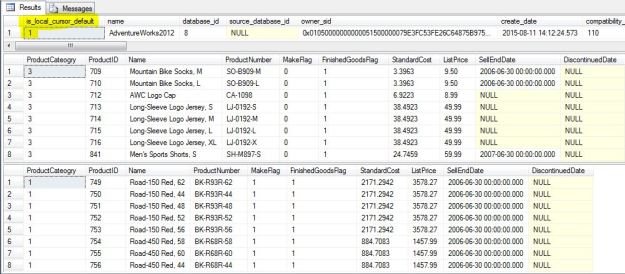
A simple check on the [is_local_cursor_default] column of the [sys].[databases] will tell us if the default cursor scope is local or global.

--Confirm that Global cursors are set:
--        is_local_cursor_default = 0, i.e. GLOBAL cursor scope
--        is_local_cursor_default = 1, i.e. LOCAL cursor scope
--This is the default setting!
SELECT [sd].[is_local_cursor_default],
       [sd].* 
FROM [sys].[databases] AS sd 
WHERE [sd].[database_id] = DB_ID('AdventureWorks2012');
GO

As the column name suggests, a value of 0 indicates that the cursor is GLOBAL, whereas a value of 1 indicates that the cursor is LOCAL.

Using SSMS

In SSMS, we can check the value of default cursor scope by looking at the “Options” page of the Database Properties window.

"Default Cursor" scope set at the database level can be verified using the "Options" page of the "Database Properties" window in SSMS

Checking “Default Cursor” scope set at the database level

Reproducing the Problem

For the purposes of this demo, I have created a simple stored procedure in the AdventureWorks database that is called once per each Product Category Id to get the product listing of products in that category.

USE AdventureWorks2012;
GO

--Create the test stored procedure
IF OBJECT_ID('Production.ProductListing','P') IS NOT NULL
    DROP PROCEDURE Production.ProductListing;
GO
CREATE PROCEDURE Production.ProductListing
    @productCategoryId INT
AS
BEGIN
    SET NOCOUNT ON;

    SELECT ppsc.ProductCategoryID AS ProductCateogry,
           pp.ProductID,
           pp.Name,
           pp.ProductNumber,
           pp.MakeFlag,
           pp.FinishedGoodsFlag,
           pp.StandardCost,
           pp.ListPrice,
           pp.SellEndDate,
           pp.DiscontinuedDate
    FROM Production.Product AS pp
    INNER JOIN Production.ProductSubcategory AS ppsc 
            ON pp.ProductSubcategoryID = ppsc.ProductSubcategoryID
    WHERE ppsc.ProductCategoryID = @productCategoryId;
END
GO

I can now create a cursor, access values from the cursor and call the stored procedure in an iterative manner. One would use this pattern when working with situations where dynamic SQL may need to be used to build the cursor (e.g. when fetching data from different tables of the same structure depending upon the configuration/situation).

USE AdventureWorks2012;
GO
--Create a CURSOR via Dynamic SQL and then 
--use the values from the CURSOR to call the stored procedure
DECLARE @productListCategoryId INT;
EXEC sp_executesql @sql = N'DECLARE ProductListByCategory CURSOR
                                FAST_FORWARD READ_ONLY
                            FOR SELECT ppc.ProductCategoryID
                                FROM Production.ProductCategory AS ppc;
                           ';

OPEN ProductListByCategory;

FETCH NEXT FROM ProductListByCategory INTO @productListCategoryId;
WHILE (@@FETCH_STATUS <> -1)
BEGIN
    EXEC Production.ProductListing @productCategoryId = @productListCategoryId;

    FETCH NEXT FROM ProductListByCategory INTO @productListCategoryId;
END

CLOSE ProductListByCategory;
DEALLOCATE ProductListByCategory;
GO

Normally the stored procedure calls will work just fine, as can be seen from the screenshot below.

Successful execution of cursor when Global cursor scope is configured

Successful execution of cursor when Global cursor scope is configured

Now, let us change the cursor scope to LOCAL at the database level.

--Now, enable local cursors by default
--for the AdventureWorks2012 database
ALTER DATABASE [AdventureWorks2012] SET CURSOR_DEFAULT LOCAL;
GO

Running the same query as above now results in errors! The errors simply state that the cursor with the name “ProductListByCategory” does not exist.

USE AdventureWorks2012;
GO
--Create a CURSOR via Dynamic SQL and then 
--use the values from the CURSOR to call the stored procedure
DECLARE @productListCategoryId INT;
EXEC sp_executesql @sql = N'DECLARE ProductListByCategory CURSOR
                                FAST_FORWARD READ_ONLY
                            FOR SELECT ppc.ProductCategoryID
                                FROM Production.ProductCategory AS ppc;
                           ';

OPEN ProductListByCategory;

FETCH NEXT FROM ProductListByCategory INTO @productListCategoryId;
WHILE (@@FETCH_STATUS <> -1)
BEGIN
    EXEC Production.ProductListing @productCategoryId = @productListCategoryId;

    FETCH NEXT FROM ProductListByCategory INTO @productListCategoryId;
END

CLOSE ProductListByCategory;
DEALLOCATE ProductListByCategory;
GO
Msg 16916, Level 16, State 1, Line 75
A cursor with the name 'ProductListByCategory' does not exist.

Learning the hard way

The error message above is exactly what we received after we restored a copy of our development database on a loaned SQL Server instance to facilitate a ramp-up activity.

After conducting an impromptu code review to confirm that there were no other obvious issues (like deallocating the cursor without closing), we set out to compare the server and database settings with a working environment to rule out environmental issues. That’s when we saw that the DBA on the loaned server had changed the cursor scope setting of our database.

The Solution

The ideal solution to this issue has two parts – a configuration piece and a failsafe embedded into standard coding practice.

Set and document database level cursor scope requirements

One part of the ideal solution is to define and document the cursor scope requirements during database design. This should then be part of the documentation and checklists that are referenced when deploying the databases in production.

Database deployment and setup scripts should also have scripts to set the default scope, similar to the one below.

ALTER DATABASE [AdventureWorks2012] SET CURSOR_DEFAULT GLOBAL;
GO

Ensure that cursor scope is defined when declaring a cursor

The fail-safe aspect of the solution is to ensure that when declaring a cursor, the code explicitly specifies whether the cursor is GLOBAL or LOCAL.

As can be seen from the example below, if scope is defined during cursor definition, it continues to work even if the cursor scope at the database level is not as expected.

--Set the cursor scope as GLOBAL when defining the cursor
--(as part of the DECLARE CURSOR statement)
--This overrides the default database configuration
USE AdventureWorks2012;
GO
DECLARE @productListCategoryId INT;
EXEC sp_executesql @sql = N'DECLARE ProductListByCategory CURSOR GLOBAL
                                FAST_FORWARD READ_ONLY
                            FOR SELECT ppc.ProductCategoryID
                                FROM Production.ProductCategory AS ppc;
                           ';

OPEN ProductListByCategory;

FETCH NEXT FROM ProductListByCategory INTO @productListCategoryId;
WHILE (@@FETCH_STATUS <> -1)
BEGIN
    EXEC Production.ProductListing @productCategoryId = @productListCategoryId;

    FETCH NEXT FROM ProductListByCategory INTO @productListCategoryId;
END

CLOSE ProductListByCategory;
DEALLOCATE ProductListByCategory;
GO
If the GLOBAL scope is defined when declaring a cursor, the code works as expected even though the database configuration is set to default cursor scope of LOCAL

If the Global scope is defined when declaring a cursor, the code works as expected irrespective of database configuration

Further Reading

The same error message (Msg. 16916) will be thrown due to a simple coding error – when we code deallocates a cursor before closing it first. This can easily be caught by implementing a code review practice and is a lesson for sustenance teams. That is what I recommend as a further reading into this topic.

Until we meet next time,

Be courteous. Drive responsibly.

#0385 – SQL Server – Query Development and NULL values


Software Design, Assumptions and their side-effects

A few days ago, I tweeted a news piece that came to my attention on the name “NULL” causing computing systems to malfunction. When I shared it with my colleagues, a healthy discussion on how should software architectures handle NULL took place.

The key focus of discussion was of course that we need to be more globally aware and avoid generalization when defining business requirements (e.g. if one country does not commonly have people with surnames greater than 10 characters in length, doesn’t mean there aren’t people with longer surnames as highlighted here).

We also talked about detection of NULL values and manipulating them. In the world of databases, joins between tables are a common scenario and it is interesting to study the impact that NULL has on the JOIN operator in a T-SQL query.

NULL values and JOINs

I had encountered a scenario involving joining on NULL-able columns which I had encountered during a unit test I was executing. What happened was that rows were disappearing and initially I was unable to figure out why. Allow me to explain with a demo.

I have a simple table with software metrics like lines of code (LoC), story points, etc. for various modules. I also have a look-up table that gives me details of the measurement units, including provision to handle unknown sizing units (which was possible in our case for modules developed in fairly uncommon technologies).

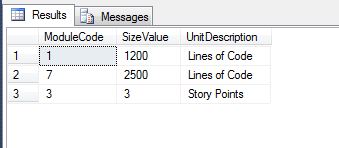
When I joined between the metrics and the sizing units table, what happened was that metrics for the project in uncommon technologies did not appear!

DECLARE @someMetrics TABLE
         (ModuleCode INT         NOT NULL,
          SizeValue  INT             NULL,
          SizeUnit   VARCHAR(10)     NULL
         );

DECLARE @unitMaster TABLE
        (SizeUnit        VARCHAR(10) NULL,
         UnitDescription VARCHAR(50) NULL
        );

INSERT INTO @unitMaster (SizeUnit,
                         UnitDescription
                        )
VALUES (NULL , 'Unit Unknown'),
       ('LOC', 'Lines of Code'),
       ( 'SP', 'Story Points');

INSERT INTO @someMetrics (ModuleCode,
                          SizeValue,
                          SizeUnit
                         )
VALUES (1, 1200, 'LOC'),
       (3, 3, 'SP' ),
       (6, 32, NULL ),
       (7, 2500, 'LOC');

--Problem
SELECT sm.ModuleCode,
       sm.SizeValue,
       um.UnitDescription
FROM @someMetrics AS sm
INNER JOIN @unitMaster AS um ON sm.SizeUnit = um.SizeUnit;
The join operator will eliminate rows with null values in the join predicates

Metrics for NULL sizing units were filtered in the join process

The Root Cause

What is happening is that by default NULL compared with any value (NULL or otherwise) yields NULL. This is expected because when one of two values in a comparison is an unknown, there is no way to ascertain the result of the comparison and hence it has to be unknown, i.e. NULL.

In case of a join, the way SQL Server behaves is that all rows that match a given condition are fetched. Rows with conditions evaluating to “anything other than true” are filtered out. This is exactly what was happening in my case – since the columns used in the joined predicate had NULL values, the comparison yielded NULL (a non-true result) and hence these rows were filtered out.

The Fix

Option 01: The ideal fix is to ensure that the data never contains NULLs. Instead of NULL, a default value (anything suitable to the domain) can be used to indicate that the source system did not supply any value.

Option 02: In case changing the source data is not feasible, the query needs to be updated to substitute the NULL values for a chosen default as shown below.

DECLARE @someMetrics TABLE
         (ModuleCode INT         NOT NULL,
          SizeValue  INT             NULL,
          SizeUnit   VARCHAR(10)     NULL
         );

DECLARE @unitMaster TABLE
        (SizeUnit        VARCHAR(10) NULL,
         UnitDescription VARCHAR(50) NULL
        );

INSERT INTO @unitMaster (SizeUnit,
                         UnitDescription
                        )
VALUES (NULL , 'Unit Unknown'),
       ('LOC', 'Lines of Code'),
       ( 'SP', 'Story Points');

INSERT INTO @someMetrics (ModuleCode,
                          SizeValue,
                          SizeUnit
                         )
VALUES (1, 1200, 'LOC'),
       (3, 3, 'SP' ),
       (6, 32, NULL ),
       (7, 2500, 'LOC');

--One way to resolve the problem
SELECT sm.ModuleCode,
       sm.SizeValue,
       um.UnitDescription
FROM @someMetrics AS sm
INNER JOIN @unitMaster AS um
      ON ISNULL(sm.SizeUnit,'NULL') = ISNULL(um.SizeUnit,'NULL');
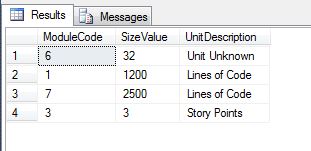
Using a chosen default instead of NULL in the join predicate

Using a chosen default instead of NULL in the join predicate

Conclusion

Irrespective of the business design, it is extremely important to have a strategy on handling of NULL values during system design. Most systems lack consistency in the way they allow for and handle NULL values.

Bringing in a set of standardized design practices on handling of NULL values makes it easier to predict system behaviour and also helps in re-engineering efforts whenever required to do so in the future.

Further Reading

  • Why is it not a good idea to implement NOT NULL check as a CHECK constraint? [Blog Link here]
  • SQL Server – CONCAT_NULL_YIELDS_NULL property [Blog Link here]
  • Fun with temporary tables – Impact of ANSI_NULL_DFLT_ON [Blog Link here]

Until we meet next time,

Be courteous. Drive responsibly.