Tag Archives: Best Practices

Articles related to performance and usability best practices in Microsoft SQL Server.

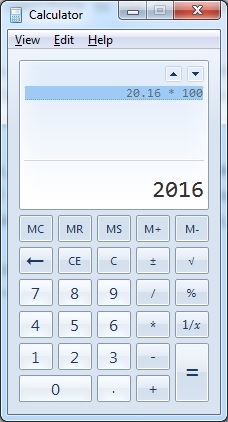
When we multiply a Decimal (20.16) with another number (100) using the calculator, the result is as expected (2016)

#0380 – SQL Server – Basics – Specify Scale and Precision when defining Decimal and Numeric datatypes


I had some interesting conversation during a code review that I was asked to conduct for a simple query that a team had written to support their project monitoring. The team was specializing in quality assurance and had minimal development experience. The team had used variables of decimal data types in their script, but they were declared without any precision or scale. When I gave a review comment on the declaration of variables, I was asked the question:

Does it make a difference if we do not specify scale and precision when defining variables of decimal or numeric datatypes?

I often look forward to such encounters for two reasons:

  1. When I answer their questions, the process reinforces my concepts and learnings
  2. It helps me contribute to the overall community by writing a blog about my experience

When the question was asked, I honestly admitted that I did not have a specific answer other than it was the best practice to do so from a long-term maintainability standpoint. Post lunch, I did a small test which I showed the team and will be presenting today.

The Problem

In the script below, I take a decimal variable (declared without a fixed scale or precision) with value (20.16) and multiply it by a constant number (100) and then by another constant decimal (100.0). If one uses a calculator, the expected result is:

  • 20.16 * 100 = 2016
  • 20.16 * 100.0 = 2016
When we multiply a Decimal (20.16) with another number (100) using the calculator, the result is as expected (2016)

Expected results when we multiply a Decimal with another number using the calculator

However, when we perform the same test via SQL Server, we are in for a surprise:

DECLARE @dVal1 DECIMAL = 20.16;

SELECT (@dVal1 * 100)   AS DecimalMultipliedByAnInteger, 
       (@dVal1 * 100.0) AS DecimalMultipliedByADecimal;
GO

As can be seen from the seen from the results below, we do not get the expected results, but we find that the decimal value was rounded off before the multiplication took place.
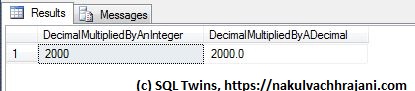
Although the test input value is declared as a decimal, the result appears to be based only on the significand, not the mantissa part of the input.

Although the test input value is declared as a decimal, the result appears to be based only on the significand, not the mantissa part of the input.

Root Cause

The reason behind this behaviour is hidden in the following lines of the SQL Server online documentation on MSDN (formerly known as “Books-On-Line”) for decimal and numeric data-types available here: https://msdn.microsoft.com/en-us/library/ms187746.aspx.

…s (scale)
The number of decimal digits that will be stored to the right of the decimal point….Scale can be specified only if precision is specified. The default scale is 0…

The real reason however is a few lines below – rounding.

Converting decimal and numeric Data

…By default, SQL Server uses rounding when converting a number to a decimal or numeric value with a lower precision and scale….

What SQL Server appears to be doing here is that when a variable of DECIMAL datatype is declared without a precision and scale value, the scale is taken to be zero (0). Hence, the test value of 20.16 is rounded to the nearest integer, 20.

To confirm that rounding is indeed taking place, I swapped the digits in the input value from 20.16 to 20.61 and re-ran the same test.

DECLARE @dVal1 DECIMAL = 20.61;

SELECT (@dVal1 * 100)   AS DecimalMultipliedByAnInteger, 
       (@dVal1 * 100.0) AS DecimalMultipliedByADecimal;
GO

Now, the result was 2100 instead of 2000 because the input test value of 20.61 was rounded to 21 before the multiplication took place.
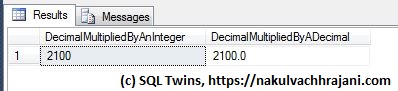
Because the test input value was declared as a decimal without precision and scale, rounding took place, resulting in a different result.

Because the test input value was declared as a decimal without precision and scale, rounding took place, resulting in a different result.

By this time, my audience was struck in awe as they realized the impact this behaviour would have had on their project monitoring numbers.

The Summary – A Best Practice

We can summarize the learning into a single sentence:

It is a best practice for ensuring data quality to always specify a precision and scale when working with variables of the numeric or decimal data types.

To confirm, here’s a version of the same test as we saw earlier. The only difference is that this time, we have explicitly specified the precision and scale on our input values.

DECLARE @dVal1 DECIMAL(19,4) = 20.16;

SELECT (@dVal1 * 100)   AS DecimalMultipliedByAnInteger, 
       (@dVal1 * 100.0) AS DecimalMultipliedByADecimal;
GO

When we look at the results, we see that the output is exactly what we wanted to see, i.e. 2016.
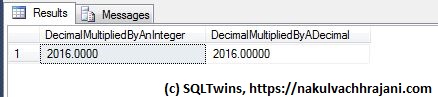
Because the test input value was declared as a decimal with precision and scale, no rounding took place and we got the expected result, i.e. 2016.

Because the test input value was declared as a decimal with precision and scale, no rounding took place and we got the expected result.

Further Reading

Until we meet next time,
Be courteous. Drive responsibly.
#0375 – SQL Server -Collation conflicts may occur when working with string functions (REPLACE, SUBSTRING, etc)


Recently, I was called upon to troubleshoot an interesting issue that came up with manipulating string termination characters (“\0”) using REPLACE. I wrote about the issue here.

As I was writing about the incident, I realized that if the data conditioning/manipulation script involves staging a “fixed” copy of the data one may end up with collation conflicts if the column collations were not specified as part of the column definition of these staging tables.

Allow me to demonstrate with an example.

Basically what I will do in the script below is create a test table with some manufacturer and product data. I later attempt to combine the ManufacturerName and ProductName into a column called FullName. In order to do this, I stage the fixed/updated data into a staging table and later join that to the main table for the update.

--1. Safety check - drop before we recreate
IF OBJECT_ID('tempdb..#product','U') IS NOT NULL
DROP TABLE tempdb..#product;
GO

IF OBJECT_ID('tempdb..#tempProduct','U') IS NOT NULL
DROP TABLE tempdb..#tempProduct;
GO

--2. Create the table to be fixed
CREATE TABLE #product
(ManufacturerName VARCHAR(50) COLLATE Latin1_General_CI_AS,
ProductName VARCHAR(50) COLLATE Latin1_General_CI_AS,
FullName VARCHAR(100) COLLATE Latin1_General_CI_AS
);
GO

--3. Insert some test data
INSERT INTO #product (ManufacturerName,
ProductName,
FullName)
VALUES ('Microsoft-','SQL Server', NULL),
('Microsoft-','Windows', 'Microsoft Windows'),
('Google','Chrome', 'Google Chrome'),
('Microsoft-','Azure',NULL);
GO

--4. Fix the data and store it to a staging table
SELECT ManufacturerName,
ProductName,
(REPLACE(p.ManufacturerName COLLATE Latin1_General_CI_AI, '-', ' ') + p.ProductName) AS FullName
INTO #tempProduct
FROM #product AS p;
GO

The key points to observe are:

  1. When doing the string manipulation, I explicitly specified a collation that is different from the collation of the original table (this may be required in case you are working on strings that need special handling)
  2. I did not explicitly specify the column definition for the staging table

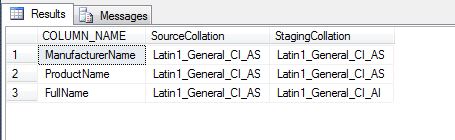
What happens is that the collation of the output of a string function (REPLACE in this case) is same as that of the input string. This collation in the example is different from the collation of the main table. The temporary staging table is created with this different collation.

--5. Check out the meta-data of both the tables
SELECT pisc.COLUMN_NAME,
pisc.COLLATION_NAME AS SourceCollation,
tpisc.COLLATION_NAME AS StagingCollation
FROM tempdb.INFORMATION_SCHEMA.COLUMNS AS pisc
INNER JOIN tempdb.INFORMATION_SCHEMA.COLUMNS AS tpisc
ON pisc.COLUMN_NAME = tpisc.COLUMN_NAME
WHERE pisc.TABLE_NAME LIKE '#product%'
AND tpisc.TABLE_NAME LIKE '#tempProduct%'
GO

CollationsInMainVsStagingTable

Now, let us see what happens when we try to execute the update:

--6. Try the update and see what happens
UPDATE p
SET p.FullName = tp.FullName
FROM #product AS p
INNER JOIN #tempProduct AS tp
ON p.ManufacturerName = tp.ManufacturerName
AND p.ProductName = tp.ProductName
AND p.FullName <> tp.FullName;
GO
Msg 468, Level 16, State 9, Line 44
Cannot resolve the collation conflict between "Latin1_General_CI_AI" and "Latin1_General_CI_AS" in the not equal to operation.

The update basically fails with a collation conflict error which could have easily been avoided by specifying the column definition (with appropriate collations) for the staging tables.

The problem demonstrated above can be reproduced with other string manipulation functions as well (e.g. SUBSTRING).

The moral of the story: Always follow best practices and specify a column definition when defining a table – permanent, staging or temporary.

Until we meet next time,
Be courteous. Drive responsibly.

Script for this post:

--1. Safety check - drop before we recreate
IF OBJECT_ID('tempdb..#product','U') IS NOT NULL
DROP TABLE tempdb..#product;
GO

IF OBJECT_ID('tempdb..#tempProduct','U') IS NOT NULL
DROP TABLE tempdb..#tempProduct;
GO

--2. Create the table to be fixed
CREATE TABLE #product (ManufacturerName VARCHAR(50) COLLATE Latin1_General_CI_AS,
ProductName VARCHAR(50) COLLATE Latin1_General_CI_AS,
FullName VARCHAR(100) COLLATE Latin1_General_CI_AS
);
GO

--3. Insert some test data
INSERT INTO #product (ManufacturerName, ProductName, FullName)
VALUES ('Microsoft-','SQL Server', NULL),
('Microsoft-','Windows', 'Microsoft Windows'),
('Google','Chrome', 'Google Chrome'),
('Microsoft-','Azure',NULL);
GO

--4. Fix the data and store it to a staging table
SELECT ManufacturerName, ProductName, (REPLACE(p.ManufacturerName COLLATE Latin1_General_CI_AI, '-', ' ') + p.ProductName) AS FullName
INTO #tempProduct
FROM #product AS p;
GO

--5. Check out the meta-data of both the tables
SELECT pisc.COLUMN_NAME, pisc.COLLATION_NAME AS SourceCollation, tpisc.COLLATION_NAME AS StagingCollation
FROM tempdb.INFORMATION_SCHEMA.COLUMNS AS pisc
INNER JOIN tempdb.INFORMATION_SCHEMA.COLUMNS AS tpisc ON pisc.COLUMN_NAME = tpisc.COLUMN_NAME
WHERE pisc.TABLE_NAME LIKE '#product%' AND tpisc.TABLE_NAME LIKE '#tempProduct%'
GO

--6. Try the update and see what happens
UPDATE p
SET p.FullName = tp.FullName
FROM #product AS p
INNER JOIN #tempProduct AS tp ON p.ManufacturerName = tp.ManufacturerName
AND p.ProductName = tp.ProductName
AND p.FullName <> tp.FullName;
GO

--7. Creating the test tables
IF OBJECT_ID('tempdb..#product','U') IS NOT NULL
DROP TABLE tempdb..#product;
GO

IF OBJECT_ID('tempdb..#tempProduct','U') IS NOT NULL
DROP TABLE tempdb..#tempProduct;
GO

#0371 – SQL Server – Best Practices – Always use precise decimal data-types


I recently came across a concrete example of something that has always been maintained as a best practice – when working on items that are sensitive to decimal precision, always use precise data-types like DECIMAL instead of FLOAT or REAL.

The following example clearly demonstrates that using a FLOAT in mathematical calculations may change the outcome of the computation. For financial calculations, this would mean incorrect reporting of revenues.

USE tempdb;
GO
DECLARE @floatValue FLOAT = 1.5,
        @decimalValue DECIMAL(5,2) = 1.5,
        @multiplicationFactor INT = 159;

SELECT @floatValue AS FloatValue,
       @decimalValue AS DecimalValue,
       (@multiplicationFactor*(@floatValue/100)) AS FloatBasedValue,
       (@multiplicationFactor*(@decimalValue/100)) AS DecimalBasedValue,
       ROUND((@multiplicationFactor*(@floatValue/100)),2) AS RoundedFloatBasedValue,
       ROUND((@multiplicationFactor*(@decimalValue/100)),2) AS RoundedDecimalBasedValue;

The output of this simple computation is provided in the screenshot below:

Result shows that we have a rounding error when a value based off a FLOAT is rounded to 2 decimals v/s when a fixed precision DECIMAL is rounded

Impact of using imprecise datatypes in mathematical computations

As can clearly be seen, the computations performed using an imprecise datatype (FLOAT) result in a rounding error. When compounded over multiple derived calculations, this can have a serious impact on the end result.

The conclusion therefore is simply that it is always a best practice to use precise datatypes when working with financial calculations.

Further Reading

Until we meet next time,
Be courteous. Drive responsibly.

#0358 – SQL Server – Best Practices – Avoid implicit conversions (Part 02) – Implicit conversions, COALESCE and ISNULL


Last week, I talked about how implicit conversions can cause unexpected issues. In this post, I will take the example forward. Implicit conversion can create problems not only during basic data load, but also during data retrieval and manipulation operations. Today, we will see how implicit conversions can cause COALESCE to error out in a rather unexpected way.

The script below creates the test data similar to what we saw in the previous post.

USE tempdb;
GO
--Demo objects & data
IF OBJECT_ID('dbo.BewareOfImplicitConversion','U') IS NOT NULL
    DROP TABLE dbo.BewareOfImplicitConversion;
GO

CREATE TABLE dbo.BewareOfImplicitConversion
    ( RecordId                   INT         NOT NULL IDENTITY(100,10),
      RowDescription             VARCHAR(20) NOT NULL,
      IntMasqueradingAsCharacter VARCHAR(20)     NULL,
      IntValue                   INT             NULL
    );
GO

INSERT INTO dbo.BewareOfImplicitConversion (RowDescription, IntMasqueradingAsCharacter, IntValue)
VALUES ('One',   NULL, 1),
       ('Two',   NULL, 4),
       ('Three',  '3', 6),
       ('Four',   '4', 8),
       ('Five',   'V', 10);
GO

Now, let us try to select the data from the test table – we will extract the data for all rows except the last one (where we have inserted a character value (V) instead of a numeric value in the column: dbo.BewareOfImplicitConversion.IntMasqueradingAsCharacter.

USE tempdb;
GO
--With COALESCE, everything will work fine untill a character data is encountered
SELECT ic.RecordId,
       ic.RowDescription,
       COALESCE(ic.IntMasqueradingAsCharacter, ic.IntValue) AS CalculatedValue
FROM dbo.BewareOfImplicitConversion AS ic
WHERE ic.IntValue < 10;
GO

image

As we can see from the screenshot above, the SELECT worked and COALESCE was able to successfully use the values from the integer column if the column IntMasqueradingAsCharacter was NULL. Now, let us try to fetch data for the last row.

USE tempdb;
GO
SELECT ic.RecordId,
       ic.RowDescription,
       COALESCE(ic.IntMasqueradingAsCharacter, ic.IntValue) AS CalculatedValue
FROM dbo.BewareOfImplicitConversion AS ic
WHERE ic.IntValue = 10;
GO

The following error is returned:

image

Msg 245, Level 16, State 1, Line 1
Conversion failed when converting the varchar value ‘V’ to data type int.

The reason is quite simple – as discussed in my previous post, data type precedence comes into effect and the  character data is implicitly converted to an integer.

Root Cause

Per MSDN (see references below), COALESCE follows the CASE expression rules and returns the data type of value with the highest precedence. This means that COALESCE would have attempted to convert supplied values to the data-type with highest precedence, which in this case is INT (the data-type of the column IntValue). Because the value ‘V’ cannot be implicitly converted to an integer, the COALESCE fails and returns the data-type conversion error.

A possible solution

One of the solutions is to use the ISNULL function instead. ISNULL() uses the data-type of the 1st supplied parameter (and all other parameters are converted to it accordingly). What this means is that in this case, all parameters will be treated as character values even though a data-type with higher precedence exists in the inputs.

Here’s the output when we use ISNULL() instead of COALESCE().

USE tempdb;
GO
--With ISNULL, the return datatype is always same as the data-type of the first expression.
SELECT ic.RecordId,
       ic.RowDescription,
       ISNULL(ic.IntMasqueradingAsCharacter, ic.IntValue) AS CalculatedValue
FROM dbo.BewareOfImplicitConversion AS ic
WHERE ic.IntValue < 10;

SELECT ic.RecordId,
       ic.RowDescription,
       ISNULL(ic.IntMasqueradingAsCharacter, ic.IntValue) AS CalculatedValue
FROM dbo.BewareOfImplicitConversion AS ic
WHERE ic.IntValue = 10;
GO

image

Conclusion

As I end this 2-part series, the only point I want to make is that one should be very, very careful in the initial database design and during code review in choosing the right data-types and data-type combinations.

These issues are very data centric and the analogy that I often like to quote is that these issues are like ghosts under the bed – they lie dormant for most of the time, but when the right data conditions are available, they raise their head  – simply because the development teams did not keep the necessary conversions and checks in place.

References

  • COALESCE and it’s comparison with ISNULL [MSDN Link]

Until we meet next time,
Be courteous. Drive responsibly.

#0357 – SQL Server – Best Practices – Avoid Implicit conversions as they may cause unexpected issues (Part 01)


Often, I see database developers relying on implicit conversions more than they should. Implicit conversions can use unexpected problems if not used judiciously.

In this post, I will demonstrate how implicit conversions can cause issues when trying to insert data in a table using the VALUES clause. Assume the following sample object into which we want to insert the data.

USE tempdb;
GO
--Demo objects
BEGIN
    IF OBJECT_ID('dbo.BewareOfImplicitConversion','U') IS NOT NULL
        DROP TABLE dbo.BewareOfImplicitConversion;

    CREATE TABLE dbo.BewareOfImplicitConversion
        ( RecordId                   INT         NOT NULL IDENTITY(100,10),
          RowDescription             VARCHAR(20) NOT NULL,
          IntMasqueradingAsCharacter VARCHAR(20)     NULL,
          IntValue                   INT             NULL
        );
END
GO

The column – dbo.BewareOfImplicitConversion.IntMasqueradingAsCharacter has been specifically named because we will be trying to insert numerical data into this column (which is supposed to hold character data) – it is perhaps one of the most common scenarios as far as integrating systems are concerned, however, we will be adding a twist – we will be inserting numeric data as-is, i.e. as integer values.

INSERT INTO dbo.BewareOfImplicitConversion (RowDescription, IntMasqueradingAsCharacter, IntValue)
VALUES ('One',   NULL, 1),
       ('Two',   NULL, 4),
       ('Three',    3, 6),
       ('Four',     4, 8),
       ('Five',   'V', 10);
GO

What we also did was to try and insert, in the same batch, one row of data that actually has character data in the column of interest. When executed, we end up in the following error:

Msg 245, Level 16, State 1, Line 3
Conversion failed when converting the varchar value ‘V’ to data type int.

However, when executed as shown below, the statements work just fine and insert all the 5 records into the table (dbo.BewareOfImplicitConversion).

INSERT INTO dbo.BewareOfImplicitConversion (RowDescription, IntMasqueradingAsCharacter, IntValue)
VALUES ('One',   NULL, 1),
       ('Two',   NULL, 4),
       ('Three',    3, 6),
       ('Four',     4, 8);

INSERT INTO dbo.BewareOfImplicitConversion (RowDescription, IntMasqueradingAsCharacter, IntValue)
VALUES ('Five',   'V', 10);
GO

SELECT * FROM dbo.BewareOfImplicitConversion;

Result:

image

Root Cause

The root cause here is very simple – before inserting data into the object, SQL Server has to first parse the queries populating the source data. During this process, the rules of data-type precedence come into the picture.

Data type precedence states that whenever an operator combines data from two expressions of different data types, the data-type with the lower precedence (in this case, it is the character data type – VARCHAR) is converted implicitly to a data-type with higher precedence (in this case – INT). When an implicit conversion fails, SQL Server will return an error.

In our example, the implicit conversion worked for the first 4 records being inserted because they did not require any implicit conversion, Implicit conversion is implemented for the data in the 5th record. Because they are part of the same statement, SQL Server will try to convert the string data implicitly to an integer value – causing the failure.

Solution/Best Practice:

Always use proper data-type casting and reference styles as shown in the query below and it is guaranteed to work.

INSERT INTO dbo.BewareOfImplicitConversion (RowDescription, IntMasqueradingAsCharacter, IntValue)
VALUES ('One',   NULL, 1),
       ('Two',   NULL, 4),
       ('Three',  '3', 6),
       ('Four',   '4', 8),
       ('Five',   'V', 10);
GO

Further Reading:

Until we meet next time,
Be courteous. Drive responsibly.